
Quản lý danh sách có dấu đầu dòng và đánh số trong bản trình bày bằng Java
Tổng quan
Aspose.Slides for Java cho phép bạn tạo và định dạng các danh sách có dấu đầu dòng và đánh số trong các bản trình bày PowerPoint và OpenDocument. Một mục danh sách là một đoạn văn mà cài đặt dấu đầu dòng được kiểm soát thông qua định dạng đoạn văn của nó.
Sử dụng phương pháp IParagraph.getParagraphFormat để truy cập cài đặt danh sách ở mức đoạn văn. Điểm vào chính là IParagraphFormat.getBullet, nó trả về một đối tượng IBulletFormat . Với đối tượng này, bạn có thể đặt loại dấu đầu dòng, ký hiệu, hình ảnh, màu sắc, kích thước, kiểu đánh số và số bắt đầu.
Bài viết này cho thấy cách:
- tạo danh sách có dấu đầu dòng với ký hiệu tùy chỉnh
- tạo dấu đầu dòng dạng hình ảnh
- tạo danh sách đa cấp bằng cách đặt độ sâu đoạn văn
- tạo danh sách đánh số
- kiểm tra và thay đổi định dạng danh sách trong một bản trình bày hiện có
Tạo danh sách có dấu đầu dòng
Để tạo danh sách có dấu đầu dòng, thêm các đối tượng IParagraph vào một ITextFrame và đặt IBulletFormat.setType thành BulletType.Symbol. Sau đó bạn có thể đặt IBulletFormat.setChar, IBulletFormat.getColor và IBulletFormat.setHeight để kiểm soát giao diện của dấu đầu dòng.
Đoạn mã Java sau minh họa cách tạo danh sách có dấu đầu dòng trong một slide:
Presentation presentation = new Presentation();
try {
    ISlide slide = presentation.getSlides().get_Item(0);
    IAutoShape autoShape = slide.getShapes().addAutoShape(ShapeType.Rectangle, 20, 20, 200, 50);

    ITextFrame textFrame = autoShape.getTextFrame();
    textFrame.getParagraphs().clear();

    Color bulletColor = new Color(205, 92, 92);

    Paragraph paragraph1 = new Paragraph();
    paragraph1.getParagraphFormat().getBullet().setType(BulletType.Symbol);
    paragraph1.getParagraphFormat().getBullet().setChar('*');
    paragraph1.getParagraphFormat().setIndent(15);
    paragraph1.getParagraphFormat().getBullet().setBulletHardColor(NullableBool.True);
    paragraph1.getParagraphFormat().getBullet().getColor().setColor(bulletColor);
    paragraph1.getParagraphFormat().getBullet().setHeight(100);
    paragraph1.setText("The first paragraph");
    textFrame.getParagraphs().add(paragraph1);

    Paragraph paragraph2 = new Paragraph();
    paragraph2.getParagraphFormat().getBullet().setType(BulletType.Symbol);
    paragraph2.getParagraphFormat().getBullet().setChar('*');
    paragraph2.getParagraphFormat().setIndent(15);
    paragraph2.getParagraphFormat().getBullet().setBulletHardColor(NullableBool.True);
    paragraph2.getParagraphFormat().getBullet().getColor().setColor(bulletColor);
    paragraph2.getParagraphFormat().getBullet().setHeight(100);
    paragraph2.setText("The second paragraph");
    textFrame.getParagraphs().add(paragraph2);

    presentation.save("symbol_bullets.pptx", SaveFormat.Pptx);
} finally {
    presentation.dispose();
}
Kết quả:

Tạo danh sách đánh số
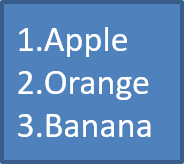
Sử dụng danh sách đánh số khi thứ tự các mục quan trọng. Đặt IBulletFormat.setType thành BulletType.Numbered. Bạn cũng có thể chọn định dạng đánh số bằng IBulletFormat.setNumberedBulletStyle hoặc đặt IBulletFormat.setNumberedBulletStartWith khi danh sách phải bắt đầu từ một giá trị khác 1.
Đoạn mã Java sau cho thấy cách tạo danh sách đánh số trong một slide:
Presentation presentation = new Presentation();
try {
    ISlide slide = presentation.getSlides().get_Item(0);
    IAutoShape autoShape = slide.getShapes().addAutoShape(ShapeType.Rectangle, 20, 20, 90, 80);

    ITextFrame textFrame = autoShape.getTextFrame();
    textFrame.getParagraphs().clear();

    Paragraph paragraph1 = new Paragraph();
    paragraph1.getParagraphFormat().getBullet().setType(BulletType.Numbered);
    paragraph1.setText("Apple");
    textFrame.getParagraphs().add(paragraph1);

    Paragraph paragraph2 = new Paragraph();
    paragraph2.getParagraphFormat().getBullet().setType(BulletType.Numbered);
    paragraph2.setText("Orange");
    textFrame.getParagraphs().add(paragraph2);

    Paragraph paragraph3 = new Paragraph();
    paragraph3.getParagraphFormat().getBullet().setType(BulletType.Numbered);
    paragraph3.setText("Banana");
    textFrame.getParagraphs().add(paragraph3);

    presentation.save("numbered_bullets.pptx", SaveFormat.Pptx);
} finally {
    presentation.dispose();
}
Kết quả:
Tạo dấu đầu dòng dạng hình ảnh
Aspose.Slides cho phép bạn thay thế ký hiệu dấu đầu dòng thông thường bằng một hình ảnh. Dấu đầu dòng dạng hình ảnh hoạt động tốt nhất với các hình ảnh đơn giản, vẫn có thể đọc được ở kích thước nhỏ, chẳng hạn như biểu tượng hoặc các file PNG trong suốt nhỏ.
Để tạo dấu đầu dòng dạng hình ảnh, thêm một hình ảnh vào Presentation.getImages và gán đối tượng hình ảnh trả về cho IBulletFormat.getPicture. Đặt IBulletFormat.setType thành BulletType.Picture trước khi gán hình ảnh.
Giả sử chúng ta có một file “image.png”:

Đoạn mã Java sau cho thấy cách tạo dấu đầu dòng dạng hình ảnh trong một slide:
Presentation presentation = new Presentation();
try {
    ISlide slide = presentation.getSlides().get_Item(0);
    IAutoShape autoShape = slide.getShapes().addAutoShape(ShapeType.Rectangle, 20, 20, 200, 50);

    ITextFrame textFrame = autoShape.getTextFrame();
    textFrame.getParagraphs().clear();

    IPPImage bulletImage = presentation.getImages().addImage(Images.fromFile("image.png"));

    Paragraph paragraph1 = new Paragraph();
    paragraph1.getParagraphFormat().getBullet().setType(BulletType.Picture);
    paragraph1.getParagraphFormat().getBullet().getPicture().setImage(bulletImage);
    paragraph1.getParagraphFormat().setIndent(15);
    paragraph1.getParagraphFormat().getBullet().setHeight(100);
    paragraph1.setText("The first paragraph");
    textFrame.getParagraphs().add(paragraph1);

    Paragraph paragraph2 = new Paragraph();
    paragraph2.getParagraphFormat().getBullet().setType(BulletType.Picture);
    paragraph2.getParagraphFormat().getBullet().getPicture().setImage(bulletImage);
    paragraph2.getParagraphFormat().setIndent(15);
    paragraph2.getParagraphFormat().getBullet().setHeight(100);
    paragraph2.setText("The second paragraph");
    textFrame.getParagraphs().add(paragraph2);

    presentation.save("picture_bullets.pptx", SaveFormat.Pptx);
} finally {
    presentation.dispose();
}
Kết quả:

Tạo danh sách đa cấp
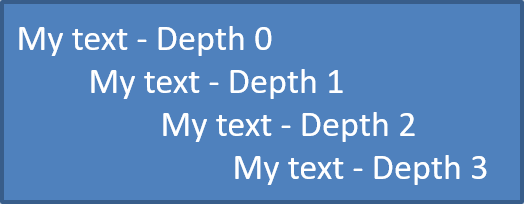
Sử dụng IParagraphFormat.setDepth để đặt các mục danh sách ở các cấp độ khác nhau. Cấp độ 0 là cấp cao nhất, cấp độ 1 là cấp lồng dưới nó, và tiếp tục như vậy.
Đoạn mã Java sau cho thấy cách tạo danh sách có dấu đầu dòng đa cấp:
Presentation presentation = new Presentation();
try {
    ISlide slide = presentation.getSlides().get_Item(0);
    IAutoShape autoShape = slide.getShapes().addAutoShape(ShapeType.Rectangle, 20, 20, 260, 110);

    ITextFrame textFrame = autoShape.getTextFrame();
    textFrame.getParagraphs().clear();

    Paragraph paragraph1 = new Paragraph();
    paragraph1.getParagraphFormat().setDepth((short) 0);
    paragraph1.setText("My text - Depth 0");
    textFrame.getParagraphs().add(paragraph1);

    Paragraph paragraph2 = new Paragraph();
    paragraph2.getParagraphFormat().setDepth((short) 1);
    paragraph2.setText("My text - Depth 1");
    textFrame.getParagraphs().add(paragraph2);

    Paragraph paragraph3 = new Paragraph();
    paragraph3.getParagraphFormat().setDepth((short) 2);
    paragraph3.setText("My text - Depth 2");
    textFrame.getParagraphs().add(paragraph3);

    Paragraph paragraph4 = new Paragraph();
    paragraph4.getParagraphFormat().setDepth((short) 3);
    paragraph4.setText("My text - Depth 3");
    textFrame.getParagraphs().add(paragraph4);

    presentation.save("multilevel_bullets.pptx", SaveFormat.Pptx);
} finally {
    presentation.dispose();
}
Kết quả:
Thay đổi danh sách hiện có
Để thay đổi định dạng danh sách trong một bản trình bày hiện có, truy cập đoạn văn mục tiêu và cập nhật cài đặt IParagraphFormat.getBullet. Các thuộc tính tương tự đã dùng để tạo danh sách cũng có thể được dùng để kiểm tra hoặc chỉnh sửa các danh sách được tải từ file PPT, PPTX, hoặc ODP.
Đoạn mã Java sau thay đổi đoạn văn đầu tiên trong một khung văn bản để sử dụng kiểu danh sách đánh số:
Presentation presentation = new Presentation("input.pptx");
try {
    ISlide slide = presentation.getSlides().get_Item(0);
    IAutoShape autoShape = (IAutoShape) slide.getShapes().get_Item(0);
    IParagraph paragraph = autoShape.getTextFrame().getParagraphs().get_Item(0);

    paragraph.getParagraphFormat().getBullet().setType(BulletType.Numbered);
    paragraph.getParagraphFormat().getBullet().setNumberedBulletStyle(NumberedBulletStyle.BulletRomanUCPeriod);
    paragraph.getParagraphFormat().getBullet().setNumberedBulletStartWith((short) 1);
    paragraph.getParagraphFormat().setMarginLeft(30);
    paragraph.getParagraphFormat().setIndent(-20);

    presentation.save("updated_list.pptx", SaveFormat.Pptx);
} finally {
    presentation.dispose();
}
Câu hỏi thường gặp
Danh sách có dấu đầu dòng và danh sách đánh số có thể xuất ra PDF hoặc hình ảnh không?
Có. Aspose.Slides giữ nguyên định dạng danh sách khi định dạng đích hỗ trợ bố cục văn bản và tính năng dấu đầu dòng tương ứng.
Tôi có thể chỉnh sửa danh sách trong các bản trình bày hiện có không?
Có. Tải bản trình bày, truy cập đoạn văn mục tiêu, kiểm tra hoặc cập nhật cài đặt IParagraphFormat.getBullet và lưu bản trình bày.
Danh sách có thể chứa văn bản không phải Latin không?
Có. Văn bản của mục danh sách có thể chứa các ký tự Unicode, vì vậy bạn có thể tạo danh sách trong các bản trình bày đa ngôn ngữ. Đảm bảo các phông chữ được sử dụng trong bản trình bày hỗ trợ các ký tự bạn cần.