Add Curve Shapes to PDF in Python
Contents
[
Hide
]
Add Curve object
Aspose.PDF for Python via .NET lets you add Curve shapes to PDF pages through the Graph class.
This article shows how to create both outlined and filled curves.
Follow the steps below:
- Create Document instance.
- Create Graph object with certain dimensions.
- Set border for Graph object.
- Add Graph object to paragraphs collection of page.
- Save our PDF file.
import aspose.pdf as ap
import aspose.pdf.drawing as drawing

def add_curve(outfile: str):
    document = ap.Document()
    page = document.pages.add()
    graph = drawing.Graph(400, 200)
    graph.border = ap.BorderInfo(ap.BorderSide.ALL, ap.Color.green)

    curve1 = drawing.Curve([10, 10, 50, 60, 70, 10, 100, 120])
    curve1.graph_info.color = ap.Color.green_yellow
    graph.shapes.add(curve1)

    page.paragraphs.add(graph)
    document.save(outfile)
The following picture shows the result executed with our code snippet:

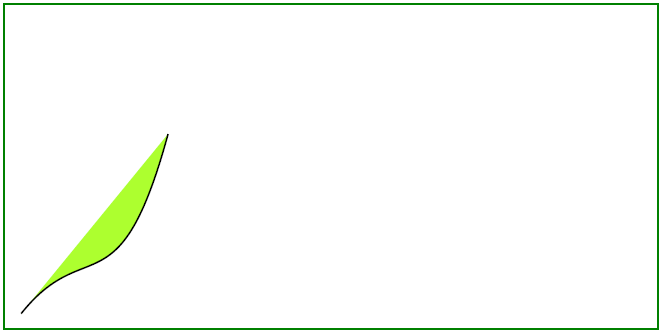
Create Filled Curve Object
This example shows how to add a Curve object that is filled with color.
import aspose.pdf as ap
import aspose.pdf.drawing as drawing


def add_curve_filled(outfile: str):
    document = ap.Document()
    page = document.pages.add()
    graph = drawing.Graph(400, 200)
    graph.border = ap.BorderInfo(ap.BorderSide.ALL, ap.Color.green)

    curve1 = drawing.Curve([10, 10, 50, 60, 70, 10, 100, 120])
    curve1.graph_info.fill_color = ap.Color.green_yellow
    graph.shapes.add(curve1)

    page.paragraphs.add(graph)
    document.save(outfile)
Result of adding a filled curve: