
مدیریت اتصالکنندهها در ارائهها با استفاده از C++
نمای کلی
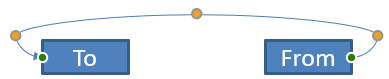
یک اتصالکننده خطی است که میتواند هنگام حرکت هر یک از دو شکل به دو شکل متصل بماند. سرهای آن به نقاط اتصال که در PowerPoint با نقاط سبز نشان داده میشوند، وصل میشوند. برخی از اتصالکنندههای خمیده و منحنی همچنین نقاط تنظیمی (نقاط نارنجی) دارند که موقعیت بخشهای مختلف اتصالکننده را کنترل میکنند.
Aspose.Slides اتصالکنندهها را از طریق رابط IConnector نمایش میدهد. میتوانید آنها را ایجاد کنید، سرهایشان را به شکلها وصل کنید، نقاط اتصال را انتخاب کنید، مسیرشان را تغییر دهید و هندسهٔ اتصالکنندههایی که نقاط تنظیمی دارند را اصلاح کنید.
انواع اتصالکننده
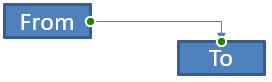
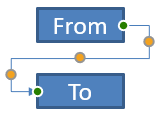
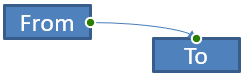
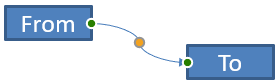
شمارشگر ShapeType شامل تنظیمات پیشفرض برای اتصالکنندههای مستقیم، خمیده و منحنی است. جدول زیر هندسههای موجود اتصالکننده و تعداد نقاط تنظیمی تعریفشده برای هر پیشفرض را نشان میدهد.
| اتصالکننده | تصویر | تعداد نقاط تنظیم |
|---|---|---|
ShapeType::Line |
 |
0 |
ShapeType::StraightConnector1 |
 |
0 |
ShapeType::BentConnector2 |
 |
0 |
ShapeType::BentConnector3 |
 |
1 |
ShapeType::BentConnector4 |
 |
2 |
ShapeType::BentConnector5 |
 |
3 |
ShapeType::CurvedConnector2 |
 |
0 |
ShapeType::CurvedConnector3 |
 |
1 |
ShapeType::CurvedConnector4 |
 |
2 |
ShapeType::CurvedConnector5 |
 |
3 |
تعداد و معنی نقاط تنظیم بخشی از پیشفرض انتخابشدهٔ اتصالکننده است. فرض نکنید که دو نوع اتصالکنندهٔ متفاوت همان چیدمان مجموعه را در اختیار دارند.
اتصال دو شکل
از IShapeCollection::AddConnector برای افزودن یک اتصالکننده استفاده کنید و سپس با فراخوانیهای IConnector::set_StartShapeConnectedTo و IConnector::set_EndShapeConnectedTo سرهای آن را وصل کنید. پس از اتصال هر دو سر، متد IConnector::Reroute یک مسیر کوتاه بین شکلها انتخاب میکند.
مثال زیر یک شکل بیضی و یک مستطیل را با یک اتصالکنندهٔ خمیده متصل میکند:
#include <DOM/IAutoShape.h>
#include <DOM/IConnector.h>
#include <DOM/IShapeCollection.h>
#include <DOM/ISlide.h>
#include <DOM/Presentation.h>
#include <DOM/ShapeType.h>
#include <Export/SaveFormat.h>

using namespace Aspose::Slides;
using namespace Aspose::Slides::Export;

System::SharedPtr<Presentation> presentation = System::MakeObject<Presentation>();
auto slide = presentation->get_Slide(0);
auto shapes = slide->get_Shapes();

auto ellipse = shapes->AddAutoShape(ShapeType::Ellipse, 40, 80, 120, 80);
auto rectangle = shapes->AddAutoShape(ShapeType::Rectangle, 320, 240, 140, 80);
auto connector = shapes->AddConnector(ShapeType::BentConnector2, 0, 0, 10, 10);

connector->set_StartShapeConnectedTo(ellipse);
connector->set_EndShapeConnectedTo(rectangle);
connector->Reroute();

presentation->Save(u"connected-shapes.pptx", SaveFormat::Pptx);
Warning
فراخوانیIConnector::Reroute میتواند مقادیر IConnector::set_StartShapeConnectionSiteIndex و IConnector::set_EndShapeConnectionSiteIndex را تغییر دهد. پس از مسیریابی مجدد، در صورتی که این نقاط باید ثابت بمانند، مکانهای اتصال خاصی را دوباره اختصاص دهید.
انتخاب یک نقطه اتصال
هر شکل قابل اتصال تعداد نقاط خود را از طریق IShape::get_ConnectionSiteCount گزارش میدهد. پیش از اختصاص یک اندیس صفر‑مبنا به یک سر اتصالکننده، اعتبارسنجی کنید؛ تعداد نقاط بسته به هندسهٔ شکل متفاوت است.
این مثال اتصالکننده را وقتی نقطهٔ موردنظر بر روی بیضی وجود داشته باشد، به آن نقطه وصل میکند:
#include <DOM/IAutoShape.h>
#include <DOM/IConnector.h>
#include <DOM/IShapeCollection.h>
#include <DOM/ISlide.h>
#include <DOM/Presentation.h>
#include <DOM/ShapeType.h>
#include <Export/SaveFormat.h>
#include <system/console.h>

using namespace Aspose::Slides;
using namespace Aspose::Slides::Export;
using namespace System;

auto presentation = MakeObject<Presentation>();
auto slide = presentation->get_Slide(0);
auto shapes = slide->get_Shapes();

auto ellipse = shapes->AddAutoShape(ShapeType::Ellipse, 40, 80, 120, 80);
auto rectangle = shapes->AddAutoShape(ShapeType::Rectangle, 320, 240, 140, 80);
auto connector = shapes->AddConnector(ShapeType::BentConnector3, 0, 0, 10, 10);

connector->set_StartShapeConnectedTo(ellipse);
connector->set_EndShapeConnectedTo(rectangle);

int32_t preferredSiteIndex = 2;
if (preferredSiteIndex < ellipse->get_ConnectionSiteCount())
{
    connector->set_StartShapeConnectionSiteIndex(preferredSiteIndex);
}
else
{
    Console::WriteLine(u"The ellipse has only {0} connection sites.", ellipse->get_ConnectionSiteCount());
}

presentation->Save(u"specific-connection-site.pptx", SaveFormat::Pptx);
تنظیم یک نقطه اتصالکننده
اتصالکنندههای دارای نقاط تنظیمی این نقاط را از طریق IGeometryShape::get_Adjustments در دسترس میگذارند. قبل از تغییر مقدار هر IAdjustValue، نوع آن را با IAdjustValue::get_Type بررسی کنید. قوانین کلی شناسایی تنظیمات پیشفرض شکل در بخش Shape Manipulation شرح داده شده است.
تعداد، ترتیب، معنا و دامنهٔ مقدار معتبر تنظیمات اتصالکننده به پیشفرض اتصالکننده بستگی دارد. نوع برگرداندهشده توسط IAdjustValue::get_Type فقط خواندنی است، در حالی که مقدار خام تنظیمات قابل نوشتن است. متد فقط‑خواندنی IAdjustValue::get_Name برای شناسایی بیشتر وقتی یک اتصالکننده بیش از یک تنظیم با نوع معنایی یکسان دارد، مفید است.
مسیر دور موانع
در طرح زیر یک اتصالکنندهٔ ShapeType::BentConnector5 بین دو شکل از طریق شکل سوم عبور میکند:
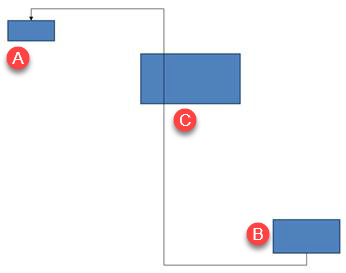
کد زیر اتصالکنندهٔ مسدودشده را میسازد:
#include <DOM/FillType.h>
#include <DOM/IAutoShape.h>
#include <DOM/IColorFormat.h>
#include <DOM/IConnector.h>
#include <DOM/ILineFillFormat.h>
#include <DOM/ILineFormat.h>
#include <DOM/IShapeCollection.h>
#include <DOM/ISlide.h>
#include <DOM/LineArrowheadStyle.h>
#include <DOM/Presentation.h>
#include <DOM/ShapeType.h>
#include <Export/SaveFormat.h>
#include <drawing/color.h>

using namespace Aspose::Slides;
using namespace Aspose::Slides::Export;
using namespace System::Drawing;

auto presentation = System::MakeObject<Presentation>();
auto slide = presentation->get_Slide(0);
auto shapes = slide->get_Shapes();

shapes->AddAutoShape(ShapeType::Rectangle, 300, 150, 150, 75);
auto sourceShape = shapes->AddAutoShape(ShapeType::Rectangle, 500, 400, 100, 50);
auto targetShape = shapes->AddAutoShape(ShapeType::Rectangle, 100, 100, 70, 30);
auto connector = shapes->AddConnector(ShapeType::BentConnector5, 20, 20, 400, 300);

auto lineFormat = connector->get_LineFormat();
lineFormat->set_EndArrowheadStyle(LineArrowheadStyle::Triangle);
auto lineFillFormat = lineFormat->get_FillFormat();
lineFillFormat->set_FillType(FillType::Solid);
lineFillFormat->get_SolidFillColor()->set_Color(Color::get_Black());
connector->set_StartShapeConnectedTo(sourceShape);
connector->set_EndShapeConnectedTo(targetShape);
connector->set_StartShapeConnectionSiteIndex(2);

presentation->Save(u"connector-obstruction.pptx", SaveFormat::Pptx);
جابجایی خم عمودی مسیر را بهگونهای تغییر میدهد که اتصالکننده مانع را دور میزند:
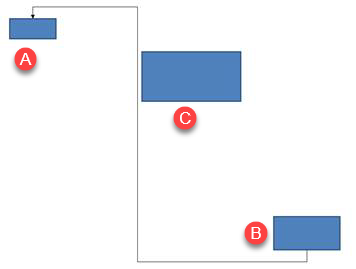
بهجای فرض اینکه اندیس مجموعهٔ 1 همیشه نمایانگر خم عمودی است، این مثال بهدنبال ShapeAdjustmentType::ConnectorBendPositionY میگردد و فقط در صورت حضور نوع معنایی مورد انتظار آن را تغییر میدهد:
#include <DOM/FillType.h>
#include <DOM/IAdjustValue.h>
#include <DOM/IAdjustValueCollection.h>
#include <DOM/IAutoShape.h>
#include <DOM/IColorFormat.h>
#include <DOM/IConnector.h>
#include <DOM/ILineFillFormat.h>
#include <DOM/ILineFormat.h>
#include <DOM/IShapeCollection.h>
#include <DOM/ISlide.h>
#include <DOM/LineArrowheadStyle.h>
#include <DOM/Presentation.h>
#include <DOM/ShapeAdjustmentType.h>
#include <DOM/ShapeType.h>
#include <Export/SaveFormat.h>
#include <drawing/color.h>
#include <system/console.h>

using namespace Aspose::Slides;
using namespace Aspose::Slides::Export;
using namespace System;
using namespace System::Drawing;

auto presentation = MakeObject<Presentation>();
auto slide = presentation->get_Slide(0);
auto shapes = slide->get_Shapes();

shapes->AddAutoShape(ShapeType::Rectangle, 300, 150, 150, 75);
auto sourceShape = shapes->AddAutoShape(ShapeType::Rectangle, 500, 400, 100, 50);
auto targetShape = shapes->AddAutoShape(ShapeType::Rectangle, 100, 100, 70, 30);
auto connector = shapes->AddConnector(ShapeType::BentConnector5, 20, 20, 400, 300);

auto lineFormat = connector->get_LineFormat();
lineFormat->set_EndArrowheadStyle(LineArrowheadStyle::Triangle);
auto lineFillFormat = lineFormat->get_FillFormat();
lineFillFormat->set_FillType(FillType::Solid);
lineFillFormat->get_SolidFillColor()->set_Color(Color::get_Black());
connector->set_StartShapeConnectedTo(sourceShape);
connector->set_EndShapeConnectedTo(targetShape);
connector->set_StartShapeConnectionSiteIndex(2);

SharedPtr<IAdjustValue> verticalBend;
auto adjustments = connector->get_Adjustments();
for (int32_t adjustmentIndex = 0; adjustmentIndex < adjustments->get_Count(); ++adjustmentIndex)
{
    auto adjustment = adjustments->idx_get(adjustmentIndex);
    Console::WriteLine(u"{0}: type = {1}, raw value = {2}", adjustment->get_Name(), static_cast<int32_t>(adjustment->get_Type()), adjustment->get_RawValue());
    if (adjustment->get_Type() == ShapeAdjustmentType::ConnectorBendPositionY)
    {
        verticalBend = adjustment;
        break;
    }
}

if (verticalBend == nullptr)
{
    Console::WriteLine(u"The connector does not expose a vertical bend adjustment.");
}
else
{
    verticalBend->set_RawValue(60000);
    presentation->Save(u"connector-obstruction-fixed.pptx", SaveFormat::Pptx);
}
یک ShapeType::BentConnector5 دو تنظیم ShapeAdjustmentType::ConnectorBendPositionX و یک تنظیم ShapeAdjustmentType::ConnectorBendPositionY دارد. اگر نوع موردنیاز بیش از یک بار ظاهر شود، قبل از انتخاب یکی، IAdjustValue::get_Name و هندسهٔ شناختهشدهٔ آن پیشفرض را بررسی کنید. اگر یک تنظیم ShapeAdjustmentType::Custom گزارش شود، معنای آن و دامنهٔ مقدار را بهعنوان پیشفرض خاص در نظر بگیرید و تا زمانی که قرارداد آن شناخته نشود، تغییر ندهید.
ارتباط مقادیر تنظیمی با هندسهٔ اتصالکننده
برای اتصالکنندههای خمیده، مقادیر تنظیم میتوانند برای برآورد موقعیت بخشهای جداگانه استفاده شوند. این محاسبات مختص پیشفرض اتصالکننده است:
ShapeType::BentConnector4بهطور معمول یک تنظیمShapeAdjustmentType::ConnectorBendPositionXو یک تنظیمShapeAdjustmentType::ConnectorBendPositionYنشان میدهد.- برای این موقعیتهای خم،
RawValue / 100000.0fکسر عرض یا ارتفاع چارچوب اتصالکننده را که در مثالهای زیر استفاده میشود، تولید میکند. - چارچوب اتصالکننده میتواند چرخیده یا معکوس شود؛ بنابراین مختصات چارچوب باید قبل از مقایسه با مختصات اسلاید تبدیل شوند.
مثالهای زیر ابتدا با استفاده از IAdjustValue::get_Type تنظیمات را شناسایی میکنند. آنها اندیسهای مجموعه را بهعنوان شناسهٔ قابلحمل در نظر نمیگیرند.
اتصالکننده بدون چرخش
طرح اولیه شامل دو شکل متنی است که توسط یک ShapeType::BentConnector4 به هم وصل شدهاند:
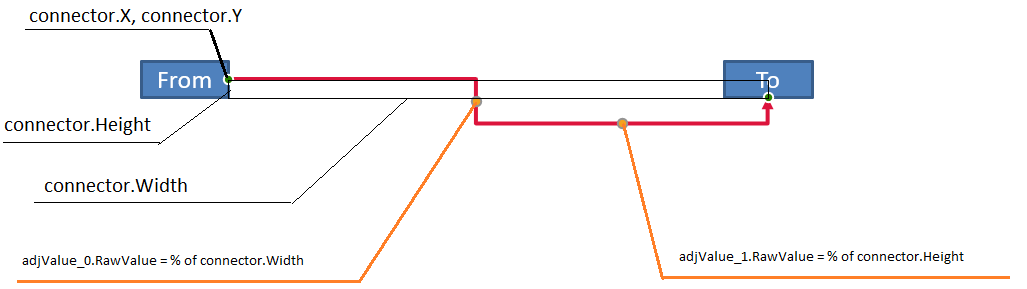
این مثال اتصالکننده را بررسی میکند و تنظیمات خم افقی و عمودی آن را بهدست میآورد:
#include <DOM/FillType.h>
#include <DOM/IAdjustValue.h>
#include <DOM/IAdjustValueCollection.h>
#include <DOM/IAutoShape.h>
#include <DOM/IColorFormat.h>
#include <DOM/IConnector.h>
#include <DOM/ILineFillFormat.h>
#include <DOM/ILineFormat.h>
#include <DOM/IShapeCollection.h>
#include <DOM/ISlide.h>
#include <DOM/ITextFrame.h>
#include <DOM/LineArrowheadStyle.h>
#include <DOM/Presentation.h>
#include <DOM/ShapeAdjustmentType.h>
#include <DOM/ShapeType.h>
#include <drawing/color.h>
#include <system/console.h>

using namespace Aspose::Slides;
using namespace System;
using namespace System::Drawing;

auto presentation = MakeObject<Presentation>();
auto slide = presentation->get_Slide(0);
auto shapes = slide->get_Shapes();

auto sourceShape = shapes->AddAutoShape(ShapeType::Rectangle, 100, 100, 60, 25);
sourceShape->get_TextFrame()->set_Text(u"From");
auto targetShape = shapes->AddAutoShape(ShapeType::Rectangle, 500, 100, 60, 25);
targetShape->get_TextFrame()->set_Text(u"To");
auto connector = shapes->AddConnector(ShapeType::BentConnector4, 20, 20, 400, 300);

auto lineFormat = connector->get_LineFormat();
lineFormat->set_EndArrowheadStyle(LineArrowheadStyle::Triangle);
auto lineFillFormat = lineFormat->get_FillFormat();
lineFillFormat->set_FillType(FillType::Solid);
lineFillFormat->get_SolidFillColor()->set_Color(Color::get_Crimson());
lineFormat->set_Width(3);
connector->set_StartShapeConnectedTo(sourceShape);
connector->set_StartShapeConnectionSiteIndex(3);
connector->set_EndShapeConnectedTo(targetShape);
connector->set_EndShapeConnectionSiteIndex(2);

auto adjustments = connector->get_Adjustments();
for (int32_t adjustmentIndex = 0; adjustmentIndex < adjustments->get_Count(); ++adjustmentIndex)
{
    auto adjustment = adjustments->idx_get(adjustmentIndex);
    Console::WriteLine(u"{0}: type = {1}, raw value = {2}", adjustment->get_Name(), static_cast<int32_t>(adjustment->get_Type()), adjustment->get_RawValue());
}
برای تغییر هر دو خم، هر نوع مورد انتظار را پیدا کنید و پس از یافتن هر دو مقدار را اصلاح کنید:
#include <DOM/IAdjustValue.h>
#include <DOM/IAdjustValueCollection.h>
#include <DOM/IAutoShape.h>
#include <DOM/IConnector.h>
#include <DOM/IShapeCollection.h>
#include <DOM/ISlide.h>
#include <DOM/Presentation.h>
#include <DOM/ShapeAdjustmentType.h>
#include <DOM/ShapeType.h>
#include <Export/SaveFormat.h>
#include <system/console.h>

using namespace Aspose::Slides;
using namespace Aspose::Slides::Export;
using namespace System;

auto presentation = MakeObject<Presentation>();
auto slide = presentation->get_Slide(0);
auto shapes = slide->get_Shapes();

auto sourceShape = shapes->AddAutoShape(ShapeType::Rectangle, 100, 100, 60, 25);
auto targetShape = shapes->AddAutoShape(ShapeType::Rectangle, 500, 100, 60, 25);
auto connector = shapes->AddConnector(ShapeType::BentConnector4, 20, 20, 400, 300);
connector->set_StartShapeConnectedTo(sourceShape);
connector->set_StartShapeConnectionSiteIndex(3);
connector->set_EndShapeConnectedTo(targetShape);
connector->set_EndShapeConnectionSiteIndex(2);

SharedPtr<IAdjustValue> horizontalBend;
SharedPtr<IAdjustValue> verticalBend;
auto adjustments = connector->get_Adjustments();
for (int32_t adjustmentIndex = 0; adjustmentIndex < adjustments->get_Count(); ++adjustmentIndex)
{
    auto adjustment = adjustments->idx_get(adjustmentIndex);
    if (adjustment->get_Type() == ShapeAdjustmentType::ConnectorBendPositionX)
    {
        horizontalBend = adjustment;
    }
    else if (adjustment->get_Type() == ShapeAdjustmentType::ConnectorBendPositionY)
    {
        verticalBend = adjustment;
    }
}

if (horizontalBend == nullptr || verticalBend == nullptr)
{
    Console::WriteLine(u"The connector does not expose the expected bend adjustments.");
}
else
{
    horizontalBend->set_RawValue(horizontalBend->get_RawValue() + 20000);
    verticalBend->set_RawValue(verticalBend->get_RawValue() + 200000);
    presentation->Save(u"connector-adjusted.pptx", SaveFormat::Pptx);
}
نتیجه یک اتصالکننده است که بخشهای افقی و عمودی آن جابهجا شدهاند:

پس از شناخت انواع معنایی، مقادیر میتوانند به مختصات چارچوب اتصالکننده تبدیل شوند. این مثال یک مستطیل نازک بر روی بخش عمودی که توسط دو تنظیم خم کنترل میشود، رسم میکند:
#include <DOM/IAdjustValue.h>
#include <DOM/IAdjustValueCollection.h>
#include <DOM/IAutoShape.h>
#include <DOM/IConnector.h>
#include <DOM/IShapeCollection.h>
#include <DOM/ISlide.h>
#include <DOM/Presentation.h>
#include <DOM/ShapeAdjustmentType.h>
#include <DOM/ShapeType.h>
#include <Export/SaveFormat.h>
#include <system/console.h>

using namespace Aspose::Slides;
using namespace Aspose::Slides::Export;
using namespace System;

auto presentation = MakeObject<Presentation>();
auto slide = presentation->get_Slide(0);
auto shapes = slide->get_Shapes();

auto sourceShape = shapes->AddAutoShape(ShapeType::Rectangle, 100, 100, 60, 25);
auto targetShape = shapes->AddAutoShape(ShapeType::Rectangle, 500, 100, 60, 25);
auto connector = shapes->AddConnector(ShapeType::BentConnector4, 20, 20, 400, 300);
connector->set_StartShapeConnectedTo(sourceShape);
connector->set_StartShapeConnectionSiteIndex(3);
connector->set_EndShapeConnectedTo(targetShape);
connector->set_EndShapeConnectionSiteIndex(2);

SharedPtr<IAdjustValue> horizontalBend;
SharedPtr<IAdjustValue> verticalBend;
auto adjustments = connector->get_Adjustments();
for (int32_t adjustmentIndex = 0; adjustmentIndex < adjustments->get_Count(); ++adjustmentIndex)
{
    auto adjustment = adjustments->idx_get(adjustmentIndex);
    if (adjustment->get_Type() == ShapeAdjustmentType::ConnectorBendPositionX)
    {
        horizontalBend = adjustment;
    }
    else if (adjustment->get_Type() == ShapeAdjustmentType::ConnectorBendPositionY)
    {
        verticalBend = adjustment;
    }
}

if (horizontalBend == nullptr || verticalBend == nullptr)
{
    Console::WriteLine(u"The connector does not expose the expected bend adjustments.");
}
else
{
    float x = connector->get_X() + connector->get_Width() * horizontalBend->get_RawValue() / 100000.0f;
    float y = connector->get_Y();
    float height = connector->get_Height() * verticalBend->get_RawValue() / 100000.0f;
    shapes->AddAutoShape(ShapeType::Rectangle, x, y, 1, height);
    presentation->Save(u"connector-segment-guide.pptx", SaveFormat::Pptx);
}
شکل راهنما بخش محاسبهشده را نشان میدهد:

اتصالکننده چرخیده یا معکوس
زمانی که همان هندسهٔ اتصالکننده بهصورت عمودی جهتگیری شده باشد، مقادیر IShape::get_Frame، IShapeFrame::get_FlipH و IShapeFrame::get_FlipV بر تبدیل مختصات چارچوب اتصالکننده به مختصات اسلاید تأثیر میگذارند.
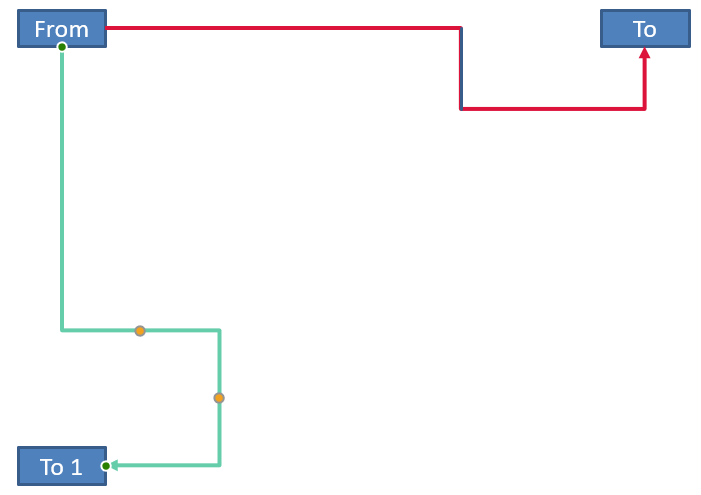
این مثال اتصالکنندهٔ جهتدار عمودی را میسازد و تنظیم میکند:
#include <DOM/FillType.h>
#include <DOM/IAdjustValue.h>
#include <DOM/IAdjustValueCollection.h>
#include <DOM/IAutoShape.h>
#include <DOM/IColorFormat.h>
#include <DOM/IConnector.h>
#include <DOM/ILineFillFormat.h>
#include <DOM/ILineFormat.h>
#include <DOM/IShapeCollection.h>
#include <DOM/ISlide.h>
#include <DOM/ITextFrame.h>
#include <DOM/LineArrowheadStyle.h>
#include <DOM/Presentation.h>
#include <DOM/ShapeAdjustmentType.h>
#include <DOM/ShapeType.h>
#include <Export/SaveFormat.h>
#include <drawing/color.h>

using namespace Aspose::Slides;
using namespace Aspose::Slides::Export;
using namespace System::Drawing;

auto presentation = System::MakeObject<Presentation>();
auto slide = presentation->get_Slide(0);
auto shapes = slide->get_Shapes();

auto sourceShape = shapes->AddAutoShape(ShapeType::Rectangle, 100, 100, 60, 25);
sourceShape->get_TextFrame()->set_Text(u"From");
auto targetShape = shapes->AddAutoShape(ShapeType::Rectangle, 100, 400, 60, 25);
targetShape->get_TextFrame()->set_Text(u"To 1");
auto connector = shapes->AddConnector(ShapeType::BentConnector4, 20, 20, 400, 300);

auto lineFormat = connector->get_LineFormat();
lineFormat->set_EndArrowheadStyle(LineArrowheadStyle::Triangle);
auto lineFillFormat = lineFormat->get_FillFormat();
lineFillFormat->set_FillType(FillType::Solid);
lineFillFormat->get_SolidFillColor()->set_Color(Color::get_MediumAquamarine());
lineFormat->set_Width(3);
connector->set_StartShapeConnectedTo(sourceShape);
connector->set_StartShapeConnectionSiteIndex(2);
connector->set_EndShapeConnectedTo(targetShape);
connector->set_EndShapeConnectionSiteIndex(3);

auto adjustments = connector->get_Adjustments();
for (int32_t adjustmentIndex = 0; adjustmentIndex < adjustments->get_Count(); ++adjustmentIndex)
{
    auto adjustment = adjustments->idx_get(adjustmentIndex);
    if (adjustment->get_Type() == ShapeAdjustmentType::ConnectorBendPositionX)
    {
        adjustment->set_RawValue(adjustment->get_RawValue() + 20000);
    }
    else if (adjustment->get_Type() == ShapeAdjustmentType::ConnectorBendPositionY)
    {
        adjustment->set_RawValue(adjustment->get_RawValue() + 200000);
    }
}

presentation->Save(u"vertical-connector-adjusted.pptx", SaveFormat::Pptx);
اتصالکننده تنظیمشده بهصورت عمودی بین شکلها ظاهر میشود:
برای یک زاویهٔ چرخش دلخواه alpha، نقطهٔ چارچوب اتصالکننده (x, y) را نسبت به مرکز چارچوب (x0, y0) میچرخانیم:
X = (x - x0) * cos(alpha) - (y - y0) * sin(alpha) + x0
Y = (x - x0) * sin(alpha) + (y - y0) * cos(alpha) + y0
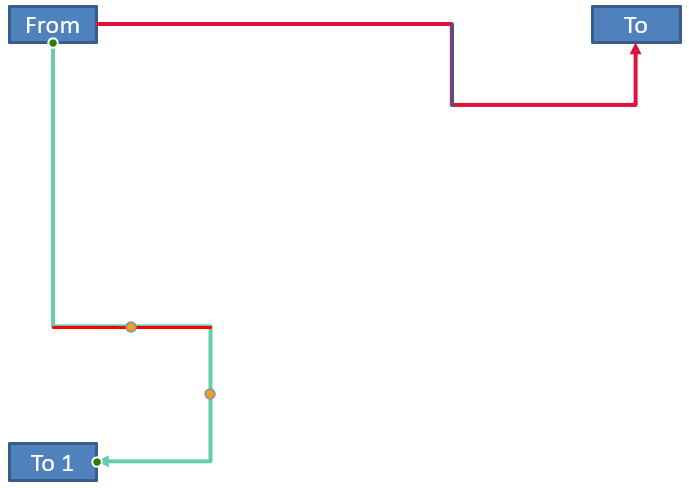
کد زیر جهتگیری 90 درجه استفادهشده در این مثال را مدیریت میکند و یک راهنمای قرمز بر روی بخش مربوطهٔ اتصالکننده میکشد:
#include <DOM/FillType.h>
#include <DOM/IAdjustValue.h>
#include <DOM/IAdjustValueCollection.h>
#include <DOM/IAutoShape.h>
#include <DOM/IColorFormat.h>
#include <DOM/IConnector.h>
#include <DOM/ILineFillFormat.h>
#include <DOM/ILineFormat.h>
#include <DOM/IShapeCollection.h>
#include <DOM/IShapeFrame.h>
#include <DOM/ISlide.h>
#include <DOM/NullableBool.h>
#include <DOM/Presentation.h>
#include <DOM/ShapeAdjustmentType.h>
#include <DOM/ShapeType.h>
#include <Export/SaveFormat.h>
#include <drawing/color.h>
#include <system/console.h>

using namespace Aspose::Slides;
using namespace Aspose::Slides::Export;
using namespace System;
using namespace System::Drawing;

auto presentation = MakeObject<Presentation>();
auto slide = presentation->get_Slide(0);
auto shapes = slide->get_Shapes();

auto sourceShape = shapes->AddAutoShape(ShapeType::Rectangle, 100, 100, 60, 25);
auto targetShape = shapes->AddAutoShape(ShapeType::Rectangle, 100, 400, 60, 25);
auto connector = shapes->AddConnector(ShapeType::BentConnector4, 20, 20, 400, 300);
connector->set_StartShapeConnectedTo(sourceShape);
connector->set_StartShapeConnectionSiteIndex(2);
connector->set_EndShapeConnectedTo(targetShape);
connector->set_EndShapeConnectionSiteIndex(3);

SharedPtr<IAdjustValue> horizontalBend;
SharedPtr<IAdjustValue> verticalBend;
auto adjustments = connector->get_Adjustments();
for (int32_t adjustmentIndex = 0; adjustmentIndex < adjustments->get_Count(); ++adjustmentIndex)
{
    auto adjustment = adjustments->idx_get(adjustmentIndex);
    if (adjustment->get_Type() == ShapeAdjustmentType::ConnectorBendPositionX)
    {
        horizontalBend = adjustment;
    }
    else if (adjustment->get_Type() == ShapeAdjustmentType::ConnectorBendPositionY)
    {
        verticalBend = adjustment;
    }
}

if (horizontalBend == nullptr || verticalBend == nullptr)
{
    Console::WriteLine(u"The connector does not expose the expected bend adjustments.");
}
else
{
    horizontalBend->set_RawValue(horizontalBend->get_RawValue() + 20000);
    verticalBend->set_RawValue(verticalBend->get_RawValue() + 200000);

    float x = connector->get_X();
    float y = connector->get_Y();
    auto frame = connector->get_Frame();
    if (frame->get_FlipH() == NullableBool::True)
    {
        x += connector->get_Width();
    }
    if (frame->get_FlipV() == NullableBool::True)
    {
        y += connector->get_Height();
    }

    x += connector->get_Width() * horizontalBend->get_RawValue() / 100000.0f;
    float rotatedX = frame->get_CenterX() - y + frame->get_CenterY();
    float rotatedY = x - frame->get_CenterX() + frame->get_CenterY();
    float segmentWidth = connector->get_Height() * verticalBend->get_RawValue() / 100000.0f;
    auto guide = shapes->AddAutoShape(ShapeType::Rectangle, rotatedX, rotatedY, segmentWidth, 1);
    auto guideLineFillFormat = guide->get_LineFormat()->get_FillFormat();
    guideLineFillFormat->set_FillType(FillType::Solid);
    guideLineFillFormat->get_SolidFillColor()->set_Color(Color::get_Red());

    presentation->Save(u"rotated-connector-segment-guide.pptx", SaveFormat::Pptx);
}
راهنمای قرمز پس از تبدیل مختصات، بخش محاسبهشده را نشان میدهد:
این فرمولها پیشفرضهای استفادهشده در مثالها را توصیف میکنند، نه یک مدل کلی برای همهٔ اتصالکنندهها. قبل از اعمال همان محاسبه بر پیشفرض دیگر، انواع تنظیم، جهتگیری چارچوب و دامنهٔ مقادیر را اعتبارسنجی کنید.
یافتن زاویهٔ جهت اتصالکننده
جهت یک اتصالکنندهٔ مستقیم میتواند از عرض و ارتفاع آن محاسبه شود، بههمراه اعمال چرخشهای افقی و عمودی. مثال زیر زاویهٔ ساعتگرد نسبت به محور افقی مثبت در مختصات اسلاید را گزارش میکند:
#include <DOM/IConnector.h>
#include <DOM/IShapeCollection.h>
#include <DOM/IShapeFrame.h>
#include <DOM/ISlide.h>
#include <DOM/NullableBool.h>
#include <DOM/Presentation.h>
#include <DOM/ShapeType.h>
#include <system/console.h>
#include <system/math.h>

using namespace Aspose::Slides;
using namespace System;

auto presentation = MakeObject<Presentation>();
auto slide = presentation->get_Slide(0);
auto connector = slide->get_Shapes()->AddConnector(ShapeType::StraightConnector1, 100, 100, 200, 100);
auto frame = connector->get_Frame();

bool flipH = frame->get_FlipH() == NullableBool::True;
bool flipV = frame->get_FlipV() == NullableBool::True;
float deltaX = connector->get_Width() * (flipH ? -1 : 1);
float deltaY = connector->get_Height() * (flipV ? -1 : 1);
double angle = Math::Atan2(deltaY, deltaX) * 180.0 / Math::PI;

if (angle < 0)
{
    angle += 360;
}

Console::WriteLine(u"Connector direction: {0:F2} degrees", angle);
سوالات متداول
چگونه میتوانم مشخص کنم آیا یک اتصالکننده میتواند به یک شکل متصل شود؟
مقدار IShape::get_ConnectionSiteCount شکل را بررسی کنید. عدد مثبت نشان میدهد شکل نقاط اتصال را ارائه میدهد. قبل از اختصاص اندیس سایت به هر سر اتصالکننده، اعتبارسنجی کنید.
آیا میتوانم تنظیم اتصالکننده را با اندیس مجموعه شناسایی کنم؟
اندیس فقط برای یک پیشفرض شناختهشدهٔ اتصالکننده و چیدمان مجموعه معنی دارد. قبل از تغییر مقدار، IAdjustValue::get_Type را بررسی کنید و وقتی همان نوع معنایی چندین بار ظاهر میشود، از IAdjustValue::get_Name بهعنوان اطلاعات تکمیلی استفاده کنید.
وقتی یک شکل متصل حذف شود چه اتفاقی میافتد؟
سر مربوط به آن شکل از اتصال قطع میشود. اتصالکننده روی اسلاید باقی میماند و میتوان آن را حذف کرد، بهعنوان خط آزاد قرار داد یا به شکل دیگری متصل کرد.
آیا پیوندهای اتصالکننده هنگام کپی اسلاید حفظ میشوند؟
معمولاً پیوندها هنگام کپی شدن شکلهای متصل همراه با اسلاید حفظ میشوند. اگر یک اتصالکننده بدون یکی از شکلهای هدف کپی شود، سر متاثر باید دوباره متصل شود.