
C++ を使用したプレゼンテーションでコネクタを管理する
概要
コネクタは、どちらかの図形が移動しても 2 つの図形に付いたままにできる線です。端点は PowerPoint の緑の点で表される接続点に接続されます。曲がったり丸められたコネクタの中には、個々のセグメントの位置を制御するオレンジの点で表される調整ポイントが公開されているものがあります。
Aspose.Slides はコネクタを IConnector インターフェイスで表現します。コネクタを作成し、端点を図形に接続し、接続点を選択し、再ルーティングし、調整ポイントを持つコネクタのジオメトリを変更できます。
コネクタの種類
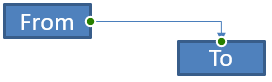
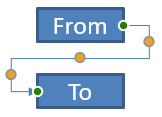
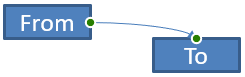
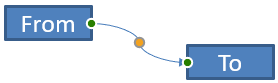
ShapeType 列挙体には、直線、曲がり、曲線のコネクタプリセットが含まれます。以下の表は利用可能なコネクタジオメトリと、各プリセットで定義されている調整ポイントの数を示します。
| コネクタ | 画像 | 調整ポイント数 |
|---|---|---|
ShapeType::Line |
 |
0 |
ShapeType::StraightConnector1 |
 |
0 |
ShapeType::BentConnector2 |
 |
0 |
ShapeType::BentConnector3 |
 |
1 |
ShapeType::BentConnector4 |
 |
2 |
ShapeType::BentConnector5 |
 |
3 |
ShapeType::CurvedConnector2 |
 |
0 |
ShapeType::CurvedConnector3 |
 |
1 |
ShapeType::CurvedConnector4 |
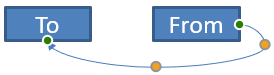 |
2 |
ShapeType::CurvedConnector5 |
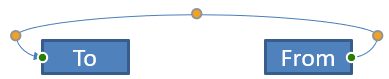 |
3 |
調整ポイントの数と意味は選択したコネクタプリセットの一部です。異なるコネクタタイプが同じコレクションレイアウトを公開するとは限りません。
2 つの図形を接続する
IShapeCollection::AddConnector を使用してコネクタを追加し、IConnector::set_StartShapeConnectedTo と IConnector::set_EndShapeConnectedTo を呼び出して端点を接続します。両端が接続された後、IConnector::Reroute が図形間の最短経路を選択します。
次の例は、楕円と矩形を曲がったコネクタで接続します。
#include <DOM/IAutoShape.h>
#include <DOM/IConnector.h>
#include <DOM/IShapeCollection.h>
#include <DOM/ISlide.h>
#include <DOM/Presentation.h>
#include <DOM/ShapeType.h>
#include <Export/SaveFormat.h>

using namespace Aspose::Slides;
using namespace Aspose::Slides::Export;

System::SharedPtr<Presentation> presentation = System::MakeObject<Presentation>();
auto slide = presentation->get_Slide(0);
auto shapes = slide->get_Shapes();

auto ellipse = shapes->AddAutoShape(ShapeType::Ellipse, 40, 80, 120, 80);
auto rectangle = shapes->AddAutoShape(ShapeType::Rectangle, 320, 240, 140, 80);
auto connector = shapes->AddConnector(ShapeType::BentConnector2, 0, 0, 10, 10);

connector->set_StartShapeConnectedTo(ellipse);
connector->set_EndShapeConnectedTo(rectangle);
connector->Reroute();

presentation->Save(u"connected-shapes.pptx", SaveFormat::Pptx);
警告
IConnector::Reroute を呼び出すと、IConnector::set_StartShapeConnectionSiteIndex と IConnector::set_EndShapeConnectionSiteIndex の値が変更されることがあります。再ルーティング後に特定の接続点を固定したままにしたい場合は、再度割り当ててください。
接続点を選択する
接続可能な各図形は、IShape::get_ConnectionSiteCount を通じて接続点の数を報告します。接続点インデックスは 0 から始まるため、コネクタの端に割り当てる前に有効なインデックスかどうかを検証してください。図形のジオメトリにより接続点数は変わります。
この例は、対象の接続点が存在する場合にコネクタを楕円の特定の接続点に結び付けます。
#include <DOM/IAutoShape.h>
#include <DOM/IConnector.h>
#include <DOM/IShapeCollection.h>
#include <DOM/ISlide.h>
#include <DOM/Presentation.h>
#include <DOM/ShapeType.h>
#include <Export/SaveFormat.h>
#include <system/console.h>

using namespace Aspose::Slides;
using namespace Aspose::Slides::Export;
using namespace System;

auto presentation = MakeObject<Presentation>();
auto slide = presentation->get_Slide(0);
auto shapes = slide->get_Shapes();

auto ellipse = shapes->AddAutoShape(ShapeType::Ellipse, 40, 80, 120, 80);
auto rectangle = shapes->AddAutoShape(ShapeType::Rectangle, 320, 240, 140, 80);
auto connector = shapes->AddConnector(ShapeType::BentConnector3, 0, 0, 10, 10);

connector->set_StartShapeConnectedTo(ellipse);
connector->set_EndShapeConnectedTo(rectangle);

int32_t preferredSiteIndex = 2;
if (preferredSiteIndex < ellipse->get_ConnectionSiteCount())
{
    connector->set_StartShapeConnectionSiteIndex(preferredSiteIndex);
}
else
{
    Console::WriteLine(u"The ellipse has only {0} connection sites.", ellipse->get_ConnectionSiteCount());
}

presentation->Save(u"specific-connection-site.pptx", SaveFormat::Pptx);
コネクタポイントを調整する
調整ポイントを持つコネクタは、IGeometryShape::get_Adjustments でそれらを取得できます。各 IAdjustValue を調べ、変更前に IAdjustValue::get_Type を確認してください。プリセット形状の調整に関する一般的なルールは、Shape Manipulation に記載されています。
調整ポイントの数、順序、意味、許容値範囲はコネクタのプリセットに依存します。IAdjustValue::get_Type が返す型は読み取り専用ですが、IAdjustValue::set_RawValue で生の調整値は書き込み可能です。コネクタに同じ意味タイプの調整が複数ある場合は、読み取り専用の IAdjustValue::get_Name メソッドが追加の識別情報を提供します。
障害物の回り道
以下のレイアウトでは、ShapeType::BentConnector5 コネクタが 2 つの図形間を通り、途中で 3 番目の図形を横切ります。
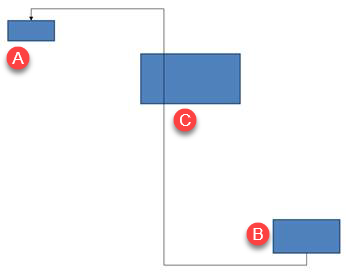
このコードは遮蔽されたコネクタを作成します。
#include <DOM/FillType.h>
#include <DOM/IAutoShape.h>
#include <DOM/IColorFormat.h>
#include <DOM/IConnector.h>
#include <DOM/ILineFillFormat.h>
#include <DOM/ILineFormat.h>
#include <DOM/IShapeCollection.h>
#include <DOM/ISlide.h>
#include <DOM/LineArrowheadStyle.h>
#include <DOM/Presentation.h>
#include <DOM/ShapeType.h>
#include <Export/SaveFormat.h>
#include <drawing/color.h>

using namespace Aspose::Slides;
using namespace Aspose::Slides::Export;
using namespace System::Drawing;

auto presentation = System::MakeObject<Presentation>();
auto slide = presentation->get_Slide(0);
auto shapes = slide->get_Shapes();

shapes->AddAutoShape(ShapeType::Rectangle, 300, 150, 150, 75);
auto sourceShape = shapes->AddAutoShape(ShapeType::Rectangle, 500, 400, 100, 50);
auto targetShape = shapes->AddAutoShape(ShapeType::Rectangle, 100, 100, 70, 30);
auto connector = shapes->AddConnector(ShapeType::BentConnector5, 20, 20, 400, 300);

auto lineFormat = connector->get_LineFormat();
lineFormat->set_EndArrowheadStyle(LineArrowheadStyle::Triangle);
auto lineFillFormat = lineFormat->get_FillFormat();
lineFillFormat->set_FillType(FillType::Solid);
lineFillFormat->get_SolidFillColor()->set_Color(Color::get_Black());
connector->set_StartShapeConnectedTo(sourceShape);
connector->set_EndShapeConnectedTo(targetShape);
connector->set_StartShapeConnectionSiteIndex(2);

presentation->Save(u"connector-obstruction.pptx", SaveFormat::Pptx);
垂直方向の曲げを移動すると、コネクタは障害物を迂回するように経路が変わります。
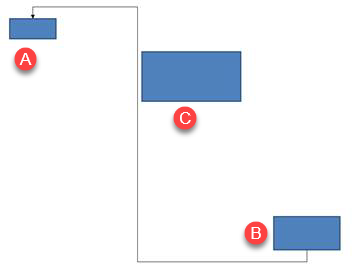
コレクションインデックス 1 が常に垂直曲げを表すと仮定せず、ShapeAdjustmentType::ConnectorBendPositionY を検索し、期待する意味タイプが存在する場合にのみ変更します。
#include <DOM/FillType.h>
#include <DOM/IAdjustValue.h>
#include <DOM/IAdjustValueCollection.h>
#include <DOM/IAutoShape.h>
#include <DOM/IColorFormat.h>
#include <DOM/IConnector.h>
#include <DOM/ILineFillFormat.h>
#include <DOM/ILineFormat.h>
#include <DOM/IShapeCollection.h>
#include <DOM/ISlide.h>
#include <DOM/LineArrowheadStyle.h>
#include <DOM/Presentation.h>
#include <DOM/ShapeAdjustmentType.h>
#include <DOM/ShapeType.h>
#include <Export/SaveFormat.h>
#include <drawing/color.h>
#include <system/console.h>

using namespace Aspose::Slides;
using namespace Aspose::Slides::Export;
using namespace System;
using namespace System::Drawing;

auto presentation = MakeObject<Presentation>();
auto slide = presentation->get_Slide(0);
auto shapes = slide->get_Shapes();

shapes->AddAutoShape(ShapeType::Rectangle, 300, 150, 150, 75);
auto sourceShape = shapes->AddAutoShape(ShapeType::Rectangle, 500, 400, 100, 50);
auto targetShape = shapes->AddAutoShape(ShapeType::Rectangle, 100, 100, 70, 30);
auto connector = shapes->AddConnector(ShapeType::BentConnector5, 20, 20, 400, 300);

auto lineFormat = connector->get_LineFormat();
lineFormat->set_EndArrowheadStyle(LineArrowheadStyle::Triangle);
auto lineFillFormat = lineFormat->get_FillFormat();
lineFillFormat->set_FillType(FillType::Solid);
lineFillFormat->get_SolidFillColor()->set_Color(Color::get_Black());
connector->set_StartShapeConnectedTo(sourceShape);
connector->set_EndShapeConnectedTo(targetShape);
connector->set_StartShapeConnectionSiteIndex(2);

SharedPtr<IAdjustValue> verticalBend;
auto adjustments = connector->get_Adjustments();
for (int32_t adjustmentIndex = 0; adjustmentIndex < adjustments->get_Count(); ++adjustmentIndex)
{
    auto adjustment = adjustments->idx_get(adjustmentIndex);
    Console::WriteLine(u"{0}: type = {1}, raw value = {2}", adjustment->get_Name(), static_cast<int32_t>(adjustment->get_Type()), adjustment->get_RawValue());
    if (adjustment->get_Type() == ShapeAdjustmentType::ConnectorBendPositionY)
    {
        verticalBend = adjustment;
        break;
    }
}

if (verticalBend == nullptr)
{
    Console::WriteLine(u"The connector does not expose a vertical bend adjustment.");
}
else
{
    verticalBend->set_RawValue(60000);
    presentation->Save(u"connector-obstruction-fixed.pptx", SaveFormat::Pptx);
}
ShapeType::BentConnector5 には ShapeAdjustmentType::ConnectorBendPositionX が 2 つ、ShapeAdjustmentType::ConnectorBendPositionY が 1 つあります。必要なタイプが複数回出現する場合は、IAdjustValue::get_Name とそのプリセットの既知ジオメトリを確認してから選択してください。調整が ShapeAdjustmentType::Custom を報告した場合は、その意味と範囲をプリセット固有とみなし、契約が明らかになるまで変更しないでください。
調整値をコネクタジオメトリに関連付ける
曲がったコネクタについては、調整値を使用して個々のセグメント位置を概算できます。これらの計算はコネクタプリセット固有です。
ShapeType::BentConnector4は通常、ShapeAdjustmentType::ConnectorBendPositionXとShapeAdjustmentType::ConnectorBendPositionYの 1 つずつを公開します。- これらの曲げ位置については、
RawValue / 100000.0fが例で使用されるコネクタフレームの幅または高さの割合を示します。 - コネクタフレームは回転または反転できるため、フレーム座標はスライド座標と比較する前に変換する必要があります。
以下の例は、まず IAdjustValue::get_Type で調整を識別し、コレクションインデックスを移植可能な識別子として扱いません。
回転していないコネクタ
最初のレイアウトは、ShapeType::BentConnector4 で接続された 2 つのテキスト図形を含みます。
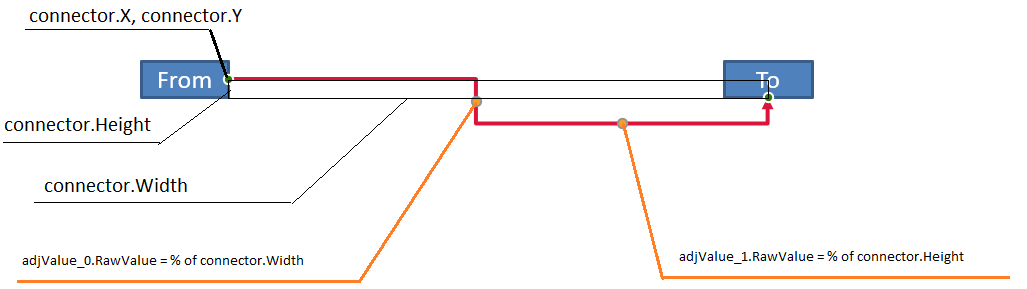
この例はコネクタを検査し、水平および垂直曲げ調整を取得します。
#include <DOM/FillType.h>
#include <DOM/IAdjustValue.h>
#include <DOM/IAdjustValueCollection.h>
#include <DOM/IAutoShape.h>
#include <DOM/IColorFormat.h>
#include <DOM/IConnector.h>
#include <DOM/ILineFillFormat.h>
#include <DOM/ILineFormat.h>
#include <DOM/IShapeCollection.h>
#include <DOM/ISlide.h>
#include <DOM/ITextFrame.h>
#include <DOM/LineArrowheadStyle.h>
#include <DOM/Presentation.h>
#include <DOM/ShapeAdjustmentType.h>
#include <DOM/ShapeType.h>
#include <drawing/color.h>
#include <system/console.h>

using namespace Aspose::Slides;
using namespace System;
using namespace System::Drawing;

auto presentation = MakeObject<Presentation>();
auto slide = presentation->get_Slide(0);
auto shapes = slide->get_Shapes();

auto sourceShape = shapes->AddAutoShape(ShapeType::Rectangle, 100, 100, 60, 25);
sourceShape->get_TextFrame()->set_Text(u"From");
auto targetShape = shapes->AddAutoShape(ShapeType::Rectangle, 500, 100, 60, 25);
targetShape->get_TextFrame()->set_Text(u"To");
auto connector = shapes->AddConnector(ShapeType::BentConnector4, 20, 20, 400, 300);

auto lineFormat = connector->get_LineFormat();
lineFormat->set_EndArrowheadStyle(LineArrowheadStyle::Triangle);
auto lineFillFormat = lineFormat->get_FillFormat();
lineFillFormat->set_FillType(FillType::Solid);
lineFillFormat->get_SolidFillColor()->set_Color(Color::get_Crimson());
lineFormat->set_Width(3);
connector->set_StartShapeConnectedTo(sourceShape);
connector->set_StartShapeConnectionSiteIndex(3);
connector->set_EndShapeConnectedTo(targetShape);
connector->set_EndShapeConnectionSiteIndex(2);

auto adjustments = connector->get_Adjustments();
for (int32_t adjustmentIndex = 0; adjustmentIndex < adjustments->get_Count(); ++adjustmentIndex)
{
    auto adjustment = adjustments->idx_get(adjustmentIndex);
    Console::WriteLine(u"{0}: type = {1}, raw value = {2}", adjustment->get_Name(), static_cast<int32_t>(adjustment->get_Type()), adjustment->get_RawValue());
}
両方の曲げを変更するには、期待する型をそれぞれ見つけてから値を変更します。
#include <DOM/IAdjustValue.h>
#include <DOM/IAdjustValueCollection.h>
#include <DOM/IAutoShape.h>
#include <DOM/IConnector.h>
#include <DOM/IShapeCollection.h>
#include <DOM/ISlide.h>
#include <DOM/Presentation.h>
#include <DOM/ShapeAdjustmentType.h>
#include <DOM/ShapeType.h>
#include <Export/SaveFormat.h>
#include <system/console.h>

using namespace Aspose::Slides;
using namespace Aspose::Slides::Export;
using namespace System;

auto presentation = MakeObject<Presentation>();
auto slide = presentation->get_Slide(0);
auto shapes = slide->get_Shapes();

auto sourceShape = shapes->AddAutoShape(ShapeType::Rectangle, 100, 100, 60, 25);
auto targetShape = shapes->AddAutoShape(ShapeType::Rectangle, 500, 100, 60, 25);
auto connector = shapes->AddConnector(ShapeType::BentConnector4, 20, 20, 400, 300);
connector->set_StartShapeConnectedTo(sourceShape);
connector->set_StartShapeConnectionSiteIndex(3);
connector->set_EndShapeConnectedTo(targetShape);
connector->set_EndShapeConnectionSiteIndex(2);

SharedPtr<IAdjustValue> horizontalBend;
SharedPtr<IAdjustValue> verticalBend;
auto adjustments = connector->get_Adjustments();
for (int32_t adjustmentIndex = 0; adjustmentIndex < adjustments->get_Count(); ++adjustmentIndex)
{
    auto adjustment = adjustments->idx_get(adjustmentIndex);
    if (adjustment->get_Type() == ShapeAdjustmentType::ConnectorBendPositionX)
    {
        horizontalBend = adjustment;
    }
    else if (adjustment->get_Type() == ShapeAdjustmentType::ConnectorBendPositionY)
    {
        verticalBend = adjustment;
    }
}

if (horizontalBend == nullptr || verticalBend == nullptr)
{
    Console::WriteLine(u"The connector does not expose the expected bend adjustments.");
}
else
{
    horizontalBend->set_RawValue(horizontalBend->get_RawValue() + 20000);
    verticalBend->set_RawValue(verticalBend->get_RawValue() + 200000);
    presentation->Save(u"connector-adjusted.pptx", SaveFormat::Pptx);
}
結果として、水平セグメントと垂直セグメントが移動したコネクタが得られます。

意味タイプが判明したら、値をコネクタフレーム座標に変換できます。この例は、2 つの曲げ調整で制御される垂直セグメント上に細い矩形を描画します。
#include <DOM/IAdjustValue.h>
#include <DOM/IAdjustValueCollection.h>
#include <DOM/IAutoShape.h>
#include <DOM/IConnector.h>
#include <DOM/IShapeCollection.h>
#include <DOM/ISlide.h>
#include <DOM/Presentation.h>
#include <DOM/ShapeAdjustmentType.h>
#include <DOM/ShapeType.h>
#include <Export/SaveFormat.h>
#include <system/console.h>

using namespace Aspose::Slides;
using namespace Aspose::Slides::Export;
using namespace System;

auto presentation = MakeObject<Presentation>();
auto slide = presentation->get_Slide(0);
auto shapes = slide->get_Shapes();

auto sourceShape = shapes->AddAutoShape(ShapeType::Rectangle, 100, 100, 60, 25);
auto targetShape = shapes->AddAutoShape(ShapeType::Rectangle, 500, 100, 60, 25);
auto connector = shapes->AddConnector(ShapeType::BentConnector4, 20, 20, 400, 300);
connector->set_StartShapeConnectedTo(sourceShape);
connector->set_StartShapeConnectionSiteIndex(3);
connector->set_EndShapeConnectedTo(targetShape);
connector->set_EndShapeConnectionSiteIndex(2);

SharedPtr<IAdjustValue> horizontalBend;
SharedPtr<IAdjustValue> verticalBend;
auto adjustments = connector->get_Adjustments();
for (int32_t adjustmentIndex = 0; adjustmentIndex < adjustments->get_Count(); ++adjustmentIndex)
{
    auto adjustment = adjustments->idx_get(adjustmentIndex);
    if (adjustment->get_Type() == ShapeAdjustmentType::ConnectorBendPositionX)
    {
        horizontalBend = adjustment;
    }
    else if (adjustment->get_Type() == ShapeAdjustmentType::ConnectorBendPositionY)
    {
        verticalBend = adjustment;
    }
}

if (horizontalBend == nullptr || verticalBend == nullptr)
{
    Console::WriteLine(u"The connector does not expose the expected bend adjustments.");
}
else
{
    float x = connector->get_X() + connector->get_Width() * horizontalBend->get_RawValue() / 100000.0f;
    float y = connector->get_Y();
    float height = connector->get_Height() * verticalBend->get_RawValue() / 100000.0f;
    shapes->AddAutoShape(ShapeType::Rectangle, x, y, 1, height);
    presentation->Save(u"connector-segment-guide.pptx", SaveFormat::Pptx);
}
ガイド形状は計算されたセグメントを示します。

回転または反転したコネクタ
同じコネクタジオメトリが垂直方向に向くと、IShape::get_Frame、IShapeFrame::get_FlipH、IShapeFrame::get_FlipV の値がコネクタフレーム座標からスライド座標への変換に影響します。
この例は垂直に向いたコネクタを作成し、調整します。
#include <DOM/FillType.h>
#include <DOM/IAdjustValue.h>
#include <DOM/IAdjustValueCollection.h>
#include <DOM/IAutoShape.h>
#include <DOM/IColorFormat.h>
#include <DOM/IConnector.h>
#include <DOM/ILineFillFormat.h>
#include <DOM/ILineFormat.h>
#include <DOM/IShapeCollection.h>
#include <DOM/ISlide.h>
#include <DOM/ITextFrame.h>
#include <DOM/LineArrowheadStyle.h>
#include <DOM/Presentation.h>
#include <DOM/ShapeAdjustmentType.h>
#include <DOM/ShapeType.h>
#include <Export/SaveFormat.h>
#include <drawing/color.h>

using namespace Aspose::Slides;
using namespace Aspose::Slides::Export;
using namespace System::Drawing;

auto presentation = System::MakeObject<Presentation>();
auto slide = presentation->get_Slide(0);
auto shapes = slide->get_Shapes();

auto sourceShape = shapes->AddAutoShape(ShapeType::Rectangle, 100, 100, 60, 25);
sourceShape->get_TextFrame()->set_Text(u"From");
auto targetShape = shapes->AddAutoShape(ShapeType::Rectangle, 100, 400, 60, 25);
targetShape->get_TextFrame()->set_Text(u"To 1");
auto connector = shapes->AddConnector(ShapeType::BentConnector4, 20, 20, 400, 300);

auto lineFormat = connector->get_LineFormat();
lineFormat->set_EndArrowheadStyle(LineArrowheadStyle::Triangle);
auto lineFillFormat = lineFormat->get_FillFormat();
lineFillFormat->set_FillType(FillType::Solid);
lineFillFormat->get_SolidFillColor()->set_Color(Color::get_MediumAquamarine());
lineFormat->set_Width(3);
connector->set_StartShapeConnectedTo(sourceShape);
connector->set_StartShapeConnectionSiteIndex(2);
connector->set_EndShapeConnectedTo(targetShape);
connector->set_EndShapeConnectionSiteIndex(3);

auto adjustments = connector->get_Adjustments();
for (int32_t adjustmentIndex = 0; adjustmentIndex < adjustments->get_Count(); ++adjustmentIndex)
{
    auto adjustment = adjustments->idx_get(adjustmentIndex);
    if (adjustment->get_Type() == ShapeAdjustmentType::ConnectorBendPositionX)
    {
        adjustment->set_RawValue(adjustment->get_RawValue() + 20000);
    }
    else if (adjustment->get_Type() == ShapeAdjustmentType::ConnectorBendPositionY)
    {
        adjustment->set_RawValue(adjustment->get_RawValue() + 200000);
    }
}

presentation->Save(u"vertical-connector-adjusted.pptx", SaveFormat::Pptx);
調整されたコネクタは図形間に垂直に表示されます。
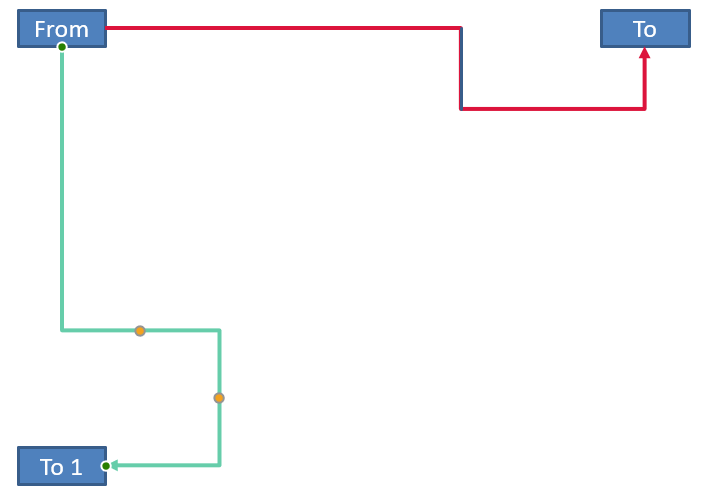
任意の回転角 alpha に対して、コネクタフレーム点 (x, y) をフレーム中心 (x0, y0) 周りに回転させる式は次のとおりです。
X = (x - x0) * cos(alpha) - (y - y0) * sin(alpha) + x0
Y = (x - x0) * sin(alpha) + (y - y0) * cos(alpha) + y0
以下のコードはこの例で使用した 90 度回転を処理し、対応するコネクタセグメント上に赤いガイドを描画します。
#include <DOM/FillType.h>
#include <DOM/IAdjustValue.h>
#include <DOM/IAdjustValueCollection.h>
#include <DOM/IAutoShape.h>
#include <DOM/IColorFormat.h>
#include <DOM/IConnector.h>
#include <DOM/ILineFillFormat.h>
#include <DOM/ILineFormat.h>
#include <DOM/IShapeCollection.h>
#include <DOM/IShapeFrame.h>
#include <DOM/ISlide.h>
#include <DOM/NullableBool.h>
#include <DOM/Presentation.h>
#include <DOM/ShapeAdjustmentType.h>
#include <DOM/ShapeType.h>
#include <Export/SaveFormat.h>
#include <drawing/color.h>
#include <system/console.h>

using namespace Aspose::Slides;
using namespace Aspose::Slides::Export;
using namespace System;
using namespace System::Drawing;

auto presentation = MakeObject<Presentation>();
auto slide = presentation->get_Slide(0);
auto shapes = slide->get_Shapes();

auto sourceShape = shapes->AddAutoShape(ShapeType::Rectangle, 100, 100, 60, 25);
auto targetShape = shapes->AddAutoShape(ShapeType::Rectangle, 100, 400, 60, 25);
auto connector = shapes->AddConnector(ShapeType::BentConnector4, 20, 20, 400, 300);
connector->set_StartShapeConnectedTo(sourceShape);
connector->set_StartShapeConnectionSiteIndex(2);
connector->set_EndShapeConnectedTo(targetShape);
connector->set_EndShapeConnectionSiteIndex(3);

SharedPtr<IAdjustValue> horizontalBend;
SharedPtr<IAdjustValue> verticalBend;
auto adjustments = connector->get_Adjustments();
for (int32_t adjustmentIndex = 0; adjustmentIndex < adjustments->get_Count(); ++adjustmentIndex)
{
    auto adjustment = adjustments->idx_get(adjustmentIndex);
    if (adjustment->get_Type() == ShapeAdjustmentType::ConnectorBendPositionX)
    {
        horizontalBend = adjustment;
    }
    else if (adjustment->get_Type() == ShapeAdjustmentType::ConnectorBendPositionY)
    {
        verticalBend = adjustment;
    }
}

if (horizontalBend == nullptr || verticalBend == nullptr)
{
    Console::WriteLine(u"The connector does not expose the expected bend adjustments.");
}
else
{
    horizontalBend->set_RawValue(horizontalBend->get_RawValue() + 20000);
    verticalBend->set_RawValue(verticalBend->get_RawValue() + 200000);

    float x = connector->get_X();
    float y = connector->get_Y();
    auto frame = connector->get_Frame();
    if (frame->get_FlipH() == NullableBool::True)
    {
        x += connector->get_Width();
    }
    if (frame->get_FlipV() == NullableBool::True)
    {
        y += connector->get_Height();
    }

    x += connector->get_Width() * horizontalBend->get_RawValue() / 100000.0f;
    float rotatedX = frame->get_CenterX() - y + frame->get_CenterY();
    float rotatedY = x - frame->get_CenterX() + frame->get_CenterY();
    float segmentWidth = connector->get_Height() * verticalBend->get_RawValue() / 100000.0f;
    auto guide = shapes->AddAutoShape(ShapeType::Rectangle, rotatedX, rotatedY, segmentWidth, 1);
    auto guideLineFillFormat = guide->get_LineFormat()->get_FillFormat();
    guideLineFillFormat->set_FillType(FillType::Solid);
    guideLineFillFormat->get_SolidFillColor()->set_Color(Color::get_Red());

    presentation->Save(u"rotated-connector-segment-guide.pptx", SaveFormat::Pptx);
}
座標変換後、赤いガイドが計算されたセグメントを示します。
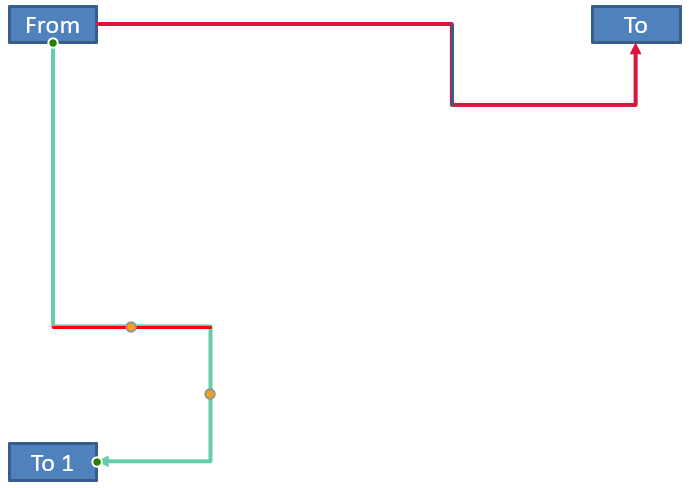
これらの式は例で使用したプリセットを説明したものであり、汎用的なコネクタモデルを示すものではありません。別のプリセットに同じ計算を適用する前に、調整タイプ、フレームの向き、値範囲を必ず検証してください。
コネクタの方向角を求める
直線コネクタの方向は幅と高さから計算でき、水平・垂直の反転も考慮されます。次の例は、スライド座標系で正の水平軸から時計回りの角度を報告します。
#include <DOM/IConnector.h>
#include <DOM/IShapeCollection.h>
#include <DOM/IShapeFrame.h>
#include <DOM/ISlide.h>
#include <DOM/NullableBool.h>
#include <DOM/Presentation.h>
#include <DOM/ShapeType.h>
#include <system/console.h>
#include <system/math.h>

using namespace Aspose::Slides;
using namespace System;

auto presentation = MakeObject<Presentation>();
auto slide = presentation->get_Slide(0);
auto connector = slide->get_Shapes()->AddConnector(ShapeType::StraightConnector1, 100, 100, 200, 100);
auto frame = connector->get_Frame();

bool flipH = frame->get_FlipH() == NullableBool::True;
bool flipV = frame->get_FlipV() == NullableBool::True;
float deltaX = connector->get_Width() * (flipH ? -1 : 1);
float deltaY = connector->get_Height() * (flipV ? -1 : 1);
double angle = Math::Atan2(deltaY, deltaX) * 180.0 / Math::PI;

if (angle < 0)
{
    angle += 360;
}

Console::WriteLine(u"Connector direction: {0:F2} degrees", angle);
FAQ
コネクタが図形に接続できるかどうかはどう確認できますか?
図形の IShape::get_ConnectionSiteCount の値を確認してください。正の数であれば接続点が公開されていることを意味します。接続点インデックスをコネクタの端に割り当てる前に必ず検証してください。
コレクションインデックスでコネクタ調整を特定できますか?
インデックスは既知のコネクタプリセットとコレクションレイアウトに対してのみ意味があります。値を変更する前に IAdjustValue::get_Type を確認し、同じ意味タイプが複数存在する場合は IAdjustValue::get_Name を追加情報として使用してください。
接続された図形が削除された場合はどうなりますか?
対応するコネクタの端は切り離されます。コネクタ自体はスライド上に残り、削除するか、自由線として位置決めするか、別の図形に再接続することができます。
スライドをコピーしたときにコネクタのバインディングは保持されますか?
接続された図形と共にスライドをコピーすると、バインディングは通常保持されます。コネクタだけがコピーされ、対象図形が含まれない場合は、影響を受けた端を再度接続する必要があります。