
使用 C++ 管理演示文稿中的连接器
概述
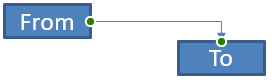
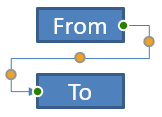
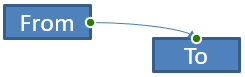
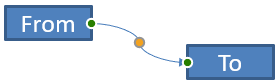
连接器是一条在任一形状移动时仍能保持连接到两个形状的线。它的两端会连接到连接点,PowerPoint 中用绿色点表示。一些弯曲或曲线形的连接器还会显示调整点,用橙色点表示,用于控制各连接段的位置。
Aspose.Slides 通过 IConnector 接口表示连接器。您可以创建它们、将两端连接到形状、选择连接点、重新路由,以及修改具有调整点的连接器的几何形状。
连接器类型
ShapeType 枚举包含直线、弯折和曲线连接器预设。下表显示了可用的连接器几何形状以及每种预设定义的调整点数量。
| 连接器 | 图片 | 调整点数量 |
|---|---|---|
ShapeType::Line |
 |
0 |
ShapeType::StraightConnector1 |
 |
0 |
ShapeType::BentConnector2 |
 |
0 |
ShapeType::BentConnector3 |
 |
1 |
ShapeType::BentConnector4 |
 |
2 |
ShapeType::BentConnector5 |
 |
3 |
ShapeType::CurvedConnector2 |
 |
0 |
ShapeType::CurvedConnector3 |
 |
1 |
ShapeType::CurvedConnector4 |
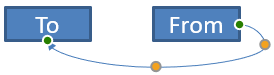 |
2 |
ShapeType::CurvedConnector5 |
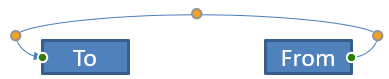 |
3 |
调整点的数量和含义是所选连接器预设的一部分。不要假设两种不同的连接器类型会暴露相同的集合布局。
连接两个形状
使用 IShapeCollection::AddConnector 添加连接器,并调用 IConnector::set_StartShapeConnectedTo 与 IConnector::set_EndShapeConnectedTo 将两端连接到形状。两个端点都连接后,调用 IConnector::Reroute 会在形状之间选择一条最短路径。
下面的示例使用弯折连接器将椭圆和矩形连接起来:
#include <DOM/IAutoShape.h>
#include <DOM/IConnector.h>
#include <DOM/IShapeCollection.h>
#include <DOM/ISlide.h>
#include <DOM/Presentation.h>
#include <DOM/ShapeType.h>
#include <Export/SaveFormat.h>

using namespace Aspose::Slides;
using namespace Aspose::Slides::Export;

System::SharedPtr<Presentation> presentation = System::MakeObject<Presentation>();
auto slide = presentation->get_Slide(0);
auto shapes = slide->get_Shapes();

auto ellipse = shapes->AddAutoShape(ShapeType::Ellipse, 40, 80, 120, 80);
auto rectangle = shapes->AddAutoShape(ShapeType::Rectangle, 320, 240, 140, 80);
auto connector = shapes->AddConnector(ShapeType::BentConnector2, 0, 0, 10, 10);

connector->set_StartShapeConnectedTo(ellipse);
connector->set_EndShapeConnectedTo(rectangle);
connector->Reroute();

presentation->Save(u"connected-shapes.pptx", SaveFormat::Pptx);
警告
调用IConnector::Reroute 可能会更改 IConnector::set_StartShapeConnectionSiteIndex 和 IConnector::set_EndShapeConnectionSiteIndex 的值。如果这些连接点必须保持固定,请在重新路由后再次指定具体的连接点。
选择连接点
每个可连接的形状会通过 IShape::get_ConnectionSiteCount 报告其连接点数量。在将首选的零基索引分配给连接器端点之前,请先验证该索引;不同形状的几何形状会导致连接点数量不同。
下面的示例在椭圆上存在特定连接点时,将连接器附加到该点:
#include <DOM/IAutoShape.h>
#include <DOM/IConnector.h>
#include <DOM/IShapeCollection.h>
#include <DOM/ISlide.h>
#include <DOM/Presentation.h>
#include <DOM/ShapeType.h>
#include <Export/SaveFormat.h>
#include <system/console.h>

using namespace Aspose::Slides;
using namespace Aspose::Slides::Export;
using namespace System;

auto presentation = MakeObject<Presentation>();
auto slide = presentation->get_Slide(0);
auto shapes = slide->get_Shapes();

auto ellipse = shapes->AddAutoShape(ShapeType::Ellipse, 40, 80, 120, 80);
auto rectangle = shapes->AddAutoShape(ShapeType::Rectangle, 320, 240, 140, 80);
auto connector = shapes->AddConnector(ShapeType::BentConnector3, 0, 0, 10, 10);

connector->set_StartShapeConnectedTo(ellipse);
connector->set_EndShapeConnectedTo(rectangle);

int32_t preferredSiteIndex = 2;
if (preferredSiteIndex < ellipse->get_ConnectionSiteCount())
{
    connector->set_StartShapeConnectionSiteIndex(preferredSiteIndex);
}
else
{
    Console::WriteLine(u"The ellipse has only {0} connection sites.", ellipse->get_ConnectionSiteCount());
}

presentation->Save(u"specific-connection-site.pptx", SaveFormat::Pptx);
调整连接器点
具有调整点的连接器通过 IGeometryShape::get_Adjustments 暴露这些点。检查每个 IAdjustValue 并在更改其 IAdjustValue::set_RawValue 之前,先查看其 IAdjustValue::get_Type。有关识别预设形状调整的通用规则,请参阅 Shape Manipulation。
调整点的数量、顺序、含义以及有效值范围取决于连接器预设。IAdjustValue::get_Type 返回的类型是只读的,而原始调整值是可写的。只读的 IAdjustValue::get_Name 方法在连接器包含多个相同语义类型的调整时,可提供额外的标识信息。
绕过障碍物的路径
在下图布局中,一个 ShapeType::BentConnector5 连接器在两形状之间穿过第三个形状:
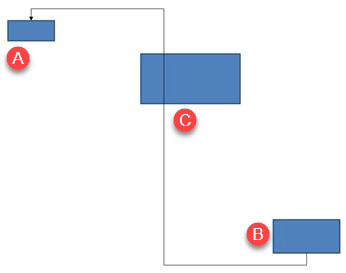
以下代码创建了受阻的连接器:
#include <DOM/FillType.h>
#include <DOM/IAutoShape.h>
#include <DOM/IColorFormat.h>
#include <DOM/IConnector.h>
#include <DOM/ILineFillFormat.h>
#include <DOM/ILineFormat.h>
#include <DOM/IShapeCollection.h>
#include <DOM/ISlide.h>
#include <DOM/LineArrowheadStyle.h>
#include <DOM/Presentation.h>
#include <DOM/ShapeType.h>
#include <Export/SaveFormat.h>
#include <drawing/color.h>

using namespace Aspose::Slides;
using namespace Aspose::Slides::Export;
using namespace System::Drawing;

auto presentation = System::MakeObject<Presentation>();
auto slide = presentation->get_Slide(0);
auto shapes = slide->get_Shapes();

shapes->AddAutoShape(ShapeType::Rectangle, 300, 150, 150, 75);
auto sourceShape = shapes->AddAutoShape(ShapeType::Rectangle, 500, 400, 100, 50);
auto targetShape = shapes->AddAutoShape(ShapeType::Rectangle, 100, 100, 70, 30);
auto connector = shapes->AddConnector(ShapeType::BentConnector5, 20, 20, 400, 300);

auto lineFormat = connector->get_LineFormat();
lineFormat->set_EndArrowheadStyle(LineArrowheadStyle::Triangle);
auto lineFillFormat = lineFormat->get_FillFormat();
lineFillFormat->set_FillType(FillType::Solid);
lineFillFormat->get_SolidFillColor()->set_Color(Color::get_Black());
connector->set_StartShapeConnectedTo(sourceShape);
connector->set_EndShapeConnectedTo(targetShape);
connector->set_StartShapeConnectionSiteIndex(2);

presentation->Save(u"connector-obstruction.pptx", SaveFormat::Pptx);
移动垂直弯折会改变路径,使连接器避开障碍物:
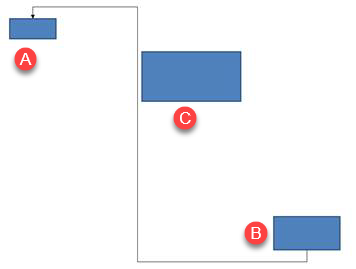
本例并未假设集合索引 1 始终表示垂直弯折,而是搜索 ShapeAdjustmentType::ConnectorBendPositionY,仅在存在预期的语义类型时才进行修改:
#include <DOM/FillType.h>
#include <DOM/IAdjustValue.h>
#include <DOM/IAdjustValueCollection.h>
#include <DOM/IAutoShape.h>
#include <DOM/IColorFormat.h>
#include <DOM/IConnector.h>
#include <DOM/ILineFillFormat.h>
#include <DOM/ILineFormat.h>
#include <DOM/IShapeCollection.h>
#include <DOM/ISlide.h>
#include <DOM/LineArrowheadStyle.h>
#include <DOM/Presentation.h>
#include <DOM/ShapeAdjustmentType.h>
#include <DOM/ShapeType.h>
#include <Export/SaveFormat.h>
#include <drawing/color.h>
#include <system/console.h>

using namespace Aspose::Slides;
using namespace Aspose::Slides::Export;
using namespace System;
using namespace System::Drawing;

auto presentation = MakeObject<Presentation>();
auto slide = presentation->get_Slide(0);
auto shapes = slide->get_Shapes();

shapes->AddAutoShape(ShapeType::Rectangle, 300, 150, 150, 75);
auto sourceShape = shapes->AddAutoShape(ShapeType::Rectangle, 500, 400, 100, 50);
auto targetShape = shapes->AddAutoShape(ShapeType::Rectangle, 100, 100, 70, 30);
auto connector = shapes->AddConnector(ShapeType::BentConnector5, 20, 20, 400, 300);

auto lineFormat = connector->get_LineFormat();
lineFormat->set_EndArrowheadStyle(LineArrowheadStyle::Triangle);
auto lineFillFormat = lineFormat->get_FillFormat();
lineFillFormat->set_FillType(FillType::Solid);
lineFillFormat->get_SolidFillColor()->set_Color(Color::get_Black());
connector->set_StartShapeConnectedTo(sourceShape);
connector->set_EndShapeConnectedTo(targetShape);
connector->set_StartShapeConnectionSiteIndex(2);

SharedPtr<IAdjustValue> verticalBend;
auto adjustments = connector->get_Adjustments();
for (int32_t adjustmentIndex = 0; adjustmentIndex < adjustments->get_Count(); ++adjustmentIndex)
{
    auto adjustment = adjustments->idx_get(adjustmentIndex);
    Console::WriteLine(u"{0}: type = {1}, raw value = {2}", adjustment->get_Name(), static_cast<int32_t>(adjustment->get_Type()), adjustment->get_RawValue());
    if (adjustment->get_Type() == ShapeAdjustmentType::ConnectorBendPositionY)
    {
        verticalBend = adjustment;
        break;
    }
}

if (verticalBend == nullptr)
{
    Console::WriteLine(u"The connector does not expose a vertical bend adjustment.");
}
else
{
    verticalBend->set_RawValue(60000);
    presentation->Save(u"connector-obstruction-fixed.pptx", SaveFormat::Pptx);
}
ShapeType::BentConnector5 包含两个 ShapeAdjustmentType::ConnectorBendPositionX 调整和一个 ShapeAdjustmentType::ConnectorBendPositionY 调整。如果所需的类型出现多次,请检查 IAdjustValue::get_Name 并结合该预设已知的几何形状再做选择。如果某个调整报告为 ShapeAdjustmentType::Custom,则其含义和范围仅针对该预设,除非明确了解其合约,否则不要更改。
将调整值关联到连接器几何形状
对于弯折连接器,调整值可用于估算各段的定位。以下计算均针对特定的连接器预设:
ShapeType::BentConnector4通常暴露一个ShapeAdjustmentType::ConnectorBendPositionX与一个ShapeAdjustmentType::ConnectorBendPositionY调整。- 对于这些弯折位置,
RawValue / 100000.0f会得到相对于连接器框宽度或高度的比例,如下例所示。 - 连接器框可能被旋转或翻转,因此在与幻灯片坐标比较之前,必须先对框坐标进行转换。
下面的示例首先使用 IAdjustValue::get_Type 识别调整点,而不是依赖集合索引:
未旋转的连接器
初始布局中有两个文本形状通过 ShapeType::BentConnector4 连接:
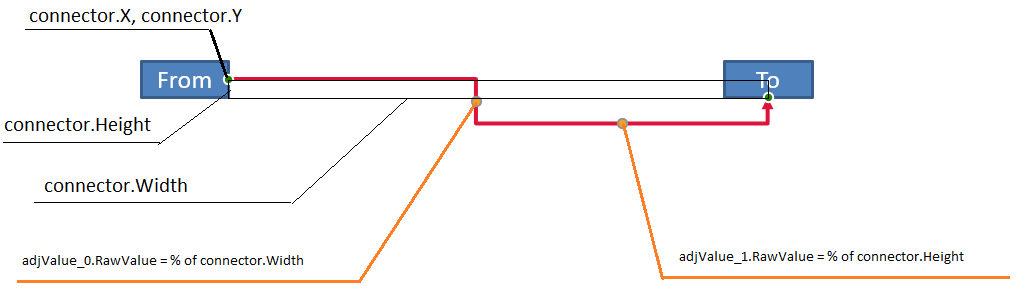
本例检查连接器并获取其水平和垂直弯折的调整值:
#include <DOM/FillType.h>
#include <DOM/IAdjustValue.h>
#include <DOM/IAdjustValueCollection.h>
#include <DOM/IAutoShape.h>
#include <DOM/IColorFormat.h>
#include <DOM/IConnector.h>
#include <DOM/ILineFillFormat.h>
#include <DOM/ILineFormat.h>
#include <DOM/IShapeCollection.h>
#include <DOM/ISlide.h>
#include <DOM/ITextFrame.h>
#include <DOM/LineArrowheadStyle.h>
#include <DOM/Presentation.h>
#include <DOM/ShapeAdjustmentType.h>
#include <DOM/ShapeType.h>
#include <drawing/color.h>
#include <system/console.h>

using namespace Aspose::Slides;
using namespace System;
using namespace System::Drawing;

auto presentation = MakeObject<Presentation>();
auto slide = presentation->get_Slide(0);
auto shapes = slide->get_Shapes();

auto sourceShape = shapes->AddAutoShape(ShapeType::Rectangle, 100, 100, 60, 25);
sourceShape->get_TextFrame()->set_Text(u"From");
auto targetShape = shapes->AddAutoShape(ShapeType::Rectangle, 500, 100, 60, 25);
targetShape->get_TextFrame()->set_Text(u"To");
auto connector = shapes->AddConnector(ShapeType::BentConnector4, 20, 20, 400, 300);

auto lineFormat = connector->get_LineFormat();
lineFormat->set_EndArrowheadStyle(LineArrowheadStyle::Triangle);
auto lineFillFormat = lineFormat->get_FillFormat();
lineFillFormat->set_FillType(FillType::Solid);
lineFillFormat->get_SolidFillColor()->set_Color(Color::get_Crimson());
lineFormat->set_Width(3);
connector->set_StartShapeConnectedTo(sourceShape);
connector->set_StartShapeConnectionSiteIndex(3);
connector->set_EndShapeConnectedTo(targetShape);
connector->set_EndShapeConnectionSiteIndex(2);

auto adjustments = connector->get_Adjustments();
for (int32_t adjustmentIndex = 0; adjustmentIndex < adjustments->get_Count(); ++adjustmentIndex)
{
    auto adjustment = adjustments->idx_get(adjustmentIndex);
    Console::WriteLine(u"{0}: type = {1}, raw value = {2}", adjustment->get_Name(), static_cast<int32_t>(adjustment->get_Type()), adjustment->get_RawValue());
}
要同时修改两个弯折,需要先定位每个预期的类型,且仅在两者都找到后才修改其值:
#include <DOM/IAdjustValue.h>
#include <DOM/IAdjustValueCollection.h>
#include <DOM/IAutoShape.h>
#include <DOM/IConnector.h>
#include <DOM/IShapeCollection.h>
#include <DOM/ISlide.h>
#include <DOM/Presentation.h>
#include <DOM/ShapeAdjustmentType.h>
#include <DOM/ShapeType.h>
#include <Export/SaveFormat.h>
#include <system/console.h>

using namespace Aspose::Slides;
using namespace Aspose::Slides::Export;
using namespace System;

auto presentation = MakeObject<Presentation>();
auto slide = presentation->get_Slide(0);
auto shapes = slide->get_Shapes();

auto sourceShape = shapes->AddAutoShape(ShapeType::Rectangle, 100, 100, 60, 25);
auto targetShape = shapes->AddAutoShape(ShapeType::Rectangle, 500, 100, 60, 25);
auto connector = shapes->AddConnector(ShapeType::BentConnector4, 20, 20, 400, 300);
connector->set_StartShapeConnectedTo(sourceShape);
connector->set_StartShapeConnectionSiteIndex(3);
connector->set_EndShapeConnectedTo(targetShape);
connector->set_EndShapeConnectionSiteIndex(2);

SharedPtr<IAdjustValue> horizontalBend;
SharedPtr<IAdjustValue> verticalBend;
auto adjustments = connector->get_Adjustments();
for (int32_t adjustmentIndex = 0; adjustmentIndex < adjustments->get_Count(); ++adjustmentIndex)
{
    auto adjustment = adjustments->idx_get(adjustmentIndex);
    if (adjustment->get_Type() == ShapeAdjustmentType::ConnectorBendPositionX)
    {
        horizontalBend = adjustment;
    }
    else if (adjustment->get_Type() == ShapeAdjustmentType::ConnectorBendPositionY)
    {
        verticalBend = adjustment;
    }
}

if (horizontalBend == nullptr || verticalBend == nullptr)
{
    Console::WriteLine(u"The connector does not expose the expected bend adjustments.");
}
else
{
    horizontalBend->set_RawValue(horizontalBend->get_RawValue() + 20000);
    verticalBend->set_RawValue(verticalBend->get_RawValue() + 200000);
    presentation->Save(u"connector-adjusted.pptx", SaveFormat::Pptx);
}
结果是水平段和垂直段都已移动的连接器:

确定语义类型后,可将其值转换为连接器框坐标。本例在由两个弯折调整控制的垂直段上绘制一个细矩形:
#include <DOM/IAdjustValue.h>
#include <DOM/IAdjustValueCollection.h>
#include <DOM/IAutoShape.h>
#include <DOM/IConnector.h>
#include <DOM/IShapeCollection.h>
#include <DOM/ISlide.h>
#include <DOM/Presentation.h>
#include <DOM/ShapeAdjustmentType.h>
#include <DOM/ShapeType.h>
#include <Export/SaveFormat.h>
#include <system/console.h>

using namespace Aspose::Slides;
using namespace Aspose::Slides::Export;
using namespace System;

auto presentation = MakeObject<Presentation>();
auto slide = presentation->get_Slide(0);
auto shapes = slide->get_Shapes();

auto sourceShape = shapes->AddAutoShape(ShapeType::Rectangle, 100, 100, 60, 25);
auto targetShape = shapes->AddAutoShape(ShapeType::Rectangle, 500, 100, 60, 25);
auto connector = shapes->AddConnector(ShapeType::BentConnector4, 20, 20, 400, 300);
connector->set_StartShapeConnectedTo(sourceShape);
connector->set_StartShapeConnectionSiteIndex(3);
connector->set_EndShapeConnectedTo(targetShape);
connector->set_EndShapeConnectionSiteIndex(2);

SharedPtr<IAdjustValue> horizontalBend;
SharedPtr<IAdjustValue> verticalBend;
auto adjustments = connector->get_Adjustments();
for (int32_t adjustmentIndex = 0; adjustmentIndex < adjustments->get_Count(); ++adjustmentIndex)
{
    auto adjustment = adjustments->idx_get(adjustmentIndex);
    if (adjustment->get_Type() == ShapeAdjustmentType::ConnectorBendPositionX)
    {
        horizontalBend = adjustment;
    }
    else if (adjustment->get_Type() == ShapeAdjustmentType::ConnectorBendPositionY)
    {
        verticalBend = adjustment;
    }
}

if (horizontalBend == nullptr || verticalBend == nullptr)
{
    Console::WriteLine(u"The connector does not expose the expected bend adjustments.");
}
else
{
    float x = connector->get_X() + connector->get_Width() * horizontalBend->get_RawValue() / 100000.0f;
    float y = connector->get_Y();
    float height = connector->get_Height() * verticalBend->get_RawValue() / 100000.0f;
    shapes->AddAutoShape(ShapeType::Rectangle, x, y, 1, height);
    presentation->Save(u"connector-segment-guide.pptx", SaveFormat::Pptx);
}
参考形状标记出计算得到的段落:

旋转或翻转的连接器
当相同的连接器几何形状垂直放置时,其 IShape::get_Frame、IShapeFrame::get_FlipH 与 IShapeFrame::get_FlipV 会影响从连接器框坐标到幻灯片坐标的转换。
本例创建并调整了垂直方向的连接器:
#include <DOM/FillType.h>
#include <DOM/IAdjustValue.h>
#include <DOM/IAdjustValueCollection.h>
#include <DOM/IAutoShape.h>
#include <DOM/IColorFormat.h>
#include <DOM/IConnector.h>
#include <DOM/ILineFillFormat.h>
#include <DOM/ILineFormat.h>
#include <DOM/IShapeCollection.h>
#include <DOM/ISlide.h>
#include <DOM/ITextFrame.h>
#include <DOM/LineArrowheadStyle.h>
#include <DOM/Presentation.h>
#include <DOM/ShapeAdjustmentType.h>
#include <DOM/ShapeType.h>
#include <Export/SaveFormat.h>
#include <drawing/color.h>

using namespace Aspose::Slides;
using namespace Aspose::Slides::Export;
using namespace System::Drawing;

auto presentation = System::MakeObject<Presentation>();
auto slide = presentation->get_Slide(0);
auto shapes = slide->get_Shapes();

auto sourceShape = shapes->AddAutoShape(ShapeType::Rectangle, 100, 100, 60, 25);
sourceShape->get_TextFrame()->set_Text(u"From");
auto targetShape = shapes->AddAutoShape(ShapeType::Rectangle, 100, 400, 60, 25);
targetShape->get_TextFrame()->set_Text(u"To 1");
auto connector = shapes->AddConnector(ShapeType::BentConnector4, 20, 20, 400, 300);

auto lineFormat = connector->get_LineFormat();
lineFormat->set_EndArrowheadStyle(LineArrowheadStyle::Triangle);
auto lineFillFormat = lineFormat->get_FillFormat();
lineFillFormat->set_FillType(FillType::Solid);
lineFillFormat->get_SolidFillColor()->set_Color(Color::get_MediumAquamarine());
lineFormat->set_Width(3);
connector->set_StartShapeConnectedTo(sourceShape);
connector->set_StartShapeConnectionSiteIndex(2);
connector->set_EndShapeConnectedTo(targetShape);
connector->set_EndShapeConnectionSiteIndex(3);

auto adjustments = connector->get_Adjustments();
for (int32_t adjustmentIndex = 0; adjustmentIndex < adjustments->get_Count(); ++adjustmentIndex)
{
    auto adjustment = adjustments->idx_get(adjustmentIndex);
    if (adjustment->get_Type() == ShapeAdjustmentType::ConnectorBendPositionX)
    {
        adjustment->set_RawValue(adjustment->get_RawValue() + 20000);
    }
    else if (adjustment->get_Type() == ShapeAdjustmentType::ConnectorBendPositionY)
    {
        adjustment->set_RawValue(adjustment->get_RawValue() + 200000);
    }
}

presentation->Save(u"vertical-connector-adjusted.pptx", SaveFormat::Pptx);
调整后的连接器在形状之间垂直显示:
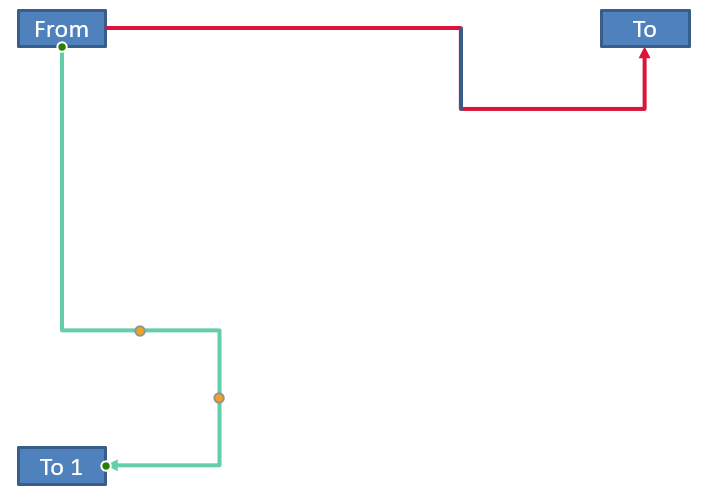
对于任意旋转角度 alpha,将连接器框点 (x, y) 绕框中心 (x0, y0) 旋转得到:
X = (x - x0) * cos(alpha) - (y - y0) * sin(alpha) + x0
Y = (x - x0) * sin(alpha) + (y - y0) * cos(alpha) + y0
以下代码处理本例中使用的 90 度方向,并在相应的连接器段上绘制红色指示线:
#include <DOM/FillType.h>
#include <DOM/IAdjustValue.h>
#include <DOM/IAdjustValueCollection.h>
#include <DOM/IAutoShape.h>
#include <DOM/IColorFormat.h>
#include <DOM/IConnector.h>
#include <DOM/ILineFillFormat.h>
#include <DOM/ILineFormat.h>
#include <DOM/IShapeCollection.h>
#include <DOM/IShapeFrame.h>
#include <DOM/ISlide.h>
#include <DOM/NullableBool.h>
#include <DOM/Presentation.h>
#include <DOM/ShapeAdjustmentType.h>
#include <DOM/ShapeType.h>
#include <Export/SaveFormat.h>
#include <drawing/color.h>
#include <system/console.h>

using namespace Aspose::Slides;
using namespace Aspose::Slides::Export;
using namespace System;
using namespace System::Drawing;

auto presentation = MakeObject<Presentation>();
auto slide = presentation->get_Slide(0);
auto shapes = slide->get_Shapes();

auto sourceShape = shapes->AddAutoShape(ShapeType::Rectangle, 100, 100, 60, 25);
auto targetShape = shapes->AddAutoShape(ShapeType::Rectangle, 100, 400, 60, 25);
auto connector = shapes->AddConnector(ShapeType::BentConnector4, 20, 20, 400, 300);
connector->set_StartShapeConnectedTo(sourceShape);
connector->set_StartShapeConnectionSiteIndex(2);
connector->set_EndShapeConnectedTo(targetShape);
connector->set_EndShapeConnectionSiteIndex(3);

SharedPtr<IAdjustValue> horizontalBend;
SharedPtr<IAdjustValue> verticalBend;
auto adjustments = connector->get_Adjustments();
for (int32_t adjustmentIndex = 0; adjustmentIndex < adjustments->get_Count(); ++adjustmentIndex)
{
    auto adjustment = adjustments->idx_get(adjustmentIndex);
    if (adjustment->get_Type() == ShapeAdjustmentType::ConnectorBendPositionX)
    {
        horizontalBend = adjustment;
    }
    else if (adjustment->get_Type() == ShapeAdjustmentType::ConnectorBendPositionY)
    {
        verticalBend = adjustment;
    }
}

if (horizontalBend == nullptr || verticalBend == nullptr)
{
    Console::WriteLine(u"The connector does not expose the expected bend adjustments.");
}
else
{
    horizontalBend->set_RawValue(horizontalBend->get_RawValue() + 20000);
    verticalBend->set_RawValue(verticalBend->get_RawValue() + 200000);

    float x = connector->get_X();
    float y = connector->get_Y();
    auto frame = connector->get_Frame();
    if (frame->get_FlipH() == NullableBool::True)
    {
        x += connector->get_Width();
    }
    if (frame->get_FlipV() == NullableBool::True)
    {
        y += connector->get_Height();
    }

    x += connector->get_Width() * horizontalBend->get_RawValue() / 100000.0f;
    float rotatedX = frame->get_CenterX() - y + frame->get_CenterY();
    float rotatedY = x - frame->get_CenterX() + frame->get_CenterY();
    float segmentWidth = connector->get_Height() * verticalBend->get_RawValue() / 100000.0f;
    auto guide = shapes->AddAutoShape(ShapeType::Rectangle, rotatedX, rotatedY, segmentWidth, 1);
    auto guideLineFillFormat = guide->get_LineFormat()->get_FillFormat();
    guideLineFillFormat->set_FillType(FillType::Solid);
    guideLineFillFormat->get_SolidFillColor()->set_Color(Color::get_Red());

    presentation->Save(u"rotated-connector-segment-guide.pptx", SaveFormat::Pptx);
}
红色指示线标记出坐标转换后的计算段落:
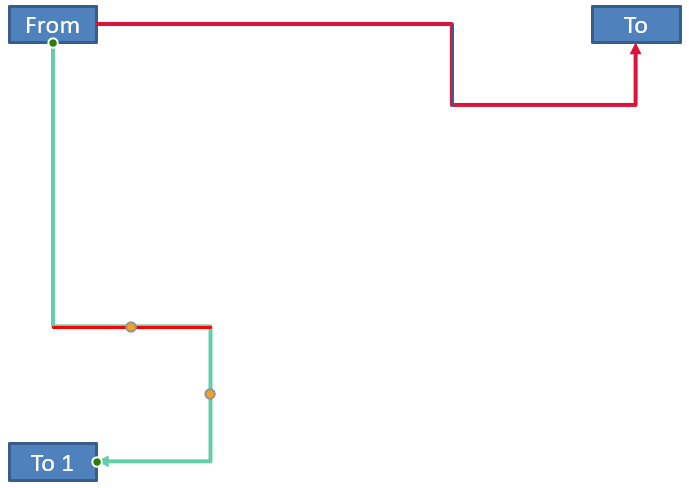
这些公式描述的是示例中使用的预设,而非通用的连接器模型。在将相同计算应用于其他预设之前,请先验证调整类型、框方向以及数值范围。
查找连接器方向角度
直线连接器的方向可以通过其宽度与高度计算,并考虑水平和垂直翻转。下面的示例在幻灯片坐标系中报告相对于正水平轴的顺时针角度:
#include <DOM/IConnector.h>
#include <DOM/IShapeCollection.h>
#include <DOM/IShapeFrame.h>
#include <DOM/ISlide.h>
#include <DOM/NullableBool.h>
#include <DOM/Presentation.h>
#include <DOM/ShapeType.h>
#include <system/console.h>
#include <system/math.h>

using namespace Aspose::Slides;
using namespace System;

auto presentation = MakeObject<Presentation>();
auto slide = presentation->get_Slide(0);
auto connector = slide->get_Shapes()->AddConnector(ShapeType::StraightConnector1, 100, 100, 200, 100);
auto frame = connector->get_Frame();

bool flipH = frame->get_FlipH() == NullableBool::True;
bool flipV = frame->get_FlipV() == NullableBool::True;
float deltaX = connector->get_Width() * (flipH ? -1 : 1);
float deltaY = connector->get_Height() * (flipV ? -1 : 1);
double angle = Math::Atan2(deltaY, deltaX) * 180.0 / Math::PI;

if (angle < 0)
{
    angle += 360;
}

Console::WriteLine(u"Connector direction: {0:F2} degrees", angle);
常见问题解答
如何判断一个连接器是否可以附着到形状上?
检查形状的 IShape::get_ConnectionSiteCount 值。正数表示该形状暴露连接点。在将该索引分配给任一连接器端点之前,请先验证所选的点索引。
我能否仅通过集合索引识别连接器的调整点?
索引仅在已知的连接器预设及其集合布局下才有意义。修改值之前,请先检查 IAdjustValue::get_Type,如果同一语义类型出现多次,可使用 IAdjustValue::get_Name 作为补充信息。
当连接的形状被删除会怎样?
对应的连接器端会被分离。连接器仍保留在幻灯片上,您可以删除它、将其作为自由线定位,或重新附着到其他形状。
复制幻灯片时,连接器的绑定是否会被保留?
在复制幻灯片时,若连同目标形状一起复制,绑定通常会被保留。如果仅复制了连接器而未复制其目标形状,则需要再次为受影响的端点进行连接。