
프레젠테이션에서 C++을 사용하여 차트 워크북 관리
개요
이 문서는 Aspose.Slides에서 차트 워크북을 사용하는 방법을 설명합니다. 워크북 스트림을 통해 차트 데이터를 읽고 쓰는 방법, 워크북 셀을 차트 데이터 레이블로 사용하는 방법, 워크시트 컬렉션에 접근하는 방법, 차트 값의 데이터 소스 유형을 지정하는 방법을 보여줍니다.
또한 외부 워크북을 차트 데이터 소스로 사용하는 방법도 다룹니다. 예제에서는 외부 워크북을 생성하고 할당하는 방법, 차트에 연결된 외부 워크북의 경로를 가져오는 방법, 워크북을 사용할 수 있을 때 차트 데이터를 편집하는 방법을 시연합니다.
워크북 셀이 누락된 데이터를 나타내는 경우, 빈 셀과 0의 차이 및 사용 가능한 표시 모드의 라인 차트 비교는 Control the Display of Empty Cells를 참조하세요.
숨겨진 행 및 열의 데이터 포함
숨겨진 워크시트 행 및 열의 데이터를 차트에 포함시킬지 제어하려면 IChart::set_PlotVisibleCellsOnly를 사용하세요. true이면 보이는 셀만 플롯하고, false이면 보이는 셀과 숨겨진 셀 모두를 포함합니다. 이 설정은 차트 플롯에만 영향을 주며 워크시트 행이나 열을 숨기거나 표시하지는 않습니다.
샘플 프레젠테이션에는 첫 번째 슬라이드 첫 번째 도형으로 열 차트가 포함되어 있습니다. 삽입된 워크시트 Sheet1에는 A1:C4 범위가 있으며, 3행과 C열이 숨겨져 있지만 셀값은 여전히 존재합니다.
| 워크시트 행 | A: 월 | B: 소매 | C: 도매 (숨겨진 열) |
|---|---|---|---|
| 2 | 1월 | 10 | 30 |
| 3 (숨겨진 행) | 2월 | 40 | 60 |
| 4 | 3월 | 20 | 50 |
소스 셀에 접근하려면 IChartData::get_ChartDataWorkbook를 사용하고, 숨김 상태를 확인하려면 IChartDataCell::get_IsHidden를 읽으세요. 이 속성은 읽기 전용입니다. 이 파일에서는 B2가 보이며, B3은 숨겨진 행에, C2는 숨겨진 열에 해당합니다. 예제는 각각 False, True, True를 출력합니다.
이 예제에서는 플롯 설정을 변경한 후 차트 데이터를 새로 고칩니다: ReadWorkbookStream으로 삽입된 워크북을 유지하고, WriteWorkbookStream으로 다시 로드합니다. 모든 셀을 포함할 때는 숨겨진 2월 범주를 복원하기 위해 SetRange도 사용해야 합니다. 플래그만 변경해도 이 샘플의 캐시된 차트 데이터와 범주 레이블이 새로 고쳐지지 않습니다.
#include <DOM/Chart/IChartData.h>
#include <DOM/Chart/IChartDataCell.h>
#include <DOM/Chart/IChartDataWorkbook.h>
#include <DOM/IChart.h>
#include <DOM/IShapeCollection.h>
#include <DOM/ISlide.h>
#include <DOM/Presentation.h>
#include <Export/SaveFormat.h>
#include <initializer_list>
#include <system/console.h>
#include <system/io/memory_stream.h>
#include <system/object_ext.h>

using namespace Aspose::Slides;
using namespace Aspose::Slides::Charts;
using namespace System;

auto presentation = MakeObject<Presentation>(u"hidden-source-data.pptx");
auto slide = presentation->get_Slide(0);

auto chart = slide->get_Shapes()->get_Count() > 0 ? AsCast<IChart>(slide->get_Shape(0)) : nullptr;
if (chart != nullptr)
{
    auto workbook = chart->get_ChartData()->get_ChartDataWorkbook();
    Console::WriteLine(u"B2 hidden: {0}", workbook->GetCell(0, u"B2")->get_IsHidden());
    Console::WriteLine(u"B3 hidden: {0}", workbook->GetCell(0, u"B3")->get_IsHidden());
    Console::WriteLine(u"C2 hidden: {0}", workbook->GetCell(0, u"C2")->get_IsHidden());

    auto workbookStream = chart->get_ChartData()->ReadWorkbookStream();
    for (auto visibleOnly : {true, false})
    {
        chart->set_PlotVisibleCellsOnly(visibleOnly);

        // 삽입된 워크북에서 차트 데이터를 새로 고칩니다.
        workbookStream->set_Position(0);
        chart->get_ChartData()->WriteWorkbookStream(workbookStream);
        if (!visibleOnly)
        {
            // 숨겨진 카테고리를 포함한 전체 소스 범위를 복원합니다.
            chart->get_ChartData()->SetRange(u"Sheet1!$A$1:$C$4");
        }

        auto outputPath = visibleOnly ? u"hidden_cells_True.pptx" : u"hidden_cells_False.pptx";
        presentation->Save(outputPath, Export::SaveFormat::Pptx);
    }
}
else
{
    Console::WriteLine(u"The first shape is not a chart.");
}
예제는 두 가지 버전의 프레젠테이션을 저장합니다: 보이는 소매 값(10 및 20)만 포함한 버전과 모든 여섯 값을 포함한 버전입니다. 아래 이미지는 두 플롯 모드를 보여줍니다. 3행과 C열은 두 삽입 워크북 모두에서 숨겨진 상태로 유지됩니다.
보이는 셀만 (true) |
모든 셀 (false) |
|---|---|
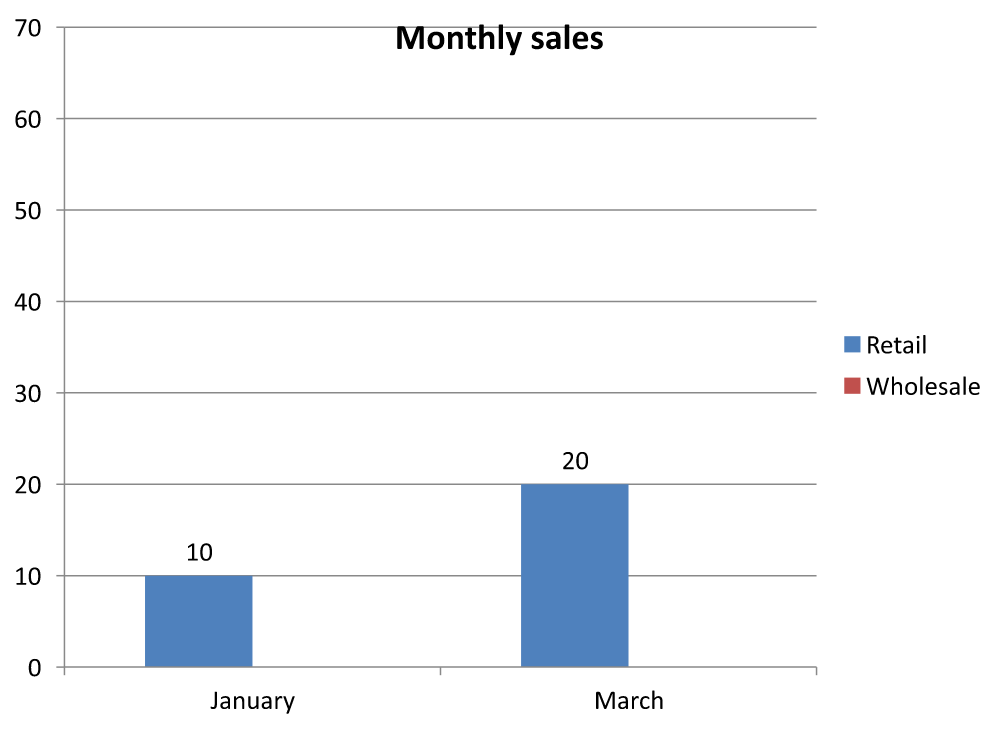 |
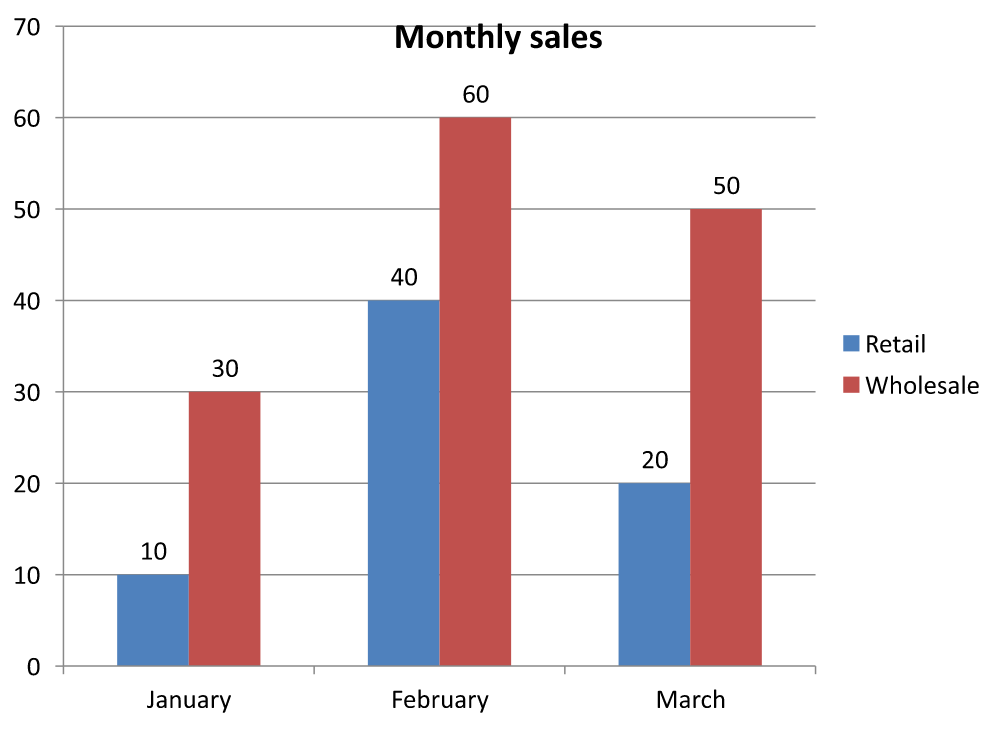 |
값을 포함한 숨겨진 셀은 빈 셀과 다릅니다. 누락된 값을 표시하는 방법은 IChart::get_DisplayBlanksAs가 제어하며, 숨겨진 소스 데이터를 포함하거나 제외하지는 않습니다. 예시는 Control the Display of Empty Cells에서 확인하세요.
차트 데이터 범위 검색
기존 프레젠테이션에서 워크북 데이터를 업데이트하기 전에, 차트가 사용하는 워크시트 셀을 식별하기 위해 소스 범위를 검사합니다. IChartData::GetRange 메서드는 현재 데이터 범위를 Sheet1!$A$1:$D$5와 같은 워크시트 자격이 있는 수식으로 반환합니다. 여기서 Sheet1은 워크시트 이름이며, !는 셀 범위와 구분하고, $A$1:$D$5는 A1부터 D5까지 절대 주소를 나타냅니다.
이 메서드는 차트나 워크북을 변경하지 않고 현재 범위를 읽습니다. 차트가 워크북을 데이터 소스로 사용하지 않는 경우 System::InvalidOperationException이 발생합니다. 자세한 내용은 ChartData API Reference를 참조하세요.
이 예제는 프레젠테이션을 열고 각 슬라이드의 도형을 직접 검사하여 차트를 찾습니다. 차트 이름과 소스 범위를 출력합니다. 워크북을 사용하지 않는 차트는 메시지를 출력하고 다음 차트로 진행합니다.
#include <DOM/Chart/IChartData.h>
#include <DOM/IChart.h>
#include <DOM/IShapeCollection.h>
#include <DOM/ISlide.h>
#include <DOM/ISlideCollection.h>
#include <DOM/Presentation.h>
#include <system/console.h>
#include <system/enumerator_adapter.h>
#include <system/exceptions.h>
#include <system/object_ext.h>

using namespace Aspose::Slides;
using namespace Aspose::Slides::Charts;
using namespace System;

auto presentation = MakeObject<Presentation>(u"presentation.pptx");

for (auto slide : IterateOver(presentation->get_Slides()))
{
    for (auto shape : IterateOver(slide->get_Shapes()))
    {
        auto chart = AsCast<IChart>(shape);
        if (chart != nullptr)
        {
            try
            {
                auto range = chart->get_ChartData()->GetRange();
                Console::WriteLine(u"{0}: {1}", chart->get_Name(), range);
            }
            catch (const InvalidOperationException&)
            {
                Console::WriteLine(u"{0}: The chart does not use a workbook as its data source.", chart->get_Name());
            }
        }
    }
}
워크북에서 차트 데이터 읽기 및 쓰기
Aspose.Slides for C++는 차트 데이터 워크북( Aspose.Cells 로 편집된 차트 데이터를 포함) 을 읽고 쓸 수 있는 ReadWorkbookStream 및 WriteWorkbookStream 메서드를 제공합니다. Note 차트 데이터는 동일한 방식으로 구성되어 있거나 소스와 유사한 구조여야 합니다.
이 예제는 첫 번째 슬라이드 첫 번째 도형으로 차트가 포함된 프레젠테이션을 사용합니다. 삽입된 워크북을 스트림으로 읽고, 기존 시리즈와 범주를 지운 뒤 동일한 워크북을 다시 씁니다. 변경 내용은 메모리에 유지되며 프레젠테이션은 저장하지 않습니다.
#include <DOM/Chart/IChartCategoryCollection.h>
#include <DOM/Chart/IChartData.h>
#include <DOM/Chart/IChartSeriesCollection.h>
#include <DOM/IChart.h>
#include <DOM/IShapeCollection.h>
#include <DOM/ISlide.h>
#include <DOM/Presentation.h>
#include <system/console.h>
#include <system/io/memory_stream.h>
#include <system/object_ext.h>

using namespace Aspose::Slides;
using namespace Aspose::Slides::Charts;
using namespace System;

auto presentation = MakeObject<Presentation>(u"chart.pptx");
auto slide = presentation->get_Slide(0);

auto chart = slide->get_Shapes()->get_Count() > 0 ? AsCast<IChart>(slide->get_Shape(0)) : nullptr;
if (chart != nullptr)
{
    auto chartData = chart->get_ChartData();
    auto workbookStream = chartData->ReadWorkbookStream();

    chartData->get_Series()->Clear();
    chartData->get_Categories()->Clear();

    workbookStream->set_Position(0);
    chartData->WriteWorkbookStream(workbookStream);
}
else
{
    Console::WriteLine(u"The first shape is not a chart.");
}
워크북 수정 후 차트 레이아웃 검증
삽입된 워크북을 수정된 워크북으로 교체하면 차트는 원래의 시리즈와 범주 컬렉션을 유지합니다. 이 불일치로 인해 IChart::ValidateChartLayout이 인덱스 범위 초과 오류로 실패할 수 있습니다. 업데이트된 워크북을 차트에 다시 쓰기 전에 기존 시리즈와 범주를 지우세요. 이 예제는 첫 번째 슬라이드 첫 번째 도형에 차트를 사용합니다. 주석은 워크북 편집이 일어날 위치를 표시하며, 실행 가능한 예제는 원본 워크북을 다시 쓰고 메모리에서 레이아웃을 검증합니다.
#include <DOM/Chart/IChartCategoryCollection.h>
#include <DOM/Chart/IChartData.h>
#include <DOM/Chart/IChartSeriesCollection.h>
#include <DOM/IChart.h>
#include <DOM/IShapeCollection.h>
#include <DOM/ISlide.h>
#include <DOM/Presentation.h>
#include <system/console.h>
#include <system/io/memory_stream.h>
#include <system/object_ext.h>

using namespace Aspose::Slides;
using namespace Aspose::Slides::Charts;
using namespace System;

auto presentation = MakeObject<Presentation>(u"chart.pptx");
auto slide = presentation->get_Slide(0);

auto chart = slide->get_Shapes()->get_Count() > 0 ? AsCast<IChart>(slide->get_Shape(0)) : nullptr;
if (chart != nullptr)
{
    auto chartData = chart->get_ChartData();
    auto workbookStream = chartData->ReadWorkbookStream();

    // 여기에서 워크북 스트림을 수정합니다. 예를 들어 Aspose.Cells를 사용합니다.

    chartData->get_Series()->Clear();
    chartData->get_Categories()->Clear();

    workbookStream->set_Position(0);
    chartData->WriteWorkbookStream(workbookStream);
    chart->ValidateChartLayout();
}
else
{
    Console::WriteLine(u"The first shape is not a chart.");
}
컬렉션을 비우면 워크북이 다시 쓰이기 전에 오래된 데이터 참조가 제거됩니다. 업데이트된 워크북에 필요한 시리즈와 범주 매핑을 다시 구성한 후 차트를 사용하세요.
워크북 셀에 사용자 지정 숫자 형식 설정
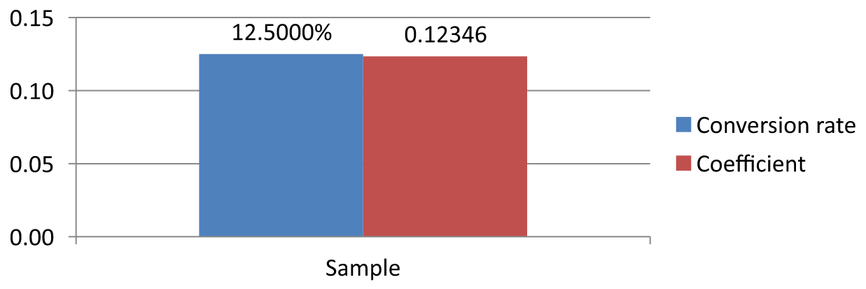
IChartDataCell::set_CustomNumberFormat을 사용하여 차트 삽입 워크북에서 숫자 값의 표시 형식을 제어합니다. 예를 들어 보고서에서 변환율을 소수점 네 자리 퍼센트로, 계수를 소수점 다섯 자리로 표시해야 할 수 있습니다. 두 값 모두 계산 및 차트 플롯에 사용될 수 있도록 숫자형으로 유지합니다.
숫자 형식은 표시 형태만 바꾸며 저장된 값 자체는 변경하지 않습니다. 0.0000% 형식은 0.125를 12.5000%로 표시하지만 저장값을 12.5로 교체하지는 않습니다. 마찬가지로 0.00000은 0.1234567을 0.12346으로 표시하지만 저장값은 반올림되지 않습니다. 사용자 지정 형식이 빈 문자열("")인 경우에는 set_PresetNumberFormat으로 지정된 형식이 사용됩니다.
다음 예제는 열 차트를 만들고 IChartData::get_ChartDataWorkbook을 통해 셀에 접근합니다. 워크시트 0의 B2에 변환율, C2에 계수가 들어 있습니다. 두 셀 모두 차트 값을 제공합니다. 예제는 소스 형식에 연결된 값 레이블도 활성화합니다.
#include <DOM/Chart/ChartType.h>
#include <DOM/Chart/IAxesManager.h>
#include <DOM/Chart/IAxis.h>
#include <DOM/Chart/IChartCategoryCollection.h>
#include <DOM/Chart/IChartData.h>
#include <DOM/Chart/IChartDataCell.h>
#include <DOM/Chart/IChartDataPoint.h>
#include <DOM/Chart/IChartDataPointCollection.h>
#include <DOM/Chart/IChartDataWorkbook.h>
#include <DOM/Chart/IChartSeries.h>
#include <DOM/Chart/IChartSeriesCollection.h>
#include <DOM/Chart/IDataLabel.h>
#include <DOM/Chart/IDataLabelFormat.h>
#include <DOM/IChart.h>
#include <DOM/IShapeCollection.h>
#include <DOM/ISlide.h>
#include <DOM/ISlideSize.h>
#include <DOM/Presentation.h>
#include <DOM/SlideSizeScaleType.h>
#include <Export/SaveFormat.h>
#include <system/enumerator_adapter.h>
#include <system/object_ext.h>

using namespace Aspose::Slides;
using namespace Aspose::Slides::Charts;
using namespace System;

auto presentation = MakeObject<Presentation>();
presentation->get_SlideSize()->SetSize(720, 270, SlideSizeScaleType::DoNotScale);
auto slide = presentation->get_Slide(0);

auto chart = slide->get_Shapes()->AddChart(ChartType::ClusteredColumn, 50, 20, 620, 210);
chart->set_HasTitle(false);

chart->get_Axes()->get_VerticalAxis()->set_IsNumberFormatLinkedToSource(false);
chart->get_Axes()->get_VerticalAxis()->set_NumberFormat(u"0.00");
chart->get_Axes()->get_VerticalAxis()->set_IsAutomaticMinValue(false);
chart->get_Axes()->get_VerticalAxis()->set_MinValue(0);

chart->get_ChartData()->get_Series()->Clear();
chart->get_ChartData()->get_Categories()->Clear();

auto workbook = chart->get_ChartData()->get_ChartDataWorkbook();
workbook->Clear(0);

auto categoryCell = workbook->GetCell(0, u"A2", ObjectExt::Box<String>(u"Sample"));
chart->get_ChartData()->get_Categories()->Add(categoryCell);

auto percentageCell = workbook->GetCell(0, u"B2", ObjectExt::Box<double>(0.125));
percentageCell->set_CustomNumberFormat(u"0.0000%");
auto percentageName = workbook->GetCell(0, u"B1", ObjectExt::Box<String>(u"Conversion rate"));
auto percentageSeries = chart->get_ChartData()->get_Series()->Add(percentageName, chart->get_Type());
percentageSeries->get_DataPoints()->AddDataPointForBarSeries(percentageCell);

auto precisionCell = workbook->GetCell(0, u"C2", ObjectExt::Box<double>(0.1234567));
precisionCell->set_CustomNumberFormat(u"0.00000");
auto precisionName = workbook->GetCell(0, u"C1", ObjectExt::Box<String>(u"Coefficient"));
auto precisionSeries = chart->get_ChartData()->get_Series()->Add(precisionName, chart->get_Type());
precisionSeries->get_DataPoints()->AddDataPointForBarSeries(precisionCell);

for (auto series : IterateOver(chart->get_ChartData()->get_Series()))
{
    auto labelFormat = series->get_DataPoint(0)->get_Label()->get_DataLabelFormat();
    labelFormat->set_ShowValue(true);
    labelFormat->set_IsNumberFormatLinkedToSource(true);
}

presentation->Save(u"CustomCellFormats.pptx", Export::SaveFormat::Pptx);
워크북 셀 형식은 차트 축이나 데이터 레이블에 직접 설정된 형식과 별개입니다. 이 예제에서는 각 레이블이 set_ShowValue를 true로 호출하고, set_IsNumberFormatLinkedToSource를 true로 호출했기 때문에 소스 셀의 숫자 형식을 따릅니다. 프레젠테이션을 저장하고 다시 열면 레이블은 12.5000%와 0.12346을 표시합니다. 세로 축은 set_NumberFormat으로 0.00을 지정하고, set_IsNumberFormatLinkedToSource를 false로 설정했습니다.
데이터 레이블을 독립적으로 포맷하려면 소스 연결 플래그를 false로 설정하고 set_NumberFormat으로 형식을 지정하세요. 이는 워크북 셀의 형식을 변경하지 않습니다. 예를 들어 0.00 형식의 독립 레이블은 첫 값을 0.13으로 표시하지만 B2는 여전히 12.5000%를 표시합니다. 직접 레이블 포맷에 대한 내용은 Chart Data Labels를 참조하세요.
아래 이미지는 프레젠테이션을 저장하고 다시 연 후 렌더링된 결과입니다.
워크북 셀을 차트 데이터 레이블로 설정
워크북 셀의 텍스트를 차트 데이터 레이블로 사용할 수 있습니다.
이 예제는 기존 프레젠테이션의 첫 번째 슬라이드에 기본 데이터가 포함된 버블 차트를 추가합니다. 워크시트 0의 A10:A12 셀을 첫 번째 시리즈의 처음 세 레이블로 사용하고, 셀 기반 레이블을 활성화한 뒤 업데이트된 프레젠테이션을 저장합니다.
#include <DOM/Chart/ChartType.h>
#include <DOM/Chart/IChartData.h>
#include <DOM/Chart/IChartDataCell.h>
#include <DOM/Chart/IChartDataWorkbook.h>
#include <DOM/Chart/IChartSeries.h>
#include <DOM/Chart/IChartSeriesCollection.h>
#include <DOM/Chart/IDataLabel.h>
#include <DOM/Chart/IDataLabelCollection.h>
#include <DOM/Chart/IDataLabelFormat.h>
#include <DOM/IChart.h>
#include <DOM/IShapeCollection.h>
#include <DOM/ISlide.h>
#include <DOM/Presentation.h>
#include <Export/SaveFormat.h>
#include <system/object_ext.h>

using namespace Aspose::Slides;
using namespace Aspose::Slides::Charts;
using namespace System;

auto presentation = MakeObject<Presentation>(u"chart2.pptx");
auto slide = presentation->get_Slide(0);

auto chart = slide->get_Shapes()->AddChart(ChartType::Bubble, 50, 50, 600, 400, true);
auto series = chart->get_ChartData()->get_Series()->idx_get(0);
auto workbook = chart->get_ChartData()->get_ChartDataWorkbook();

series->get_Labels()->get_DefaultDataLabelFormat()->set_ShowLabelValueFromCell(true);
auto firstLabelCell = workbook->GetCell(0, u"A10", ObjectExt::Box<String>(u"Label 0 cell value"));
auto secondLabelCell = workbook->GetCell(0, u"A11", ObjectExt::Box<String>(u"Label 1 cell value"));
auto thirdLabelCell = workbook->GetCell(0, u"A12", ObjectExt::Box<String>(u"Label 2 cell value"));
series->get_Labels()->idx_get(0)->set_ValueFromCell(firstLabelCell);
series->get_Labels()->idx_get(1)->set_ValueFromCell(secondLabelCell);
series->get_Labels()->idx_get(2)->set_ValueFromCell(thirdLabelCell);

presentation->Save(u"resultchart.pptx", Export::SaveFormat::Pptx);
워크시트 관리
IChartDataWorkbook::get_Worksheets 메서드는 차트 워크북에 포함된 워크시트에 대한 접근을 제공합니다. 이 예제는 기본 데이터가 포함된 파이 차트를 만들고 각 워크시트 이름을 콘솔에 출력합니다.
#include <DOM/Chart/ChartType.h>
#include <DOM/Chart/IChartData.h>
#include <DOM/Chart/IChartDataWorkbook.h>
#include <DOM/Chart/IChartDataWorksheet.h>
#include <DOM/Chart/IChartDataWorksheetCollection.h>
#include <DOM/IChart.h>
#include <DOM/IShapeCollection.h>
#include <DOM/ISlide.h>
#include <DOM/Presentation.h>
#include <system/console.h>
#include <system/object_ext.h>

using namespace Aspose::Slides;
using namespace Aspose::Slides::Charts;
using namespace System;

auto presentation = MakeObject<Presentation>();
auto slide = presentation->get_Slide(0);

auto chart = slide->get_Shapes()->AddChart(ChartType::Pie, 50, 50, 400, 500);
auto workbook = chart->get_ChartData()->get_ChartDataWorkbook();

for (auto i = 0; i < workbook->get_Worksheets()->get_Count(); i++)
{
    Console::WriteLine(workbook->get_Worksheets()->idx_get(i)->get_Name());
}
데이터 소스 유형 지정
시리즈 포인트 값은 숫자 리터럴로 직접 저장할 수도 있습니다. 전체 예제는 Set Series Values Using Numeric Literals를 참고하세요. 포인트 값의 소스 유형은 차트의 내부 또는 외부 워크북 구성과 별개이며, 숫자 리터럴을 사용한다고 해서 삽입 워크북이 자동으로 제거되지는 않습니다.
이 예제는 기본 데이터가 포함된 3D 열 차트를 만들고 두 개의 시리즈 이름을 서로 다른 데이터 소스로 설정합니다. 첫 번째 이름은 문자열 리터럴을 사용하고, 두 번째는 워크시트 0의 C1 셀을 사용합니다. DataSourceType 열거형을 사용하여 각 이름의 소스를 선택합니다. 예제는 업데이트된 시리즈 이름을 포함한 프레젠테이션을 저장합니다.
#include <DOM/Chart/ChartType.h>
#include <DOM/Chart/DataSourceType.h>
#include <DOM/Chart/IChartData.h>
#include <DOM/Chart/IChartDataCell.h>
#include <DOM/Chart/IChartDataWorkbook.h>
#include <DOM/Chart/IChartSeries.h>
#include <DOM/Chart/IChartSeriesCollection.h>
#include <DOM/Chart/IStringChartValue.h>
#include <DOM/IChart.h>
#include <DOM/IShapeCollection.h>
#include <DOM/ISlide.h>
#include <DOM/Presentation.h>
#include <Export/SaveFormat.h>
#include <system/object_ext.h>

using namespace Aspose::Slides;
using namespace Aspose::Slides::Charts;
using namespace System;

auto presentation = MakeObject<Presentation>();
auto slide = presentation->get_Slide(0);

auto chart = slide->get_Shapes()->AddChart(ChartType::Column3D, 50, 50, 600, 400, true);
auto literalName = chart->get_ChartData()->get_Series()->idx_get(0)->get_Name();

literalName->set_DataSourceType(DataSourceType::StringLiterals);
literalName->set_Data(ObjectExt::Box<String>(u"LiteralString"));

auto cellName = chart->get_ChartData()->get_Series()->idx_get(1)->get_Name();
auto nameCell = chart->get_ChartData()->get_ChartDataWorkbook()->GetCell(0, u"C1", ObjectExt::Box<String>(u"NewCell"));
cellName->set_DataSourceType(DataSourceType::Worksheet);
cellName->set_Data(nameCell);

presentation->Save(u"pres.pptx", Export::SaveFormat::Pptx);
지원되지 않는 포함 워크북 형식 감지
Aspose.Slides는 일부 차트에 삽입될 수 있는 Excel 바이너리 워크북(.xlsb) 형식을 지원하지 않습니다. IChartData의 get_EmbeddedWorkbookType 메서드와 WorkbookType 열거형을 함께 사용하여 지원되지 않는 형식을 감지하고 해당 차트를 건너뛸 수 있습니다. 이 예제는 기존 프레젠테이션의 첫 번째 슬라이드에 있는 도형을 검사하고, 차트가 아닌 도형은 건너뛰며, .xlsb 워크북이 삽입된 차트마다 진단 메시지를 출력합니다.
#include <DOM/Chart/ChartDataSourceType.h>
#include <DOM/Chart/IChartData.h>
#include <DOM/Chart/WorkbookType.h>
#include <DOM/IChart.h>
#include <DOM/IShapeCollection.h>
#include <DOM/ISlide.h>
#include <DOM/Presentation.h>
#include <system/console.h>
#include <system/enumerator_adapter.h>
#include <system/object_ext.h>

using namespace Aspose::Slides;
using namespace Aspose::Slides::Charts;
using namespace System;

auto presentation = MakeObject<Presentation>(u"sample.pptx");
auto slide = presentation->get_Slide(0);

for (auto shape : IterateOver(slide->get_Shapes()))
{
    auto chart = AsCast<IChart>(shape);
    if (chart == nullptr)
    {
        continue;
    }

    auto chartData = chart->get_ChartData();
    auto isInternalWorkbook = chartData->get_DataSourceType() == ChartDataSourceType::InternalWorkbook;
    auto isBinaryMacro = chartData->get_EmbeddedWorkbookType() == WorkbookType::WorkbookBinaryMacro;

    if (isInternalWorkbook && isBinaryMacro)
    {
        Console::WriteLine(u"Skipping a chart with an unsupported .xlsb workbook.");
        continue;
    }

    // 여기에서 지원되는 차트 워크북 데이터를 읽거나 수정합니다.
}
외부 워크북
Aspose.Slides는 차트의 데이터 소스로 외부 워크북을 사용하는 것을 지원합니다.
외부 워크북 만들기
ReadWorkbookStream과 SetExternalWorkbook을 사용하여 삽입 차트 워크북을 파일로 내보내고 차트를 해당 외부 워크북에 연결합니다.
이 예제는 기본 데이터가 포함된 파이 차트를 만들고 워크북을 내보냅니다. 외부 워크북을 차트 데이터 소스로 할당하기 전에 출력 스트림을 닫고, 연결된 프레젠테이션을 저장합니다.
#include <DOM/Chart/ChartType.h>
#include <DOM/Chart/IChartData.h>
#include <DOM/IChart.h>
#include <DOM/IShapeCollection.h>
#include <DOM/ISlide.h>
#include <DOM/Presentation.h>
#include <Export/SaveFormat.h>
#include <system/io/file.h>
#include <system/io/file_stream.h>
#include <system/io/memory_stream.h>
#include <system/io/path.h>

using namespace Aspose::Slides;
using namespace Aspose::Slides::Charts;
using namespace System;

auto presentation = MakeObject<Presentation>();
auto slide = presentation->get_Slide(0);

auto chart = slide->get_Shapes()->AddChart(ChartType::Pie, 50, 50, 400, 600);
auto workbookPath = IO::Path::GetFullPath(u"externalWorkbook1.xlsx");
auto workbookStream = chart->get_ChartData()->ReadWorkbookStream();
auto fileStream = IO::File::Create(workbookPath);
workbookStream->CopyTo(fileStream);
fileStream->Close();

chart->get_ChartData()->SetExternalWorkbook(workbookPath);

presentation->Save(u"externalWorkbook.pptx", Export::SaveFormat::Pptx);
외부 워크북 설정
SetExternalWorkbook 메서드를 사용하면 외부 워크북을 차트의 데이터 소스로 지정할 수 있습니다. 이 메서드는 외부 워크북이 이동된 경우 경로를 업데이트하는 데에도 사용할 수 있습니다.
원격 위치나 리소스에 저장된 워크북의 데이터를 편집할 수는 없지만, 외부 데이터 소스로는 여전히 사용할 수 있습니다. 외부 워크북에 대한 상대 경로가 제공되면 자동으로 전체 경로로 변환됩니다.
이 예제는 워크시트 Sheet1에 B1에 시리즈 이름, A2:A4에 범주 이름, B2:B4에 숫자 값을 가진 외부 워크북을 사용합니다. 파이 차트를 만든 뒤 워크북을 연결하고, SetRange을 사용하여 A1:B4 범위를 하나의 시리즈와 세 개의 범주에 매핑합니다. 연결된 차트와 함께 프레젠테이션을 저장합니다.
#include <DOM/Chart/ChartType.h>
#include <DOM/Chart/IChartData.h>
#include <DOM/IChart.h>
#include <DOM/IShapeCollection.h>
#include <DOM/ISlide.h>
#include <DOM/Presentation.h>
#include <Export/SaveFormat.h>
#include <system/io/path.h>

using namespace Aspose::Slides;
using namespace Aspose::Slides::Charts;
using namespace System;

auto presentation = MakeObject<Presentation>();
auto slide = presentation->get_Slide(0);

auto chart = slide->get_Shapes()->AddChart(ChartType::Pie, 50, 50, 400, 600, true);
auto chartData = chart->get_ChartData();
auto workbookPath = IO::Path::GetFullPath(u"externalWorkbook.xlsx");

chartData->SetExternalWorkbook(workbookPath);
chartData->SetRange(u"Sheet1!$A$1:$B$4");

presentation->Save(u"Presentation_with_externalWorkbook.pptx", Export::SaveFormat::Pptx);
SetExternalWorkbook의 updateChartData 매개변수는 워크북이 로드되는지 여부를 제어합니다.
updateChartData가false이면 워크북 경로만 업데이트됩니다. 차트 데이터는 로드되거나 대상 워크북에서 업데이트되지 않으므로 워크북이 없어도 됩니다.updateChartData가true이면 차트 데이터가 대상 워크북에서 업데이트됩니다.
다음 예제는 updateChartData를 false로 설정하고 자리표시자 URL을 할당합니다. 파이 차트의 기본 데이터를 유지하고, 사용할 수 없는 워크북을 로드하지 않은 상태로 프레젠테이션을 저장합니다.
#include <DOM/Chart/ChartType.h>
#include <DOM/Chart/IChartData.h>
#include <DOM/IChart.h>
#include <DOM/IShapeCollection.h>
#include <DOM/ISlide.h>
#include <DOM/Presentation.h>
#include <Export/SaveFormat.h>

using namespace Aspose::Slides;
using namespace Aspose::Slides::Charts;
using namespace System;

auto presentation = MakeObject<Presentation>();
auto slide = presentation->get_Slide(0);

auto chart = slide->get_Shapes()->AddChart(ChartType::Pie, 50, 50, 400, 600, true);

chart->get_ChartData()->SetExternalWorkbook(u"https://example.com/unavailable-workbook.xlsx", false);
presentation->Save(u"SetExternalWorkbookWithUpdateChartData.pptx", Export::SaveFormat::Pptx);
차트의 외부 데이터 소스 워크북 경로 가져오기
차트에 연결된 워크북을 확인하려면 차트가 외부 데이터 소스를 사용하는지 확인하고 워크북 경로를 가져옵니다.
이 예제는 외부 워크북이 연결된 프레젠테이션의 첫 번째 슬라이드 첫 번째 도형을 검사합니다. 차트가 외부 워크북에 연결된 경우 get_ExternalWorkbookPath을 콘솔에 출력하고 프레젠테이션 복사본을 저장합니다.
#include <DOM/Chart/ChartDataSourceType.h>
#include <DOM/Chart/IChartData.h>
#include <DOM/IChart.h>
#include <DOM/IShapeCollection.h>
#include <DOM/ISlide.h>
#include <DOM/Presentation.h>
#include <Export/SaveFormat.h>
#include <system/console.h>
#include <system/object_ext.h>

using namespace Aspose::Slides;
using namespace Aspose::Slides::Charts;
using namespace System;

auto presentation = MakeObject<Presentation>(u"externalWorkbook.pptx");
auto slide = presentation->get_Slide(0);

auto chart = slide->get_Shapes()->get_Count() > 0 ? AsCast<IChart>(slide->get_Shape(0)) : nullptr;
if (chart != nullptr)
{
    auto chartData = chart->get_ChartData();
    if (chartData->get_DataSourceType() == ChartDataSourceType::ExternalWorkbook)
    {
        Console::WriteLine(chartData->get_ExternalWorkbookPath());
    }
    else
    {
        Console::WriteLine(u"The chart does not use an external workbook.");
    }
}
else
{
    Console::WriteLine(u"The first shape is not a chart.");
}

presentation->Save(u"Result.pptx", Export::SaveFormat::Pptx);
차트 데이터 편집
외부 워크북의 데이터를 내부 워크북과 동일한 방식으로 편집할 수 있습니다. 외부 워크북을 로드할 수 없을 때는 예외가 발생합니다.
이 예제는 첫 번째 슬라이드 첫 번째 도형에 있는 차트가 접근 가능한 외부 워크북에 연결된 경우를 사용합니다. 첫 번째 시리즈의 첫 번째 데이터 포인트 셀 기반 값을 100으로 설정하고 업데이트된 프레젠테이션을 저장합니다. 셀 값을 편집하면 연결된 외부 XLSX 파일이 업데이트되므로 원본 워크북을 보존하려면 복사본을 사용하세요.
#include <DOM/Chart/IChartData.h>
#include <DOM/Chart/IChartDataCell.h>
#include <DOM/Chart/IChartDataPoint.h>
#include <DOM/Chart/IChartDataPointCollection.h>
#include <DOM/Chart/IChartDataWorkbook.h>
#include <DOM/Chart/IChartSeries.h>
#include <DOM/Chart/IChartSeriesCollection.h>
#include <DOM/Chart/IDoubleChartValue.h>
#include <DOM/IChart.h>
#include <DOM/IShapeCollection.h>
#include <DOM/ISlide.h>
#include <DOM/Presentation.h>
#include <Export/SaveFormat.h>
#include <system/console.h>
#include <system/object_ext.h>

using namespace Aspose::Slides;
using namespace Aspose::Slides::Charts;
using namespace System;

auto presentation = MakeObject<Presentation>(u"presentation.pptx");
auto slide = presentation->get_Slide(0);

auto chart = slide->get_Shapes()->get_Count() > 0 ? AsCast<IChart>(slide->get_Shape(0)) : nullptr;
if (chart != nullptr)
{
    auto series = chart->get_ChartData()->get_Series();
    if (series->get_Count() > 0 && series->idx_get(0)->get_DataPoints()->get_Count() > 0)
    {
        auto valueCell = series->idx_get(0)->get_DataPoints()->idx_get(0)->get_Value()->get_AsCell();
        if (valueCell != nullptr)
        {
            valueCell->set_Value(ObjectExt::Box<int32_t>(100));
            presentation->Save(u"presentation_out.pptx", Export::SaveFormat::Pptx);
        }
        else
        {
            Console::WriteLine(u"The first data point is not linked to a workbook cell.");
        }
    }
    else
    {
        Console::WriteLine(u"The chart has no data points to edit.");
    }
}
else
{
    Console::WriteLine(u"The first shape is not a chart.");
}
차트 캐시에서 워크북 복구
차트가 존재하지 않거나 사용할 수 없는 외부 워크북을 사용 중인 경우, Aspose.Slides는 프레젠테이션에 캐시된 데이터를 기반으로 차트 워크북을 재구성할 수 있습니다. LoadOptions를 생성하고 set_SpreadsheetOptions로 구성한 뒤, 프레젠테이션을 열기 전에 ISpreadsheetOptions::set_RecoverWorkbookFromChartCache를 true로 설정합니다.
다음 C++ 예제는 첫 번째 슬라이드 첫 번째 도형에 있는 차트가 사용 불가능한 외부 워크북을 참조하는 경우 워크북 데이터를 복구합니다. 복구된 데이터는 IChart::get_ChartData와 IChartData::get_ChartDataWorkbook를 통해 접근합니다.
#include <DOM/Chart/IChartData.h>
#include <DOM/Chart/IChartDataWorkbook.h>
#include <DOM/IChart.h>
#include <DOM/IShapeCollection.h>
#include <DOM/ISlide.h>
#include <DOM/LoadOptions.h>
#include <DOM/Presentation.h>
#include <DOM/SpreadsheetOptions.h>
#include <system/console.h>
#include <system/object_ext.h>

using namespace Aspose::Slides;
using namespace Aspose::Slides::Charts;
using namespace System;

auto spreadsheetOptions = MakeObject<SpreadsheetOptions>();
spreadsheetOptions->set_RecoverWorkbookFromChartCache(true);

auto loadOptions = MakeObject<LoadOptions>();
loadOptions->set_SpreadsheetOptions(spreadsheetOptions);

auto presentation = MakeObject<Presentation>(u"presentation.pptx", loadOptions);
auto slide = presentation->get_Slide(0);

auto chart = slide->get_Shapes()->get_Count() > 0 ? AsCast<IChart>(slide->get_Shape(0)) : nullptr;
if (chart != nullptr)
{
    auto recoveredWorkbook = chart->get_ChartData()->get_ChartDataWorkbook();

    // 여기에서 복구된 워크북 데이터를 읽거나 수정합니다.
}
else
{
    Console::WriteLine(u"The first shape is not a chart.");
}
외부 워크북을 사용할 수 없고 복구가 비활성화된 경우 Aspose.Slides는 System::InvalidOperationException을 발생시킵니다. 캐시된 차트 데이터를 사용하는 것이 허용되는 경우에만 복구를 활성화하세요. 캐시에는 프레젠테이션이 마지막으로 업데이트된 이후 외부 워크북에 적용된 변경 사항이 포함되지 않을 수 있습니다.
자주 묻는 질문
특정 차트가 외부 워크북에 연결되어 있는지 삽입 워크북에 연결되어 있는지 판단할 수 있나요?
예. 차트는 data source type과 external workbook 경로를 가지고 있습니다. 소스가 외부 워크북인 경우 전체 경로를 읽어 외부 파일이 사용되고 있는지 확인할 수 있습니다.
외부 워크북에 대한 상대 경로가 지원되며 어떻게 저장되나요?
예. 상대 경로를 지정하면 자동으로 절대 경로로 변환됩니다. 프레젠테이션은 절대 경로를 PPTX 파일에 저장하므로 워크북을 이동하면 링크를 업데이트해야 할 수 있습니다.
네트워크 리소스/공유에 있는 워크북을 사용할 수 있나요?
예. 이러한 워크북을 외부 데이터 소스로 사용할 수 있습니다. 하지만 Aspose.Slides에서 원격 워크북을 직접 편집하는 것은 지원되지 않으며, 소스로만 사용할 수 있습니다.
프레젠테이션을 저장할 때 Aspose.Slides가 외부 XLSX 파일을 덮어쓰나요?
프레젠테이션은 external file에 대한 링크를 저장합니다. 셀 기반 차트 데이터를 편집하면 연결된 로컬 XLSX 파일도 업데이트될 수 있습니다. 원본 파일을 그대로 유지해야 한다면 워크북을 복사본으로 사용하세요.
외부 파일이 비밀번호로 보호된 경우 어떻게 해야 하나요?
Aspose.Slides는 링크 시 비밀번호를 받지 않습니다. 일반적인 방법은 미리 보호를 해제하거나 Aspose.Cells 등으로 복호화된 복사본을 만든 뒤 연결하는 것입니다.
여러 차트가 동일한 외부 워크북을 참조할 수 있나요?
예. 각 차트는 자체 링크를 저장합니다. 모두 같은 파일을 가리키면 해당 파일을 업데이트했을 때 다음 데이터 로드 시 모든 차트에 반영됩니다.