
จัดการหนังสือทำงานของแผนภูมิในงานนำเสนอโดยใช้ C++
ภาพรวม
บทความนี้อธิบายวิธีการทำงานกับหนังสือทำงานของแผนภูมิใน Aspose.Slides มันแสดงวิธีการอ่านและเขียนข้อมูลแผนภูมิผ่านสตรีมของหนังสือทำงาน, ใช้เซลล์ของหนังสือทำงานเป็นป้ายกำกับข้อมูลแผนภูมิ, เข้าถึงชุดข้อมูลแผ่นงาน, และระบุประเภทแหล่งข้อมูลสำหรับค่าของแผนภูมิ
นอกจากนี้ยังครอบคลุมการทำงานกับหนังสือทำงานภายนอกเป็นแหล่งข้อมูลของแผนภูมิ ตัวอย่างสาธิตวิธีสร้างและกำหนดหนังสือทำงานภายนอก, ดึงเส้นทางของหนังสือทำงานภายนอกที่เชื่อมโยงกับแผนภูมิ, และแก้ไขข้อมูลแผนภูมิเมื่อหนังสือทำงานพร้อมใช้งาน
สำหรับเซลล์หนังสือทำงานที่แทนข้อมูลที่หายไป, ดูที่ ควบคุมการแสดงเซลล์ว่าง เพื่อความแตกต่างระหว่างเซลล์ว่างและศูนย์, และการเปรียบเทียบแผนภูมิเส้นของโหมดการแสดงผลที่มีอยู่
รวมข้อมูลจากแถวและคอลัมน์ที่ซ่อนไว้
ใช้ IChart::set_PlotVisibleCellsOnly เพื่อควบคุมว่าแผนภูมิจะพล็อตข้อมูลจากแถวและคอลัมน์ของแผ่นงานที่ซ่อนไว้หรือไม่ ตั้งค่าเป็น true เพื่อพล็อตเฉพาะเซลล์ที่มองเห็น, หรือ false เพื่อรวมทั้งเซลล์ที่มองเห็นและซ่อน การตั้งค่านี้ควบคุมการพล็อตของแผนภูมิ; มันไม่ได้ซ่อนหรือแสดงแถวหรือคอลัมน์ของแผ่นงาน
ตัวอย่างการนำเสนอ มีแผนภูมิคอลัมน์เป็นรูปร่างแรกบนสไลด์แรก แผ่นงานฝังตัว Sheet1 มีช่วงแหล่งข้อมูลต่อไปนี้ A1:C4 แถวที่ 3 และคอลัมน์ C ถูกซ่อน, แต่เซลล์ของพวกมันยังคงมีค่
| แถวแผ่นงาน | A: เดือน | B: การค้าปลีก | C: การค้าส่ง (คอลัมน์ที่ซ่อน) |
|---|---|---|---|
| 2 | มกราคม | 10 | 30 |
| 3 (hidden row) | กุมภาพันธ์ | 40 | 60 |
| 4 | มีนาคม | 20 | 50 |
เข้าถึงเซลล์แหล่งข้อมูลผ่าน IChartData::get_ChartDataWorkbook และอ่าน IChartDataCell::get_IsHidden เพื่อสอบถามสถานะการซ่อนของเซลล์ คุณสมบัตินี้เป็นแบบอ่านอย่างเดียว ในไฟล์นี้ B2 มองเห็น, B3 อยู่ในแถวที่ซ่อน, และ C2 อยู่ในคอลัมน์ที่ซ่อน; ตัวอย่างจะพิมพ์ False, True, และ True ตามลำดับ
สำหรับตัวอย่างนี้ให้รีเฟรชข้อมูลแผนภูมิหลังจากเปลี่ยนการตั้งค่าการพล็อต: คงหนังสือทำงานฝังไว้ด้วย ReadWorkbookStream แล้วโหลดใหม่ด้วย WriteWorkbookStream เมื่อรวมทุกเซลล์ให้ใช้ SetRange เพื่อกู้คืนช่วงเต็มรวมถึงประเภทเดือนกุมภาพันธ์ที่ซ่อน การเปลี่ยนแฟล็กอย่างเดียวไม่เพียงพอที่จะรีเฟรชข้อมูลแผนภูมิและป้ายกำกับประเภทที่แคชไว้ในตัวอย่างนี้
#include <DOM/Chart/IChartData.h>
#include <DOM/Chart/IChartDataCell.h>
#include <DOM/Chart/IChartDataWorkbook.h>
#include <DOM/IChart.h>
#include <DOM/IShapeCollection.h>
#include <DOM/ISlide.h>
#include <DOM/Presentation.h>
#include <Export/SaveFormat.h>
#include <initializer_list>
#include <system/console.h>
#include <system/io/memory_stream.h>
#include <system/object_ext.h>

using namespace Aspose::Slides;
using namespace Aspose::Slides::Charts;
using namespace System;

auto presentation = MakeObject<Presentation>(u"hidden-source-data.pptx");
auto slide = presentation->get_Slide(0);

auto chart = slide->get_Shapes()->get_Count() > 0 ? AsCast<IChart>(slide->get_Shape(0)) : nullptr;
if (chart != nullptr)
{
    auto workbook = chart->get_ChartData()->get_ChartDataWorkbook();
    Console::WriteLine(u"B2 hidden: {0}", workbook->GetCell(0, u"B2")->get_IsHidden());
    Console::WriteLine(u"B3 hidden: {0}", workbook->GetCell(0, u"B3")->get_IsHidden());
    Console::WriteLine(u"C2 hidden: {0}", workbook->GetCell(0, u"C2")->get_IsHidden());

    auto workbookStream = chart->get_ChartData()->ReadWorkbookStream();
    for (auto visibleOnly : {true, false})
    {
        chart->set_PlotVisibleCellsOnly(visibleOnly);

        // รีเฟรชข้อมูลแผนภูมิจากหนังสือทำงานที่ฝังไว้.
        workbookStream->set_Position(0);
        chart->get_ChartData()->WriteWorkbookStream(workbookStream);
        if (!visibleOnly)
        {
            // กู้คืนช่วงแหล่งข้อมูลเต็มรวมถึงประเภทที่ซ่อนอยู่.
            chart->get_ChartData()->SetRange(u"Sheet1!$A$1:$C$4");
        }

        auto outputPath = visibleOnly ? u"hidden_cells_True.pptx" : u"hidden_cells_False.pptx";
        presentation->Save(outputPath, Export::SaveFormat::Pptx);
    }
}
else
{
    Console::WriteLine(u"The first shape is not a chart.");
}
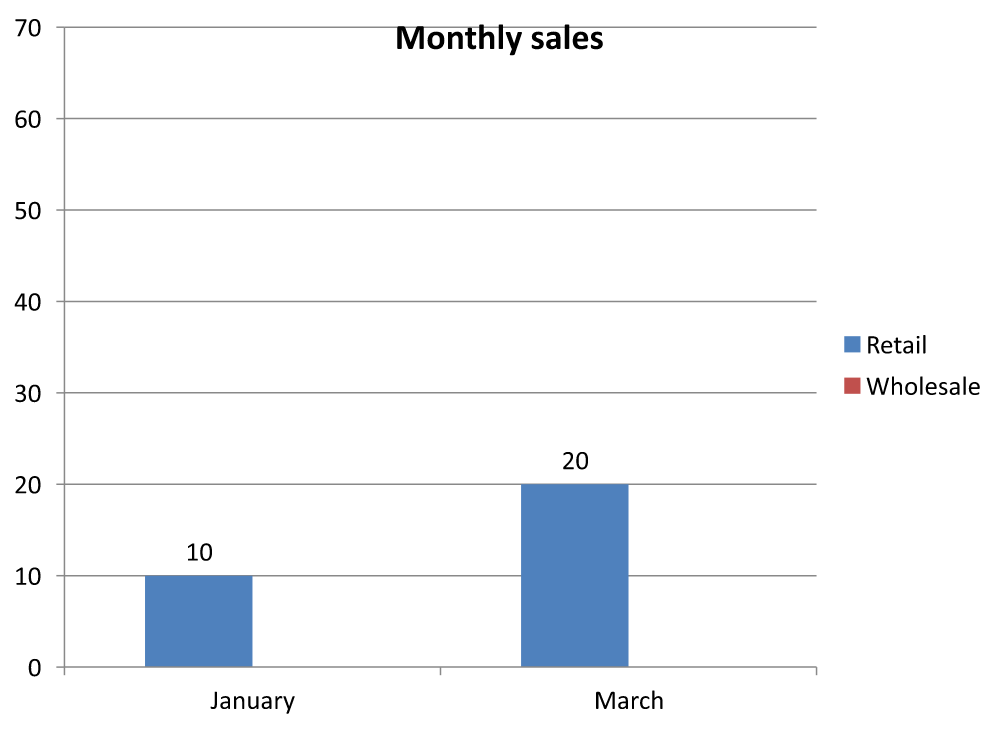
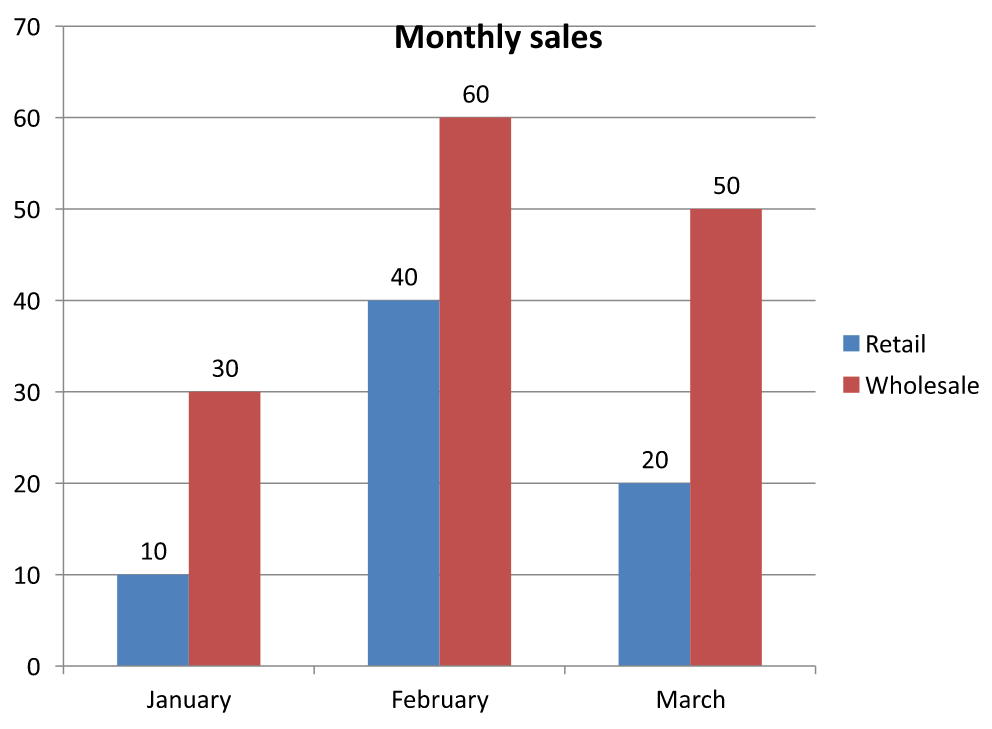
ตัวอย่างบันทึกสองเวอร์ชันของการนำเสนอ: เวอร์ชันหนึ่งมีเฉพาะค่าการค้าปลีกที่มองเห็น (10 และ 20) และอีกเวอร์ชันหนึ่งมีค่าทั้งหกค่า รูปภาพด้านล่างแสดงสองโหมดการพล็อต แถวที่ 3 และคอลัมน์ C ยังคงซ่อนอยู่ในทั้งสองหนังสือทำงานฝัง
เซลล์ที่มองเห็นเท่านั้น (true) |
ทุกเซลล์ (false) |
|---|---|
 |
 |
เซลล์ที่ซ่อนโดยมีค่าแตกต่างจากเซลล์ว่าง IChart::get_DisplayBlanksAs ควบคุมวิธีการแสดงค่าที่หายไป; มันไม่ได้รวมหรือยกเว้นข้อมูลแหล่งที่ซ่อน ดูที่ ควบคุมการแสดงเซลล์ว่าง สำหรับตัวอย่าง
ดึงช่วงข้อมูลของแผนภูมิ
ก่อนจะอัปเดตข้อมูลหนังสือทำงานในงานนำเสนอที่มีอยู่ ให้ตรวจสอบช่วงแหล่งข้อมูลเพื่อระบุว่าแผ่นงานใดที่แต่ละแผนภูมิใช้ IChartData::GetRange คืนค่าช่วงข้อมูลปัจจุบันเป็นสูตรที่อ้างอิงแผ่นงาน เช่น Sheet1!$A$1:$D$5 ที่นี่ Sheet1 คือชื่อแผ่นงาน, ! แยกออกจากช่วงเซลล์, และ $A$1:$D$5 ระบุเซลล์ A1 ถึง D5 รวมสัญลักษณ์ดอลลาร์แสดงการอ้างอิงคงที่ของแถวและคอลัมน์
เมธอดนี้อ่านช่วงปัจจุบันโดยไม่เปลี่ยนแปลงแผนภูมิหรือหนังสือทำงานของมัน หากแผนภูมิไม่ใช้หนังสือทำงานเป็นแหล่งข้อมูล จะโยงข้อผิดพลาด System::InvalidOperationException สำหรับข้อมูลเพิ่มเติมดูที่ ChartData API Reference
ตัวอย่างนี้เปิดงานนำเสนอและตรวจสอบรูปร่างโดยตรงบนแต่ละสไลด์เพื่อหาแผนภูมิ จะพิมพ์ชื่อแผนภูมิและช่วงแหล่งข้อมูล หากแผนภูมิไม่ใช้หนังสือทำงานจะพิมพ์ข้อความและดำเนินการต่อไปยังแผนภูมถัดไป
#include <DOM/Chart/IChartData.h>
#include <DOM/IChart.h>
#include <DOM/IShapeCollection.h>
#include <DOM/ISlide.h>
#include <DOM/ISlideCollection.h>
#include <DOM/Presentation.h>
#include <system/console.h>
#include <system/enumerator_adapter.h>
#include <system/exceptions.h>
#include <system/object_ext.h>

using namespace Aspose::Slides;
using namespace Aspose::Slides::Charts;
using namespace System;

auto presentation = MakeObject<Presentation>(u"presentation.pptx");

for (auto slide : IterateOver(presentation->get_Slides()))
{
    for (auto shape : IterateOver(slide->get_Shapes()))
    {
        auto chart = AsCast<IChart>(shape);
        if (chart != nullptr)
        {
            try
            {
                auto range = chart->get_ChartData()->GetRange();
                Console::WriteLine(u"{0}: {1}", chart->get_Name(), range);
            }
            catch (const InvalidOperationException&)
            {
                Console::WriteLine(u"{0}: The chart does not use a workbook as its data source.", chart->get_Name());
            }
        }
    }
}
อ่านและเขียนข้อมูลแผนภูมิโดยใช้หนังสือทำงาน
Aspose.Slides for C++ มีเมธอด ReadWorkbookStream และ WriteWorkbookStream ที่ให้คุณอ่านและเขียนหนังสือทำงานของแผนภูมิ (ซึ่งอาจถูกแก้ไขด้วย Aspose.Cells) หมายเหตุ ว่าข้อมูลแผนภูมิจำเป็นต้องจัดอยู่ในรูปแบบเดียวกันหรือมีโครงสร้างคล้ายกับแหล่งข้อมูล
ตัวอย่างนี้ใช้การนำเสนอที่มีแผนภูมิเป็นรูปร่างแรกบนสไลด์แรก มันอ่านหนังสือทำงานฝังเข้าเป็นสตรีม, ลบชุดข้อมูลและประเภทที่มีอยู่, แล้วเขียนหนังสือทำงานเดิมกลับไป ตัวอย่างนี้เก็บการเปลี่ยนแปลงในหน่วยความจำ; ตัวอย่างไม่บันทึกการนำเสนอ
#include <DOM/Chart/IChartCategoryCollection.h>
#include <DOM/Chart/IChartData.h>
#include <DOM/Chart/IChartSeriesCollection.h>
#include <DOM/IChart.h>
#include <DOM/IShapeCollection.h>
#include <DOM/ISlide.h>
#include <DOM/Presentation.h>
#include <system/console.h>
#include <system/io/memory_stream.h>
#include <system/object_ext.h>

using namespace Aspose::Slides;
using namespace Aspose::Slides::Charts;
using namespace System;

auto presentation = MakeObject<Presentation>(u"chart.pptx");
auto slide = presentation->get_Slide(0);

auto chart = slide->get_Shapes()->get_Count() > 0 ? AsCast<IChart>(slide->get_Shape(0)) : nullptr;
if (chart != nullptr)
{
    auto chartData = chart->get_ChartData();
    auto workbookStream = chartData->ReadWorkbookStream();

    chartData->get_Series()->Clear();
    chartData->get_Categories()->Clear();

    workbookStream->set_Position(0);
    chartData->WriteWorkbookStream(workbookStream);
}
else
{
    Console::WriteLine(u"The first shape is not a chart.");
}
ตรวจสอบการจัดวางแผนภูมิหลังการแก้ไขหนังสือทำงาน
เมื่อคุณแทนที่หนังสือทำงานฝังด้วยหนังสือทำงานที่แก้ไขแล้ว, แผนภูมิจะยังคงรักษาชุดข้อมูลและประเภทเดิมของมัน การไม่ตรงกันนี้อาจทำให้ IChart::ValidateChartLayout ล้มเหลวด้วยข้อผิดพลาดดัชนีอยู่นอกช่วง ลบชุดข้อมูลและประเภทที่มีอยู่ก่อนเขียนหนังสือทำงานที่อัปเดตกลับไปแผนภูมิ ตัวอย่างนี้ใช้แผนภูมิที่เป็นรูปร่างแรกบนสไลด์แรก คอมเมนต์บ่งชี้ตำแหน่งที่การแก้ไขหนังสือทำงานจะเกิดขึ้น; ตัวอย่างทำงานเขียนหนังสือทำงานดั้งเดิมกลับและตรวจสอบการจัดวางในหน่วยความจำ
#include <DOM/Chart/IChartCategoryCollection.h>
#include <DOM/Chart/IChartData.h>
#include <DOM/Chart/IChartSeriesCollection.h>
#include <DOM/IChart.h>
#include <DOM/IShapeCollection.h>
#include <DOM/ISlide.h>
#include <DOM/Presentation.h>
#include <system/console.h>
#include <system/io/memory_stream.h>
#include <system/object_ext.h>

using namespace Aspose::Slides;
using namespace Aspose::Slides::Charts;
using namespace System;

auto presentation = MakeObject<Presentation>(u"chart.pptx");
auto slide = presentation->get_Slide(0);

auto chart = slide->get_Shapes()->get_Count() > 0 ? AsCast<IChart>(slide->get_Shape(0)) : nullptr;
if (chart != nullptr)
{
    auto chartData = chart->get_ChartData();
    auto workbookStream = chartData->ReadWorkbookStream();

    // แก้ไขสตรีมของหนังสือทำงานที่นี่, ตัวอย่างเช่น, โดยใช้ Aspose.Cells.

    chartData->get_Series()->Clear();
    chartData->get_Categories()->Clear();

    workbookStream->set_Position(0);
    chartData->WriteWorkbookStream(workbookStream);
    chart->ValidateChartLayout();
}
else
{
    Console::WriteLine(u"The first shape is not a chart.");
}
ล้างคอลเล็กชันจะลบการอ้างอิงข้อมูลที่ล้าสมัยก่อนหนังสือทำงานถูกเขียนกลับ สร้างชุดข้อมูลและการแมพประเภทใหม่ตามหนังสือทำงานที่อัปเดตก่อนใช้แผนภูมิ
กำหนดรูปแบบตัวเลขแบบกำหนดเองสำหรับเซลล์ในหนังสือทำงาน
ใช้ IChartDataCell::set_CustomNumberFormat เพื่อควบคุมวิธีการแสดงค่าตัวเลขในหนังสือทำงานฝังของแผนภูมิ ตัวอย่างเช่น รายงานอาจต้องการอัตราการแปลงแสดงเป็นเปอร์เซ็นต์ด้วยทศนิยมสี่ตำแหน่งและค่าสัมประสิทธิ์แสดงด้วยทศนิยมห้าตำแหน่ง ค่าทั้งสองต้องเป็นตัวเลขเพื่อให้ยังคงใช้ในการคำนวณและการพล็อตแผนภูมิได้
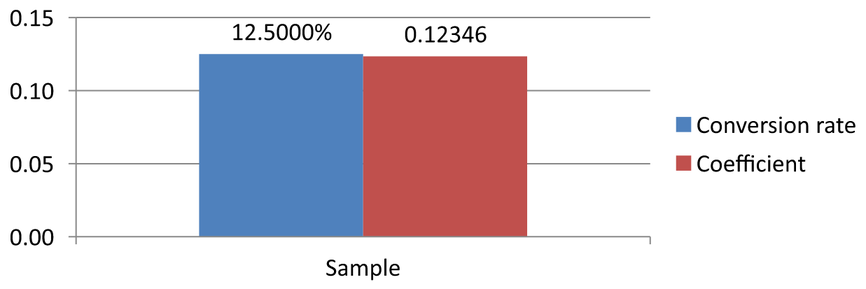
รูปแบบตัวเลขเปลี่ยนการแสดงผล ไม่ได้เปลี่ยนค่าที่เก็บไว้ รูปแบบ 0.0000% จะแสดง 0.125 เป็น 12.5000%; มันไม่ได้แทนที่ตัวเลขที่เก็บไว้ด้วย 12.5 เช่นเดียวกัน 0.00000 จะแสดง 0.1234567 เป็น 0.12346 โดยไม่ปัดค่าที่เก็บไว้ หากรูปแบบกำหนดเองเป็นสตริงว่าง ("") ระบบจะใช้รูปแบบที่กำหนดผ่าน set_PresetNumberFormat แทน
ตัวอย่างต่อไปสร้างแผนภูมิคอลัมน์และเข้าถึงเซลล์ของมันผ่าน IChartData::get_ChartDataWorkbook บนแผ่นงาน 0, B2 มีอัตราการแปลงและ C2 มีค่าสัมประสิทธิ์ ทั้งสองเซลล์เป็นแหล่งค่าของแผนภูมิ ตัวอย่างยังเปิดใช้งานป้ายกำกับค่าที่เชื่อมโยงกับรูปแบบแหล่งข้อมูล
#include <DOM/Chart/ChartType.h>
#include <DOM/Chart/IAxesManager.h>
#include <DOM/Chart/IAxis.h>
#include <DOM/Chart/IChartCategoryCollection.h>
#include <DOM/Chart/IChartData.h>
#include <DOM/Chart/IChartDataCell.h>
#include <DOM/Chart/IChartDataPoint.h>
#include <DOM/Chart/IChartDataPointCollection.h>
#include <DOM/Chart/IChartDataWorkbook.h>
#include <DOM/Chart/IChartSeries.h>
#include <DOM/Chart/IChartSeriesCollection.h>
#include <DOM/Chart/IDataLabel.h>
#include <DOM/Chart/IDataLabelFormat.h>
#include <DOM/IChart.h>
#include <DOM/IShapeCollection.h>
#include <DOM/ISlide.h>
#include <DOM/ISlideSize.h>
#include <DOM/Presentation.h>
#include <DOM/SlideSizeScaleType.h>
#include <Export/SaveFormat.h>
#include <system/enumerator_adapter.h>
#include <system/object_ext.h>

using namespace Aspose::Slides;
using namespace Aspose::Slides::Charts;
using namespace System;

auto presentation = MakeObject<Presentation>();
presentation->get_SlideSize()->SetSize(720, 270, SlideSizeScaleType::DoNotScale);
auto slide = presentation->get_Slide(0);

auto chart = slide->get_Shapes()->AddChart(ChartType::ClusteredColumn, 50, 20, 620, 210);
chart->set_HasTitle(false);

chart->get_Axes()->get_VerticalAxis()->set_IsNumberFormatLinkedToSource(false);
chart->get_Axes()->get_VerticalAxis()->set_NumberFormat(u"0.00");
chart->get_Axes()->get_VerticalAxis()->set_IsAutomaticMinValue(false);
chart->get_Axes()->get_VerticalAxis()->set_MinValue(0);

chart->get_ChartData()->get_Series()->Clear();
chart->get_ChartData()->get_Categories()->Clear();

auto workbook = chart->get_ChartData()->get_ChartDataWorkbook();
workbook->Clear(0);

auto categoryCell = workbook->GetCell(0, u"A2", ObjectExt::Box<String>(u"Sample"));
chart->get_ChartData()->get_Categories()->Add(categoryCell);

auto percentageCell = workbook->GetCell(0, u"B2", ObjectExt::Box<double>(0.125));
percentageCell->set_CustomNumberFormat(u"0.0000%");
auto percentageName = workbook->GetCell(0, u"B1", ObjectExt::Box<String>(u"Conversion rate"));
auto percentageSeries = chart->get_ChartData()->get_Series()->Add(percentageName, chart->get_Type());
percentageSeries->get_DataPoints()->AddDataPointForBarSeries(percentageCell);

auto precisionCell = workbook->GetCell(0, u"C2", ObjectExt::Box<double>(0.1234567));
precisionCell->set_CustomNumberFormat(u"0.00000");
auto precisionName = workbook->GetCell(0, u"C1", ObjectExt::Box<String>(u"Coefficient"));
auto precisionSeries = chart->get_ChartData()->get_Series()->Add(precisionName, chart->get_Type());
precisionSeries->get_DataPoints()->AddDataPointForBarSeries(precisionCell);

for (auto series : IterateOver(chart->get_ChartData()->get_Series()))
{
    auto labelFormat = series->get_DataPoint(0)->get_Label()->get_DataLabelFormat();
    labelFormat->set_ShowValue(true);
    labelFormat->set_IsNumberFormatLinkedToSource(true);
}

presentation->Save(u"CustomCellFormats.pptx", Export::SaveFormat::Pptx);
รูปแบบเซลล์หนังสือทำงานแยกจากรูปแบบที่ตั้งโดยตรงบนแกนแผนภูมิหรือป้ายกำกับข้อมูล ในตัวอย่างนี้แต่ละป้ายกำกับจะแสดงค่าจากเซลล์แหล่งเพราะเรียก set_ShowValue ด้วย true และทำตามรูปแบบตัวเลขของแหล่งข้อมูลเพราะเรียก set_IsNumberFormatLinkedToSource ด้วย true หลังจากบันทึกและเปิดงานนำเสนอใหม่ ป้ายกำกับจะแสดง 12.5000% และ 0.12346 ตามที่แสดงด้านล่าง แกนแนวตั้งใช้รูปแบบของตนเอง 0.00 กำหนดผ่าน set_NumberFormat, โดยเรียก set_IsNumberFormatLinkedToSource ด้วย false
หากต้องการกำหนดรูปแบบป้ายกำกับโดยอิสระ ให้ตั้งค่าสถานะเชื่อมโยงแหล่งเป็น false แล้วกำหนดรูปแบบผ่าน set_NumberFormat สิ่งนี้จะไม่เปลี่ยนรูปแบบของเซลล์หนังสือทำงาน ตัวอย่างเช่น รูปแบบป้ายกำกับอิสระ 0.00 จะแสดงค่าตัวแรกเป็น 0.13 ขณะที่ B2 ยังคงแสดง 12.5000% ดูที่ Chart Data Labels สำหรับการกำหนดรูปแบบป้ายโดยตรง
ตั้งค่าเซลล์หนังสือทำงานเป็นป้ายกำกับข้อมูลแผนภูมิ
คุณสามารถใช้ข้อความจากเซลล์หนังสือทำงานเป็นป้ายกำกับข้อมูลของแผนภูมิได้
ตัวอย่างนี้เพิ่มแผนภูมิบับล่อนพร้อมข้อมูลเริ่มต้นไปยังสไลด์แรกของงานนำเสนอที่มีอยู่ ใช้เซลล์ A10:A12 บนแผ่นงาน 0 เป็นสามป้ายแรกในชุดแรก, เปิดใช้งานป้ายจากเซลล์, แล้วบันทึกงานนำเสนอที่อัปเดต
#include <DOM/Chart/ChartType.h>
#include <DOM/Chart/IChartData.h>
#include <DOM/Chart/IChartDataCell.h>
#include <DOM/Chart/IChartDataWorkbook.h>
#include <DOM/Chart/IChartSeries.h>
#include <DOM/Chart/IChartSeriesCollection.h>
#include <DOM/Chart/IDataLabel.h>
#include <DOM/Chart/IDataLabelCollection.h>
#include <DOM/Chart/IDataLabelFormat.h>
#include <DOM/IChart.h>
#include <DOM/IShapeCollection.h>
#include <DOM/ISlide.h>
#include <DOM/Presentation.h>
#include <Export/SaveFormat.h>
#include <system/object_ext.h>

using namespace Aspose::Slides;
using namespace Aspose::Slides::Charts;
using namespace System;

auto presentation = MakeObject<Presentation>(u"chart2.pptx");
auto slide = presentation->get_Slide(0);

auto chart = slide->get_Shapes()->AddChart(ChartType::Bubble, 50, 50, 600, 400, true);
auto series = chart->get_ChartData()->get_Series()->idx_get(0);
auto workbook = chart->get_ChartData()->get_ChartDataWorkbook();

series->get_Labels()->get_DefaultDataLabelFormat()->set_ShowLabelValueFromCell(true);
auto firstLabelCell = workbook->GetCell(0, u"A10", ObjectExt::Box<String>(u"Label 0 cell value"));
auto secondLabelCell = workbook->GetCell(0, u"A11", ObjectExt::Box<String>(u"Label 1 cell value"));
auto thirdLabelCell = workbook->GetCell(0, u"A12", ObjectExt::Box<String>(u"Label 2 cell value"));
series->get_Labels()->idx_get(0)->set_ValueFromCell(firstLabelCell);
series->get_Labels()->idx_get(1)->set_ValueFromCell(secondLabelCell);
series->get_Labels()->idx_get(2)->set_ValueFromCell(thirdLabelCell);

presentation->Save(u"resultchart.pptx", Export::SaveFormat::Pptx);
จัดการแผ่นงาน
เมธอด IChartDataWorkbook::get_Worksheets ให้การเข้าถึงแผ่นงานในหนังสือทำงานของแผนภูมิ ตัวอย่างนี้สร้างแผนภูมิวงกลมพร้อมข้อมูลเริ่มต้นและพิมพ์ชื่อแผ่นงานแต่ละชื่อออกทางคอนโซล
#include <DOM/Chart/ChartType.h>
#include <DOM/Chart/IChartData.h>
#include <DOM/Chart/IChartDataWorkbook.h>
#include <DOM/Chart/IChartDataWorksheet.h>
#include <DOM/Chart/IChartDataWorksheetCollection.h>
#include <DOM/IChart.h>
#include <DOM/IShapeCollection.h>
#include <DOM/ISlide.h>
#include <DOM/Presentation.h>
#include <system/console.h>
#include <system/object_ext.h>

using namespace Aspose::Slides;
using namespace Aspose::Slides::Charts;
using namespace System;

auto presentation = MakeObject<Presentation>();
auto slide = presentation->get_Slide(0);

auto chart = slide->get_Shapes()->AddChart(ChartType::Pie, 50, 50, 400, 500);
auto workbook = chart->get_ChartData()->get_ChartDataWorkbook();

for (auto i = 0; i < workbook->get_Worksheets()->get_Count(); i++)
{
    Console::WriteLine(workbook->get_Worksheets()->idx_get(i)->get_Name());
}
ระบุประเภทแหล่งข้อมูล
ค่าจุดของชุดข้อมูลสามารถจัดเก็บเป็นค่าเลขลิเบอรัลได้โดยตรง ดูที่ ตั้งค่าค่าชุดข้อมูลโดยใช้ค่าเลขลิเบอรัล สำหรับตัวอย่างสมบัติที่บันทึกและอ่านค่าเหล่านั้น ประเภทแหล่งข้อมูลของค่าจุดแยกจากการกำหนดค่าหนังสือทำงานภายในหรือภายนอกของแผนภูมิ; การใช้ค่าเลขลิเบอรัลไม่ได้ลบหนังสือทำงานฝังออกโดยอัตโนมัติ
ตัวอย่างนี้สร้างแผนภูมิคอลัมน์ 3 มิติพร้อมข้อมูลเริ่มต้นและตั้งชื่อสองชุดโดยใช้แหล่งข้อมูลที่ต่างกัน ชื่อแรกใช้ลิเบอรัลสตริง; ชื่อที่สองใช้เซลล์ C1 บนแผ่นงาน 0. การนับ DataSourceType เลือกแหล่งสำหรับแต่ละชื่อ ตัวอย่างบันทึกงานนำเสนอพร้อมชื่อชุดที่อัปเดต
#include <DOM/Chart/ChartType.h>
#include <DOM/Chart/DataSourceType.h>
#include <DOM/Chart/IChartData.h>
#include <DOM/Chart/IChartDataCell.h>
#include <DOM/Chart/IChartDataWorkbook.h>
#include <DOM/Chart/IChartSeries.h>
#include <DOM/Chart/IChartSeriesCollection.h>
#include <DOM/Chart/IStringChartValue.h>
#include <DOM/IChart.h>
#include <DOM/IShapeCollection.h>
#include <DOM/ISlide.h>
#include <DOM/Presentation.h>
#include <Export/SaveFormat.h>
#include <system/object_ext.h>

using namespace Aspose::Slides;
using namespace Aspose::Slides::Charts;
using namespace System;

auto presentation = MakeObject<Presentation>();
auto slide = presentation->get_Slide(0);

auto chart = slide->get_Shapes()->AddChart(ChartType::Column3D, 50, 50, 600, 400, true);
auto literalName = chart->get_ChartData()->get_Series()->idx_get(0)->get_Name();

literalName->set_DataSourceType(DataSourceType::StringLiterals);
literalName->set_Data(ObjectExt::Box<String>(u"LiteralString"));

auto cellName = chart->get_ChartData()->get_Series()->idx_get(1)->get_Name();
auto nameCell = chart->get_ChartData()->get_ChartDataWorkbook()->GetCell(0, u"C1", ObjectExt::Box<String>(u"NewCell"));
cellName->set_DataSourceType(DataSourceType::Worksheet);
cellName->set_Data(nameCell);

presentation->Save(u"pres.pptx", Export::SaveFormat::Pptx);
ตรวจจับรูปแบบหนังสือทำงานที่ฝังไม่รองรับ
Aspose.Slides ไม่รองรับรูปแบบหนังสือทำงาน Excel ไบนารี (.xlsb) ที่อาจฝังในบางแผนภูมิ คุณสามารถใช้เมธอด get_EmbeddedWorkbookType บน IChartData ร่วมกับการนับ WorkbookType เพื่อตรวจจับรูปแบบที่ไม่รองรับและข้ามแผนภูมิเหล่านั้น ตัวอย่างนี้ตรวจสอบรูปร่างบนสไลด์แรกของงานนำเสนอที่มีอยู่, ข้ามรูปร่างที่ไม่ใช่แผนภูมิ, แล้วพิมพ์ข้อความการวินิจฉัยสำหรับแต่ละแผนภูมิที่มีหนังสือทำงาน .xlsb ฝังอยู่
#include <DOM/Chart/ChartDataSourceType.h>
#include <DOM/Chart/IChartData.h>
#include <DOM/Chart/WorkbookType.h>
#include <DOM/IChart.h>
#include <DOM/IShapeCollection.h>
#include <DOM/ISlide.h>
#include <DOM/Presentation.h>
#include <system/console.h>
#include <system/enumerator_adapter.h>
#include <system/object_ext.h>

using namespace Aspose::Slides;
using namespace Aspose::Slides::Charts;
using namespace System;

auto presentation = MakeObject<Presentation>(u"sample.pptx");
auto slide = presentation->get_Slide(0);

for (auto shape : IterateOver(slide->get_Shapes()))
{
    auto chart = AsCast<IChart>(shape);
    if (chart == nullptr)
    {
        continue;
    }

    auto chartData = chart->get_ChartData();
    auto isInternalWorkbook = chartData->get_DataSourceType() == ChartDataSourceType::InternalWorkbook;
    auto isBinaryMacro = chartData->get_EmbeddedWorkbookType() == WorkbookType::WorkbookBinaryMacro;

    if (isInternalWorkbook && isBinaryMacro)
    {
        Console::WriteLine(u"Skipping a chart with an unsupported .xlsb workbook.");
        continue;
    }

    // อ่านหรือแก้ไขข้อมูลหนังสือทำงานของแผนภูมิที่รองรับที่นี่.
}
หนังสือทำงานภายนอก
Aspose.Slides รองรับการใช้หนังสือทำงานภายนอกเป็นแหล่งข้อมูลของแผนภูมิ
สร้างหนังสือทำงานภายนอก
ใช้ ReadWorkbookStream และ SetExternalWorkbook เพื่อส่งออกหนังสือทำงานแผนภูมิที่ฝังเป็นไฟล์และเชื่อมโยงแผนภูมิกับหนังสือทำงานภายนอกนั้น
ตัวอย่างนี้สร้างแผนภูมิวงกลมพร้อมข้อมูลเริ่มต้นและส่งออกหนังสือทำงานของมัน ปิดสตรีมผลลัพธ์ก่อนกำหนดหนังสือทำงานภายนอกเป็นแหล่งข้อมูลของแผนภูมิ, แล้วบันทึกงานนำเสนอที่เชื่อมโยง
#include <DOM/Chart/ChartType.h>
#include <DOM/Chart/IChartData.h>
#include <DOM/IChart.h>
#include <DOM/IShapeCollection.h>
#include <DOM/ISlide.h>
#include <DOM/Presentation.h>
#include <Export/SaveFormat.h>
#include <system/io/file.h>
#include <system/io/file_stream.h>
#include <system/io/memory_stream.h>
#include <system/io/path.h>

using namespace Aspose::Slides;
using namespace Aspose::Slides::Charts;
using namespace System;

auto presentation = MakeObject<Presentation>();
auto slide = presentation->get_Slide(0);

auto chart = slide->get_Shapes()->AddChart(ChartType::Pie, 50, 50, 400, 600);
auto workbookPath = IO::Path::GetFullPath(u"externalWorkbook1.xlsx");
auto workbookStream = chart->get_ChartData()->ReadWorkbookStream();
auto fileStream = IO::File::Create(workbookPath);
workbookStream->CopyTo(fileStream);
fileStream->Close();

chart->get_ChartData()->SetExternalWorkbook(workbookPath);

presentation->Save(u"externalWorkbook.pptx", Export::SaveFormat::Pptx);
กำหนดหนังสือทำงานภายนอก
โดยใช้เมธอด SetExternalWorkbook คุณสามารถกำหนดหนังสือทำงานภายนอกให้กับแผนภูมิเป็นแหล่งข้อมูลได้ เมธอดนี้ยังสามารถใช้เพื่ออัปเดตเส้นทางของหนังสือทำงานภายนอก (หากหนังสือทำงานถูกย้าย)
แม้ว่าคุณจะไม่สามารถแก้ไขข้อมูลในหนังสือทำงานที่จัดเก็บในตำแหน่งรีโมตหรือทรัพยากรได้, คุณยังคงใช้หนังสือทำงานเหล่านั้นเป็นแหล่งข้อมูลภายนอกได้ หากระบุเส้นทางแบบสัมพันธ์สำหรับหนังสือทำงานภายนอก ระบบจะเปลี่ยนเป็นเส้นทางเต็มโดยอัตโนมัติ
ตัวอย่างนี้ใช้หนังสือทำงานภายนอกที่แผ่นงานชื่อ Sheet1 มีชื่อชุดข้อมูลใน B1, ชื่อประเภทใน A2:A4, และค่าตัวเลขใน B2:B4 ตัวอย่างสร้างแผนภูมิวงกลม, เชื่อมโยงหนังสือทำงาน, และใช้ SetRange เพื่อแมพ A1:B4 ให้เป็นชุดข้อมูลหนึ่งชุดและประเภทสามประเภท แล้วบันทึกงานนำเสนอพร้อมแผนภูมิที่เชื่อมโยง
#include <DOM/Chart/ChartType.h>
#include <DOM/Chart/IChartData.h>
#include <DOM/IChart.h>
#include <DOM/IShapeCollection.h>
#include <DOM/ISlide.h>
#include <DOM/Presentation.h>
#include <Export/SaveFormat.h>
#include <system/io/path.h>

using namespace Aspose::Slides;
using namespace Aspose::Slides::Charts;
using namespace System;

auto presentation = MakeObject<Presentation>();
auto slide = presentation->get_Slide(0);

auto chart = slide->get_Shapes()->AddChart(ChartType::Pie, 50, 50, 400, 600, true);
auto chartData = chart->get_ChartData();
auto workbookPath = IO::Path::GetFullPath(u"externalWorkbook.xlsx");

chartData->SetExternalWorkbook(workbookPath);
chartData->SetRange(u"Sheet1!$A$1:$B$4");

presentation->Save(u"Presentation_with_externalWorkbook.pptx", Export::SaveFormat::Pptx);
พารามิเตอร์ updateChartData ของ SetExternalWorkbook ควบคุมว่าหนังสือทำงานจะถูกโหลดหรือไม่
- เมื่อ
updateChartDataเป็นfalseจะอัปเดตเฉพาะเส้นทางของหนังสือทำงาน แผนภูมิจะไม่โหลดหรืออัปเดตข้อมูลจากหนังสือทำงานเป้าหมาย, ดังนั้นหนังสือทำงานอาจไม่มีอยู่ - เมื่อ
updateChartDataเป็นtrueจะอัปเดตข้อมูลแผนภูมิจากหนังสือทำงานเป้าหมาย
ตัวอย่างต่อไปกำหนด URL ตัวแทนด้วย updateChartData เป็น false จะคงข้อมูลเริ่มต้นของแผนภูมิวงกลมและบันทึกงานนำเสนอโดยไม่โหลดหนังสือทำงานที่ไม่มีอยู่
#include <DOM/Chart/ChartType.h>
#include <DOM/Chart/IChartData.h>
#include <DOM/IChart.h>
#include <DOM/IShapeCollection.h>
#include <DOM/ISlide.h>
#include <DOM/Presentation.h>
#include <Export/SaveFormat.h>

using namespace Aspose::Slides;
using namespace Aspose::Slides::Charts;
using namespace System;

auto presentation = MakeObject<Presentation>();
auto slide = presentation->get_Slide(0);

auto chart = slide->get_Shapes()->AddChart(ChartType::Pie, 50, 50, 400, 600, true);

chart->get_ChartData()->SetExternalWorkbook(u"https://example.com/unavailable-workbook.xlsx", false);
presentation->Save(u"SetExternalWorkbookWithUpdateChartData.pptx", Export::SaveFormat::Pptx);
ดึงเส้นทางของหนังสือทำงานแหล่งข้อมูลภายนอกจากแผนภูมิ
เพื่อระบุหนังสือทำงานที่เชื่อมโยงกับแผนภูมิ, ตรวจสอบว่าแผนภูมิใช้แหล่งข้อมูลภายนอกหรือไม่แล้วดึงเส้นทางของหนังสือทำงาน
ตัวอย่างนี้ตรวจสอบรูปร่างแรกบนสไลด์แรกของงานนำเสนอที่เชื่อมโยงกับหนังสือทำงานภายนอก หากเป็นแผนภูมิที่เชื่อมโยงกับหนังสือทำงานภายนอก, ตัวอย่างจะพิมพ์ get_ExternalWorkbookPath ไปยังคอนโซล แล้วบันทึกสำเนาของงานนำเสนอ
#include <DOM/Chart/ChartDataSourceType.h>
#include <DOM/Chart/IChartData.h>
#include <DOM/IChart.h>
#include <DOM/IShapeCollection.h>
#include <DOM/ISlide.h>
#include <DOM/Presentation.h>
#include <Export/SaveFormat.h>
#include <system/console.h>
#include <system/object_ext.h>

using namespace Aspose::Slides;
using namespace Aspose::Slides::Charts;
using namespace System;

auto presentation = MakeObject<Presentation>(u"externalWorkbook.pptx");
auto slide = presentation->get_Slide(0);

auto chart = slide->get_Shapes()->get_Count() > 0 ? AsCast<IChart>(slide->get_Shape(0)) : nullptr;
if (chart != nullptr)
{
    auto chartData = chart->get_ChartData();
    if (chartData->get_DataSourceType() == ChartDataSourceType::ExternalWorkbook)
    {
        Console::WriteLine(chartData->get_ExternalWorkbookPath());
    }
    else
    {
        Console::WriteLine(u"The chart does not use an external workbook.");
    }
}
else
{
    Console::WriteLine(u"The first shape is not a chart.");
}

presentation->Save(u"Result.pptx", Export::SaveFormat::Pptx);
แก้ไขข้อมูลแผนภูมิ
คุณสามารถแก้ไขข้อมูลในหนังสือทำงานภายนอกได้เช่นเดียวกับการเปลี่ยนแปลงเนื้อหาในหนังสือทำงานภายใน เมื่อหนังสือทำงานภายนอกไม่สามารถโหลดได้ จะเกิดข้อยกเว้น
ตัวอย่างนี้ใช้แผนภูมิที่เป็นรูปร่างแรกบนสไลด์แรกและเชื่อมโยงกับหนังสือทำงานภายนอกที่เข้าถึงได้ ตั้งค่าค่าที่สนับสนุนโดยเซลล์ของจุดข้อมูลแรกในชุดแรกเป็น 100 แล้วบันทึกงานนำเสนอที่อัปเดต การแก้ไขค่าของเซลล์สามารถอัปเดตไฟล์ XLSX ภายนอกที่เชื่อมโยงได้, ดังนั้นควรใช้สำเนาหากต้องการเก็บหนังสือทำงานเดิมไว้
#include <DOM/Chart/IChartData.h>
#include <DOM/Chart/IChartDataCell.h>
#include <DOM/Chart/IChartDataPoint.h>
#include <DOM/Chart/IChartDataPointCollection.h>
#include <DOM/Chart/IChartDataWorkbook.h>
#include <DOM/Chart/IChartSeries.h>
#include <DOM/Chart/IChartSeriesCollection.h>
#include <DOM/Chart/IDoubleChartValue.h>
#include <DOM/IChart.h>
#include <DOM/IShapeCollection.h>
#include <DOM/ISlide.h>
#include <DOM/Presentation.h>
#include <Export/SaveFormat.h>
#include <system/console.h>
#include <system/object_ext.h>

using namespace Aspose::Slides;
using namespace Aspose::Slides::Charts;
using namespace System;

auto presentation = MakeObject<Presentation>(u"presentation.pptx");
auto slide = presentation->get_Slide(0);

auto chart = slide->get_Shapes()->get_Count() > 0 ? AsCast<IChart>(slide->get_Shape(0)) : nullptr;
if (chart != nullptr)
{
    auto series = chart->get_ChartData()->get_Series();
    if (series->get_Count() > 0 && series->idx_get(0)->get_DataPoints()->get_Count() > 0)
    {
        auto valueCell = series->idx_get(0)->get_DataPoints()->idx_get(0)->get_Value()->get_AsCell();
        if (valueCell != nullptr)
        {
            valueCell->set_Value(ObjectExt::Box<int32_t>(100));
            presentation->Save(u"presentation_out.pptx", Export::SaveFormat::Pptx);
        }
        else
        {
            Console::WriteLine(u"The first data point is not linked to a workbook cell.");
        }
    }
    else
    {
        Console::WriteLine(u"The chart has no data points to edit.");
    }
}
else
{
    Console::WriteLine(u"The first shape is not a chart.");
}
กู้คืนหนังสือทำงานจากแคชของแผนภูมิ
หากแผนภูมิใช้หนังสือทำงานภายนอกที่หายไปหรือไม่มีอยู่, Aspose.Slides สามารถสร้างหนังสือทำงานของแผนภูมิจากข้อมูลที่แคชในงานนำเสนอได้ สร้าง LoadOptions ตั้งค่าโดยใช้ set_SpreadsheetOptions แล้วเรียก ISpreadsheetOptions::set_RecoverWorkbookFromChartCache ด้วย true ก่อนเปิดงานนำเสนอ
ตัวอย่าง C++ ต่อไปนี้กู้คืนข้อมูลหนังสือทำงานสำหรับแผนภูมิที่เป็นรูปร่างแรกบนสไลด์แรกและอ้างอิงถึงหนังสือทำงานภายนอกที่ไม่มีอยู่ มันเข้าถึงข้อมูลที่กู้คืนผ่าน IChart::get_ChartData และ IChartData::get_ChartDataWorkbook:
#include <DOM/Chart/IChartData.h>
#include <DOM/Chart/IChartDataWorkbook.h>
#include <DOM/IChart.h>
#include <DOM/IShapeCollection.h>
#include <DOM/ISlide.h>
#include <DOM/LoadOptions.h>
#include <DOM/Presentation.h>
#include <DOM/SpreadsheetOptions.h>
#include <system/console.h>
#include <system/object_ext.h>

using namespace Aspose::Slides;
using namespace Aspose::Slides::Charts;
using namespace System;

auto spreadsheetOptions = MakeObject<SpreadsheetOptions>();
spreadsheetOptions->set_RecoverWorkbookFromChartCache(true);

auto loadOptions = MakeObject<LoadOptions>();
loadOptions->set_SpreadsheetOptions(spreadsheetOptions);

auto presentation = MakeObject<Presentation>(u"presentation.pptx", loadOptions);
auto slide = presentation->get_Slide(0);

auto chart = slide->get_Shapes()->get_Count() > 0 ? AsCast<IChart>(slide->get_Shape(0)) : nullptr;
if (chart != nullptr)
{
    auto recoveredWorkbook = chart->get_ChartData()->get_ChartDataWorkbook();

    // อ่านหรือแก้ไขข้อมูลหนังสือทำงานที่กู้คืนได้ที่นี่.
}
else
{
    Console::WriteLine(u"The first shape is not a chart.");
}
หากหนังสือทำงานภายนอกไม่มีอยู่และการกู้คืนถูกปิด, Aspose.Slides จะโยงข้อผิดพลาด System::InvalidOperationException เปิดการกู้คืนเฉพาะเมื่อการใช้ข้อมูลแคชของแผนภูมิเป็นวิธีสำรองที่ยอมรับได้, เนื่องจากแคชอาจไม่มีการเปลี่ยนแปลงที่ทำในหนังสือทำงานภายนอกหลังจากที่งานนำเสนออัปเดตครั้งสุดท้าย
คำถามที่พบบ่อย
ฉันสามารถตรวจสอบได้หรือไม่ว่าแผนภูมิบางอย่างเชื่อมโยงกับหนังสือทำงานภายนอกหรือหนังสือทำงานที่ฝังอยู่?
ใช่. แผนภูมิมี ประเภทแหล่งข้อมูล และ เส้นทางไปยังหนังสือทำงานภายนอก หากแหล่งเป็นหนังสือทำงานภายนอกคุณสามารถอ่านเส้นทางเต็มเพื่อยืนยันว่าไฟล์ภายนอกกำลังถูกใช้
รองรับการใช้เส้นทางสัมพัทธ์ไปยังหนังสือทำงานภายนอกหรือไม่, และจะถูกจัดเก็บอย่างไร?
รองรับ. หากคุณระบุเส้นทางสัมพัทธ์ ระบบจะเปลี่ยนเป็นเส้นทางแบบเต็มโดยอัตโนมัติ งานนำเสนอจะเก็บเส้นทางแบบเต็มไว้ในไฟล์ PPTX, ดังนั้นการย้ายหนังสือทำงานอาจต้องอัปเดตลิงก์
ฉันสามารถใช้หนังสือทำงานที่อยู่บนทรัพยากรเครือข่ายหรือแชร์ได้หรือไม่?
ได้, หนังสือทำงานเหล่านั้นสามารถใช้เป็นแหล่งข้อมูลภายนอกได้ อย่างไรก็ตามการแก้ไขหนังสือทำงานระยะไกลโดยตรงจาก Aspose.Slides ไม่ได้รับการสนับสนุน – สามารถใช้เป็นแหล่งข้อมูลเท่านั้น
Aspose.Slides จะเขียนทับไฟล์ XLSX ภายนอกเมื่อบันทึกงานนำเสนอหรือไม่?
งานนำเสนอจะเก็บ ลิงก์ไปยังไฟล์ภายนอก การแก้ไขข้อมูลแผนภูมิที่สนับสนุนโดยเซลล์อาจอัปเดตไฟล์ XLSX ภายในท้องถิ่นด้วย ใช้สำเนาของหนังสือทำงานหากต้องการให้ไฟล์ต้นฉบับคงเดิม
ถ้าไฟล์ภายนอกถูกป้องกันด้วยรหัสผ่านฉันควรทำอย่างไร?
Aspose.Slides ไม่รับรหัสผ่านเมื่อตั้งลิงก์ วิธีทั่วไปคือถอดการป้องกันล่วงหน้าหรือเตรียมสำเนาที่ถอดรหัสแล้ว (เช่น ใช้ Aspose.Cells) แล้วลิงก์ไปยังสำเนานั้น
หลายแผนภูมิสามารถอ้างอิงถึงหนังสือทำงานภายนอกเดียวกันได้หรือไม่?
ได้. แต่ละแผนภูมิเก็บลิงก์ของตนเอง หากทั้งหมดชี้ไปยังไฟล์เดียวกัน การอัปเดตไฟล์นั้นจะสะท้อนในแต่ละแผนภูมิเมื่อต่อไปข้อมูลถูกโหลด.