
在簡報中使用 PHP 套用形狀效果
簡介
雖然 PowerPoint 中的效果可用於使形狀突出,但它們與 填色 或輪廓不同。使用 PowerPoint 效果,您可以在形狀上建立逼真的反射、擴散形狀的發光等。
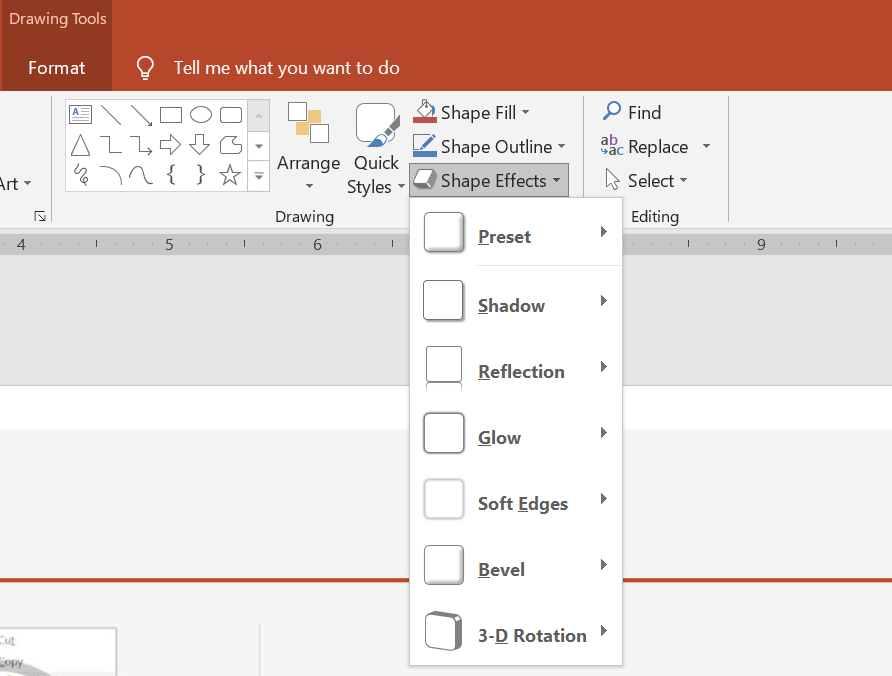
PowerPoint 提供六種可套用於形狀的效果。您可以對一個形狀套用一個或多個效果。
某些效果組合看起來比其他組合更好。基於此原因,PowerPoint 在 Preset 下提供選項。Preset 選項是兩種或以上效果的組合,已知外觀良好。這樣,透過選擇預設,您就不必花時間測試或組合不同的效果來尋找理想的組合。
Aspose.Slides 在 EffectFormat 類別中提供屬性與方法,讓您能將相同的效果套用於 PowerPoint 簡報中的形狀。
套用陰影效果
Aspose.Slides for PHP via Java 支援形狀的外部與內部陰影。您可以自訂其顏色、方向、距離與模糊半徑,以符合簡報的設計。
套用外部陰影
使用外部陰影可讓卡片或面板在投影片背景上更突出。陰影延伸至形狀邊緣之外,營造形狀高於投影片的效果。調整其顏色、方向、距離與模糊半徑,以符合範本的光線與樣式。
以下 PHP 程式碼示範如何將 外部陰影效果 套用至矩形:
use aspose\slides\Presentation;
use aspose\slides\SaveFormat;
use aspose\slides\ShapeType;

$presentation = new Presentation();
try {
    $slide = $presentation->getSlides()->get_Item(0);

    $shape = $slide->getShapes()->addAutoShape(ShapeType::RoundCornerRectangle, 20, 20, 200, 100);
    $shape->getEffectFormat()->enableOuterShadowEffect();
    $shadowColor = new Java("java.awt.Color", 169, 169, 169);
    $shape->getEffectFormat()->getOuterShadowEffect()->getShadowColor()->setColor($shadowColor);
    $shape->getEffectFormat()->getOuterShadowEffect()->setDistance(10);
    $shape->getEffectFormat()->getOuterShadowEffect()->setDirection(45);

    $presentation->save("shadow_effect.pptx", SaveFormat::Pptx);
} finally {
    $presentation->dispose();
}

套用內部陰影
在還原範本的視覺樣式時,使用內部陰影可讓卡片或面板呈現凹陷外觀。外部陰影延伸至形狀外部,使其看起來凸起;而內部陰影則在其邊緣內側投射陰影。
呼叫 enableInnerShadowEffect,然後設定由 getInnerShadowEffect 返回的陰影。較大的模糊半徑值會產生較軟的邊緣。
以下 PHP 範例建立一個淡藍色卡片,具有深灰色內部陰影,並將其儲存為 PPTX 檔案。陰影方向為 225 度,距離為 7 點,模糊半徑為 6 點:
use aspose\slides\FillType;
use aspose\slides\Presentation;
use aspose\slides\SaveFormat;
use aspose\slides\ShapeType;

$presentation = new Presentation();
try {
    $slide = $presentation->getSlides()->get_Item(0);

    $shape = $slide->getShapes()->addAutoShape(ShapeType::Rectangle, 20, 20, 200, 100);
    $shape->getFillFormat()->setFillType(FillType::Solid);
    $fillColor = new Java("java.awt.Color", 173, 216, 230);
    $shape->getFillFormat()->getSolidFillColor()->setColor($fillColor);
    $shape->getLineFormat()->getFillFormat()->setFillType(FillType::NoFill);

    $shape->getEffectFormat()->enableInnerShadowEffect();
    $shadow = $shape->getEffectFormat()->getInnerShadowEffect();
    $shadowColor = new Java("java.awt.Color", 105, 105, 105);
    $shadow->getShadowColor()->setColor($shadowColor);
    $shadow->setDirection(225);
    $shadow->setDistance(7);
    $shadow->setBlurRadius(6);

    $presentation->save("inner_shadow_effect.pptx", SaveFormat::Pptx);
} finally {
    $presentation->dispose();
}

若要移除內部陰影,請在形狀的 effect format 上呼叫 disableInnerShadowEffect。
套用反射效果
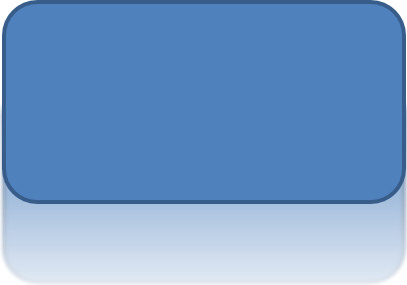
在 Aspose.Slides for PHP via Java 中套用反射效果時,您可以為形狀加入類似鏡面的反射,調整距離、透明度與大小等參數。此效果透過賦予形狀更精緻、專業的外觀,提升簡報的美感。使用簡單程式碼即可輕鬆實作,快速在多個元素上套用,以維持一致的設計。
以下 PHP 程式碼示範如何將 反射效果 套用至形狀:
use aspose\slides\Presentation;
use aspose\slides\RectangleAlignment;
use aspose\slides\SaveFormat;
use aspose\slides\ShapeType;

$presentation = new Presentation();
try {
    $slide = $presentation->getSlides()->get_Item(0);

    $shape = $slide->getShapes()->addAutoShape(ShapeType::RoundCornerRectangle, 20, 20, 200, 100);
    $shape->getEffectFormat()->enableReflectionEffect();
    $shape->getEffectFormat()->getReflectionEffect()->setRectangleAlign(RectangleAlignment::Bottom);
    $shape->getEffectFormat()->getReflectionEffect()->setDirection(90);
    $shape->getEffectFormat()->getReflectionEffect()->setDistance(40);
    $shape->getEffectFormat()->getReflectionEffect()->setBlurRadius(2);

    $presentation->save("reflection_effect.pptx", SaveFormat::Pptx);
} finally {
    $presentation->dispose();
}
套用發光效果
在 Aspose.Slides for PHP via Java 中對形狀套用發光效果時,您可以在形狀周圍添加柔和、發光的光暈,並調整顏色與大小等屬性。此效果有助於突出形狀,為簡報增添吸引人、醒目的視覺元素。只需少量程式碼即可輕鬆實作,提升投影片的整體外觀。
以下 PHP 程式碼示範如何將 發光效果 套用至形狀:
use aspose\slides\Presentation;
use aspose\slides\SaveFormat;
use aspose\slides\ShapeType;

$presentation = new Presentation();
try {
    $slide = $presentation->getSlides()->get_Item(0);

    $shape = $slide->getShapes()->addAutoShape(ShapeType::RoundCornerRectangle, 20, 20, 200, 100);
    $shape->getEffectFormat()->enableGlowEffect();
    $shape->getEffectFormat()->getGlowEffect()->getColor()->setColor(java("java.awt.Color")->MAGENTA);
    $shape->getEffectFormat()->getGlowEffect()->setRadius(15);

    $presentation->save("glow_effect.pptx", SaveFormat::Pptx);
} finally {
    $presentation->dispose();
}

套用柔和邊緣效果
在 Aspose.Slides for PHP via Java 中套用柔和邊緣效果時,您可以在形狀的邊緣產生平滑、模糊的過渡。此效果提供更細膩、精緻的外觀,非常適合需要柔和外觀的設計。您可以輕鬆調整半徑等參數,以在簡報的各種形狀上達到理想效果。
以下 PHP 程式碼示範如何將 柔和邊緣效果 套用至形狀:
use aspose\slides\Presentation;
use aspose\slides\SaveFormat;
use aspose\slides\ShapeType;

$presentation = new Presentation();
try {
    $slide = $presentation->getSlides()->get_Item(0);

    $shape = $slide->getShapes()->addAutoShape(ShapeType::RoundCornerRectangle, 20, 20, 200, 150);
    $shape->getEffectFormat()->enableSoftEdgeEffect();
    $shape->getEffectFormat()->getSoftEdgeEffect()->setRadius(8);

    $presentation->save("soft_edges_effect.pptx", SaveFormat::Pptx);
} finally {
    $presentation->dispose();
}

常見問題
我能將多個效果套用到同一個形狀嗎?
是的,您可以在單一形狀上結合不同的效果,例如陰影、反射和發光,以產生更動態的外觀。
我可以對哪些形狀套用效果?
您可以對各種形狀套用效果,包括自動圖形、圖表、表格、圖片、SmartArt 物件、OLE 物件等。
我可以對群組形狀套用效果嗎?
是的,您可以對群組形狀套用效果。該效果會套用至整個群組。