
在 PHP 中將數學方程式加入 PowerPoint 簡報
概觀
PowerPoint 以 Office Math Markup Language (OMML) 儲存方程式。使用 Aspose.Slides for PHP via Java,您可以以程式方式建立相同類型的數學內容:分數、根號、函式、極限、N 元運算子、矩陣、陣列以及格式化的數學區塊。
在 PowerPoint 中,使用者通常從 Insert > Equation 新增方程式:
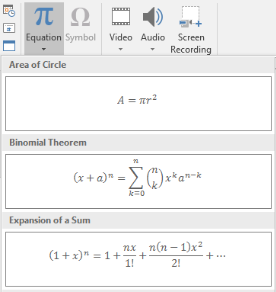
結果是在投影片上呈現可編輯的數學文字:

Aspose.Slides 透過三個主要物件建立此數學文字:
- 一個以 addMathShape 建立的數學圖形,是包含方程式的圖形。
- MathPortion 在圖形的文字框中儲存數學內容。
- MathParagraph 包含一個或多個 MathBlock 物件。
以下大多數範例使用 MathematicalText 以及來自 MathElementBase 的流暢方法,以保持程式碼簡潔易讀。
欲了解 MathML 匯出情境,請參閱 Export Math Equations from Presentations in PHP via Java。
建立方程式
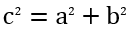
此範例建立一個數學圖形並加入畢氏定理:
$presentation = new Presentation();
try {
    $slide = $presentation->getSlides()->get_Item(0);

    $mathShape = $slide->getShapes()->addMathShape(20, 20, 700, 120);
    $mathParagraph = $mathShape->getTextFrame()->getParagraphs()
        - >get_Item(0)->getPortions()->get_Item(0)->getMathParagraph();

    $equation = (new MathematicalText("c"))
        - >setSuperscript("2")
        - >join("=")
        - >join((new MathematicalText("a"))->setSuperscript("2"))
        - >join("+")
        - >join((new MathematicalText("b"))->setSuperscript("2"));

    $mathParagraph->add($equation);

    $presentation->save("pythagorean-theorem.pptx", SaveFormat::Pptx);
} finally {
    if (!java_is_null($presentation)) {
        $presentation->dispose();
    }
}
addMathShape 會建立一個已含數學段落的圖形。存取第一個 MathPortion,取得其 MathParagraph,然後將數學區塊或數學元素加入其中。
加入分數
使用 divide 建立分數。您可以使用 MathFractionTypes 選擇分數樣式。

$presentation = new Presentation();
try {
    $slide = $presentation->getSlides()->get_Item(0);

    $mathShape = $slide->getShapes()->addMathShape(20, 20, 700, 100);
    $mathParagraph = $mathShape->getTextFrame()->getParagraphs()
        - >get_Item(0)->getPortions()->get_Item(0)->getMathParagraph();

    $fraction = (new MathematicalText("1"))
        - >divide("x", MathFractionTypes::Skewed);

    $mathParagraph->add(new MathBlock($fraction));

    $presentation->save("fraction.pptx", SaveFormat::Pptx);
} finally {
    if (!java_is_null($presentation)) {
        $presentation->dispose();
    }
}
對於堆疊分數,使用 MathFractionTypes::Bar:
$stackedFraction = (new MathematicalText("x + 1"))->divide("y - 1", MathFractionTypes::Bar);
加入根號
使用 radical 建立平方根、立方根或其他根號。當前元素成為底數,參數則為次方。

$presentation = new Presentation();
try {
    $slide = $presentation->getSlides()->get_Item(0);

    $mathShape = $slide->getShapes()->addMathShape(20, 20, 700, 100);
    $mathParagraph = $mathShape->getTextFrame()->getParagraphs()
        - >get_Item(0)->getPortions()->get_Item(0)->getMathParagraph();

    $radical = (new MathematicalText("x"))
        - >radical("n");

    $mathParagraph->add(new MathBlock($radical));

    $presentation->save("radical.pptx", SaveFormat::Pptx);
} finally {
    if (!java_is_null($presentation)) {
        $presentation->dispose();
    }
}
加入函式與極限
使用 asArgumentOfFunction 或 function 可建立如 sin(x)、log(x) 或自訂函式名稱的函式。對於極限,將 lim 放入 MathLimit 或使用 setLowerLimit。

$presentation = new Presentation();
try {
    $slide = $presentation->getSlides()->get_Item(0);

    $mathShape = $slide->getShapes()->addMathShape(20, 20, 700, 100);
    $mathParagraph = $mathShape->getTextFrame()->getParagraphs()
        - >get_Item(0)->getPortions()->get_Item(0)->getMathParagraph();

    $limit = (new MathematicalText("lim"))
        - >setLowerLimit("x\u{2192}\u{221E}")
        - >function("x");

    $mathParagraph->add(new MathBlock($limit));

    $presentation->save("functions-and-limits.pptx", SaveFormat::Pptx);
} finally {
    if (!java_is_null($presentation)) {
        $presentation->dispose();
    }
}
若要自訂函式名稱,將函式名稱設為當前元素:
$customFunction = (new MathematicalText("f"))->function("x + 1");
加入 N 元運算子與積分
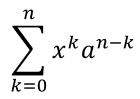
使用 nary 處理求和、聯集、交集等大型運算子。使用 integral 處理積分。兩者皆可設定上下限。
$presentation = new Presentation();
try {
    $slide = $presentation->getSlides()->get_Item(0);

    $mathShape = $slide->getShapes()->addMathShape(20, 20, 700, 120);
    $mathParagraph = $mathShape->getTextFrame()->getParagraphs()
        - >get_Item(0)->getPortions()->get_Item(0)->getMathParagraph();

    $summationBase = (new MathematicalText("x"))
        - >setSuperscript("k")
        - >join((new MathematicalText("a"))->setSuperscript("n-k"));

    $summation = $summationBase->nary(MathNaryOperatorTypes::Summation, "k=0", "n");

    $mathParagraph->add(new MathBlock($summation));

    $presentation->save("nary-operators.pptx", SaveFormat::Pptx);
} finally {
    if (!java_is_null($presentation)) {
        $presentation->dispose();
    }
}
N 元運算子用於可選上下限的大型運算子。+、-、= 等簡單運算子通常以 MathematicalText 加入並串接成表達式。
對於積分,使用 integral:
$integralBase = (new MathematicalText("x"))->join((new MathematicalText("dx"))->toBox());
$integral = $integralBase->integral(MathIntegralTypes::Simple, "0", "1");
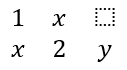
加入矩陣
使用 MathMatrix 建立列與行。矩陣預設不包含括號,若需要括號、方括號或大括號,請自行將矩陣包起來。
$presentation = new Presentation();
try {
    $slide = $presentation->getSlides()->get_Item(0);

    $mathShape = $slide->getShapes()->addMathShape(20, 20, 700, 120);
    $mathParagraph = $mathShape->getTextFrame()->getParagraphs()
        - >get_Item(0)->getPortions()->get_Item(0)->getMathParagraph();

    $matrix = new MathMatrix(2, 3);
    $matrix->set_Item(0, 0, new MathematicalText("1"));
    $matrix->set_Item(0, 1, new MathematicalText("x"));
    $matrix->set_Item(1, 0, new MathematicalText("x"));
    $matrix->set_Item(1, 1, new MathematicalText("2"));
    $matrix->set_Item(1, 2, new MathematicalText("y"));

    $mathParagraph->add(new MathBlock($matrix));

    $presentation->save("matrix.pptx", SaveFormat::Pptx);
} finally {
    if (!java_is_null($presentation)) {
        $presentation->dispose();
    }
}
加入方程式陣列
需要對齊的方程式或垂直堆疊的表達式時,請使用 toMathArray。

$presentation = new Presentation();
try {
    $slide = $presentation->getSlides()->get_Item(0);

    $mathShape = $slide->getShapes()->addMathShape(20, 20, 700, 140);
    $mathParagraph = $mathShape->getTextFrame()->getParagraphs()
        - >get_Item(0)->getPortions()->get_Item(0)->getMathParagraph();

    $equationArray = (new MathematicalText("x"))
        - >join("y")
        - >toMathArray();

    $mathParagraph->add(new MathBlock($equationArray));

    $presentation->save("equation-array.pptx", SaveFormat::Pptx);
} finally {
    if (!java_is_null($presentation)) {
        $presentation->dispose();
    }
}
加入三角函式
當參數是當前元素且函式名稱已知時,使用 asArgumentOfFunction。

$presentation = new Presentation();
try {
    $slide = $presentation->getSlides()->get_Item(0);

    $mathShape = $slide->getShapes()->addMathShape(20, 20, 700, 100);
    $mathParagraph = $mathShape->getTextFrame()->getParagraphs()
        - >get_Item(0)->getPortions()->get_Item(0)->getMathParagraph();

    $cosine = (new MathematicalText("2x"))
        - >asArgumentOfFunction(MathFunctionsOfOneArgument::Cos);

    $mathParagraph->add(new MathBlock($cosine));

    $presentation->save("trigonometric-function.pptx", SaveFormat::Pptx);
} finally {
    if (!java_is_null($presentation)) {
        $presentation->dispose();
    }
}
加入下標與上標
使用下標與上標輔助方法處理索引與次方。若索引需顯示在基底左側,請使用 setSubSuperscriptOnTheLeft。

$presentation = new Presentation();
try {
    $slide = $presentation->getSlides()->get_Item(0);

    $mathShape = $slide->getShapes()->addMathShape(20, 20, 700, 100);
    $mathParagraph = $mathShape->getTextFrame()->getParagraphs()
        - >get_Item(0)->getPortions()->get_Item(0)->getMathParagraph();

    $scripts = (new MathematicalText("Y"))
        - >setSubSuperscriptOnTheLeft("1", "n");

    $mathParagraph->add(new MathBlock($scripts));

    $presentation->save("subscript-superscript.pptx", SaveFormat::Pptx);
} finally {
    if (!java_is_null($presentation)) {
        $presentation->dispose();
    }
}
加入分界符號
使用 enclose 將表達式包在分界符號內。若分界符號內含多個元素,亦可設定分隔字元。

$presentation = new Presentation();
try {
    $slide = $presentation->getSlides()->get_Item(0);

    $mathShape = $slide->getShapes()->addMathShape(20, 20, 700, 100);
    $mathParagraph = $mathShape->getTextFrame()->getParagraphs()
        - >get_Item(0)->getPortions()->get_Item(0)->getMathParagraph();

    $delimiter = (new MathematicalText("x"))
        - >join("y")
        - >join("z")
        - >enclose(new Java("java.lang.Character", "<"), new Java("java.lang.Character", ">"));
    $delimiter->setSeparatorCharacter(new Java("java.lang.Character", "|"));

    $mathParagraph->add(new MathBlock($delimiter));

    $presentation->save("delimiters.pptx", SaveFormat::Pptx);
} finally {
    if (!java_is_null($presentation)) {
        $presentation->dispose();
    }
}
加入框線盒子
當方程式本身需要被框住時,使用 toBorderBox。
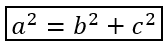
$presentation = new Presentation();
try {
    $slide = $presentation->getSlides()->get_Item(0);

    $mathShape = $slide->getShapes()->addMathShape(20, 20, 700, 100);
    $mathParagraph = $mathShape->getTextFrame()->getParagraphs()
        - >get_Item(0)->getPortions()->get_Item(0)->getMathParagraph();

    $boxedEquation = (new MathematicalText("a"))
        - >setSuperscript("2")
        - >join("=")
        - >join((new MathematicalText("b"))->setSuperscript("2"))
        - >join("+")
        - >join((new MathematicalText("c"))->setSuperscript("2"))
        - >toBorderBox();

    $mathParagraph->add(new MathBlock($boxedEquation));

    $presentation->save("border-box.pptx", SaveFormat::Pptx);
} finally {
    if (!java_is_null($presentation)) {
        $presentation->dispose();
    }
}
分組項目
使用 group 可在表達式上方或下方放置分組符號。加入上下限以標示分組的項目。

$presentation = new Presentation();
try {
    $slide = $presentation->getSlides()->get_Item(0);

    $mathShape = $slide->getShapes()->addMathShape(20, 20, 700, 120);
    $mathParagraph = $mathShape->getTextFrame()->getParagraphs()
        - >get_Item(0)->getPortions()->get_Item(0)->getMathParagraph();

    $grouped = (new MathematicalText("x + y"))
        - >group(new Java("java.lang.Character", "\u{23DF}"), MathTopBotPositions::Bottom, MathTopBotPositions::Top)
        - >setLowerLimit("any text");

    $mathParagraph->add(new MathBlock($grouped));

    $presentation->save("grouped-terms.pptx", SaveFormat::Pptx);
} finally {
    if (!java_is_null($presentation)) {
        $presentation->dispose();
    }
}
格式化數學元素
僅在需強調公式時使用格式化輔助方法。例如,overbar 為數學元素加上上橫線。

$presentation = new Presentation();
try {
    $slide = $presentation->getSlides()->get_Item(0);

    $mathShape = $slide->getShapes()->addMathShape(20, 20, 700, 100);
    $mathParagraph = $mathShape->getTextFrame()->getParagraphs()
        - >get_Item(0)->getPortions()->get_Item(0)->getMathParagraph();

    $overbar = (new MathematicalText("ABC"))->overbar();

    $mathParagraph->add(new MathBlock($overbar));

    $presentation->save("overbar.pptx", SaveFormat::Pptx);
} finally {
    if (!java_is_null($presentation)) {
        $presentation->dispose();
    }
}
快速參考
| 任務 | 主要 API |
|---|---|
| 建立數學文字 | MathematicalText |
| 結合元素 | join |
| 建立分數 | divide |
| 加入上標或下標 | setSuperscript, setSubscript |
| 加入函式 | function, asArgumentOfFunction |
| 加入根號 | radical |
| 加入極限 | setLowerLimit, setUpperLimit |
| 加入左側標記 | setSubSuperscriptOnTheLeft |
| 加入求和與積分 | nary, integral |
| 加入矩陣 | MathMatrix |
| 加入方程式陣列 | toMathArray |
| 加入分界符號 | enclose |
| 加入上橫線與框線 | overbar, toBorderBox |
| 分組項目 | group |
常見問題
我可以編輯現有的 PowerPoint 方程式嗎?
可以。開啟簡報,尋找包含 MathPortion 的圖形,取得其 MathParagraph,然後更新該段落中的數學區塊。
方程式會以可編輯的 PowerPoint 數學形式儲存嗎?
會。將檔案儲存為 PPTX 時,Aspose.Slides 會將方程式寫入為可編輯的 Office 數學內容。
我可以將方程式匯出為 LaTeX 嗎?
可以。從其 MathPortion 取得方程式的 MathParagraph,然後呼叫 MathParagraph::toLatex 直接匯出。完整範例請參閱 Export Math Equations from Presentations in PHP via Java。