
ใช้เอฟเฟกต์รูปร่างในงานนำเสนอด้วย PHP
บทนำ
ขณะที่เอฟเฟกต์ใน PowerPoint สามารถใช้ทำให้รูปร่างโดดเด่นได้ แต่จะแตกต่างจาก การเติม หรือขอบ โดยใช้เอฟเฟกต์ของ PowerPoint คุณสามารถสร้างการสะท้อนที่สมจริงบนรูปร่าง, ทำให้รูปร่างมีแสงเรืองแสง ฯลฯ
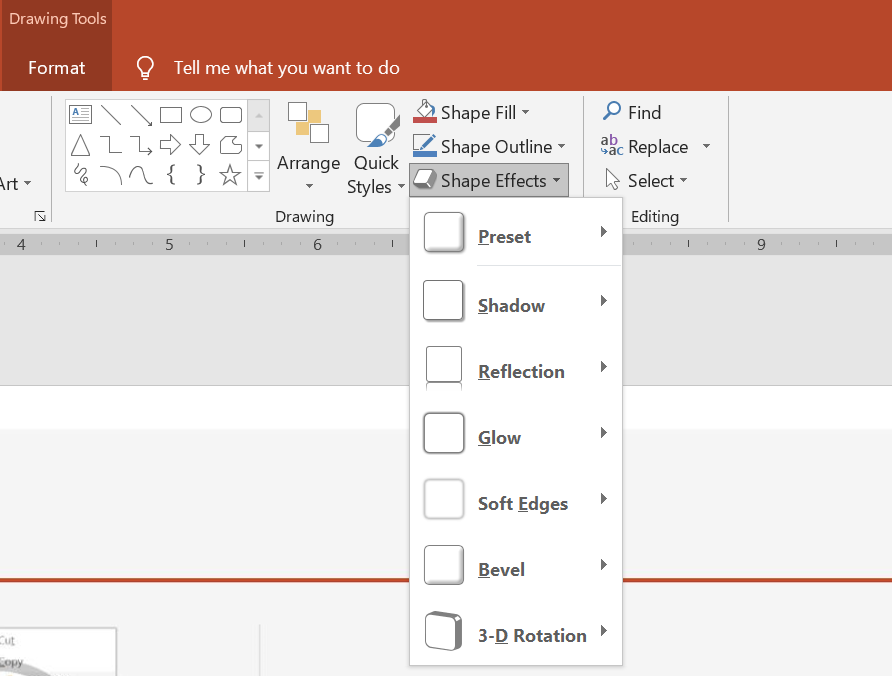
PowerPoint มีเอฟเฟกต์ทั้งหมดหกแบบที่สามารถนำไปใช้กับรูปร่างได้ คุณสามารถใช้เอฟเฟกต์หนึ่งหรือหลายแบบกับรูปร่างได้
บางการจับคู่อิฟเฟกต์ดูดีกว่าอื่น ๆ ด้วยเหตุนี้ PowerPoint จึงมีตัวเลือกใน Preset ตัวเลือก Preset คือการผสมผสานของสองหรือมากกว่าอิฟเฟกต์ที่รู้ว่าดูดี วิธีนี้เมื่อคุณเลือก Preset แล้วคุณจะไม่ต้องเสียเวลาในการทดสอบหรือผสมอิฟเฟกต์ต่าง ๆ เพื่อหาการจับคู่ที่ดี
Aspose.Slides มีคุณสมบัติและเมธอดภายใต้คลาส EffectFormat ที่ทำให้คุณสามารถใช้เอฟเฟกต์เดียวกันกับรูปร่างในงานนำเสนอ PowerPoint ได้
ใช้เอฟเฟกต์เงา
Aspose.Slides สำหรับ PHP ผ่าน Java รองรับเงานอกและเงาภายในสำหรับรูปร่าง คุณสามารถปรับสี, ทิศทาง, ระยะทาง และรัศมีการเบลอให้ตรงกับการออกแบบการนำเสนอของคุณ
ใช้เงานอก
ใช้เงานอกเพื่อทำให้การ์ดหรือแผงเด่นขึ้นจากพื้นหลังของสไลด์ เงาจะขยายออกนอกขอบของรูปร่าง ทำให้รูปร่างดูเหมือนลอยขึ้นเหนือสไลด์ ปรับสี, ทิศทาง, ระยะทาง และรัศมีการเบลอให้สอดคล้องกับแสงและสไตล์ของแม่แบบของคุณ
โค้ด PHP นี้แสดงวิธีใช้ เอฟเฟกต์เงานอก กับสี่เหลี่ยมผืนผ้า:
use aspose\slides\Presentation;
use aspose\slides\SaveFormat;
use aspose\slides\ShapeType;

$presentation = new Presentation();
try {
    $slide = $presentation->getSlides()->get_Item(0);

    $shape = $slide->getShapes()->addAutoShape(ShapeType::RoundCornerRectangle, 20, 20, 200, 100);
    $shape->getEffectFormat()->enableOuterShadowEffect();
    $shadowColor = new Java("java.awt.Color", 169, 169, 169);
    $shape->getEffectFormat()->getOuterShadowEffect()->getShadowColor()->setColor($shadowColor);
    $shape->getEffectFormat()->getOuterShadowEffect()->setDistance(10);
    $shape->getEffectFormat()->getOuterShadowEffect()->setDirection(45);

    $presentation->save("shadow_effect.pptx", SaveFormat::Pptx);
} finally {
    $presentation->dispose();
}

ใช้เงาภายใน
เมื่อต้องทำซ้ำสไตล์ภาพของแม่แบบ ให้ใช้เงาภายในเพื่อให้การ์ดหรือแผงดูเหมือนถูกฝังเข้ากลับ เงานอกจะขยายออกนอกรูปร่างและทำให้ดูสูงขึ้น ขณะที่เงาภายในจะให้เงาแก่ด้านในของขอบ
เรียก enableInnerShadowEffect จากนั้นกำหนดค่าเงาที่ได้จาก getInnerShadowEffect ค่ารัศมีเบลอที่ใหญ่ขึ้นจะทำให้ขอบนุ่มขึ้น
ตัวอย่าง PHP นี้สร้างการ์ดสีน้ำเงินอ่อนพร้อมเงาภายในสีเทาเข้มและบันทึกเป็นไฟล์ PPTX ทิศทางของเงาคือ 225 องศา ระยะห่างคือ 7 จุด และรัศมีเบลอคือ 6 จุด:
use aspose\slides\FillType;
use aspose\slides\Presentation;
use aspose\slides\SaveFormat;
use aspose\slides\ShapeType;

$presentation = new Presentation();
try {
    $slide = $presentation->getSlides()->get_Item(0);

    $shape = $slide->getShapes()->addAutoShape(ShapeType::Rectangle, 20, 20, 200, 100);
    $shape->getFillFormat()->setFillType(FillType::Solid);
    $fillColor = new Java("java.awt.Color", 173, 216, 230);
    $shape->getFillFormat()->getSolidFillColor()->setColor($fillColor);
    $shape->getLineFormat()->getFillFormat()->setFillType(FillType::NoFill);

    $shape->getEffectFormat()->enableInnerShadowEffect();
    $shadow = $shape->getEffectFormat()->getInnerShadowEffect();
    $shadowColor = new Java("java.awt.Color", 105, 105, 105);
    $shadow->getShadowColor()->setColor($shadowColor);
    $shadow->setDirection(225);
    $shadow->setDistance(7);
    $shadow->setBlurRadius(6);

    $presentation->save("inner_shadow_effect.pptx", SaveFormat::Pptx);
} finally {
    $presentation->dispose();
}

เพื่อเอาเงาภายในออก ให้เรียก disableInnerShadowEffect บน EffectFormat ของรูปร่าง
ใช้เอฟเฟกต์การสะท้อน
เพื่อใช้เอฟเฟกต์การสะท้อนใน Aspose.Slides สำหรับ PHP ผ่าน Java คุณสามารถเพิ่มการสะท้อนแบบกระจกให้กับรูปร่างโดยปรับพารามิเตอร์เช่น ระยะ, ความโปร่งใส, และขนาด เอฟเฟกต์นี้ช่วยยกระดับความสวยงามของงานนำเสนอโดยทำให้รูปร่างดูเรียบหรูและเป็นมืออาชีพ ง่ายต่อการใช้งานด้วยโค้ดง่าย ๆ ทำให้สามารถนำไปใช้กับหลายองค์ประกอบได้อย่างรวดเร็วเพื่อการออกแบบที่สอดคล้องกัน
โค้ด PHP นี้แสดงวิธีใช้ เอฟเฟกต์การสะท้อน กับรูปร่าง:
use aspose\slides\Presentation;
use aspose\slides\RectangleAlignment;
use aspose\slides\SaveFormat;
use aspose\slides\ShapeType;

$presentation = new Presentation();
try {
    $slide = $presentation->getSlides()->get_Item(0);

    $shape = $slide->getShapes()->addAutoShape(ShapeType::RoundCornerRectangle, 20, 20, 200, 100);
    $shape->getEffectFormat()->enableReflectionEffect();
    $shape->getEffectFormat()->getReflectionEffect()->setRectangleAlign(RectangleAlignment::Bottom);
    $shape->getEffectFormat()->getReflectionEffect()->setDirection(90);
    $shape->getEffectFormat()->getReflectionEffect()->setDistance(40);
    $shape->getEffectFormat()->getReflectionEffect()->setBlurRadius(2);

    $presentation->save("reflection_effect.pptx", SaveFormat::Pptx);
} finally {
    $presentation->dispose();
}

ใช้เอฟเฟกต์เรืองแสง
เพื่อใช้เอฟเฟกต์เรืองแสงกับรูปร่างใน Aspose.Slides สำหรับ PHP ผ่าน Java คุณสามารถเพิ่มออร่านุ่มนวลและสว่างไสวรอบรูปร่างโดยปรับคุณสมบัติเช่น สีและขนาด เอฟเฟกต์นี้ช่วยให้รูปร่างเด่นขึ้นและเพิ่มองค์ประกอบภาพที่น่าสนใจให้กับการนำเสนอของคุณ ง่ายต่อการใช้งานด้วยโค้ดที่สั้นและช่วยยกระดับรูปลักษณ์โดยรวมของสไลด์
โค้ด PHP นี้แสดงวิธีใช้ เอฟเฟกต์เรืองแสง กับรูปร่าง:
use aspose\slides\Presentation;
use aspose\slides\SaveFormat;
use aspose\slides\ShapeType;

$presentation = new Presentation();
try {
    $slide = $presentation->getSlides()->get_Item(0);

    $shape = $slide->getShapes()->addAutoShape(ShapeType::RoundCornerRectangle, 20, 20, 200, 100);
    $shape->getEffectFormat()->enableGlowEffect();
    $shape->getEffectFormat()->getGlowEffect()->getColor()->setColor(java("java.awt.Color")->MAGENTA);
    $shape->getEffectFormat()->getGlowEffect()->setRadius(15);

    $presentation->save("glow_effect.pptx", SaveFormat::Pptx);
} finally {
    $presentation->dispose();
}

ใช้เอฟเฟกต์ขอบนุ่ม
เพื่อใช้เอฟเฟกต์ขอบนุ่มใน Aspose.Slides สำหรับ PHP ผ่าน Java คุณสามารถสร้างการเปลี่ยนแปลงที่เรียบและเบลอรอบขอบของรูปร่าง เอฟเฟกต์นี้เพิ่มลุคที่ละเอียดอ่อนและประณีต เหมาะสำหรับการออกแบบที่ต้องการรูปลักษณ์อ่อนโยนและนุ่มนวล คุณสามารถปรับพารามิเตอร์เช่น รัศมี เพื่อให้ได้เอฟเฟกต์ตามที่ต้องการกับรูปร่างหลากหลายในงานนำเสนอของคุณ
โค้ด PHP นี้แสดงวิธีใช้ เอฟเฟกต์ขอบนุ่ม กับรูปร่าง:
use aspose\slides\Presentation;
use aspose\slides\SaveFormat;
use aspose\slides\ShapeType;

$presentation = new Presentation();
try {
    $slide = $presentation->getSlides()->get_Item(0);

    $shape = $slide->getShapes()->addAutoShape(ShapeType::RoundCornerRectangle, 20, 20, 200, 150);
    $shape->getEffectFormat()->enableSoftEdgeEffect();
    $shape->getEffectFormat()->getSoftEdgeEffect()->setRadius(8);

    $presentation->save("soft_edges_effect.pptx", SaveFormat::Pptx);
} finally {
    $presentation->dispose();
}

คำถามที่พบบ่อย
ฉันสามารถใช้หลายเอฟเฟกต์กับรูปร่างเดียวกันได้หรือไม่?
ได้ คุณสามารถรวมเอฟเฟกต์ต่าง ๆ เช่น เงา, การสะท้อน, และเรืองแสง เข้าด้วยกันบนรูปร่างเดียวเพื่อสร้างลุคที่มีความเคลื่อนไหวมากขึ้น
ฉันสามารถใช้เอฟเฟกต์กับรูปร่างประเภทใดได้บ้าง?
คุณสามารถใช้เอฟเฟกต์กับรูปร่างหลายประเภท เช่น autoshapes, แผนภูมิ, ตาราง, รูปภาพ, วัตถุ SmartArt, วัตถุ OLE และอื่น ๆ
ฉันสามารถใช้เอฟเฟกต์กับกลุ่มรูปร่างได้หรือไม่?
ได้ คุณสามารถใช้เอฟเฟกต์กับกลุ่มรูปร่างได้ เอฟเฟกต์จะถูกนำไปใช้กับกลุ่มทั้งหมด