
在 PHP 中管理演示文稿幻灯片母版
概述
幻灯片母版 定义一组幻灯片的共享设计设置。它可以包含通用形状、标志、背景、文字样式、主题设置和页脚设置。在 PowerPoint 中,编辑幻灯片母版是保持演示文稿统一而无需在每张幻灯片上重复相同格式的常用方式。
Aspose.Slides for PHP via Java 支持相同的模型。一个演示文稿可以包含一个或多个母版幻灯片,每个母版幻灯片可以包含若干版式幻灯片。普通幻灯片通常不会直接引用母版幻灯片,而是使用版式幻灯片,而该版式幻灯片属于某个母版幻灯片。
层次结构如下:
- 幻灯片母版 – 定义共享的设计和主题。
- 版式幻灯片 – 定义占位符的具体排列和版式级别的格式。
- 普通幻灯片 – 包含实际的演示内容并使用一个版式幻灯片。

在 Aspose.Slides 中,幻灯片母版由 MasterSlide 类表示。演示文稿中的所有母版幻灯片可通过 Presentation.getMasters 方法获取,该方法返回一个 MasterSlideCollection 对象。
Inheritance
当相同属性在多个层级上定义时,更具体的层级会覆盖更高层级。例如,如果母版幻灯片和版式幻灯片都定义了背景,则基于该版式的幻灯片使用版式的背景。有关版式幻灯片的更多信息,请参阅 Apply or Change Slide Layouts。访问幻灯片母版
在 PowerPoint 中,可通过 视图 > 幻灯片母版 打开幻灯片母版视图。
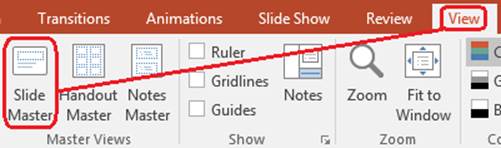
在 Aspose.Slides 中,使用 getMasters 方法访问母版幻灯片:
$presentation = new Presentation("presentation.pptx");
try {
    $firstMasterSlide = $presentation->getMasters()->get_Item(0);
    $masterSlideCount = $presentation->getMasters()->size();
    $firstMasterLayoutSlideCount = $firstMasterSlide->getLayoutSlides()->size();

    echo "Master slides: " . $masterSlideCount . PHP_EOL;
    echo "Layouts in the first master: " . $firstMasterLayoutSlideCount . PHP_EOL;
} finally {
    $presentation->dispose();
}
您还可以通过普通幻灯片的版式获取其使用的母版幻灯片:
$presentation = new Presentation("presentation.pptx");
try {
    $slide = $presentation->getSlides()->get_Item(0);
    $layoutSlide = $slide->getLayoutSlide();
    $masterSlide = $layoutSlide->getMasterSlide();
    $masterSlideName = $masterSlide->getName();

    echo $masterSlideName . PHP_EOL;
} finally {
    $presentation->dispose();
}
幻灯片母版包含的内容
母版幻灯片是类似幻灯片的对象。它继承自 BaseSlide,因此具有普通幻灯片和版式幻灯片的许多相同属性。母版特有的成员列在 MasterSlide API 页面上。
常用的母版幻灯片成员包括:
| 成员 | 目的 |
|---|---|
getBackground |
设置母版级别的幻灯片背景。 |
getShapes |
存储放置在母版上的形状,例如标志、图片框和共享文本。 |
getLayoutSlides |
存储属于该母版的版式幻灯片。 |
getThemeManager |
提供对母版主题 API 的访问。 |
getHeaderFooterManager |
控制母版及其子版式的页眉、页脚、日期和幻灯片编号。 |
getDependingSlides |
返回通过其版式依赖于该母版的普通幻灯片。 |
向幻灯片母版添加图像
向母版幻灯片添加图像后,使用该母版版式的幻灯片都会显示该图像。这对于标志、水印、装饰条带以及其他重复的视觉元素非常有用。
以下示例向第一张母版幻灯片添加徽标:
$presentation = new Presentation("presentation.pptx");
try {
    $masterSlide = $presentation->getMasters()->get_Item(0);
    $logoImage = Images::fromFile("logo.png");
    try {
        $presentationImage = $presentation->getImages()->addImage($logoImage);
    } finally {
        $logoImage->dispose();
    }

    $masterSlide->getShapes()->addPictureFrame(
        ShapeType::Rectangle,
        20,
        20,
        80,
        80,
        $presentationImage
    );

    $presentation->save("presentation-with-logo.pptx", SaveFormat::Pptx);
} finally {
    $presentation->dispose();
}
有关图片框的更多信息,请参阅 Picture Frame。
控制母版图形的可见性
使用 BaseSlide::setShowMasterShapes 可以隐藏继承自母版的图形(如标志或装饰形状),而无需从母版中删除它们。在需要省略这些图形的幻灯片上,将 false 传递给 Slide::setShowMasterShapes;在需要显示的幻灯片上保持 true。
以下独立示例在母版上创建蓝色装饰条带,并创建两个使用相同空白版式的幻灯片。该条带在第一张幻灯片上可见,在第二张幻灯片上隐藏。示例不需要输入演示文稿或图像。
use aspose\slides\FillType;
use aspose\slides\Presentation;
use aspose\slides\SaveFormat;
use aspose\slides\ShapeType;
use aspose\slides\SlideLayoutType;

$presentation = new Presentation();
try {
    $masterSlide = $presentation->getMasters()->get_Item(0);
    $layoutSlide = $masterSlide->getLayoutSlides()->getByType(SlideLayoutType::Blank);
    $layoutSlide->setShowMasterShapes(true);

    $slideHeight = java_values($presentation->getSlideSize()->getSize()->getHeight());
    $band = $masterSlide->getShapes()->addAutoShape(ShapeType::Rectangle, 0, 0, 60, $slideHeight);
    $bandColor = new Java("java.awt.Color", 70, 130, 180);
    $band->getFillFormat()->setFillType(FillType::Solid);
    $band->getFillFormat()->getSolidFillColor()->setColor($bandColor);
    $band->getLineFormat()->getFillFormat()->setFillType(FillType::NoFill);

    $visibleSlide = $presentation->getSlides()->get_Item(0);
    $visibleSlide->setLayoutSlide($layoutSlide);
    $visibleSlide->getShapes()->clear();

    $hiddenSlide = $presentation->getSlides()->addEmptySlide($layoutSlide);

    $visibleSlide->setShowMasterShapes(true);
    $hiddenSlide->setShowMasterShapes(false);

    $presentation->save("master-graphics.pptx", SaveFormat::Pptx);
} finally {
    $presentation->dispose();
}
该示例使用新演示文稿附带的 Blank 版式,并删除了初始幻灯片自身的占位符。
选择设置的作用范围
普通幻灯片通过 Slide::getLayoutSlide 和 LayoutSlide::getMasterSlide 使用其母版。将属性设置在单个幻灯片上只会影响该幻灯片本身。将 false 传递给 LayoutSlide::setShowMasterShapes 可隐藏使用该共享版式的所有幻灯片的母版图形,即使它们各自的设置为 true。若仅想在单张幻灯片上隐藏图形,请更改该幻灯片的属性而保持共享版式不变。
该设置不支持在母版幻灯片本身上控制可见性。在母版上,getShowMasterShapes 总是返回 false,将 true 传递给 setShowMasterShapes 会抛出异常。请将其应用于普通幻灯片或版式。
将图形与背景区分
| 操作 | 效果 |
|---|---|
| 隐藏母版图形 | 在不删除或更改幻灯片自身形状的情况下控制继承的母版形状的可见性。 |
| 更改幻灯片背景填充 | 更改背景颜色、渐变或图像。母版图形是独立形状,可保持在该背景之上可见。参见 Presentation Background。 |
| 从母版删除形状 | 移除共享源形状,所有使用该母版的幻灯片将不再拥有该形状。 |
使用占位符
占位符通常在版式幻灯片上定义。母版幻灯片提供共享的样式和主题,版式则决定哪些占位符可用以及它们的位置。
在 PowerPoint 中,占位符命令位于幻灯片母版视图中。
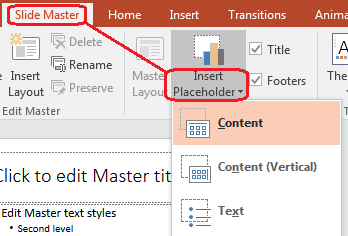
要使用 Aspose.Slides 添加新占位符,请操作属于母版的版式幻灯片:
$presentation = new Presentation("presentation.pptx");
try {
    $masterSlide = $presentation->getMasters()->get_Item(0);
    $blankLayoutSlideName = "Custom Blank";
    $blankLayoutSlide = $masterSlide->getLayoutSlides()->add(
        SlideLayoutType::Blank,
        $blankLayoutSlideName
    );

    $blankLayoutSlide->getPlaceholderManager()->addTextPlaceholder(
        60,
        120,
        600,
        80
    );

    $presentation->getSlides()->addEmptySlide($blankLayoutSlide);
    $presentation->save("presentation-with-placeholder.pptx", SaveFormat::Pptx);
} finally {
    $presentation->dispose();
}
您也可以格式化已存在于母版幻灯片上的占位符形状。下面的示例找到标题占位符并应用线性渐变填充:
$presentation = new Presentation("presentation.pptx");
try {
    $masterSlide = $presentation->getMasters()->get_Item(0);
    $titlePlaceholder = findPlaceholder($masterSlide, PlaceholderType::Title);

    if (!java_is_null($titlePlaceholder)) {
        $redGradientColor = java("java.awt.Color")->RED;
        $purpleGradientColor = new Java("java.awt.Color", 128, 0, 128);

        $fillFormat = $titlePlaceholder->getFillFormat();
        $fillFormat->setFillType(FillType::Gradient);
        $gradientFormat = $fillFormat->getGradientFormat();
        $gradientFormat->setGradientShape(GradientShape::Linear);
        $gradientStops = $gradientFormat->getGradientStops();
        $gradientStops->add(0, $redGradientColor);
        $gradientStops->add(255, $purpleGradientColor);
    }

    $presentation->save("presentation-title-style.pptx", SaveFormat::Pptx);
} finally {
    $presentation->dispose();
}

function findPlaceholder($masterSlide, $placeholderType)
{
    $shapesCount = java_values($masterSlide->getShapes()->size());
    for ($shapeIndex = 0; $shapeIndex < $shapesCount; $shapeIndex++) {
        $shape = $masterSlide->getShapes()->get_Item($shapeIndex);
        $placeholder = $shape->getPlaceholder();

        if (!java_is_null($placeholder) && java_values($placeholder->getType()) == $placeholderType) {
            return $shape;
        }
    }

    return null;
}
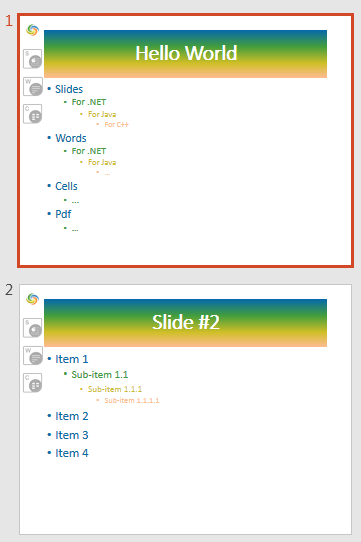
有关占位符和文本格式化的更多选项,请参阅 Set Prompt Text in Placeholder 和 Text Formatting。
更改幻灯片母版背景
母版背景会被版式和未覆盖它的幻灯片继承。以下示例为第一张母版幻灯片设置纯色背景:
$presentation = new Presentation("presentation.pptx");
try {
    $masterSlide = $presentation->getMasters()->get_Item(0);
    $forestGreenColor = new Java("java.awt.Color", 34, 139, 34);

    $background = $masterSlide->getBackground();
    $background->setType(BackgroundType::OwnBackground);
    $fillFormat = $background->getFillFormat();
    $fillFormat->setFillType(FillType::Solid);
    $fillFormat->getSolidFillColor()->setColor($forestGreenColor);

    $presentation->save("presentation-master-background.pptx", SaveFormat::Pptx);
} finally {
    $presentation->dispose();
}
相关主题请参阅 Presentation Background 和 Presentation Theme。
将幻灯片母版克隆到其他演示文稿
使用 MasterSlideCollection 的 addClone 方法可将母版幻灯片复制到另一演示文稿。复制后的母版可供目标演示文稿的版式和幻灯片使用。
$sourcePresentation = new Presentation("source.pptx");
$destinationPresentation = new Presentation("destination.pptx");
try {
    $sourceMasterSlide = $sourcePresentation->getMasters()->get_Item(0);
    $clonedMasterSlide = $destinationPresentation->getMasters()->addClone($sourceMasterSlide);

    $destinationPresentation->save("destination-with-master.pptx", SaveFormat::Pptx);
} finally {
    $destinationPresentation->dispose();
    $sourcePresentation->dispose();
}
如果需要连同母版一起克隆普通幻灯片,请参阅 Clone Slides。
添加多个幻灯片母版
一个演示文稿可以包含多个母版幻灯片。当不同章节需要不同品牌、页面结构或主题设置时,这非常有用。
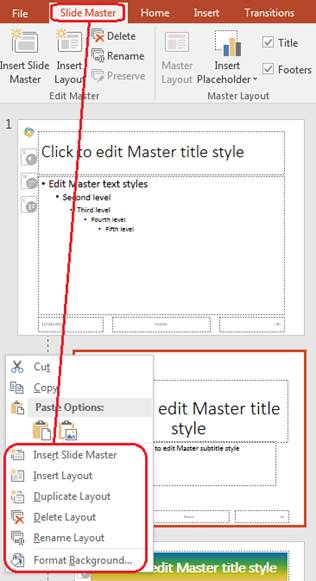
以下示例克隆默认母版,为克隆母版设置不同的背景,在该克隆母版下创建版式,并基于该版式添加新幻灯片:
$presentation = new Presentation("presentation.pptx");
try {
    $defaultMasterSlide = $presentation->getMasters()->get_Item(0);
    $sectionMasterSlide = $presentation->getMasters()->addClone($defaultMasterSlide);
    $lightSteelBlueColor = new Java("java.awt.Color", 176, 196, 222);

    $background = $sectionMasterSlide->getBackground();
    $background->setType(BackgroundType::OwnBackground);
    $fillFormat = $background->getFillFormat();
    $fillFormat->setFillType(FillType::Solid);
    $fillFormat->getSolidFillColor()->setColor($lightSteelBlueColor);

    $sourceBlankLayout = $defaultMasterSlide->getLayoutSlides()->get_Item(0);
    $sectionBlankLayout = $sectionMasterSlide->getLayoutSlides()->addClone($sourceBlankLayout);

    $presentation->getSlides()->addEmptySlide($sectionBlankLayout);
    $presentation->save("presentation-with-multiple-masters.pptx", SaveFormat::Pptx);
} finally {
    $presentation->dispose();
}
比较幻灯片母版
母版幻灯片可以使用从 BaseSlide 继承的 equals 方法进行比较。比较检查结构和静态内容,如形状、文本、格式、动画以及其他幻灯片设置。它不比较唯一标识符(如幻灯片 ID)或动态占位符值(如当前日期)。
$firstPresentation = new Presentation("first.pptx");
$secondPresentation = new Presentation("second.pptx");
try {
    $firstPresentationMasterCount = java_values($firstPresentation->getMasters()->size());
    $secondPresentationMasterCount = java_values($secondPresentation->getMasters()->size());

    for ($firstMasterIndex = 0; $firstMasterIndex < $firstPresentationMasterCount; $firstMasterIndex++) {
        for ($secondMasterIndex = 0; $secondMasterIndex < $secondPresentationMasterCount; $secondMasterIndex++) {
            $firstMasterSlide = $firstPresentation->getMasters()->get_Item($firstMasterIndex);
            $secondMasterSlide = $secondPresentation->getMasters()->get_Item($secondMasterIndex);
            $areMasterSlidesEqual = $firstMasterSlide->equals($secondMasterSlide);

            if ($areMasterSlidesEqual) {
                echo "first.pptx master #" . $firstMasterIndex .
                    " equals second.pptx master #" . $secondMasterIndex . PHP_EOL;
            }
        }
    }
} finally {
    $secondPresentation->dispose();
    $firstPresentation->dispose();
}
有关更多信息,请参阅 Compare Presentation Slides。
将幻灯片母版视图设为默认视图
在 ViewProperties 上使用 setLastView 方法可控制 PowerPoint 首次打开时的视图。下面的示例在幻灯片母版视图中打开演示文稿:
$presentation = new Presentation("presentation.pptx");
try {
    $presentation->getViewProperties()->setLastView(ViewType::SlideMasterView);
    $presentation->save("presentation-master-view.pptx", SaveFormat::Pptx);
} finally {
    $presentation->dispose();
}
有关更多视图设置,请参阅 Save Presentation。
删除未使用的母版幻灯片
有时演示文稿中会包含已不再被任何普通幻灯片使用的母版幻灯片。删除未使用的母版可以减小文件大小并简化模板维护。
使用 MasterSlideCollection 的 removeUnused 方法可从 getMasters 集合中删除未使用的母版:
$presentation = new Presentation("presentation.pptx");
try {
    $presentation->getMasters()->removeUnused(true);
    $presentation->save("presentation-clean.pptx", SaveFormat::Pptx);
} finally {
    $presentation->dispose();
}
您也可以使用 Compress 类中的低代码 removeUnusedMasterSlides 方法:
$presentation = new Presentation("presentation.pptx");
try {
    Compress::removeUnusedMasterSlides($presentation);
    $presentation->save("presentation-clean.pptx", SaveFormat::Pptx);
} finally {
    $presentation->dispose();
}
常见问题
幻灯片母版和版式幻灯片有什么区别?
幻灯片母版定义共享的设计设置,如主题、背景、通用形状和文字样式。版式幻灯片属于母版并定义占位符的具体排列。普通幻灯片使用版式幻灯片,因此它同时继承版式和母版的属性。
一个演示文稿可以包含多个幻灯片母版吗?
可以。一个演示文稿可以包含多个幻灯片母版。当不同章节需要不同的视觉系统或品牌时,请使用多个母版。
应当在母版幻灯片还是版式幻灯片上添加占位符?
在大多数情况下,应在版式幻灯片上添加占位符。将共享的视觉元素和共享格式放在母版上,然后在普通幻灯片将使用的版式上放置内容占位符。
我可以删除仍在使用中的母版幻灯片吗?
不可以。仍有依赖幻灯片的母版不能直接安全删除。请先将这些幻灯片移动到另一个母版的版式下,或使用仅删除未使用母版的清理方法。