
Applicare effetti di forma nelle presentazioni usando Python via Java
Introduzione
Mentre gli effetti in PowerPoint possono essere utilizzati per far risaltare una forma, differiscono da riempimenti o contorni. Utilizzando gli effetti di PowerPoint, è possibile creare riflessi convincenti su una forma, diffondere il bagliore di una forma, ecc.
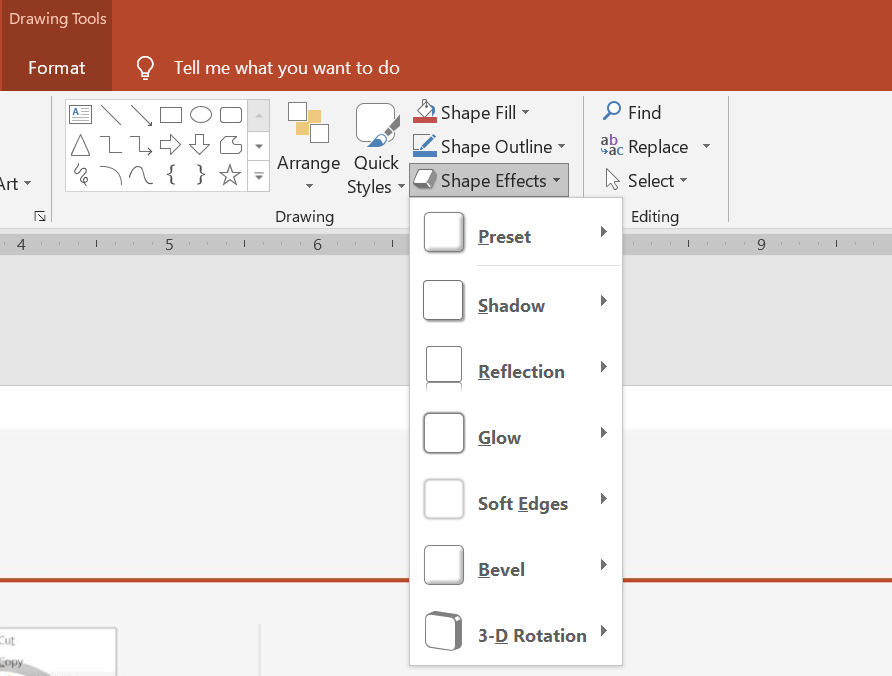
PowerPoint offre sei effetti che possono essere applicati alle forme. È possibile applicare uno o più effetti a una forma.
Alcune combinazioni di effetti appaiono migliori di altre. Per questo motivo, PowerPoint offre opzioni sotto Preset. Le opzioni Preset sono combinazioni di due o più effetti noti per risultare gradevoli. In questo modo, selezionando un preset, non dovrai perdere tempo a testare o combinare diversi effetti per trovare una buona combinazione.
Aspose.Slides fornisce proprietà e metodi nella classe EffectFormat che consentono di applicare gli stessi effetti alle forme nelle presentazioni PowerPoint.
Applicare un effetto ombra
Aspose.Slides per Python via Java supporta ombre esterne e interne per le forme. È possibile personalizzare colore, direzione, distanza e raggio di sfocatura per adattarli al design della presentazione.
Applicare un’ombra esterna
Usa un’ombra esterna per far risaltare una scheda o un pannello sullo sfondo della diapositiva. L’ombra si estende oltre i bordi della forma, creando l’impressione che la forma sia sollevata sopra la diapositiva. Regola colore, direzione, distanza e raggio di sfocatura per adeguarli all’illuminazione e allo stile del modello.
Questo codice Python mostra come applicare l'effetto ombra esterna a un rettangolo:
import jpype
import asposeslides

if not jpype.isJVMStarted():
    jpype.startJVM()

from asposeslides.api import Presentation, SaveFormat, ShapeType
from java.awt import Color

presentation = Presentation()
try:
    slide = presentation.getSlides().get_Item(0)

    shape = slide.getShapes().addAutoShape(ShapeType.RoundCornerRectangle, 20, 20, 200, 100)
    shape.getEffectFormat().enableOuterShadowEffect()
    shape.getEffectFormat().getOuterShadowEffect().getShadowColor().setColor(Color(169, 169, 169))
    shape.getEffectFormat().getOuterShadowEffect().setDistance(10)
    shape.getEffectFormat().getOuterShadowEffect().setDirection(45)

    presentation.save("shadow_effect.pptx", SaveFormat.Pptx)
finally:
    presentation.dispose()

Applicare un’ombra interna
Quando si riproduce lo stile visivo di un modello, usa un’ombra interna per dare a una scheda o a un pannello un aspetto incassato. Un’ombra esterna si estende fuori dalla forma e la fa apparire sollevata, mentre un’ombra interna ombreggia l’interno dei suoi bordi.
Chiama enableInnerShadowEffect, quindi configura l’ombra restituita da getInnerShadowEffect. Valori più alti del raggio di sfocatura producono bordi più morbidi.
Questo esempio Python crea una scheda azzurro chiaro con un’ombra interna grigio scuro e la salva come file PPTX. La direzione dell’ombra è di 225 gradi, la sua distanza è di 7 punti e il raggio di sfocatura è di 6 punti:
import jpype
import asposeslides

if not jpype.isJVMStarted():
    jpype.startJVM()

from asposeslides.api import FillType, Presentation, SaveFormat, ShapeType
from java.awt import Color

presentation = Presentation()
try:
    slide = presentation.getSlides().get_Item(0)

    shape = slide.getShapes().addAutoShape(ShapeType.Rectangle, 20, 20, 200, 100)
    shape.getFillFormat().setFillType(FillType.Solid)
    shape.getFillFormat().getSolidFillColor().setColor(Color(173, 216, 230))
    shape.getLineFormat().getFillFormat().setFillType(FillType.NoFill)

    shape.getEffectFormat().enableInnerShadowEffect()
    shadow = shape.getEffectFormat().getInnerShadowEffect()
    shadow.getShadowColor().setColor(Color(105, 105, 105))
    shadow.setDirection(225)
    shadow.setDistance(7)
    shadow.setBlurRadius(6)

    presentation.save("inner_shadow_effect.pptx", SaveFormat.Pptx)
finally:
    presentation.dispose()

Per rimuovere l’ombra interna, chiama disableInnerShadowEffect sul formato effetti della forma.
Applicare un effetto riflessione
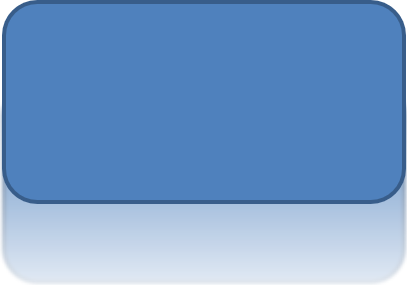
Per applicare un effetto di riflessione in Aspose.Slides per Python via Java, è possibile aggiungere una riflessione simile a uno specchio alle forme, regolando parametri come distanza, trasparenza e dimensione. Questo effetto migliora l’estetica delle presentazioni conferendo alle forme un aspetto più levigato e sofisticato. È facile da implementare con un codice semplice, permettendo un’applicazione rapida su più elementi per un design coerente.
Questo codice Python mostra come applicare l'effetto di riflessione a una forma:
import jpype
import asposeslides

if not jpype.isJVMStarted():
    jpype.startJVM()

from asposeslides.api import Presentation, RectangleAlignment, SaveFormat, ShapeType

presentation = Presentation()
try:
    slide = presentation.getSlides().get_Item(0)

    shape = slide.getShapes().addAutoShape(ShapeType.RoundCornerRectangle, 20, 20, 200, 100)
    shape.getEffectFormat().enableReflectionEffect()
    shape.getEffectFormat().getReflectionEffect().setRectangleAlign(RectangleAlignment.Bottom)
    shape.getEffectFormat().getReflectionEffect().setDirection(90)
    shape.getEffectFormat().getReflectionEffect().setDistance(40)
    shape.getEffectFormat().getReflectionEffect().setBlurRadius(2)

    presentation.save("reflection_effect.pptx", SaveFormat.Pptx)
finally:
    presentation.dispose()
Applicare un effetto bagliore
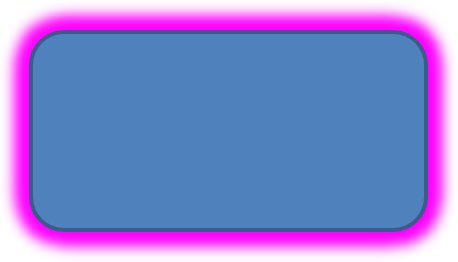
Per applicare un effetto bagliore a una forma in Aspose.Slides per Python via Java, è possibile aggiungere un’aura morbida e luminosa attorno alle forme, regolando proprietà come colore e dimensione. Questo effetto aiuta a far risaltare le forme e aggiunge un elemento visivo attraente e accattivante alla presentazione. È facile da implementare con poco codice, migliorando l’aspetto generale delle diapositive.
Questo codice Python mostra come applicare l'effetto bagliore a una forma:
import jpype
import asposeslides

if not jpype.isJVMStarted():
    jpype.startJVM()

from asposeslides.api import Presentation, SaveFormat, ShapeType
from java.awt import Color

presentation = Presentation()
try:
    slide = presentation.getSlides().get_Item(0)

    shape = slide.getShapes().addAutoShape(ShapeType.RoundCornerRectangle, 20, 20, 200, 100)
    shape.getEffectFormat().enableGlowEffect()
    shape.getEffectFormat().getGlowEffect().getColor().setColor(Color.MAGENTA)
    shape.getEffectFormat().getGlowEffect().setRadius(15)

    presentation.save("glow_effect.pptx", SaveFormat.Pptx)
finally:
    presentation.dispose()
Applicare un effetto bordi morbidi
Per applicare un effetto bordi morbidi in Aspose.Slides per Python via Java, è possibile creare una transizione fluida e sfocata attorno ai bordi di una forma. Questo effetto aggiunge un aspetto più delicato e raffinato, perfetto per progetti che richiedono un’apparenza gentile e più morbida. È possibile regolare facilmente parametri come il raggio per ottenere l’effetto desiderato su varie forme nella presentazione.
Questo codice Python mostra come applicare l'effetto bordi morbidi a una forma:
import jpype
import asposeslides

if not jpype.isJVMStarted():
    jpype.startJVM()

from asposeslides.api import Presentation, SaveFormat, ShapeType

presentation = Presentation()
try:
    slide = presentation.getSlides().get_Item(0)

    shape = slide.getShapes().addAutoShape(ShapeType.RoundCornerRectangle, 20, 20, 200, 150)
    shape.getEffectFormat().enableSoftEdgeEffect()
    shape.getEffectFormat().getSoftEdgeEffect().setRadius(8)

    presentation.save("soft_edges_effect.pptx", SaveFormat.Pptx)
finally:
    presentation.dispose()

FAQ
Posso applicare più effetti alla stessa forma?
Sì, è possibile combinare effetti diversi, come ombra, riflessione e bagliore, su un’unica forma per creare un aspetto più dinamico.
A quali forme posso applicare gli effetti?
È possibile applicare effetti a varie forme, incluse forme automatiche, grafici, tabelle, immagini, oggetti SmartArt, oggetti OLE e altro.
Posso applicare effetti a forme raggruppate?
Sì, è possibile applicare effetti a forme raggruppate. L’effetto verrà applicato all’intero gruppo.