
Aplicar efeitos de forma em apresentações usando Python via Java
Introdução
Enquanto os efeitos no PowerPoint podem ser usados para fazer um objeto se destacar, eles são diferentes de preenchimentos ou contornos. Usando os efeitos do PowerPoint, você pode criar reflexos convincentes em um objeto, espalhar o brilho de um objeto, etc.
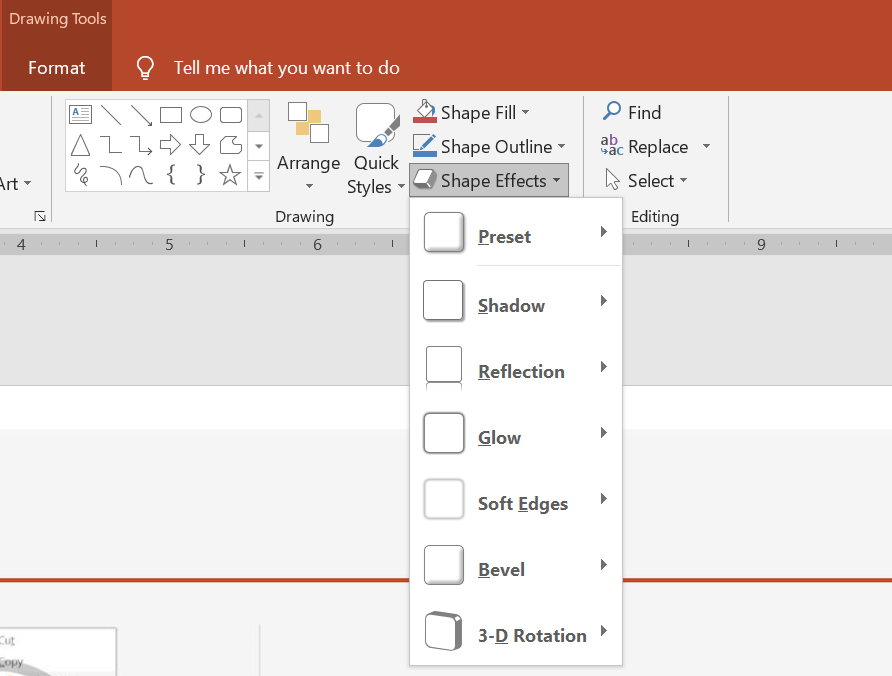
O PowerPoint oferece seis efeitos que podem ser aplicados a objetos. Você pode aplicar um ou mais efeitos a um objeto.
Algumas combinações de efeitos ficam melhores que outras. Por esse motivo, o PowerPoint oferece opções em Predefinição. As opções de Predefinição são combinações de dois ou mais efeitos que são conhecidos por ficar bem. Dessa forma, ao selecionar uma predefinição, você não precisará perder tempo testando ou combinando diferentes efeitos para encontrar uma boa combinação.
Aspose.Slides fornece propriedades e métodos na classe EffectFormat que permitem aplicar os mesmos efeitos a objetos em apresentações do PowerPoint.
Aplicar um efeito de sombra
Aspose.Slides for Python via Java suporta sombras externas e internas para objetos. Você pode personalizar sua cor, direção, distância e raio de desfoque para combinar com o design da sua apresentação.
Aplicar uma sombra externa
Use uma sombra externa para fazer um cartão ou painel se destacar contra o fundo do slide. A sombra se estende além das bordas do objeto, criando a impressão de que o objeto está elevado acima do slide. Ajuste sua cor, direção, distância e raio de desfoque para combinar com a iluminação e o estilo do seu modelo.
Este código Python mostra como aplicar o efeito de sombra externa a um retângulo:
import jpype
import asposeslides

if not jpype.isJVMStarted():
    jpype.startJVM()

from asposeslides.api import Presentation, SaveFormat, ShapeType
from java.awt import Color

presentation = Presentation()
try:
    slide = presentation.getSlides().get_Item(0)

    shape = slide.getShapes().addAutoShape(ShapeType.RoundCornerRectangle, 20, 20, 200, 100)
    shape.getEffectFormat().enableOuterShadowEffect()
    shape.getEffectFormat().getOuterShadowEffect().getShadowColor().setColor(Color(169, 169, 169))
    shape.getEffectFormat().getOuterShadowEffect().setDistance(10)
    shape.getEffectFormat().getOuterShadowEffect().setDirection(45)

    presentation.save("shadow_effect.pptx", SaveFormat.Pptx)
finally:
    presentation.dispose()

Aplicar uma sombra interna
Ao reproduzir o estilo visual de um modelo, use uma sombra interna para dar a um cartão ou painel uma aparência rebaixada. Uma sombra externa se estende fora do objeto e faz com que ele pareça elevado, enquanto uma sombra interna sombreia o interior de suas bordas.
Chame enableInnerShadowEffect, depois configure a sombra retornada por getInnerShadowEffect. Valores maiores de raio de desfoque produzem bordas mais suaves.
Este exemplo Python cria um cartão azul claro com uma sombra interna cinza escura e o salva como um arquivo PPTX. A direção da sombra é 225 graus, sua distância é 7 pontos e seu raio de desfoque é 6 pontos:
import jpype
import asposeslides

if not jpype.isJVMStarted():
    jpype.startJVM()

from asposeslides.api import FillType, Presentation, SaveFormat, ShapeType
from java.awt import Color

presentation = Presentation()
try:
    slide = presentation.getSlides().get_Item(0)

    shape = slide.getShapes().addAutoShape(ShapeType.Rectangle, 20, 20, 200, 100)
    shape.getFillFormat().setFillType(FillType.Solid)
    shape.getFillFormat().getSolidFillColor().setColor(Color(173, 216, 230))
    shape.getLineFormat().getFillFormat().setFillType(FillType.NoFill)

    shape.getEffectFormat().enableInnerShadowEffect()
    shadow = shape.getEffectFormat().getInnerShadowEffect()
    shadow.getShadowColor().setColor(Color(105, 105, 105))
    shadow.setDirection(225)
    shadow.setDistance(7)
    shadow.setBlurRadius(6)

    presentation.save("inner_shadow_effect.pptx", SaveFormat.Pptx)
finally:
    presentation.dispose()

Para remover a sombra interna, chame disableInnerShadowEffect no formato de efeito do objeto.
Aplicar um efeito de reflexão
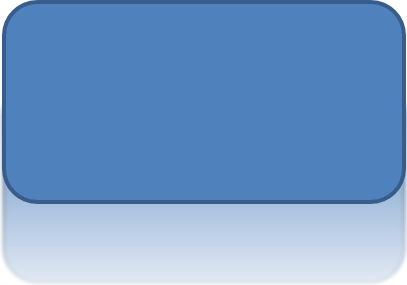
Para aplicar um efeito de reflexão no Aspose.Slides for Python via Java, você pode adicionar uma reflexão semelhante a um espelho aos objetos, ajustando parâmetros como distância, transparência e tamanho. Esse efeito aprimora a estética de suas apresentações ao conferir aos objetos um aspecto mais polido e sofisticado. É fácil de implementar com código simples, permitindo aplicação rápida em vários elementos para um design consistente.
Este código Python mostra como aplicar o efeito de reflexão a um objeto:
import jpype
import asposeslides

if not jpype.isJVMStarted():
    jpype.startJVM()

from asposeslides.api import Presentation, RectangleAlignment, SaveFormat, ShapeType

presentation = Presentation()
try:
    slide = presentation.getSlides().get_Item(0)

    shape = slide.getShapes().addAutoShape(ShapeType.RoundCornerRectangle, 20, 20, 200, 100)
    shape.getEffectFormat().enableReflectionEffect()
    shape.getEffectFormat().getReflectionEffect().setRectangleAlign(RectangleAlignment.Bottom)
    shape.getEffectFormat().getReflectionEffect().setDirection(90)
    shape.getEffectFormat().getReflectionEffect().setDistance(40)
    shape.getEffectFormat().getReflectionEffect().setBlurRadius(2)

    presentation.save("reflection_effect.pptx", SaveFormat.Pptx)
finally:
    presentation.dispose()
Aplicar um efeito de brilho
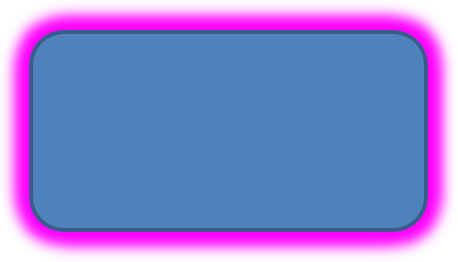
Para aplicar um efeito de brilho a um objeto no Aspose.Slides for Python via Java, você pode adicionar uma aura suave e luminosa ao redor dos objetos, ajustando propriedades como cor e tamanho. Esse efeito ajuda a fazer os objetos se destacarem e adiciona um elemento visual atraente e chamativo à sua apresentação. É fácil de implementar com código mínimo, realçando a aparência geral de seus slides.
Este código Python mostra como aplicar o efeito de brilho a um objeto:
import jpype
import asposeslides

if not jpype.isJVMStarted():
    jpype.startJVM()

from asposeslides.api import Presentation, SaveFormat, ShapeType
from java.awt import Color

presentation = Presentation()
try:
    slide = presentation.getSlides().get_Item(0)

    shape = slide.getShapes().addAutoShape(ShapeType.RoundCornerRectangle, 20, 20, 200, 100)
    shape.getEffectFormat().enableGlowEffect()
    shape.getEffectFormat().getGlowEffect().getColor().setColor(Color.MAGENTA)
    shape.getEffectFormat().getGlowEffect().setRadius(15)

    presentation.save("glow_effect.pptx", SaveFormat.Pptx)
finally:
    presentation.dispose()
Aplicar um efeito de bordas suaves
Para aplicar um efeito de bordas suaves no Aspose.Slides for Python via Java, você pode criar uma transição suave e borrada ao redor das bordas de um objeto. Esse efeito confere um aspecto mais sutil e refinado, perfeito para designs que exigem uma aparência delicada. Você pode ajustar facilmente parâmetros como raio para alcançar o efeito desejado em vários objetos da sua apresentação.
Este código Python mostra como aplicar o efeito de bordas suaves a um objeto:
import jpype
import asposeslides

if not jpype.isJVMStarted():
    jpype.startJVM()

from asposeslides.api import Presentation, SaveFormat, ShapeType

presentation = Presentation()
try:
    slide = presentation.getSlides().get_Item(0)

    shape = slide.getShapes().addAutoShape(ShapeType.RoundCornerRectangle, 20, 20, 200, 150)
    shape.getEffectFormat().enableSoftEdgeEffect()
    shape.getEffectFormat().getSoftEdgeEffect().setRadius(8)

    presentation.save("soft_edges_effect.pptx", SaveFormat.Pptx)
finally:
    presentation.dispose()

Perguntas Frequentes
Posso aplicar múltiplos efeitos ao mesmo objeto?
Sim, você pode combinar diferentes efeitos, como sombra, reflexão e brilho, em um único objeto para criar uma aparência mais dinâmica.
Quais objetos posso aplicar efeitos?
Você pode aplicar efeitos a vários objetos, incluindo formas automáticas, gráficos, tabelas, imagens, objetos SmartArt, objetos OLE e muito mais.
Posso aplicar efeitos a objetos agrupados?
Sim, você pode aplicar efeitos a objetos agrupados. O efeito será aplicado a todo o grupo.