
Gerenciar Listas com Marcadores e Numeradas em Apresentações Usando PHP
Visão geral
Aspose.Slides for PHP via Java permite criar e formatar listas com marcadores e numeradas em apresentações PowerPoint e OpenDocument. Um item de lista é um parágrafo cujas configurações de marcador são controladas por seu formato de parágrafo.
Use o método Paragraph.getParagraphFormat para acessar as configurações de lista ao nível do parágrafo. O ponto de entrada principal é ParagraphFormat.getBullet que devolve um objeto BulletFormat. Com este objeto, você pode definir o tipo de marcador, símbolo, imagem, cor, tamanho, estilo de numeração e número inicial.
Este artigo mostra como:
- criar uma lista com marcadores usando um símbolo personalizado
- criar um marcador de imagem
- criar uma lista multinível definindo a profundidade do parágrafo
- criar uma lista numerada
- inspecionar e alterar a formatação de lista em uma apresentação existente
Criar uma Lista com Marcadores
Para criar uma lista com marcadores, adicione objetos Paragraph a um TextFrame e defina BulletFormat.setType para BulletType.Symbol. Em seguida, você pode definir BulletFormat.setChar, BulletFormat.getColor e BulletFormat.setHeight para controlar a aparência do marcador.
O código PHP a seguir demonstra como criar uma lista com marcadores em um slide:
function createParagraph($paragraphText)
{
    $paragraph = new Paragraph();
    $paragraph->getParagraphFormat()->getBullet()->setType(BulletType::Symbol);
    $paragraph->getParagraphFormat()->getBullet()->setChar("*");
    $paragraph->getParagraphFormat()->setIndent(15);
    $paragraph->getParagraphFormat()->getBullet()->setBulletHardColor(NullableBool::True);
    $bulletColor = new Java("java.awt.Color", 205, 92, 92);
    $paragraph->getParagraphFormat()->getBullet()->getColor()->setColor($bulletColor);
    $paragraph->getParagraphFormat()->getBullet()->setHeight(100);
    $paragraph->setText($paragraphText);
    return $paragraph;
}

$presentation = new Presentation();
try {
    $slide = $presentation->getSlides()->get_Item(0);
    $autoShape = $slide->getShapes()->addAutoShape(ShapeType::Rectangle, 20, 20, 200, 50);

    $textFrame = $autoShape->getTextFrame();
    $textFrame->getParagraphs()->clear();

    $paragraph1 = createParagraph("The first paragraph");
    $textFrame->getParagraphs()->add($paragraph1);

    $paragraph2 = createParagraph("The second paragraph");
    $textFrame->getParagraphs()->add($paragraph2);

    $presentation->save("symbol_bullets.pptx", SaveFormat::Pptx);
} finally {
    if (!java_is_null($presentation)) {
        $presentation->dispose();
    }
}
O resultado:

Criar uma Lista Numerada
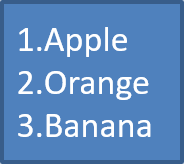
Use listas numeradas quando a ordem dos itens for importante. Defina BulletFormat.setType para BulletType.Numbered. Você também pode escolher um formato de numeração com BulletFormat.setNumberedBulletStyle ou definir BulletFormat.setNumberedBulletStartWith quando a lista deve iniciar a partir de um valor diferente de 1.
O código PHP a seguir mostra como criar uma lista numerada em um slide:
$presentation = new Presentation();
try {
    $slide = $presentation->getSlides()->get_Item(0);
    $autoShape = $slide->getShapes()->addAutoShape(ShapeType::Rectangle, 20, 20, 90, 80);

    $textFrame = $autoShape->getTextFrame();
    $textFrame->getParagraphs()->clear();

    $paragraph1 = new Paragraph();
    $paragraph1->getParagraphFormat()->getBullet()->setType(BulletType::Numbered);
    $paragraph1->setText("Apple");
    $textFrame->getParagraphs()->add($paragraph1);

    $paragraph2 = new Paragraph();
    $paragraph2->getParagraphFormat()->getBullet()->setType(BulletType::Numbered);
    $paragraph2->setText("Orange");
    $textFrame->getParagraphs()->add($paragraph2);

    $paragraph3 = new Paragraph();
    $paragraph3->getParagraphFormat()->getBullet()->setType(BulletType::Numbered);
    $paragraph3->setText("Banana");
    $textFrame->getParagraphs()->add($paragraph3);

    $presentation->save("numbered_bullets.pptx", SaveFormat::Pptx);
} finally {
    if (!java_is_null($presentation)) {
        $presentation->dispose();
    }
}
O resultado:
Criar um Marcador de Imagem
Aspose.Slides permite substituir um símbolo de marcador comum por uma imagem. Marcadores de imagem funcionam melhor com imagens simples que permanecem legíveis em tamanho pequeno, como ícones ou arquivos PNG transparentes.
Idealmente, se você pretende substituir o símbolo de marcador padrão por uma imagem, é recomendado escolher um gráfico simples com fundo transparente. Essas imagens funcionam bem como símbolos de marcador personalizados.
Tenha em mente que a imagem será reduzida a um tamanho muito pequeno. Por esse motivo, recomendamos fortemente selecionar uma imagem que continue clara e visualmente eficaz quando usada como marcador em uma lista.
Para criar um marcador de imagem, adicione uma imagem a Presentation.getImages e atribua o objeto PPImage retornado a BulletFormat.getPicture. Defina BulletFormat.setType para BulletType.Picture antes de atribuir a imagem.
Vamos supor que temos um “image.png”:

O código PHP a seguir mostra como criar marcadores de imagem em um slide:
function createParagraph($paragraphText, $bulletImage)
{
    $paragraph = new Paragraph();
    $paragraph->getParagraphFormat()->getBullet()->setType(BulletType::Picture);
    $paragraph->getParagraphFormat()->getBullet()->getPicture()->setImage($bulletImage);
    $paragraph->getParagraphFormat()->setIndent(15);
    $paragraph->getParagraphFormat()->getBullet()->setHeight(100);
    $paragraph->setText($paragraphText);
    return $paragraph;
}

$presentation = new Presentation();
try {
    $slide = $presentation->getSlides()->get_Item(0);
    $autoShape = $slide->getShapes()->addAutoShape(ShapeType::Rectangle, 20, 20, 200, 50);

    $textFrame = $autoShape->getTextFrame();
    $textFrame->getParagraphs()->clear();

    $image = Images::fromFile("image.png");
    $bulletImage = $presentation->getImages()->addImage($image);

    $paragraph1 = createParagraph("The first paragraph", $bulletImage);
    $textFrame->getParagraphs()->add($paragraph1);

    $paragraph2 = createParagraph("The second paragraph", $bulletImage);
    $textFrame->getParagraphs()->add($paragraph2);

    $presentation->save("picture_bullets.pptx", SaveFormat::Pptx);
} finally {
    if (!java_is_null($presentation)) {
        $presentation->dispose();
    }
}
O resultado:

Criar uma Lista Multinível
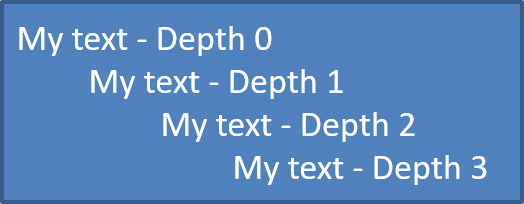
Use ParagraphFormat.setDepth para posicionar itens de lista em diferentes níveis. O nível 0 é o nível superior, o nível 1 está aninhado abaixo dele e assim por diante.
O código PHP a seguir mostra como criar uma lista multinível com marcadores:
$presentation = new Presentation();
try {
    $slide = $presentation->getSlides()->get_Item(0);
    $autoShape = $slide->getShapes()->addAutoShape(ShapeType::Rectangle, 20, 20, 260, 110);

    $textFrame = $autoShape->getTextFrame();
    $textFrame->getParagraphs()->clear();

    $paragraph1 = new Paragraph();
    $paragraph1->getParagraphFormat()->setDepth(0);
    $paragraph1->setText("My text - Depth 0");
    $textFrame->getParagraphs()->add($paragraph1);

    $paragraph2 = new Paragraph();
    $paragraph2->getParagraphFormat()->setDepth(1);
    $paragraph2->setText("My text - Depth 1");
    $textFrame->getParagraphs()->add($paragraph2);

    $paragraph3 = new Paragraph();
    $paragraph3->getParagraphFormat()->setDepth(2);
    $paragraph3->setText("My text - Depth 2");
    $textFrame->getParagraphs()->add($paragraph3);

    $paragraph4 = new Paragraph();
    $paragraph4->getParagraphFormat()->setDepth(3);
    $paragraph4->setText("My text - Depth 3");
    $textFrame->getParagraphs()->add($paragraph4);

    $presentation->save("multilevel_bullets.pptx", SaveFormat::Pptx);
} finally {
    if (!java_is_null($presentation)) {
        $presentation->dispose();
    }
}
O resultado:
Alterar uma Lista Existente
Para alterar a formatação de lista em uma apresentação existente, acesse o parágrafo alvo e atualize suas configurações de ParagraphFormat.getBullet. As mesmas propriedades usadas para criar listas podem ser usadas para inspecionar ou modificar listas carregadas de um arquivo PPT, PPTX ou ODP.
O código PHP a seguir altera o primeiro parágrafo em um quadro de texto para usar um estilo de lista numerada:
$presentation = new Presentation("input.pptx");
try {
    $slide = $presentation->getSlides()->get_Item(0);
    $autoShape = $slide->getShapes()->get_Item(0);
    $paragraph = $autoShape->getTextFrame()->getParagraphs()->get_Item(0);

    $paragraph->getParagraphFormat()->getBullet()->setType(BulletType::Numbered);
    $paragraph->getParagraphFormat()->getBullet()->setNumberedBulletStyle(NumberedBulletStyle::BulletRomanUCPeriod);
    $paragraph->getParagraphFormat()->getBullet()->setNumberedBulletStartWith(1);
    $paragraph->getParagraphFormat()->setMarginLeft(30);
    $paragraph->getParagraphFormat()->setIndent(-20);

    $presentation->save("updated_list.pptx", SaveFormat::Pptx);
} finally {
    if (!java_is_null($presentation)) {
        $presentation->dispose();
    }
}
Perguntas Frequentes
As listas com marcadores e numeradas podem ser exportadas para PDF ou imagens?
Sim. Aspose.Slides preserva a formatação da lista quando o formato de destino suporta o layout de texto correspondente e os recursos de marcadores.
Posso editar listas em apresentações existentes?
Sim. Carregue a apresentação, acesse o parágrafo alvo, inspecione ou atualize suas configurações de ParagraphFormat.getBullet, e salve a apresentação.
As listas podem conter texto não latino?
Sim. O texto dos itens de lista pode conter caracteres Unicode, permitindo criar listas em apresentações multilíngues. Certifique‑se de que as fontes usadas na apresentação suportam os caracteres necessários.