
PHP를 사용하여 프레젠테이션에서 글머리표 및 번호 매기기 목록 관리
개요
Aspose.Slides for PHP via Java을 사용하면 PowerPoint 및 OpenDocument 프레젠테이션에서 글머리표 및 번호 매기기 목록을 만들고 서식 지정할 수 있습니다. 목록 항목은 글머리표 설정이 해당 단락 서식을 통해 제어되는 단락입니다.
단락 수준의 목록 설정에 액세스하려면 Paragraph.getParagraphFormat 메서드를 사용합니다. 주요 진입점은 ParagraphFormat.getBullet이며, 이는 BulletFormat 객체를 반환합니다. 이 객체를 사용하여 글머리표 유형, 기호, 그림, 색상, 크기, 번호 매기기 스타일 및 시작 번호를 설정할 수 있습니다.
This article shows how to:
- 사용자 정의 기호를 사용한 글머리표 목록 만들기
- 그림 글머리표 만들기
- 단락 깊이를 설정하여 다중 수준 목록 만들기
- 번호 매기기 목록 만들기
- 기존 프레젠테이션에서 목록 서식을 검사하고 변경하기
글머리표 목록 만들기
글머리표 목록을 만들려면 Paragraph 객체를 TextFrame에 추가하고 BulletFormat.setType을 BulletType.Symbol으로 설정합니다. 그런 다음 BulletFormat.setChar, BulletFormat.getColor, 및 BulletFormat.setHeight를 설정하여 글머리표 모양을 제어할 수 있습니다.
다음 PHP 코드는 슬라이드에서 글머리표 목록을 만드는 방법을 보여줍니다:
function createParagraph($paragraphText)
{
    $paragraph = new Paragraph();
    $paragraph->getParagraphFormat()->getBullet()->setType(BulletType::Symbol);
    $paragraph->getParagraphFormat()->getBullet()->setChar("*");
    $paragraph->getParagraphFormat()->setIndent(15);
    $paragraph->getParagraphFormat()->getBullet()->setBulletHardColor(NullableBool::True);
    $bulletColor = new Java("java.awt.Color", 205, 92, 92);
    $paragraph->getParagraphFormat()->getBullet()->getColor()->setColor($bulletColor);
    $paragraph->getParagraphFormat()->getBullet()->setHeight(100);
    $paragraph->setText($paragraphText);
    return $paragraph;
}

$presentation = new Presentation();
try {
    $slide = $presentation->getSlides()->get_Item(0);
    $autoShape = $slide->getShapes()->addAutoShape(ShapeType::Rectangle, 20, 20, 200, 50);

    $textFrame = $autoShape->getTextFrame();
    $textFrame->getParagraphs()->clear();

    $paragraph1 = createParagraph("The first paragraph");
    $textFrame->getParagraphs()->add($paragraph1);

    $paragraph2 = createParagraph("The second paragraph");
    $textFrame->getParagraphs()->add($paragraph2);

    $presentation->save("symbol_bullets.pptx", SaveFormat::Pptx);
} finally {
    if (!java_is_null($presentation)) {
        $presentation->dispose();
    }
}
결과:

번호 매기기 목록 만들기
항목 순서가 중요한 경우 번호 매기기 목록을 사용합니다. BulletFormat.setType을 BulletType.Numbered으로 설정합니다. 또한 BulletFormat.setNumberedBulletStyle를 사용하여 번호 매기기 형식을 선택하거나, 목록을 1이 아닌 다른 값에서 시작하도록 할 경우 BulletFormat.setNumberedBulletStartWith를 설정할 수 있습니다.
다음 PHP 코드는 슬라이드에서 번호 매기기 목록을 만드는 방법을 보여줍니다:
$presentation = new Presentation();
try {
    $slide = $presentation->getSlides()->get_Item(0);
    $autoShape = $slide->getShapes()->addAutoShape(ShapeType::Rectangle, 20, 20, 90, 80);

    $textFrame = $autoShape->getTextFrame();
    $textFrame->getParagraphs()->clear();

    $paragraph1 = new Paragraph();
    $paragraph1->getParagraphFormat()->getBullet()->setType(BulletType::Numbered);
    $paragraph1->setText("Apple");
    $textFrame->getParagraphs()->add($paragraph1);

    $paragraph2 = new Paragraph();
    $paragraph2->getParagraphFormat()->getBullet()->setType(BulletType::Numbered);
    $paragraph2->setText("Orange");
    $textFrame->getParagraphs()->add($paragraph2);

    $paragraph3 = new Paragraph();
    $paragraph3->getParagraphFormat()->getBullet()->setType(BulletType::Numbered);
    $paragraph3->setText("Banana");
    $textFrame->getParagraphs()->add($paragraph3);

    $presentation->save("numbered_bullets.pptx", SaveFormat::Pptx);
} finally {
    if (!java_is_null($presentation)) {
        $presentation->dispose();
    }
}
결과:
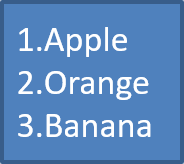
그림 글머리표 만들기
Aspose.Slides를 사용하면 일반 글머리표 기호를 이미지로 교체할 수 있습니다. 그림 글머리표는 아이콘이나 작은 투명 PNG 파일처럼 작은 크기에서도 읽을 수 있는 단순한 이미지와 가장 잘 어울립니다.
가능하면 일반 글머리표 기호를 이미지로 교체하려는 경우, 투명 배경의 단순한 그래픽을 선택하는 것이 가장 좋습니다. 이러한 이미지는 사용자 정의 글머리표 기호로 잘 사용됩니다.
이미지가 매우 작은 크기로 축소된다는 점을 기억하십시오. 따라서 목록에서 글머리표로 사용할 때도 선명하고 시각적으로 효과적인 이미지를 선택하는 것이 강력히 권장됩니다.
그림 글머리표를 만들려면 Presentation.getImages에 이미지를 추가하고 반환된 PPImage 객체를 BulletFormat.getPicture에 할당합니다. 이미지를 할당하기 전에 BulletFormat.setType을 BulletType.Picture으로 설정합니다.
예를 들어 “image.png"가 있다고 가정해 보겠습니다:

다음 PHP 코드는 슬라이드에서 그림 글머리표를 만드는 방법을 보여줍니다:
function createParagraph($paragraphText, $bulletImage)
{
    $paragraph = new Paragraph();
    $paragraph->getParagraphFormat()->getBullet()->setType(BulletType::Picture);
    $paragraph->getParagraphFormat()->getBullet()->getPicture()->setImage($bulletImage);
    $paragraph->getParagraphFormat()->setIndent(15);
    $paragraph->getParagraphFormat()->getBullet()->setHeight(100);
    $paragraph->setText($paragraphText);
    return $paragraph;
}

$presentation = new Presentation();
try {
    $slide = $presentation->getSlides()->get_Item(0);
    $autoShape = $slide->getShapes()->addAutoShape(ShapeType::Rectangle, 20, 20, 200, 50);

    $textFrame = $autoShape->getTextFrame();
    $textFrame->getParagraphs()->clear();

    $image = Images::fromFile("image.png");
    $bulletImage = $presentation->getImages()->addImage($image);

    $paragraph1 = createParagraph("The first paragraph", $bulletImage);
    $textFrame->getParagraphs()->add($paragraph1);

    $paragraph2 = createParagraph("The second paragraph", $bulletImage);
    $textFrame->getParagraphs()->add($paragraph2);

    $presentation->save("picture_bullets.pptx", SaveFormat::Pptx);
} finally {
    if (!java_is_null($presentation)) {
        $presentation->dispose();
    }
}
결과:

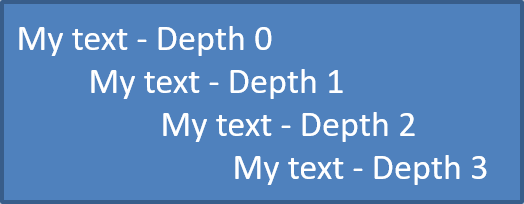
다중 수준 목록 만들기
ParagraphFormat.setDepth를 사용하여 목록 항목을 다른 수준에 배치합니다. 레벨 0은 최상위 수준이며, 레벨 1은 그 아래에 중첩되고, 계속해서 이어집니다.
다음 PHP 코드는 다중 수준 글머리표 목록을 만드는 방법을 보여줍니다:
$presentation = new Presentation();
try {
    $slide = $presentation->getSlides()->get_Item(0);
    $autoShape = $slide->getShapes()->addAutoShape(ShapeType::Rectangle, 20, 20, 260, 110);

    $textFrame = $autoShape->getTextFrame();
    $textFrame->getParagraphs()->clear();

    $paragraph1 = new Paragraph();
    $paragraph1->getParagraphFormat()->setDepth(0);
    $paragraph1->setText("My text - Depth 0");
    $textFrame->getParagraphs()->add($paragraph1);

    $paragraph2 = new Paragraph();
    $paragraph2->getParagraphFormat()->setDepth(1);
    $paragraph2->setText("My text - Depth 1");
    $textFrame->getParagraphs()->add($paragraph2);

    $paragraph3 = new Paragraph();
    $paragraph3->getParagraphFormat()->setDepth(2);
    $paragraph3->setText("My text - Depth 2");
    $textFrame->getParagraphs()->add($paragraph3);

    $paragraph4 = new Paragraph();
    $paragraph4->getParagraphFormat()->setDepth(3);
    $paragraph4->setText("My text - Depth 3");
    $textFrame->getParagraphs()->add($paragraph4);

    $presentation->save("multilevel_bullets.pptx", SaveFormat::Pptx);
} finally {
    if (!java_is_null($presentation)) {
        $presentation->dispose();
    }
}
결과:
기존 목록 변경
기존 프레젠테이션에서 목록 서식을 변경하려면 대상 단락에 접근하여 해당 ParagraphFormat.getBullet 설정을 업데이트합니다. 목록을 만들 때 사용한 동일한 속성을 사용하여 PPT, PPTX 또는 ODP 파일에서 로드한 목록을 검사하거나 수정할 수 있습니다.
다음 PHP 코드는 텍스트 프레임의 첫 번째 단락을 번호 매기기 목록 스타일로 변경합니다:
$presentation = new Presentation("input.pptx");
try {
    $slide = $presentation->getSlides()->get_Item(0);
    $autoShape = $slide->getShapes()->get_Item(0);
    $paragraph = $autoShape->getTextFrame()->getParagraphs()->get_Item(0);

    $paragraph->getParagraphFormat()->getBullet()->setType(BulletType::Numbered);
    $paragraph->getParagraphFormat()->getBullet()->setNumberedBulletStyle(NumberedBulletStyle::BulletRomanUCPeriod);
    $paragraph->getParagraphFormat()->getBullet()->setNumberedBulletStartWith(1);
    $paragraph->getParagraphFormat()->setMarginLeft(30);
    $paragraph->getParagraphFormat()->setIndent(-20);

    $presentation->save("updated_list.pptx", SaveFormat::Pptx);
} finally {
    if (!java_is_null($presentation)) {
        $presentation->dispose();
    }
}
FAQ
글머리표 및 번호 매기기 목록을 PDF 또는 이미지로 내보낼 수 있나요?
예. Aspose.Slides는 대상 형식이 해당 텍스트 레이아웃 및 글머리표 기능을 지원할 경우 목록 서식을 유지합니다.
기존 프레젠테이션에서 목록을 편집할 수 있나요?
예. 프레젠테이션을 로드하고, 대상 단락에 접근하여 해당 ParagraphFormat.getBullet 설정을 검사하거나 업데이트한 후 프레젠테이션을 저장합니다.
목록에 비라틴 문자 텍스트를 포함할 수 있나요?
예. 목록 항목 텍스트는 Unicode 문자를 포함할 수 있으므로 다국어 프레젠테이션에서도 목록을 만들 수 있습니다. 프레젠테이션에 사용된 글꼴이 필요한 문자를 지원하는지 확인하십시오.