
จัดการรายการหัวข้อแบบบูลเล็ตและลำดับเลขในงานนำเสนอโดยใช้ PHP
ภาพรวม
Aspose.Slides for PHP via Java ให้คุณสร้างและจัดรูปแบบรายการที่มีสัญลักษณ์หัวข้อ (bulleted) และรายการลำดับเลข (numbered) ในงานนำเสนอ PowerPoint และ OpenDocument รายการหนึ่งเป็นย่อหน้าที่การตั้งค่าสัญลักษณ์หัวข้อถูกควบคุมผ่านรูปแบบย่อหน้า (paragraph format) ของมัน
ใช้เมธอด Paragraph.getParagraphFormat เพื่อเข้าถึงการตั้งค่ารายการระดับย่อหน้า จุดเริ่มต้นหลักคือเมธอด ParagraphFormat.getBullet ซึ่งจะคืนค่าอ็อบเจ็กต์ BulletFormat ด้วยอ็อบเจ็กต์นี้ คุณสามารถตั้งค่าชนิดสัญลักษณ์หัวข้อ, สัญลักษณ์, รูปภาพ, สี, ขนาด, รูปแบบการนับเลข, และเลขเริ่มต้นได้
บทความนี้แสดงวิธี:
- สร้างรายการที่มีสัญลักษณ์หัวข้อด้วยสัญลักษณ์ที่กำหนดเอง
- สร้างสัญลักษณ์หัวข้อแบบรูปภาพ
- สร้างรายการหลายระดับโดยตั้งค่าความลึกของย่อหน้า
- สร้างรายการลำดับเลข
- ตรวจสอบและเปลี่ยนการจัดรูปแบบรายการในงานนำเสนอที่มีอยู่
สร้างรายการที่มีสัญลักษณ์หัวข้อ
เพื่อสร้างรายการที่มีสัญลักษณ์หัวข้อ ให้เพิ่มอ็อบเจ็กต์ Paragraph ไปยังอ็อบเจ็กต์ TextFrame และตั้งค่า BulletFormat.setType เป็น BulletType.Symbol จากนั้นคุณสามารถตั้งค่า BulletFormat.setChar, BulletFormat.getColor, และ BulletFormat.setHeight เพื่อควบคุมลักษณะของสัญลักษณ์หัวข้อได้
โค้ด PHP ต่อไปนี้สาธิตวิธีสร้างรายการที่มีสัญลักษณ์หัวข้อในสไลด์:
function createParagraph($paragraphText)
{
    $paragraph = new Paragraph();
    $paragraph->getParagraphFormat()->getBullet()->setType(BulletType::Symbol);
    $paragraph->getParagraphFormat()->getBullet()->setChar("*");
    $paragraph->getParagraphFormat()->setIndent(15);
    $paragraph->getParagraphFormat()->getBullet()->setBulletHardColor(NullableBool::True);
    $bulletColor = new Java("java.awt.Color", 205, 92, 92);
    $paragraph->getParagraphFormat()->getBullet()->getColor()->setColor($bulletColor);
    $paragraph->getParagraphFormat()->getBullet()->setHeight(100);
    $paragraph->setText($paragraphText);
    return $paragraph;
}

$presentation = new Presentation();
try {
    $slide = $presentation->getSlides()->get_Item(0);
    $autoShape = $slide->getShapes()->addAutoShape(ShapeType::Rectangle, 20, 20, 200, 50);

    $textFrame = $autoShape->getTextFrame();
    $textFrame->getParagraphs()->clear();

    $paragraph1 = createParagraph("The first paragraph");
    $textFrame->getParagraphs()->add($paragraph1);

    $paragraph2 = createParagraph("The second paragraph");
    $textFrame->getParagraphs()->add($paragraph2);

    $presentation->save("symbol_bullets.pptx", SaveFormat::Pptx);
} finally {
    if (!java_is_null($presentation)) {
        $presentation->dispose();
    }
}
ผลลัพธ์:

สร้างรายการลำดับเลข
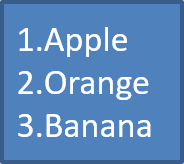
ใช้รายการลำดับเลขเมื่อลำดับของรายการมีความสำคัญ ตั้งค่า BulletFormat.setType เป็น BulletType.Numbered คุณยังสามารถเลือกรูปแบบการนับเลขด้วยเมธอด BulletFormat.setNumberedBulletStyle หรือกำหนดค่าเริ่มต้นด้วย BulletFormat.setNumberedBulletStartWith เมื่อรายการควรเริ่มจากค่าที่ไม่ใช่ 1
โค้ด PHP ต่อไปนี้แสดงวิธีสร้างรายการลำดับเลขในสไลด์:
$presentation = new Presentation();
try {
    $slide = $presentation->getSlides()->get_Item(0);
    $autoShape = $slide->getShapes()->addAutoShape(ShapeType::Rectangle, 20, 20, 90, 80);

    $textFrame = $autoShape->getTextFrame();
    $textFrame->getParagraphs()->clear();

    $paragraph1 = new Paragraph();
    $paragraph1->getParagraphFormat()->getBullet()->setType(BulletType::Numbered);
    $paragraph1->setText("Apple");
    $textFrame->getParagraphs()->add($paragraph1);

    $paragraph2 = new Paragraph();
    $paragraph2->getParagraphFormat()->getBullet()->setType(BulletType::Numbered);
    $paragraph2->setText("Orange");
    $textFrame->getParagraphs()->add($paragraph2);

    $paragraph3 = new Paragraph();
    $paragraph3->getParagraphFormat()->getBullet()->setType(BulletType::Numbered);
    $paragraph3->setText("Banana");
    $textFrame->getParagraphs()->add($paragraph3);

    $presentation->save("numbered_bullets.pptx", SaveFormat::Pptx);
} finally {
    if (!java_is_null($presentation)) {
        $presentation->dispose();
    }
}
ผลลัพธ์:
สร้างสัญลักษณ์หัวข้อแบบรูปภาพ
Aspose.Slides อนุญาตให้คุณแทนที่สัญลักษณ์หัวข้อปกติด้วยรูปภาพ สัญลักษณ์หัวข้อแบบรูปภาพทำงานดีที่สุดกับรูปภาพที่เรียบง่ายและยังคงอ่านได้เมื่อขนาดเล็ก เช่น ไอคอนหรือไฟล์ PNG โปร่งแสงขนาดเล็ก
ควรจำว่า รูปภาพจะถูกย่อขนาดลงเป็นขนาดเล็กมาก ดังนั้นเราขอแนะนำอย่างยิ่งให้เลือกภาพที่ยังคงคมชัดและมีประสิทธิภาพเชิงภาพเมื่อนำไปใช้เป็นสัญลักษณ์หัวข้อในรายการ
เพื่อสร้างสัญลักษณ์หัวข้อแบบรูปภาพ ให้เพิ่มรูปภาพไปยังเมธอด Presentation.getImages แล้วกำหนดอ็อบเจ็กต์ PPImage ที่คืนค่าให้กับเมธอด BulletFormat.getPicture ตั้งค่า BulletFormat.setType เป็น BulletType.Picture ก่อนกำหนดรูปภาพ
สมมติว่าเรามีไฟล์ “image.png”:

โค้ด PHP ต่อไปนี้แสดงวิธีสร้างสัญลักษณ์หัวข้อแบบรูปภาพในสไลด์:
function createParagraph($paragraphText, $bulletImage)
{
    $paragraph = new Paragraph();
    $paragraph->getParagraphFormat()->getBullet()->setType(BulletType::Picture);
    $paragraph->getParagraphFormat()->getBullet()->getPicture()->setImage($bulletImage);
    $paragraph->getParagraphFormat()->setIndent(15);
    $paragraph->getParagraphFormat()->getBullet()->setHeight(100);
    $paragraph->setText($paragraphText);
    return $paragraph;
}

$presentation = new Presentation();
try {
    $slide = $presentation->getSlides()->get_Item(0);
    $autoShape = $slide->getShapes()->addAutoShape(ShapeType::Rectangle, 20, 20, 200, 50);

    $textFrame = $autoShape->getTextFrame();
    $textFrame->getParagraphs()->clear();

    $image = Images::fromFile("image.png");
    $bulletImage = $presentation->getImages()->addImage($image);

    $paragraph1 = createParagraph("The first paragraph", $bulletImage);
    $textFrame->getParagraphs()->add($paragraph1);

    $paragraph2 = createParagraph("The second paragraph", $bulletImage);
    $textFrame->getParagraphs()->add($paragraph2);

    $presentation->save("picture_bullets.pptx", SaveFormat::Pptx);
} finally {
    if (!java_is_null($presentation)) {
        $presentation->dispose();
    }
}
ผลลัพธ์:

สร้างรายการหลายระดับ
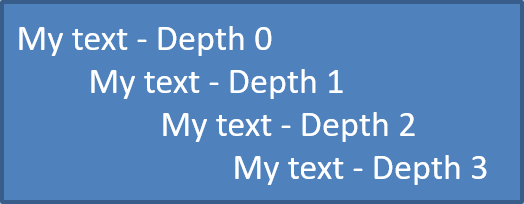
ใช้เมธอด ParagraphFormat.setDepth เพื่อวางรายการในระดับที่ต่างกัน ระดับ 0 คือระดับบนสุด, ระดับ 1 อยู่ภายในระดับนั้น, และต่อไปเรื่อย ๆ
โค้ด PHP ต่อไปนี้แสดงวิธีสร้างรายการหัวข้อหลายระดับ:
$presentation = new Presentation();
try {
    $slide = $presentation->getSlides()->get_Item(0);
    $autoShape = $slide->getShapes()->addAutoShape(ShapeType::Rectangle, 20, 20, 260, 110);

    $textFrame = $autoShape->getTextFrame();
    $textFrame->getParagraphs()->clear();

    $paragraph1 = new Paragraph();
    $paragraph1->getParagraphFormat()->setDepth(0);
    $paragraph1->setText("My text - Depth 0");
    $textFrame->getParagraphs()->add($paragraph1);

    $paragraph2 = new Paragraph();
    $paragraph2->getParagraphFormat()->setDepth(1);
    $paragraph2->setText("My text - Depth 1");
    $textFrame->getParagraphs()->add($paragraph2);

    $paragraph3 = new Paragraph();
    $paragraph3->getParagraphFormat()->setDepth(2);
    $paragraph3->setText("My text - Depth 2");
    $textFrame->getParagraphs()->add($paragraph3);

    $paragraph4 = new Paragraph();
    $paragraph4->getParagraphFormat()->setDepth(3);
    $paragraph4->setText("My text - Depth 3");
    $textFrame->getParagraphs()->add($paragraph4);

    $presentation->save("multilevel_bullets.pptx", SaveFormat::Pptx);
} finally {
    if (!java_is_null($presentation)) {
        $presentation->dispose();
    }
}
ผลลัพธ์:
เปลี่ยนรายการที่มีอยู่
เพื่อเปลี่ยนรูปแบบรายการในงานนำเสนอที่มีอยู่ ให้เข้าถึงย่อหน้าที่ต้องการและอัปเดตการตั้งค่า ParagraphFormat.getBullet ของมัน คุณสามารถใช้คุณสมบัติเดียวกับที่ใช้สร้างรายการเพื่อตรวจสอบหรือแก้ไขรายการที่โหลดจากไฟล์ PPT, PPTX หรือ ODP
โค้ด PHP ต่อไปนี้เปลี่ยนย่อหน้าแรกใน TextFrame ให้ใช้รูปแบบรายการลำดับเลข:
$presentation = new Presentation("input.pptx");
try {
    $slide = $presentation->getSlides()->get_Item(0);
    $autoShape = $slide->getShapes()->get_Item(0);
    $paragraph = $autoShape->getTextFrame()->getParagraphs()->get_Item(0);

    $paragraph->getParagraphFormat()->getBullet()->setType(BulletType::Numbered);
    $paragraph->getParagraphFormat()->getBullet()->setNumberedBulletStyle(NumberedBulletStyle::BulletRomanUCPeriod);
    $paragraph->getParagraphFormat()->getBullet()->setNumberedBulletStartWith(1);
    $paragraph->getParagraphFormat()->setMarginLeft(30);
    $paragraph->getParagraphFormat()->setIndent(-20);

    $presentation->save("updated_list.pptx", SaveFormat::Pptx);
} finally {
    if (!java_is_null($presentation)) {
        $presentation->dispose();
    }
}
คำถามที่พบบ่อย
สามารถส่งออกรายการหัวข้อและรายการลำดับเลขเป็น PDF หรือรูปภาพได้หรือไม่?
ได้ Aspose.Slides จะรักษาการจัดรูปแบบรายการเมื่อรูปแบบปลายทางรองรับการจัดวางข้อความและคุณสมบัติหัวข้อที่สอดคล้องกัน
ฉันสามารถแก้ไขรายการในงานนำเสนอที่มีอยู่ได้หรือไม่?
ได้ โหลดงานนำเสนอ, เข้าถึงย่อหน้าที่ต้องการ, ตรวจสอบหรืออัปเดตการตั้งค่า ParagraphFormat.getBullet ของมัน, แล้วบันทึกงานนำเสนอ
รายการสามารถรวมข้อความที่ไม่ใช่ละตินได้หรือไม่?
ได้ ข้อความของรายการสามารถมีอักขระยูนิโค้ดได้ ดังนั้นคุณสามารถสร้างรายการในงานนำเสนอหลายภาษได้ ตรวจสอบให้แน่ใจว่าแบบอักษรที่ใช้ในงานนำเสนอรองรับอักขระที่คุณต้องการ