
Quản lý các connector trong bản trình chiếu trên Android
Tổng quan
Một connector là một đường có thể vẫn được gắn vào hai shape khi bất kỳ shape nào di chuyển. Các đầu của nó gắn vào các connection site, được biểu thị bằng các chấm xanh trong PowerPoint. Một số connector cong và uốn cũng cung cấp các điểm điều chỉnh, được biểu thị bằng các chấm cam, điều khiển vị trí của các đoạn connector riêng lẻ.
Aspose.Slides biểu diễn các connector thông qua giao diện IConnector. Bạn có thể tạo chúng, gắn các đầu vào shape, chọn connection site, reroute chúng và sửa đổi hình học của các connector có điểm điều chỉnh.
Các loại connector
Lớp ShapeType bao gồm các preset connector thẳng, uốn và cong. Bảng dưới đây hiển thị các hình học connector có sẵn và số điểm điều chỉnh được định nghĩa cho từng preset.
| Connector | Image | Number of adjustment points |
|---|---|---|
ShapeType.Line |
 |
0 |
ShapeType.StraightConnector1 |
 |
0 |
ShapeType.BentConnector2 |
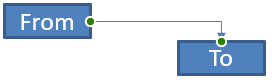 |
0 |
ShapeType.BentConnector3 |
 |
1 |
ShapeType.BentConnector4 |
 |
2 |
ShapeType.BentConnector5 |
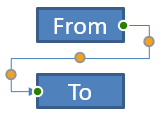 |
3 |
ShapeType.CurvedConnector2 |
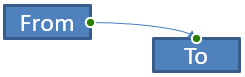 |
0 |
ShapeType.CurvedConnector3 |
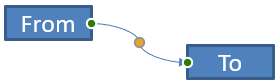 |
1 |
ShapeType.CurvedConnector4 |
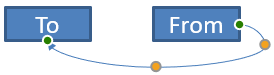 |
2 |
ShapeType.CurvedConnector5 |
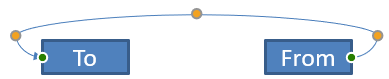 |
3 |
Số lượng và ý nghĩa của các điểm điều chỉnh là một phần của preset connector đã chọn. Đừng giả định rằng hai loại connector khác nhau sẽ hiển thị cùng một bố cục collection.
Kết nối hai shape
Sử dụng IShapeCollection.addConnector để thêm một connector, và sử dụng IConnector.setStartShapeConnectedTo và IConnector.setEndShapeConnectedTo để gắn các đầu của nó. Sau khi cả hai đầu đã được gắn, IConnector.reroute sẽ chọn một lộ trình ngắn giữa các shape.
Ví dụ sau kết nối một ellipse và một rectangle bằng một bent connector:
import com.aspose.slides.*;

Presentation presentation = new Presentation();
try {
    ISlide slide = presentation.getSlides().get_Item(0);

    IAutoShape ellipse = slide.getShapes().addAutoShape(ShapeType.Ellipse, 40, 80, 120, 80);
    IAutoShape rectangle = slide.getShapes().addAutoShape(ShapeType.Rectangle, 320, 240, 140, 80);
    IConnector connector = slide.getShapes().addConnector(ShapeType.BentConnector2, 0, 0, 10, 10);

    connector.setStartShapeConnectedTo(ellipse);
    connector.setEndShapeConnectedTo(rectangle);
    connector.reroute();

    presentation.save("connected-shapes.pptx", SaveFormat.Pptx);
} finally {
    presentation.dispose();
}
Cảnh báo
Gọireroute có thể thay đổi các giá trị setStartShapeConnectionSiteIndex và setEndShapeConnectionSiteIndex. Gán các connection site cụ thể sau khi reroute nếu các site đó phải được cố định.
Chọn một Connection Site
Mỗi shape có thể kết nối trả về số lượng site thông qua IShape.getConnectionSiteCount. Hãy xác thực một chỉ mục site dựa trên zero trước khi gán nó cho đầu connector; số lượng site thay đổi tùy thuộc vào hình học của shape.
Ví dụ này gắn connector vào một site cụ thể trên ellipse khi site đó tồn tại:
import com.aspose.slides.*;

Presentation presentation = new Presentation();
try {
    ISlide slide = presentation.getSlides().get_Item(0);

    IAutoShape ellipse = slide.getShapes().addAutoShape(ShapeType.Ellipse, 40, 80, 120, 80);
    IAutoShape rectangle = slide.getShapes().addAutoShape(ShapeType.Rectangle, 320, 240, 140, 80);
    IConnector connector = slide.getShapes().addConnector(ShapeType.BentConnector3, 0, 0, 10, 10);

    connector.setStartShapeConnectedTo(ellipse);
    connector.setEndShapeConnectedTo(rectangle);

    long preferredSiteIndex = 2;
    if (preferredSiteIndex < ellipse.getConnectionSiteCount()) {
        connector.setStartShapeConnectionSiteIndex(preferredSiteIndex);
    } else {
        System.out.println("The ellipse has only " + ellipse.getConnectionSiteCount() + " connection sites.");
    }

    presentation.save("specific-connection-site.pptx", SaveFormat.Pptx);
} finally {
    presentation.dispose();
}
Điều chỉnh một điểm connector
Các connector có điểm điều chỉnh sẽ cung cấp chúng thông qua IGeometryShape.getAdjustments. Kiểm tra mỗi IAdjustValue và kiểm tra giá trị getType trước khi thay đổi bằng setRawValue. Các quy tắc chung để xác định các điều chỉnh shape preset được mô tả trong Shape Manipulation.
Số lượng, thứ tự, ý nghĩa và phạm vi giá trị hợp lệ của các điều chỉnh connector phụ thuộc vào preset connector. Kiểu điều chỉnh chỉ đọc, trong khi giá trị điều chỉnh có thể ghi. Phương thức chỉ đọc getName cung cấp thông tin bổ sung khi một connector chứa nhiều hơn một điều chỉnh cùng kiểu ngữ nghĩa.
Định hướng quanh một chướng ngại vật
Trong bố cục dưới đây, một connector BentConnector5 giữa hai shape đi qua một shape thứ ba:
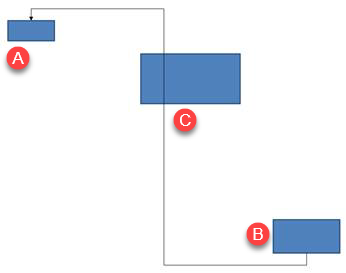
Mã này tạo connector bị chặn:
import com.aspose.slides.*;
import android.graphics.Color;

Presentation presentation = new Presentation();
try {
    ISlide slide = presentation.getSlides().get_Item(0);

    slide.getShapes().addAutoShape(ShapeType.Rectangle, 300, 150, 150, 75);
    IAutoShape sourceShape = slide.getShapes().addAutoShape(ShapeType.Rectangle, 500, 400, 100, 50);
    IAutoShape targetShape = slide.getShapes().addAutoShape(ShapeType.Rectangle, 100, 100, 70, 30);
    IConnector connector = slide.getShapes().addConnector(ShapeType.BentConnector5, 20, 20, 400, 300);

    connector.getLineFormat().setEndArrowheadStyle(LineArrowheadStyle.Triangle);
    connector.getLineFormat().getFillFormat().setFillType(FillType.Solid);
    connector.getLineFormat().getFillFormat().getSolidFillColor().setColor(Color.BLACK);
    connector.setStartShapeConnectedTo(sourceShape);
    connector.setEndShapeConnectedTo(targetShape);
    connector.setStartShapeConnectionSiteIndex(2);

    presentation.save("connector-obstruction.pptx", SaveFormat.Pptx);
} finally {
    presentation.dispose();
}
Di chuyển độ uốn dọc thay đổi lộ trình sao cho connector tránh chướng ngại vật:
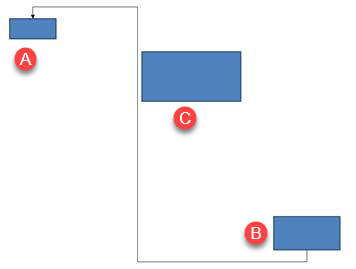
Thay vì giả định rằng chỉ số collection 1 luôn đại diện cho độ uốn dọc, ví dụ này tìm kiếm ConnectorBendPositionY và chỉ thay đổi nó khi kiểu ngữ nghĩa mong đợi xuất hiện:
import com.aspose.slides.*;
import android.graphics.Color;

Presentation presentation = new Presentation();
try {
    ISlide slide = presentation.getSlides().get_Item(0);

    slide.getShapes().addAutoShape(ShapeType.Rectangle, 300, 150, 150, 75);
    IAutoShape sourceShape = slide.getShapes().addAutoShape(ShapeType.Rectangle, 500, 400, 100, 50);
    IAutoShape targetShape = slide.getShapes().addAutoShape(ShapeType.Rectangle, 100, 100, 70, 30);
    IConnector connector = slide.getShapes().addConnector(ShapeType.BentConnector5, 20, 20, 400, 300);

    connector.getLineFormat().setEndArrowheadStyle(LineArrowheadStyle.Triangle);
    connector.getLineFormat().getFillFormat().setFillType(FillType.Solid);
    connector.getLineFormat().getFillFormat().getSolidFillColor().setColor(Color.BLACK);
    connector.setStartShapeConnectedTo(sourceShape);
    connector.setEndShapeConnectedTo(targetShape);
    connector.setStartShapeConnectionSiteIndex(2);

    IAdjustValue verticalBend = null;
    for (int adjustmentIndex = 0; adjustmentIndex < connector.getAdjustments().size(); adjustmentIndex++) {
        IAdjustValue adjustment = connector.getAdjustments().get_Item(adjustmentIndex);
        System.out.println(adjustment.getName() + ": " + adjustment.getType() + ", raw value = " + adjustment.getRawValue());
        if (adjustment.getType() == ShapeAdjustmentType.ConnectorBendPositionY) {
            verticalBend = adjustment;
            break;
        }
    }

    if (verticalBend == null) {
        System.out.println("The connector does not expose a vertical bend adjustment.");
    } else {
        verticalBend.setRawValue(60000);
        presentation.save("connector-obstruction-fixed.pptx", SaveFormat.Pptx);
    }
} finally {
    presentation.dispose();
}
Một BentConnector5 có hai điều chỉnh ConnectorBendPositionX và một điều chỉnh ConnectorBendPositionY. Nếu kiểu bạn cần xuất hiện nhiều hơn một lần, hãy kiểm tra getName và hình học đã biết của preset trước khi chọn. Nếu một điều chỉnh báo ShapeAdjustmentType.Custom, coi ý nghĩa và phạm vi của nó là đặc thù cho preset và không thay đổi cho tới khi hợp đồng này được xác định.
Liên kết giá trị điều chỉnh với hình học connector
Đối với các bent connector, giá trị điều chỉnh có thể được dùng để ước tính vị trí của các đoạn riêng lẻ. Các phép tính này là riêng cho preset connector:
BentConnector4thường cung cấp một điều chỉnhConnectorBendPositionXvà mộtConnectorBendPositionY.- Đối với các vị trí uốn này, chia giá trị trả về bởi
getRawValuecho100000ftạo ra phân số của chiều rộng hoặc chiều cao frame connector được sử dụng trong các ví dụ dưới. - Một frame connector có thể được xoay hoặc lật, vì vậy tọa độ frame phải được biến đổi trước khi so sánh với tọa độ slide.
Các ví dụ sau sử dụng getType để xác định các điều chỉnh trước. Chúng không xem chỉ số collection là định danh di động.
Connector chưa xoay
Bố cục ban đầu chứa hai shape văn bản được kết nối bằng một BentConnector4:
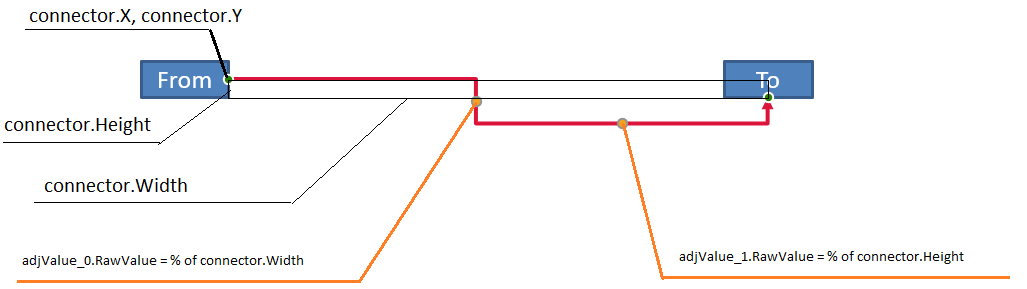
Ví dụ này kiểm tra connector và lấy các điều chỉnh độ uốn ngang và dọc:
import com.aspose.slides.*;
import android.graphics.Color;

Presentation presentation = new Presentation();
try {
    ISlide slide = presentation.getSlides().get_Item(0);

    IAutoShape sourceShape = slide.getShapes().addAutoShape(ShapeType.Rectangle, 100, 100, 60, 25);
    sourceShape.getTextFrame().setText("From");
    IAutoShape targetShape = slide.getShapes().addAutoShape(ShapeType.Rectangle, 500, 100, 60, 25);
    targetShape.getTextFrame().setText("To");
    IConnector connector = slide.getShapes().addConnector(ShapeType.BentConnector4, 20, 20, 400, 300);

    connector.getLineFormat().setEndArrowheadStyle(LineArrowheadStyle.Triangle);
    connector.getLineFormat().getFillFormat().setFillType(FillType.Solid);
    connector.getLineFormat().getFillFormat().getSolidFillColor().setColor(Color.RED);
    connector.getLineFormat().setWidth(3);
    connector.setStartShapeConnectedTo(sourceShape);
    connector.setStartShapeConnectionSiteIndex(3);
    connector.setEndShapeConnectedTo(targetShape);
    connector.setEndShapeConnectionSiteIndex(2);

    for (int adjustmentIndex = 0; adjustmentIndex < connector.getAdjustments().size(); adjustmentIndex++) {
        IAdjustValue adjustment = connector.getAdjustments().get_Item(adjustmentIndex);
        System.out.println(adjustment.getName() + ": " + adjustment.getType() + ", raw value = " + adjustment.getRawValue());
    }
} finally {
    presentation.dispose();
}
Để thay đổi cả hai độ uốn, tìm mỗi kiểu mong đợi và sửa đổi giá trị chỉ sau khi cả hai đã được tìm thấy:
import com.aspose.slides.*;

Presentation presentation = new Presentation();
try {
    ISlide slide = presentation.getSlides().get_Item(0);

    IAutoShape sourceShape = slide.getShapes().addAutoShape(ShapeType.Rectangle, 100, 100, 60, 25);
    IAutoShape targetShape = slide.getShapes().addAutoShape(ShapeType.Rectangle, 500, 100, 60, 25);
    IConnector connector = slide.getShapes().addConnector(ShapeType.BentConnector4, 20, 20, 400, 300);
    connector.setStartShapeConnectedTo(sourceShape);
    connector.setStartShapeConnectionSiteIndex(3);
    connector.setEndShapeConnectedTo(targetShape);
    connector.setEndShapeConnectionSiteIndex(2);

    IAdjustValue horizontalBend = null;
    IAdjustValue verticalBend = null;
    for (int adjustmentIndex = 0; adjustmentIndex < connector.getAdjustments().size(); adjustmentIndex++) {
        IAdjustValue adjustment = connector.getAdjustments().get_Item(adjustmentIndex);
        if (adjustment.getType() == ShapeAdjustmentType.ConnectorBendPositionX) {
            horizontalBend = adjustment;
        } else if (adjustment.getType() == ShapeAdjustmentType.ConnectorBendPositionY) {
            verticalBend = adjustment;
        }
    }

    if (horizontalBend == null || verticalBend == null) {
        System.out.println("The connector does not expose the expected bend adjustments.");
    } else {
        horizontalBend.setRawValue(horizontalBend.getRawValue() + 20000);
        verticalBend.setRawValue(verticalBend.getRawValue() + 200000);
        presentation.save("connector-adjusted.pptx", SaveFormat.Pptx);
    }
} finally {
    presentation.dispose();
}
Kết quả là một connector mà các đoạn ngang và dọc đã di chuyển:

Khi các kiểu ngữ nghĩa đã được biết, giá trị của chúng có thể chuyển thành tọa độ frame connector. Ví dụ này vẽ một hình chữ nhật mảnh qua đoạn dọc được điều khiển bởi hai độ uốn:
import com.aspose.slides.*;

Presentation presentation = new Presentation();
try {
    ISlide slide = presentation.getSlides().get_Item(0);

    IAutoShape sourceShape = slide.getShapes().addAutoShape(ShapeType.Rectangle, 100, 100, 60, 25);
    IAutoShape targetShape = slide.getShapes().addAutoShape(ShapeType.Rectangle, 500, 100, 60, 25);
    IConnector connector = slide.getShapes().addConnector(ShapeType.BentConnector4, 20, 20, 400, 300);
    connector.setStartShapeConnectedTo(sourceShape);
    connector.setStartShapeConnectionSiteIndex(3);
    connector.setEndShapeConnectedTo(targetShape);
    connector.setEndShapeConnectionSiteIndex(2);

    IAdjustValue horizontalBend = null;
    IAdjustValue verticalBend = null;
    for (int adjustmentIndex = 0; adjustmentIndex < connector.getAdjustments().size(); adjustmentIndex++) {
        IAdjustValue adjustment = connector.getAdjustments().get_Item(adjustmentIndex);
        if (adjustment.getType() == ShapeAdjustmentType.ConnectorBendPositionX) {
            horizontalBend = adjustment;
        } else if (adjustment.getType() == ShapeAdjustmentType.ConnectorBendPositionY) {
            verticalBend = adjustment;
        }
    }

    if (horizontalBend == null || verticalBend == null) {
        System.out.println("The connector does not expose the expected bend adjustments.");
    } else {
        float x = connector.getX() + connector.getWidth() * horizontalBend.getRawValue() / 100000f;
        float y = connector.getY();
        float height = connector.getHeight() * verticalBend.getRawValue() / 100000f;
        slide.getShapes().addAutoShape(ShapeType.Rectangle, x, y, 1, height);
        presentation.save("connector-segment-guide.pptx", SaveFormat.Pptx);
    }
} finally {
    presentation.dispose();
}
Hình guide đánh dấu đoạn đã tính:

Connector xoay hoặc lật
Khi cùng một hình học connector được định hướng dọc, các giá trị IShape.getFrame, ShapeFrame.getFlipH, và ShapeFrame.getFlipV ảnh hưởng đến việc chuyển đổi từ tọa độ frame connector sang tọa độ slide.
Ví dụ này tạo và điều chỉnh connector được định hướng dọc:
import com.aspose.slides.*;
import android.graphics.Color;

Presentation presentation = new Presentation();
try {
    ISlide slide = presentation.getSlides().get_Item(0);

    IAutoShape sourceShape = slide.getShapes().addAutoShape(ShapeType.Rectangle, 100, 100, 60, 25);
    sourceShape.getTextFrame().setText("From");
    IAutoShape targetShape = slide.getShapes().addAutoShape(ShapeType.Rectangle, 100, 400, 60, 25);
    targetShape.getTextFrame().setText("To 1");
    IConnector connector = slide.getShapes().addConnector(ShapeType.BentConnector4, 20, 20, 400, 300);

    connector.getLineFormat().setEndArrowheadStyle(LineArrowheadStyle.Triangle);
    connector.getLineFormat().getFillFormat().setFillType(FillType.Solid);
    int connectorColor = Color.rgb(102, 205, 170);
    connector.getLineFormat().getFillFormat().getSolidFillColor().setColor(connectorColor);
    connector.getLineFormat().setWidth(3);
    connector.setStartShapeConnectedTo(sourceShape);
    connector.setStartShapeConnectionSiteIndex(2);
    connector.setEndShapeConnectedTo(targetShape);
    connector.setEndShapeConnectionSiteIndex(3);

    for (int adjustmentIndex = 0; adjustmentIndex < connector.getAdjustments().size(); adjustmentIndex++) {
        IAdjustValue adjustment = connector.getAdjustments().get_Item(adjustmentIndex);
        if (adjustment.getType() == ShapeAdjustmentType.ConnectorBendPositionX) {
            adjustment.setRawValue(adjustment.getRawValue() + 20000);
        } else if (adjustment.getType() == ShapeAdjustmentType.ConnectorBendPositionY) {
            adjustment.setRawValue(adjustment.getRawValue() + 200000);
        }
    }

    presentation.save("vertical-connector-adjusted.pptx", SaveFormat.Pptx);
} finally {
    presentation.dispose();
}
Connector đã được điều chỉnh xuất hiện dọc giữa các shape:
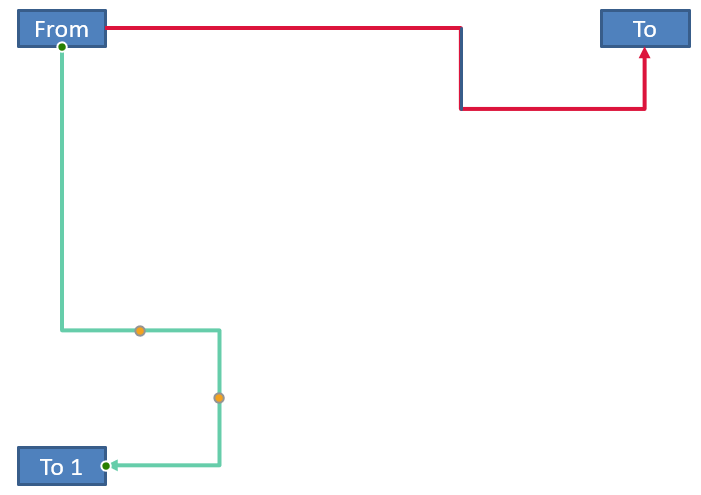
Với một góc xoay tùy ý alpha, xoay một điểm frame connector (x, y) quanh trung tâm frame (x0, y0):
X = (x - x0) * cos(alpha) - (y - y0) * sin(alpha) + x0
Y = (x - x0) * sin(alpha) + (y - y0) * cos(alpha) + y0
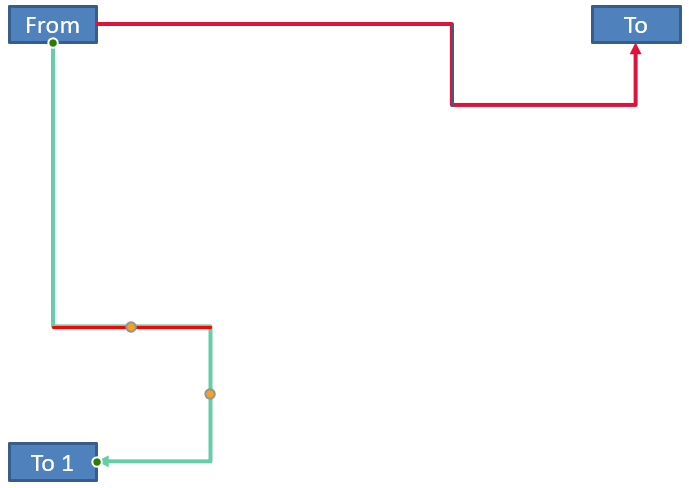
Mã dưới đây xử lý độ hướng 90 độ được dùng trong ví dụ này và vẽ một guide màu đỏ lên đoạn connector tương ứng:
import com.aspose.slides.*;
import android.graphics.Color;

Presentation presentation = new Presentation();
try {
    ISlide slide = presentation.getSlides().get_Item(0);

    IAutoShape sourceShape = slide.getShapes().addAutoShape(ShapeType.Rectangle, 100, 100, 60, 25);
    IAutoShape targetShape = slide.getShapes().addAutoShape(ShapeType.Rectangle, 100, 400, 60, 25);
    IConnector connector = slide.getShapes().addConnector(ShapeType.BentConnector4, 20, 20, 400, 300);
    connector.setStartShapeConnectedTo(sourceShape);
    connector.setStartShapeConnectionSiteIndex(2);
    connector.setEndShapeConnectedTo(targetShape);
    connector.setEndShapeConnectionSiteIndex(3);

    IAdjustValue horizontalBend = null;
    IAdjustValue verticalBend = null;
    for (int adjustmentIndex = 0; adjustmentIndex < connector.getAdjustments().size(); adjustmentIndex++) {
        IAdjustValue adjustment = connector.getAdjustments().get_Item(adjustmentIndex);
        if (adjustment.getType() == ShapeAdjustmentType.ConnectorBendPositionX) {
            horizontalBend = adjustment;
        } else if (adjustment.getType() == ShapeAdjustmentType.ConnectorBendPositionY) {
            verticalBend = adjustment;
        }
    }

    if (horizontalBend == null || verticalBend == null) {
        System.out.println("The connector does not expose the expected bend adjustments.");
    } else {
        horizontalBend.setRawValue(horizontalBend.getRawValue() + 20000);
        verticalBend.setRawValue(verticalBend.getRawValue() + 200000);

        float x = connector.getX();
        float y = connector.getY();
        if (connector.getFrame().getFlipH() == NullableBool.True) {
            x += connector.getWidth();
        }
        if (connector.getFrame().getFlipV() == NullableBool.True) {
            y += connector.getHeight();
        }

        x += connector.getWidth() * horizontalBend.getRawValue() / 100000f;
        float rotatedX = connector.getFrame().getCenterX() - y + connector.getFrame().getCenterY();
        float rotatedY = x - connector.getFrame().getCenterX() + connector.getFrame().getCenterY();
        float segmentWidth = connector.getHeight() * verticalBend.getRawValue() / 100000f;
        IAutoShape guide = slide.getShapes().addAutoShape(ShapeType.Rectangle, rotatedX, rotatedY, segmentWidth, 1);
        guide.getLineFormat().getFillFormat().setFillType(FillType.Solid);
        guide.getLineFormat().getFillFormat().getSolidFillColor().setColor(Color.RED);

        presentation.save("rotated-connector-segment-guide.pptx", SaveFormat.Pptx);
    }
} finally {
    presentation.dispose();
}
Guide màu đỏ đánh dấu đoạn đã tính sau khi biến đổi tọa độ:
Các công thức này mô tả các preset được dùng trong các ví dụ, không phải mô hình connector chung. Xác thực các kiểu điều chỉnh, hướng frame và phạm vi giá trị trước khi áp dụng cùng một phép tính cho một preset khác.
Tìm góc hướng của connector
Hướng của một straight connector có thể tính từ chiều rộng và chiều cao, với các lật ngang và dọc đã được áp dụng. Ví dụ sau báo cáo góc theo chiều kim đồng hồ từ trục ngang dương trong tọa độ slide:
import com.aspose.slides.*;

Presentation presentation = new Presentation();
try {
    ISlide slide = presentation.getSlides().get_Item(0);
    IConnector connector = slide.getShapes().addConnector(ShapeType.StraightConnector1, 100, 100, 200, 100);

    boolean flipH = connector.getFrame().getFlipH() == NullableBool.True;
    boolean flipV = connector.getFrame().getFlipV() == NullableBool.True;
    float deltaX = connector.getWidth() * (flipH ? -1 : 1);
    float deltaY = connector.getHeight() * (flipV ? -1 : 1);
    double angle = Math.atan2(deltaY, deltaX) * 180.0 / Math.PI;

    if (angle < 0) {
        angle += 360;
    }

    System.out.printf("Connector direction: %.2f degrees%n", angle);
} finally {
    presentation.dispose();
}
Câu hỏi thường gặp
Làm sao tôi biết một connector có thể gắn vào một shape?
Kiểm tra giá trị getConnectionSiteCount của shape. Giá trị dương có nghĩa shape cung cấp các connection site. Xác thực chỉ mục site đã chọn trước khi gán cho bất kỳ đầu connector nào.
Tôi có thể xác định một điều chỉnh connector bằng chỉ mục collection không?
Một chỉ mục chỉ có ý nghĩa đối với một preset connector đã biết và bố cục collection. Kiểm tra IAdjustValue.getType trước khi thay đổi giá trị, và sử dụng IAdjustValue.getName như thông tin bổ sung khi cùng một kiểu ngữ nghĩa xuất hiện nhiều lần.
Điều gì xảy ra khi một shape đã được kết nối bị xóa?
Đầu connector tương ứng sẽ bị tách rời. Connector vẫn còn trên slide và có thể bị xóa, đặt như một đường tự do, hoặc gắn lại vào một shape khác.
Liên kết connector có được giữ lại khi slide được sao chép không?
Liên kết thường được giữ lại khi các shape được kết nối cùng với slide được sao chép. Nếu một connector được sao chép mà không có một trong các shape mục tiêu, đầu bị ảnh hưởng phải được gắn lại.