
使用 C++ 在演示文稿中管理文本框
介绍
在 Aspose.Slides for C++ 中,幻灯片文本存储在属于形状的文本框中。 IAutoShape 接口表示最常见的含文本形状,并通过 IAutoShape::get_TextFrame 方法公开其文本。
在幻灯片上创建文本框
要创建文本框,向幻灯片添加自动形状,为其文本框添加文本,然后保存演示文稿。下面的示例创建了一个矩形文本框:
#include <DOM/IAutoShape.h>
#include <DOM/IShapeCollection.h>
#include <DOM/ISlide.h>
#include <DOM/Presentation.h>
#include <DOM/ShapeType.h>
#include <Export/SaveFormat.h>
#include <system/shared_ptr.h>

using namespace Aspose::Slides;
using namespace Aspose::Slides::Export;
using namespace System;

auto presentation = MakeObject<Presentation>();
auto slide = presentation->get_Slide(0);
auto textBox = slide->get_Shapes()->AddAutoShape(ShapeType::Rectangle, 150, 75, 300, 50);
textBox->AddTextFrame(u"Aspose TextBox");

presentation->Save(u"TextBox.pptx", SaveFormat::Pptx);
传递给 IShapeCollection::AddAutoShape 的坐标和尺寸以点为单位。 IAutoShape::AddTextFrame 使用提供的文本初始化文本框。
检查文本框形状
使用 IAutoShape::get_IsTextBox 方法确定自动形状是否被视为文本框。当演示文稿同时包含含文本的自动形状和纯图形自动形状时,这非常有用。
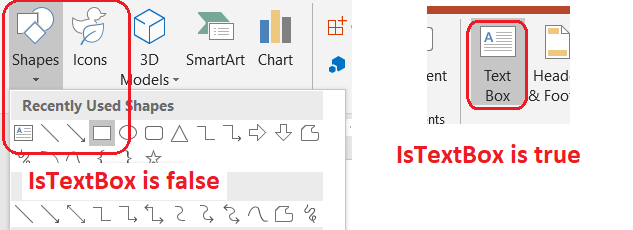
下面的示例检查演示文稿中的每个自动形状:
#include <DOM/IAutoShape.h>
#include <DOM/IShapeCollection.h>
#include <DOM/ISlide.h>
#include <DOM/ISlideCollection.h>
#include <DOM/Presentation.h>
#include <DOM/ShapeType.h>
#include <system/console.h>
#include <system/enumerator_adapter.h>
#include <system/object_ext.h>
#include <system/shared_ptr.h>

using namespace Aspose::Slides;
using namespace System;

auto presentation = MakeObject<Presentation>();
auto slide = presentation->get_Slide(0);
auto textBox = slide->get_Shapes()->AddAutoShape(ShapeType::Rectangle, 10, 10, 120, 40);
textBox->AddTextFrame(u"Text box");
slide->get_Shapes()->AddAutoShape(ShapeType::Ellipse, 150, 10, 40, 40);

for (const auto& currentSlide : IterateOver(presentation->get_Slides()))
{
    for (const auto& shape : IterateOver(currentSlide->get_Shapes()))
    {
        auto autoShape = AsCast<IAutoShape>(shape);
        if (autoShape != nullptr)
        {
            Console::WriteLine(autoShape->get_IsTextBox() ? u"The shape is a text box." : u"The shape is not a text box.");
        }
    }
}
新添加的自动形状在包含非空文本之前不被视为文本框。可以通过 IAutoShape::AddTextFrame 或 ITextFrame::set_Text 提供该文本。将空字符串赋给文本框会使 IAutoShape::get_IsTextBox 返回 false:
#include <DOM/IAutoShape.h>
#include <DOM/IShapeCollection.h>
#include <DOM/ISlide.h>
#include <DOM/ITextFrame.h>
#include <DOM/Presentation.h>
#include <DOM/ShapeType.h>
#include <system/console.h>
#include <system/shared_ptr.h>

using namespace Aspose::Slides;
using namespace System;

auto presentation = MakeObject<Presentation>();
auto slide = presentation->get_Slide(0);

auto shape1 = slide->get_Shapes()->AddAutoShape(ShapeType::Rectangle, 10, 10, 100, 40);
shape1->AddTextFrame(u"Shape 1");
Console::WriteLine(shape1->get_IsTextBox());

auto shape2 = slide->get_Shapes()->AddAutoShape(ShapeType::Rectangle, 10, 70, 100, 40);
shape2->get_TextFrame()->set_Text(u"Shape 2");
Console::WriteLine(shape2->get_IsTextBox());

auto shape3 = slide->get_Shapes()->AddAutoShape(ShapeType::Rectangle, 10, 130, 100, 40);
shape3->AddTextFrame(u"");
Console::WriteLine(shape3->get_IsTextBox());

auto shape4 = slide->get_Shapes()->AddAutoShape(ShapeType::Rectangle, 10, 190, 100, 40);
shape4->get_TextFrame()->set_Text(u"");
Console::WriteLine(shape4->get_IsTextBox());
前两个检查返回 true;后两个返回 false。
查找拥有文本框的形状
通用文本处理代码可能收到一个 ITextFrame,但不知道它所属的演示文稿对象。使用 ITextFrame::get_ParentShape 方法返回其所属的 IShape。
对于由自动形状或其他含文本形状拥有的文本框,ITextFrame::get_ParentShape 返回所有者,而 ITextFrame::get_ParentCell 返回 nullptr。这两个方法均提供只读导航。在访问之前请检查返回值是否为 nullptr。如需识别形状和表格单元格的所有者(包括与 SmartArt 节点关联的形状),请参阅 Search and Replace Text。
向文本框添加列
ITextFrameFormat::set_ColumnCount 方法将文本框划分为多列,而 ITextFrameFormat::set_ColumnSpacing 设置列间的间距(单位为点)。这两个方法属于 ITextFrameFormat,可通过现有文本框的文本框调用。文本在同一形状内部的列之间重新排版,不会流向其他形状。
下面的示例创建一个三列文本框,列间距为 10 点,保存演示文稿后再从输出文件读取已保存的设置:
#include <DOM/IAutoShape.h>
#include <DOM/IShapeCollection.h>
#include <DOM/ISlide.h>
#include <DOM/ITextFrame.h>
#include <DOM/ITextFrameFormat.h>
#include <DOM/Presentation.h>
#include <DOM/ShapeType.h>
#include <Export/SaveFormat.h>
#include <system/console.h>
#include <system/object_ext.h>
#include <system/shared_ptr.h>

using namespace Aspose::Slides;
using namespace Aspose::Slides::Export;
using namespace System;

auto presentation = MakeObject<Presentation>();
auto slide = presentation->get_Slide(0);
auto textBox = slide->get_Shapes()->AddAutoShape(ShapeType::Rectangle, 100, 100, 300, 200);
textBox->AddTextFrame(u"This text is distributed automatically across all columns in the text box.");

auto textFrameFormat = textBox->get_TextFrame()->get_TextFrameFormat();
textFrameFormat->set_ColumnCount(3);
textFrameFormat->set_ColumnSpacing(10);

presentation->Save(u"TextBoxColumns.pptx", SaveFormat::Pptx);

auto savedPresentation = MakeObject<Presentation>(u"TextBoxColumns.pptx");
auto savedTextBox = ExplicitCast<IAutoShape>(savedPresentation->get_Slide(0)->get_Shape(0));
auto savedFormat = savedTextBox->get_TextFrame()->get_TextFrameFormat();
Console::WriteLine(u"Columns: {0}; spacing: {1} points", savedFormat->get_ColumnCount(), savedFormat->get_ColumnSpacing());
从各列提取文本
使用 ITextFrame::SplitTextByColumns 可检索现有文本框中每个可视列分配的文本。该方法按列的阅读顺序返回每列的字符串。单列文本框返回仅包含一个元素的数组,空列则用空字符串表示。返回的字符串仅包含纯文本;不保留段级格式。
在以下情况下此功能非常有用:
- 在保留列顺序的同时提取文本。
- 对多列幻灯片的内容进行索引或比较。
- 将每列导出到单独的文件、数据库字段或其他目标。
- 检查在使用 ITextFrameFormat::set_ColumnCount 或 ITextFrameFormat::set_ColumnSpacing 设置列数或间距,或更改字体或文本框大小后,文本是如何重新分配的。
该方法报告当前 ITextFrame 中分布的文本;不会自动在不同形状或文本框之间流动。列的分布可能受可用字体和其他文字布局设置的影响;在结果一致性重要时请确保所需字体可用。
下面的示例加载演示文稿,找到第一张幻灯片上第一个具有文本框的多列自动形状,读取其配置的列数,并将每列的文本写入单独的文件。没有文本框的形状将被跳过。
#include <DOM/IAutoShape.h>
#include <DOM/IShapeCollection.h>
#include <DOM/ISlide.h>
#include <DOM/ITextFrame.h>
#include <DOM/ITextFrameFormat.h>
#include <DOM/Presentation.h>
#include <system/array.h>
#include <system/console.h>
#include <system/enumerator_adapter.h>
#include <system/io/file.h>
#include <system/object_ext.h>
#include <system/shared_ptr.h>
#include <system/string.h>

using namespace Aspose::Slides;
using namespace System;
using namespace System::IO;

auto presentation = MakeObject<Presentation>(u"MultiColumnText.pptx");

SharedPtr<IAutoShape> textBox = nullptr;
for (const auto& shape : IterateOver(presentation->get_Slide(0)->get_Shapes()))
{
    auto autoShape = AsCast<IAutoShape>(shape);
    if (autoShape != nullptr && autoShape->get_TextFrame() != nullptr)
    {
        auto columnCount = autoShape->get_TextFrame()->get_TextFrameFormat()->get_ColumnCount();
        if (columnCount > 1)
        {
            textBox = autoShape;
            break;
        }
    }
}

if (textBox == nullptr)
{
    Console::WriteLine(u"No multi-column text frame was found.");
}
else
{
    auto textFrame = textBox->get_TextFrame();
    auto configuredColumnCount = textFrame->get_TextFrameFormat()->get_ColumnCount();
    auto columnTexts = textFrame->SplitTextByColumns();

    Console::WriteLine(u"Configured columns: {0}", configuredColumnCount);

    for (auto columnIndex = 0; columnIndex < columnTexts->get_Length(); columnIndex++)
    {
        auto columnNumber = columnIndex + 1;
        auto columnText = columnTexts->idx_get(columnIndex);
        Console::WriteLine(u"Column {0}: {1}", columnNumber, columnText);
        auto fileName = String::Format(u"Column-{0}.txt", columnNumber);
        File::WriteAllText(fileName, columnText);
    }
}
更新文本
要在整个演示文稿中更新文本,遍历幻灯片和形状,选择自动形状,然后编辑其文本段。对段进行操作可同时更改文本和字符格式。
下面的示例将每个自动形状文本段中的 years 替换为 months,并将受影响的段设为粗体:
#include <DOM/IAutoShape.h>
#include <DOM/IParagraph.h>
#include <DOM/IParagraphCollection.h>
#include <DOM/IPortion.h>
#include <DOM/IPortionCollection.h>
#include <DOM/IPortionFormat.h>
#include <DOM/IShapeCollection.h>
#include <DOM/ISlide.h>
#include <DOM/ISlideCollection.h>
#include <DOM/ITextFrame.h>
#include <DOM/NullableBool.h>
#include <DOM/Presentation.h>
#include <Export/SaveFormat.h>
#include <system/enumerator_adapter.h>
#include <system/object_ext.h>
#include <system/shared_ptr.h>
#include <system/string.h>

using namespace Aspose::Slides;
using namespace Aspose::Slides::Export;
using namespace System;

auto presentation = MakeObject<Presentation>(u"Text.pptx");

for (const auto& slide : IterateOver(presentation->get_Slides()))
{
    for (const auto& shape : IterateOver(slide->get_Shapes()))
    {
        auto autoShape = AsCast<IAutoShape>(shape);
        if (autoShape == nullptr || autoShape->get_TextFrame() == nullptr)
        {
            continue;
        }

        for (const auto& paragraph : IterateOver(autoShape->get_TextFrame()->get_Paragraphs()))
        {
            for (const auto& portion : IterateOver(paragraph->get_Portions()))
            {
                auto text = portion->get_Text();
                if (!String::IsNullOrEmpty(text) && text.Contains(u"years"))
                {
                    portion->set_Text(text.Replace(u"years", u"months"));
                    portion->get_PortionFormat()->set_FontBold(NullableBool::True);
                }
            }
        }
    }
}

presentation->Save(u"TextChanged.pptx", SaveFormat::Pptx);
此遍历仅更新自动形状中的文本。表格、图表、SmartArt 或组合形状中的文本需要对各自对象的集合进行遍历才能修改。
添加带超链接的文本框
可以将超链接分配给特定的文本段,仅该文本可点击。使用 IHyperlinkManager::SetExternalHyperlinkClick 将该段与外部 URL 关联。
下面的示例创建了带链接的文本并将其保存到演示文稿中:
#include <DOM/IAutoShape.h>
#include <DOM/IHyperlinkManager.h>
#include <DOM/IParagraph.h>
#include <DOM/IPortion.h>
#include <DOM/IPortionFormat.h>
#include <DOM/IShapeCollection.h>
#include <DOM/ISlide.h>
#include <DOM/ITextFrame.h>
#include <DOM/Presentation.h>
#include <DOM/ShapeType.h>
#include <Export/SaveFormat.h>
#include <system/shared_ptr.h>

using namespace Aspose::Slides;
using namespace Aspose::Slides::Export;
using namespace System;

auto presentation = MakeObject<Presentation>();
auto slide = presentation->get_Slide(0);
auto textBox = slide->get_Shapes()->AddAutoShape(ShapeType::Rectangle, 150, 150, 200, 50);
textBox->AddTextFrame(u"Aspose.Slides");

auto textPortion = textBox->get_TextFrame()->get_Paragraph(0)->get_Portion(0);
textPortion->get_PortionFormat()->get_HyperlinkManager()->SetExternalHyperlinkClick(u"https://www.aspose.com/");

presentation->Save(u"Hyperlink.pptx", SaveFormat::Pptx);
常见问答
文本框和母版或布局幻灯片上的文本占位符有什么区别?
占位符 可以从 母版幻灯片 或 布局幻灯片 继承其位置和格式。普通文本框是创建所在幻灯片上的独立形状,布局更改时不会获得占位符行为。
如何在不更改图表、表格或 SmartArt 中的文本的情况下替换文本?
将遍历限制在实现了 IAutoShape 的形状上,如“更新文本”示例所示。图表、表格和 SmartArt 将文本存储在各自的对象模型中,因此不会被该循环修改。