
مدیریت جعبههای متن در ارائهها با C++
مقدمه
در Aspose.Slides برای C++ متن اسلایدها در قابهای متنی که به اشکال تعلق دارند ذخیره میشود. رابط IAutoShape رایجترین شکل حاوی متن را نشان میدهد و متن آن را از طریق متد IAutoShape::get_TextFrame در دسترس میگذارد.
Note
هر شکل خودکار پیادهسازی IShape را دارد، اما هر شکل خودکار نیست یا از قاب متنی پشتیبانی نمیکند. هنگام پردازش یک ارائه موجود، قبل از دسترسی به متن، بررسی کنید که شکل پیادهسازی IAutoShape را داشته باشد.ایجاد جعبه متن در یک اسلاید
برای ایجاد یک جعبه متن، یک شکل خودکار را به اسلاید اضافه کنید، متن را به قاب متن آن اضافه کنید و ارائه را ذخیره کنید. مثال زیر یک جعبه متن مستطیلی ایجاد میکند:
#include <DOM/IAutoShape.h>
#include <DOM/IShapeCollection.h>
#include <DOM/ISlide.h>
#include <DOM/Presentation.h>
#include <DOM/ShapeType.h>
#include <Export/SaveFormat.h>
#include <system/shared_ptr.h>

using namespace Aspose::Slides;
using namespace Aspose::Slides::Export;
using namespace System;

auto presentation = MakeObject<Presentation>();
auto slide = presentation->get_Slide(0);
auto textBox = slide->get_Shapes()->AddAutoShape(ShapeType::Rectangle, 150, 75, 300, 50);
textBox->AddTextFrame(u"Aspose TextBox");

presentation->Save(u"TextBox.pptx", SaveFormat::Pptx);
مختصات و ابعادی که به متد IShapeCollection::AddAutoShape پاس داده میشوند بر حسب پوینت اندازهگیری میشوند. متد IAutoShape::AddTextFrame قاب متن را با متن ارائهشده مقداردهی اولیه میکند.
بررسی وجود شکل جعبه متن
از متد IAutoShape::get_IsTextBox استفاده کنید تا تعیین کنید آیا یک شکل خودکار بهعنوان جعبه متن در نظر گرفته میشود یا خیر. این موضوع زمانی مفید است که ارائه شامل هم شکلهای خودکار حاوی متن و هم شکلهای گرافیکی صرف باشد.
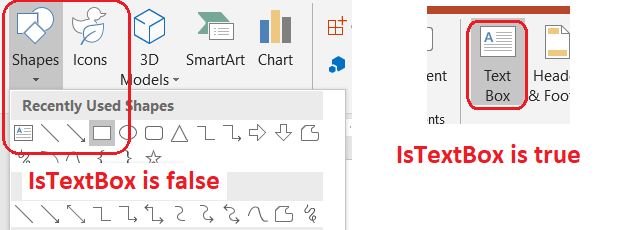
مثال زیر هر شکل خودکار در یک ارائه را بررسی میکند:
#include <DOM/IAutoShape.h>
#include <DOM/IShapeCollection.h>
#include <DOM/ISlide.h>
#include <DOM/ISlideCollection.h>
#include <DOM/Presentation.h>
#include <DOM/ShapeType.h>
#include <system/console.h>
#include <system/enumerator_adapter.h>
#include <system/object_ext.h>
#include <system/shared_ptr.h>

using namespace Aspose::Slides;
using namespace System;

auto presentation = MakeObject<Presentation>();
auto slide = presentation->get_Slide(0);
auto textBox = slide->get_Shapes()->AddAutoShape(ShapeType::Rectangle, 10, 10, 120, 40);
textBox->AddTextFrame(u"Text box");
slide->get_Shapes()->AddAutoShape(ShapeType::Ellipse, 150, 10, 40, 40);

for (const auto& currentSlide : IterateOver(presentation->get_Slides()))
{
    for (const auto& shape : IterateOver(currentSlide->get_Shapes()))
    {
        auto autoShape = AsCast<IAutoShape>(shape);
        if (autoShape != nullptr)
        {
            Console::WriteLine(autoShape->get_IsTextBox() ? u"The shape is a text box." : u"The shape is not a text box.");
        }
    }
}
یک شکل خودکار تازه اضافهشده تا زمانی که متن غیرخالی داشته باشد، بهعنوان جعبه متن در نظر گرفته نمیشود. میتوانید آن متن را از طریق IAutoShape::AddTextFrame یا ITextFrame::set_Text فراهم کنید. افزودن یا اختصاص یک رشته خالی باعث میشود IAutoShape::get_IsTextBox مقدار false برگرداند:
#include <DOM/IAutoShape.h>
#include <DOM/IShapeCollection.h>
#include <DOM/ISlide.h>
#include <DOM/ITextFrame.h>
#include <DOM/Presentation.h>
#include <DOM/ShapeType.h>
#include <system/console.h>
#include <system/shared_ptr.h>

using namespace Aspose::Slides;
using namespace System;

auto presentation = MakeObject<Presentation>();
auto slide = presentation->get_Slide(0);

auto shape1 = slide->get_Shapes()->AddAutoShape(ShapeType::Rectangle, 10, 10, 100, 40);
shape1->AddTextFrame(u"Shape 1");
Console::WriteLine(shape1->get_IsTextBox());

auto shape2 = slide->get_Shapes()->AddAutoShape(ShapeType::Rectangle, 10, 70, 100, 40);
shape2->get_TextFrame()->set_Text(u"Shape 2");
Console::WriteLine(shape2->get_IsTextBox());

auto shape3 = slide->get_Shapes()->AddAutoShape(ShapeType::Rectangle, 10, 130, 100, 40);
shape3->AddTextFrame(u"");
Console::WriteLine(shape3->get_IsTextBox());

auto shape4 = slide->get_Shapes()->AddAutoShape(ShapeType::Rectangle, 10, 190, 100, 40);
shape4->get_TextFrame()->set_Text(u"");
Console::WriteLine(shape4->get_IsTextBox());
دو بررسی اول مقدار true برمیگردانند؛ دو بررسی آخر مقدار false برمیگردانند.
یافتن شکلی که قاب متن را مالک است
کد عمومی پردازش متن ممکن است یک ITextFrame دریافت کند بدون اینکه بداند کدام شیء ارائه آن را شامل میشود. از متد ITextFrame::get_ParentShape برای بازگشت به IShape مالک آن استفاده کنید.
برای قاب متنی که توسط یک شکل خودکار یا شکل دیگری حاوی متن مالکیت میشود، ITextFrame::get_ParentShape مالک را برمیگرداند و ITextFrame::get_ParentCell مقدار nullptr برمیگرداند. هر دو متد ناوبری فقط‑خواندنی را فراهم میکنند. قبل از دسترسی به مقدار برگشتی، برای nullptr بررسی کنید. برای شناسایی هر دو مالک شکل و سلول جدول، از جمله شکلهایی که به گرههای SmartArt مرتبط هستند، به Search and Replace Text مراجعه کنید.
افزودن ستونها به جعبه متن
متد ITextFrameFormat::set_ColumnCount قاب متن را به ستونها تقسیم میکند، در حالی که متد ITextFrameFormat::set_ColumnSpacing فاصله بین ستونها را بر حسب پوینت تنظیم میسازد. هر دو متد متعلق به ITextFrameFormat هستند و میتوانند از طریق قاب متن یک جعبه متن موجود فراخوانی شوند. متن بین ستونها داخل همان شکل مجدداً جریان مییابد؛ به شکل دیگری ادامه پیدا نمیکند.
مثال زیر یک جعبه متن سهستونی با فاصله ۱۰ پوینت بین ستونها ایجاد میکند، ارائه را ذخیره میکند و تنظیمات ذخیرهشده را از فایل خروجی میخواند:
#include <DOM/IAutoShape.h>
#include <DOM/IShapeCollection.h>
#include <DOM/ISlide.h>
#include <DOM/ITextFrame.h>
#include <DOM/ITextFrameFormat.h>
#include <DOM/Presentation.h>
#include <DOM/ShapeType.h>
#include <Export/SaveFormat.h>
#include <system/console.h>
#include <system/object_ext.h>
#include <system/shared_ptr.h>

using namespace Aspose::Slides;
using namespace Aspose::Slides::Export;
using namespace System;

auto presentation = MakeObject<Presentation>();
auto slide = presentation->get_Slide(0);
auto textBox = slide->get_Shapes()->AddAutoShape(ShapeType::Rectangle, 100, 100, 300, 200);
textBox->AddTextFrame(u"This text is distributed automatically across all columns in the text box.");

auto textFrameFormat = textBox->get_TextFrame()->get_TextFrameFormat();
textFrameFormat->set_ColumnCount(3);
textFrameFormat->set_ColumnSpacing(10);

presentation->Save(u"TextBoxColumns.pptx", SaveFormat::Pptx);

auto savedPresentation = MakeObject<Presentation>(u"TextBoxColumns.pptx");
auto savedTextBox = ExplicitCast<IAutoShape>(savedPresentation->get_Slide(0)->get_Shape(0));
auto savedFormat = savedTextBox->get_TextFrame()->get_TextFrameFormat();
Console::WriteLine(u"Columns: {0}; spacing: {1} points", savedFormat->get_ColumnCount(), savedFormat->get_ColumnSpacing());
استخراج متن از ستونهای جداگانه
از متد ITextFrame::SplitTextByColumns برای دریافت متنی که به هر ستون بصری در یک قاب متن موجود اختصاص یافته است، استفاده کنید. این متد یک رشته برای هر ستون در ترتیب خواندن مبتنی بر ستون برمیگرداند. یک قاب متن تکستونی آرایهای با یک عنصر تولید میکند و یک ستون خالی توسط رشته خالی نشان داده میشود. رشتهها تنها شامل متن ساده هستند؛ قالببندی سطح بخش حفظ نمیشود.
این امر زمانی مفید است که نیاز داشته باشید:
- متن را استخراج کنید در حالی که ترتیب خواندن ستونمحور آن حفظ شود.
- محتوی اسلایدهای چندستونی را نمایهسازی یا مقایسه کنید.
- هر ستون را به یک فایل جداگانه، فیلد پایگاه داده یا مقصد دیگری صادر کنید.
- بررسی کنید متن پس از تنظیم تعداد ستون با ITextFrameFormat::set_ColumnCount یا فاصله با ITextFrameFormat::set_ColumnSpacing، یا تغییر فونت یا اندازهٔ قاب متن، چگونه توزیع میشود.
این متد متن توزیعشده در داخل ITextFrame فعلی را گزارش میدهد؛ بهطور خودکار متن را بین شکلها یا جعبههای متن جداگانه جریان نمیدهد. توزیع ستون میتواند به فونتهای موجود و سایر تنظیمات چیدمان متن وابسته باشد، بنابراین هنگام نیاز به نتایج سازگار، اطمینان حاصل کنید فونتهای مورد نیاز در دسترس باشند.
مثال زیر یک ارائه را بارگذاری میکند، اولین شکل خودکار چندستونی با قاب متن را در اولین اسلاید پیدا میکند، تعداد ستونهای پیکربندیشده را میخواند و متن هر ستون را به یک فایل جداگانه مینویسد. شکلهایی که قاب متنی فراهم نمیکنند، نادیده گرفته میشوند.
#include <DOM/IAutoShape.h>
#include <DOM/IShapeCollection.h>
#include <DOM/ISlide.h>
#include <DOM/ITextFrame.h>
#include <DOM/ITextFrameFormat.h>
#include <DOM/Presentation.h>
#include <system/array.h>
#include <system/console.h>
#include <system/enumerator_adapter.h>
#include <system/io/file.h>
#include <system/object_ext.h>
#include <system/shared_ptr.h>
#include <system/string.h>

using namespace Aspose::Slides;
using namespace System;
using namespace System::IO;

auto presentation = MakeObject<Presentation>(u"MultiColumnText.pptx");

SharedPtr<IAutoShape> textBox = nullptr;
for (const auto& shape : IterateOver(presentation->get_Slide(0)->get_Shapes()))
{
    auto autoShape = AsCast<IAutoShape>(shape);
    if (autoShape != nullptr && autoShape->get_TextFrame() != nullptr)
    {
        auto columnCount = autoShape->get_TextFrame()->get_TextFrameFormat()->get_ColumnCount();
        if (columnCount > 1)
        {
            textBox = autoShape;
            break;
        }
    }
}

if (textBox == nullptr)
{
    Console::WriteLine(u"No multi-column text frame was found.");
}
else
{
    auto textFrame = textBox->get_TextFrame();
    auto configuredColumnCount = textFrame->get_TextFrameFormat()->get_ColumnCount();
    auto columnTexts = textFrame->SplitTextByColumns();

    Console::WriteLine(u"Configured columns: {0}", configuredColumnCount);

    for (auto columnIndex = 0; columnIndex < columnTexts->get_Length(); columnIndex++)
    {
        auto columnNumber = columnIndex + 1;
        auto columnText = columnTexts->idx_get(columnIndex);
        Console::WriteLine(u"Column {0}: {1}", columnNumber, columnText);
        auto fileName = String::Format(u"Column-{0}.txt", columnNumber);
        File::WriteAllText(fileName, columnText);
    }
}
بهروزرسانی متن
برای بهروزرسانی متن در سراسر یک ارائه، اسلایدها و اشکال را پیمایش کنید، شکلهای خودکار را انتخاب کنید و سپس بخشهای متن آنها را ویرایش کنید. کار بر سطح بخش امکان تغییر هم متن و هم قالببندی کاراکترها را میدهد.
مثال زیر تمام موارد years را با months در بخشهای متن شکلهای خودکار جایگزین میکند و هر بخش تحت تأثیر را بولد میسازد:
#include <DOM/IAutoShape.h>
#include <DOM/IParagraph.h>
#include <DOM/IParagraphCollection.h>
#include <DOM/IPortion.h>
#include <DOM/IPortionCollection.h>
#include <DOM/IPortionFormat.h>
#include <DOM/IShapeCollection.h>
#include <DOM/ISlide.h>
#include <DOM/ISlideCollection.h>
#include <DOM/ITextFrame.h>
#include <DOM/NullableBool.h>
#include <DOM/Presentation.h>
#include <Export/SaveFormat.h>
#include <system/enumerator_adapter.h>
#include <system/object_ext.h>
#include <system/shared_ptr.h>
#include <system/string.h>

using namespace Aspose::Slides;
using namespace Aspose::Slides::Export;
using namespace System;

auto presentation = MakeObject<Presentation>(u"Text.pptx");

for (const auto& slide : IterateOver(presentation->get_Slides()))
{
    for (const auto& shape : IterateOver(slide->get_Shapes()))
    {
        auto autoShape = AsCast<IAutoShape>(shape);
        if (autoShape == nullptr || autoShape->get_TextFrame() == nullptr)
        {
            continue;
        }

        for (const auto& paragraph : IterateOver(autoShape->get_TextFrame()->get_Paragraphs()))
        {
            for (const auto& portion : IterateOver(paragraph->get_Portions()))
            {
                auto text = portion->get_Text();
                if (!String::IsNullOrEmpty(text) && text.Contains(u"years"))
                {
                    portion->set_Text(text.Replace(u"years", u"months"));
                    portion->get_PortionFormat()->set_FontBold(NullableBool::True);
                }
            }
        }
    }
}

presentation->Save(u"TextChanged.pptx", SaveFormat::Pptx);
این پیمایش تنها متن را در شکلهای خودکار بهروز میکند. متنی که در جداول، نمودارها، SmartArt یا شکلهای گروهی ذخیره شدهاند، نیاز به پیمایش مجموعههای مربوط به آن اشیاء دارد.
افزودن جعبه متن با پیوند
یک پیوند میتواند به یک بخش متن خاص اختصاص یابد، بهطوری که فقط همان متن بهعنوان لینک قابل کلیک عمل کند. از متد IHyperlinkManager::SetExternalHyperlinkClick برای ارتباط بخش با یک URL خارجی استفاده کنید.
مثال زیر متن پیوندی ایجاد میکند و آن را در یک ارائه ذخیره مینماید:
#include <DOM/IAutoShape.h>
#include <DOM/IHyperlinkManager.h>
#include <DOM/IParagraph.h>
#include <DOM/IPortion.h>
#include <DOM/IPortionFormat.h>
#include <DOM/IShapeCollection.h>
#include <DOM/ISlide.h>
#include <DOM/ITextFrame.h>
#include <DOM/Presentation.h>
#include <DOM/ShapeType.h>
#include <Export/SaveFormat.h>
#include <system/shared_ptr.h>

using namespace Aspose::Slides;
using namespace Aspose::Slides::Export;
using namespace System;

auto presentation = MakeObject<Presentation>();
auto slide = presentation->get_Slide(0);
auto textBox = slide->get_Shapes()->AddAutoShape(ShapeType::Rectangle, 150, 150, 200, 50);
textBox->AddTextFrame(u"Aspose.Slides");

auto textPortion = textBox->get_TextFrame()->get_Paragraph(0)->get_Portion(0);
textPortion->get_PortionFormat()->get_HyperlinkManager()->SetExternalHyperlinkClick(u"https://www.aspose.com/");

presentation->Save(u"Hyperlink.pptx", SaveFormat::Pptx);
سوالات متداول
تفاوت بین جعبه متن و جایگزین متن در اسلاید مستر یا چیدمان چیست؟
یک placeholder میتواند موقعیت و قالببندی خود را از یک master slide یا layout slide به ارث ببرد. یک جعبه متن معمولی یک شکل مستقل بر روی اسلایدی است که در آن ایجاد شده و هنگامی که چیدمان تغییر میکند، رفتار جایگزین متن را بهدست نمیآورد.
چگونه میتوان متن را جایگزین کرد بدون اینکه متن در نمودارها، جداول یا SmartArt تغییر یابد؟
پیمایش را به شکلهایی که پیادهسازی IAutoShape میکنند محدود کنید، همانطور که در مثال بهروزرسانی متن نشان داده شده است. نمودارها، جداول و SmartArt متن را در مدلهای شیء خود ذخیره میکنند، بنابراین توسط آن حلقه تغییر نمییابند.