
在演示文稿中使用 C++ 自定义饼图
概述
本文介绍了如何在 Aspose.Slides 中使用饼图。演示了如何为「饼中饼」和「柱形饼」图配置次要绘图选项,以及如何为普通饼图启用自动切片着色。
示例侧重于图表自定义任务,如向幻灯片添加图表、调整系列和标签设置、使用自定义类别和值替换默认图表数据,以及保存更新后的演示文稿。
「饼中饼」和「柱形饼」图的次要绘图选项
Aspose.Slides for C++ 支持「饼中饼」和「柱形饼」图的次要绘图选项。这些选项控制次要绘图的大小以及数据点在两个绘图之间的划分方式。
下面的示例在新演示文稿中创建一个「饼中饼」图,并将数据点值显示为标签。set_SecondPieSize 方法将次要绘图大小设置为主绘图的 149%。set_PieSplitBy 选择基于百分比的划分,而 set_PieSplitPosition 将阈值设为 53%。
#include <system/shared_ptr.h>
#include <DOM/Presentation.h>
#include <DOM/ISlide.h>
#include <DOM/IShapeCollection.h>
#include <DOM/Chart/ChartType.h>
#include <DOM/IChart.h>
#include <DOM/Chart/IChartData.h>
#include <DOM/Chart/IChartSeriesCollection.h>
#include <DOM/Chart/IChartSeries.h>
#include <DOM/Chart/IDataLabelCollection.h>
#include <DOM/Chart/IDataLabelFormat.h>
#include <DOM/Chart/IChartSeriesGroup.h>
#include <Export/SaveFormat.h>
#include <DOM/Chart/PieSplitType.h>

using namespace Aspose::Slides;
using namespace Aspose::Slides::Charts;
using namespace Aspose::Slides::Export;

auto presentation = System::MakeObject<Presentation>();
auto slide = presentation->get_Slide(0);

auto chart = slide->get_Shapes()->AddChart(ChartType::PieOfPie, 50, 50, 500, 400);
auto series = chart->get_ChartData()->get_Series()->idx_get(0);

// Display values and configure the secondary plot.
series->get_Labels()->get_DefaultDataLabelFormat()->set_ShowValue(true);
auto seriesGroup = series->get_ParentSeriesGroup();
seriesGroup->set_SecondPieSize(149);
seriesGroup->set_PieSplitBy(PieSplitType::ByPercentage);
seriesGroup->set_PieSplitPosition(53);

presentation->Save(u"pie_of_pie.pptx", SaveFormat::Pptx);
为次要绘图选择类别
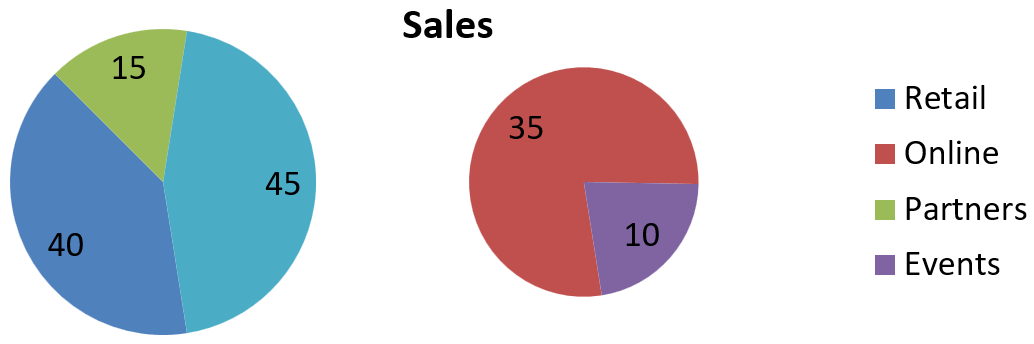
当您希望无论百分比值如何都将特定类别放入次要绘图时,使用自定义划分。例如,销售报告可能会将「在线」和「活动」放在一起,以便读者比较这两个渠道,即使它们分别占总销量的 35% 和 10%。
使用 set_PieSplitBy 并传入 PieSplitType::Custom,通过 get_PieSplitCustomPoints 选择点。集合的 Add 方法接受系列中的零基索引。此示例中,索引 1 选中「在线」,索引 3 选中「活动」。随后临时添加「合作伙伴」,再使用 Remove 将其排除。
#include <system/shared_ptr.h>
#include <DOM/Presentation.h>
#include <DOM/ISlide.h>
#include <DOM/IShapeCollection.h>
#include <DOM/Chart/ChartType.h>
#include <DOM/IChart.h>
#include <DOM/Chart/IChartData.h>
#include <DOM/Chart/IChartSeriesCollection.h>
#include <DOM/Chart/IChartSeries.h>
#include <DOM/Chart/IDataLabelCollection.h>
#include <DOM/Chart/IDataLabelFormat.h>
#include <DOM/Chart/IChartSeriesGroup.h>
#include <Export/SaveFormat.h>
#include <DOM/Chart/PieSplitType.h>
#include <vector>
#include <system/object_ext.h>
#include <DOM/Chart/IChartDataWorkbook.h>
#include <DOM/Chart/IChartDataCell.h>
#include <DOM/Chart/IChartCategoryCollection.h>
#include <DOM/Chart/IChartDataPointCollection.h>
#include <DOM/Chart/IChartDataPoint.h>
#include <DOM/Chart/IPieSplitCustomPointCollection.h>

using namespace Aspose::Slides;
using namespace Aspose::Slides::Charts;
using namespace Aspose::Slides::Export;

auto presentation = System::MakeObject<Presentation>();
auto slide = presentation->get_Slide(0);

auto chart = slide->get_Shapes()->AddChart(ChartType::PieOfPie, 50, 50, 600, 200);

// 用渠道销售数据替换默认数据。
auto workbook = chart->get_ChartData()->get_ChartDataWorkbook();
chart->get_ChartData()->get_Series()->Clear();
chart->get_ChartData()->get_Categories()->Clear();
auto categoryNames = std::vector<System::String>{ u"Retail", u"Online", u"Partners", u"Events" };
auto values = std::vector<int>{ 40, 35, 15, 10 };
auto seriesNameCell = workbook->GetCell(0, 0, 1, System::ObjectExt::Box(System::String(u"Sales")));
auto series = chart->get_ChartData()->get_Series()->Add(seriesNameCell, chart->get_Type());

for (auto i = 0; i < static_cast<int>(categoryNames.size()); i++)
{
    auto categoryCell = workbook->GetCell(0, i + 1, 0, System::ObjectExt::Box(categoryNames[i]));
    chart->get_ChartData()->get_Categories()->Add(categoryCell);

    auto valueCell = workbook->GetCell(0, i + 1, 1, System::ObjectExt::Box(values[i]));
    series->get_DataPoints()->AddDataPointForPieSeries(valueCell);
}

series->get_Labels()->get_DefaultDataLabelFormat()->set_ShowValue(true);
auto seriesGroup = series->get_ParentSeriesGroup();
seriesGroup->set_PieSplitBy(PieSplitType::Custom);
seriesGroup->set_IsColorVaried(true);

// 在系列中按零基索引选择 Online 和 Events。
seriesGroup->get_PieSplitCustomPoints()->Add(1);
seriesGroup->get_PieSplitCustomPoints()->Add(3);

// 从选择中排除 Partners,但不删除其源数据。
seriesGroup->get_PieSplitCustomPoints()->Add(2);
seriesGroup->get_PieSplitCustomPoints()->Remove(2);

presentation->Save(u"pie_of_pie_custom.pptx", SaveFormat::Pptx);
「在线」(35) 和「活动」(10) 在次要绘图中显示为独立切片。在主绘图中,它们合并为一个值为 45 的切片,另外还有「零售」(40) 和「合作伙伴」(15)。从自定义选择中移除「合作伙伴」仅使其不出现在次要绘图中;它仍保留在主绘图中,且不会从图表源数据中删除该类别或其数值。
下图展示了在 PowerPoint 中保存的演示文稿:
设置自动饼图切片颜色
Aspose.Slides for C++ 可以自动为饼图切片分配不同颜色。下面的示例创建了一个带居中标题的饼图,并用三个季度类别及其数值替换默认数据。set_ShowValue 方法将值 20、50、30 显示为标签,而 set_IsColorVaried 则为每个切片启用不同颜色。
#include <system/shared_ptr.h>
#include <DOM/Presentation.h>
#include <DOM/ISlide.h>
#include <DOM/IShapeCollection.h>
#include <DOM/Chart/ChartType.h>
#include <DOM/IChart.h>
#include <DOM/Chart/IChartData.h>
#include <DOM/Chart/IChartSeriesCollection.h>
#include <DOM/Chart/IChartSeries.h>
#include <DOM/Chart/IDataLabelCollection.h>
#include <DOM/Chart/IDataLabelFormat.h>
#include <DOM/Chart/IChartSeriesGroup.h>
#include <Export/SaveFormat.h>
#include <vector>
#include <system/object_ext.h>
#include <DOM/Chart/IChartDataWorkbook.h>
#include <DOM/Chart/IChartDataCell.h>
#include <DOM/Chart/IChartCategoryCollection.h>
#include <DOM/Chart/IChartDataPointCollection.h>
#include <DOM/Chart/IChartDataPoint.h>
#include <DOM/Chart/IChartTitle.h>
#include <DOM/ITextFrame.h>
#include <DOM/ITextFrameFormat.h>
#include <DOM/NullableBool.h>

using namespace Aspose::Slides;
using namespace Aspose::Slides::Charts;
using namespace Aspose::Slides::Export;

auto presentation = System::MakeObject<Presentation>();
auto slide = presentation->get_Slide(0);

auto chart = slide->get_Shapes()->AddChart(ChartType::Pie, 100, 100, 400, 400);

// 添加居中的图表标题。
chart->get_ChartTitle()->AddTextFrameForOverriding(u"Sample Title");
chart->get_ChartTitle()->get_TextFrameForOverriding()->get_TextFrameFormat()->set_CenterText(NullableBool::True);
chart->get_ChartTitle()->set_Height(20);
chart->set_HasTitle(true);

// 使用第一张工作表替换默认数据。
auto workbook = chart->get_ChartData()->get_ChartDataWorkbook();
auto worksheetIndex = 0;
chart->get_ChartData()->get_Series()->Clear();
chart->get_ChartData()->get_Categories()->Clear();
auto categoryNames = std::vector<System::String>{ u"First Qtr", u"2nd Qtr", u"3rd Qtr" };
auto values = std::vector<int>{ 20, 50, 30 };
auto seriesNameCell = workbook->GetCell(worksheetIndex, 0, 1, System::ObjectExt::Box(System::String(u"Series 1")));
auto series = chart->get_ChartData()->get_Series()->Add(seriesNameCell, chart->get_Type());

for (auto i = 0; i < static_cast<int>(categoryNames.size()); i++)
{
    auto categoryCell = workbook->GetCell(worksheetIndex, i + 1, 0, System::ObjectExt::Box(categoryNames[i]));
    chart->get_ChartData()->get_Categories()->Add(categoryCell);

    auto valueCell = workbook->GetCell(worksheetIndex, i + 1, 1, System::ObjectExt::Box(values[i]));
    series->get_DataPoints()->AddDataPointForPieSeries(valueCell);
}

// 显示数值并为切片分配不同颜色。
series->get_Labels()->get_DefaultDataLabelFormat()->set_ShowValue(true);
series->get_ParentSeriesGroup()->set_IsColorVaried(true);

presentation->Save(u"pie.pptx", SaveFormat::Pptx);
常见问题解答
是否支持「饼中饼」和「柱形饼」变体?
是的,库支持 饼图的次要绘图,包括「饼中饼」和「柱形饼」类型。
我可以仅将图表导出为图像(例如 PNG)吗?
可以,您可以将图表本身导出为图像(如 PNG),而无需导出整个演示文稿。