
Tùy chỉnh biểu đồ tròn trong bản trình bày bằng C++
Tổng quan
Bài viết này giải thích cách làm việc với biểu đồ tròn trong Aspose.Slides. Nó cho thấy cách cấu hình các tùy chọn đồ thị phụ cho biểu đồ Pie of Pie và Bar of Pie, và cách bật tính năng tự động màu cho các lát của biểu đồ tròn tiêu chuẩn.
Các ví dụ tập trung vào các tác vụ tùy chỉnh biểu đồ như thêm biểu đồ vào slide, điều chỉnh cài đặt series và nhãn, thay thế dữ liệu biểu đồ mặc định bằng các danh mục và giá trị tùy chỉnh, và lưu bản trình bày đã cập nhật.
Các tùy chọn đồ thị phụ cho biểu đồ Pie of Pie và Bar of Pie
Aspose.Slides for C++ hỗ trợ các tùy chọn đồ thị phụ cho biểu đồ Pie of Pie và Bar of Pie. Các tùy chọn này kiểm soát kích thước của đồ thị phụ và cách các điểm dữ liệu được phân chia giữa hai đồ thị.
Ví dụ sau tạo một biểu đồ Pie of Pie trong một bản trình bày mới và hiển thị giá trị các điểm dữ liệu dưới dạng nhãn. Phương thức set_SecondPieSize đặt kích thước đồ thị phụ là 149% của đồ thị chính. set_PieSplitBy chọn việc chia theo tỷ lệ phần trăm, và set_PieSplitPosition đặt ngưỡng ở 53%.
#include <system/shared_ptr.h>
#include <DOM/Presentation.h>
#include <DOM/ISlide.h>
#include <DOM/IShapeCollection.h>
#include <DOM/Chart/ChartType.h>
#include <DOM/IChart.h>
#include <DOM/Chart/IChartData.h>
#include <DOM/Chart/IChartSeriesCollection.h>
#include <DOM/Chart/IChartSeries.h>
#include <DOM/Chart/IDataLabelCollection.h>
#include <DOM/Chart/IDataLabelFormat.h>
#include <DOM/Chart/IChartSeriesGroup.h>
#include <Export/SaveFormat.h>
#include <DOM/Chart/PieSplitType.h>

using namespace Aspose::Slides;
using namespace Aspose::Slides::Charts;
using namespace Aspose::Slides::Export;

auto presentation = System::MakeObject<Presentation>();
auto slide = presentation->get_Slide(0);

auto chart = slide->get_Shapes()->AddChart(ChartType::PieOfPie, 50, 50, 500, 400);
auto series = chart->get_ChartData()->get_Series()->idx_get(0);

// Display values and configure the secondary plot.
series->get_Labels()->get_DefaultDataLabelFormat()->set_ShowValue(true);
auto seriesGroup = series->get_ParentSeriesGroup();
seriesGroup->set_SecondPieSize(149);
seriesGroup->set_PieSplitBy(PieSplitType::ByPercentage);
seriesGroup->set_PieSplitPosition(53);

presentation->Save(u"pie_of_pie.pptx", SaveFormat::Pptx);
Chọn Danh mục cho Đồ thị Phụ
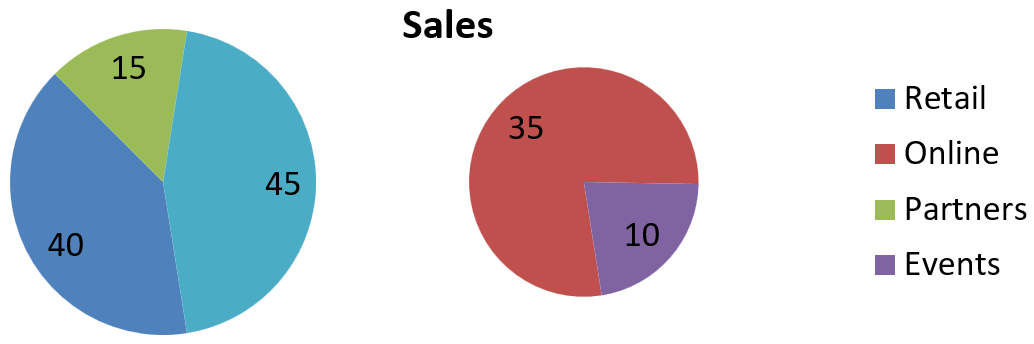
Sử dụng chia tùy chỉnh khi bạn muốn nhóm các danh mục cụ thể trong đồ thị phụ bất kể giá trị phần trăm của chúng. Ví dụ, một báo cáo bán hàng có thể hiển thị Online và Events cùng nhau để người đọc có thể so sánh hai kênh này, dù chúng chiếm 35% và 10% tổng doanh số.
Gọi set_PieSplitBy với PieSplitType::Custom và chọn các điểm qua get_PieSplitCustomPoints. Phương thức Add của bộ sưu tập chấp nhận một chỉ mục bắt đầu từ 0 trong series. Trong ví dụ này, chỉ mục 1 chọn Online, và chỉ mục 3 chọn Events. Partners cũng được thêm tạm thời, sau đó bị loại bỏ bằng cách sử dụng Remove.
#include <system/shared_ptr.h>
#include <DOM/Presentation.h>
#include <DOM/ISlide.h>
#include <DOM/IShapeCollection.h>
#include <DOM/Chart/ChartType.h>
#include <DOM/IChart.h>
#include <DOM/Chart/IChartData.h>
#include <DOM/Chart/IChartSeriesCollection.h>
#include <DOM/Chart/IChartSeries.h>
#include <DOM/Chart/IDataLabelCollection.h>
#include <DOM/Chart/IDataLabelFormat.h>
#include <DOM/Chart/IChartSeriesGroup.h>
#include <Export/SaveFormat.h>
#include <DOM/Chart/PieSplitType.h>
#include <vector>
#include <system/object_ext.h>
#include <DOM/Chart/IChartDataWorkbook.h>
#include <DOM/Chart/IChartDataCell.h>
#include <DOM/Chart/IChartCategoryCollection.h>
#include <DOM/Chart/IChartDataPointCollection.h>
#include <DOM/Chart/IChartDataPoint.h>
#include <DOM/Chart/IPieSplitCustomPointCollection.h>

using namespace Aspose::Slides;
using namespace Aspose::Slides::Charts;
using namespace Aspose::Slides::Export;

auto presentation = System::MakeObject<Presentation>();
auto slide = presentation->get_Slide(0);

auto chart = slide->get_Shapes()->AddChart(ChartType::PieOfPie, 50, 50, 600, 200);

// Thay thế dữ liệu mặc định bằng doanh số theo kênh.
auto workbook = chart->get_ChartData()->get_ChartDataWorkbook();
chart->get_ChartData()->get_Series()->Clear();
chart->get_ChartData()->get_Categories()->Clear();
auto categoryNames = std::vector<System::String>{ u"Retail", u"Online", u"Partners", u"Events" };
auto values = std::vector<int>{ 40, 35, 15, 10 };
auto seriesNameCell = workbook->GetCell(0, 0, 1, System::ObjectExt::Box(System::String(u"Sales")));
auto series = chart->get_ChartData()->get_Series()->Add(seriesNameCell, chart->get_Type());

for (auto i = 0; i < static_cast<int>(categoryNames.size()); i++)
{
    auto categoryCell = workbook->GetCell(0, i + 1, 0, System::ObjectExt::Box(categoryNames[i]));
    chart->get_ChartData()->get_Categories()->Add(categoryCell);

    auto valueCell = workbook->GetCell(0, i + 1, 1, System::ObjectExt::Box(values[i]));
    series->get_DataPoints()->AddDataPointForPieSeries(valueCell);
}

series->get_Labels()->get_DefaultDataLabelFormat()->set_ShowValue(true);
auto seriesGroup = series->get_ParentSeriesGroup();
seriesGroup->set_PieSplitBy(PieSplitType::Custom);
seriesGroup->set_IsColorVaried(true);

// Chọn Online và Events bằng các chỉ mục bắt đầu từ 0 trong series.
seriesGroup->get_PieSplitCustomPoints()->Add(1);
seriesGroup->get_PieSplitCustomPoints()->Add(3);

// Loại bỏ Partners khỏi lựa chọn mà không xóa dữ liệu nguồn của nó.
seriesGroup->get_PieSplitCustomPoints()->Add(2);
seriesGroup->get_PieSplitCustomPoints()->Remove(2);

presentation->Save(u"pie_of_pie_custom.pptx", SaveFormat::Pptx);
Online (35) và Events (10) xuất hiện dưới dạng các lát riêng biệt trong đồ thị phụ. Trong đồ thị chính, chúng được đại diện bằng một lát kết hợp có giá trị 45, cùng với Retail (40) và Partners (15). Việc xóa Partners khỏi lựa chọn tùy chỉnh vẫn giữ nó trong đồ thị chính; nó không loại bỏ danh mục hoặc giá trị của nó khỏi dữ liệu nguồn của biểu đồ.
Hình ảnh sau đây hiển thị bản trình bày đã lưu trong PowerPoint:
Đặt Màu Tự Động cho Các Lát Biểu Đồ Tròn
Aspose.Slides for C++ có thể tự động gán các màu khác nhau cho các lát của biểu đồ tròn. Ví dụ sau tạo một biểu đồ tròn với tiêu đề ở trung tâm và thay thế dữ liệu mặc định bằng ba danh mục quý và các giá trị của chúng. Phương thức set_ShowValue hiển thị các giá trị 20, 50 và 30 dưới dạng nhãn, trong khi set_IsColorVaried bật màu sắc riêng biệt cho mỗi lát.
#include <system/shared_ptr.h>
#include <DOM/Presentation.h>
#include <DOM/ISlide.h>
#include <DOM/IShapeCollection.h>
#include <DOM/Chart/ChartType.h>
#include <DOM/IChart.h>
#include <DOM/Chart/IChartData.h>
#include <DOM/Chart/IChartSeriesCollection.h>
#include <DOM/Chart/IChartSeries.h>
#include <DOM/Chart/IDataLabelCollection.h>
#include <DOM/Chart/IDataLabelFormat.h>
#include <DOM/Chart/IChartSeriesGroup.h>
#include <Export/SaveFormat.h>
#include <vector>
#include <system/object_ext.h>
#include <DOM/Chart/IChartDataWorkbook.h>
#include <DOM/Chart/IChartDataCell.h>
#include <DOM/Chart/IChartCategoryCollection.h>
#include <DOM/Chart/IChartDataPointCollection.h>
#include <DOM/Chart/IChartDataPoint.h>
#include <DOM/Chart/IChartTitle.h>
#include <DOM/ITextFrame.h>
#include <DOM/ITextFrameFormat.h>
#include <DOM/NullableBool.h>

using namespace Aspose::Slides;
using namespace Aspose::Slides::Charts;
using namespace Aspose::Slides::Export;

auto presentation = System::MakeObject<Presentation>();
auto slide = presentation->get_Slide(0);

auto chart = slide->get_Shapes()->AddChart(ChartType::Pie, 100, 100, 400, 400);

// Thêm tiêu đề biểu đồ ở giữa.
chart->get_ChartTitle()->AddTextFrameForOverriding(u"Sample Title");
chart->get_ChartTitle()->get_TextFrameForOverriding()->get_TextFrameFormat()->set_CenterText(NullableBool::True);
chart->get_ChartTitle()->set_Height(20);
chart->set_HasTitle(true);

// Thay thế dữ liệu mặc định bằng bảng tính đầu tiên.
auto workbook = chart->get_ChartData()->get_ChartDataWorkbook();
auto worksheetIndex = 0;
chart->get_ChartData()->get_Series()->Clear();
chart->get_ChartData()->get_Categories()->Clear();
auto categoryNames = std::vector<System::String>{ u"First Qtr", u"2nd Qtr", u"3rd Qtr" };
auto values = std::vector<int>{ 20, 50, 30 };
auto seriesNameCell = workbook->GetCell(worksheetIndex, 0, 1, System::ObjectExt::Box(System::String(u"Series 1")));
auto series = chart->get_ChartData()->get_Series()->Add(seriesNameCell, chart->get_Type());

for (auto i = 0; i < static_cast<int>(categoryNames.size()); i++)
{
    auto categoryCell = workbook->GetCell(worksheetIndex, i + 1, 0, System::ObjectExt::Box(categoryNames[i]));
    chart->get_ChartData()->get_Categories()->Add(categoryCell);

    auto valueCell = workbook->GetCell(worksheetIndex, i + 1, 1, System::ObjectExt::Box(values[i]));
    series->get_DataPoints()->AddDataPointForPieSeries(valueCell);
}

// Hiển thị giá trị và gán màu khác nhau cho các lát.
series->get_Labels()->get_DefaultDataLabelFormat()->set_ShowValue(true);
series->get_ParentSeriesGroup()->set_IsColorVaried(true);

presentation->Save(u"pie.pptx", SaveFormat::Pptx);
FAQ
Các biến thể Pie of Pie và Bar of Pie có được hỗ trợ không?
Có, thư viện supports một đồ thị phụ cho biểu đồ tròn, bao gồm các loại Pie of Pie và Bar of Pie.
Tôi có thể xuất riêng biểu đồ dưới dạng hình ảnh (ví dụ, PNG) không?
Có, bạn có thể export the chart itself as an image (như PNG) mà không cần xuất toàn bộ bản trình bày.