
在 C++ 中管理演示文稿形状
概述
Aspose.Slides for C++ 将幻灯片上的形状表示为有序的 IShapeCollection。该集合既是查找和修改形状的地方,也是它们堆叠顺序的来源:索引 0 是最靠后的形状,而最后一个索引是最前面的形状。
本文遵循该模型。首先说明如何可靠地标识形状并修改预设形状的调整点,然后展示如何克隆、删除、隐藏和重新排序形状。最后几节覆盖布局级格式、SVG 导出、对齐和翻转设置。每个示例都是独立的,您可以只使用工作流所需的操作。
标识和查找形状
在处理已知文件时,集合索引很方便,但它们不是稳定的标识符。添加、删除或重新排序形状都会改变其索引。请根据演示文稿的编写和维护方式选择标识符:
- 名称 对于开发者控制的模板很有用,并且可以在 PowerPoint 的“选择窗格”中轻松查看。名称可以编辑,但不保证唯一,若代码依赖名称,请建立命名约定。
- 替代文本 在可访问性描述或作者提供的标签已经标识形状时很有用。它对用户可见,可能会本地化或为可访问性重写,但也不保证唯一。不要悄悄将有意义的可访问性文本用作数据库键。
- OfficeInteropShapeId 是只读标识符,在同一幻灯片内唯一,且对应 PowerPoint 互操作使用的形状 ID。将其用于与 PowerPoint 集成或在形状生命周期内需要明确引用的场景。克隆或重新创建的形状是不同的形状,会获得自己的 ID。
相关的 UniqueId 属性具有演示文稿范围,但旨在供加载项使用,且可能被重新分配。它不应被视为永久的外部键。如果长期身份至关重要,请在应用程序数据中保留映射并验证预期形状仍然存在。
有关读取和更新替代文本标题与描述的实用示例,请参阅 管理替代文本标题和描述。使用替代文本向阅读器解释视觉含义,并将其与代码用于查找形状的名称分离。
下面的示例通过 Name 进行搜索并返回幻灯片范围的互操作 ID。当模板不包含预期形状时,代码会报告该结果,而不是继续使用错误的对象。
#include <DOM/IShape.h>
#include <DOM/IShapeCollection.h>
#include <DOM/ISlide.h>
#include <DOM/Presentation.h>
#include <system/console.h>
#include <system/string.h>

using namespace Aspose::Slides;
using namespace System;

auto presentation = MakeObject<Presentation>(u"input.pptx");
auto slide = presentation->get_Slide(0);

SharedPtr<IShape> targetShape;
for (auto shape : slide->get_Shapes())
{
    if (shape->get_Name() == u"RevenueChart")
    {
        targetShape = shape;
        break;
    }
}

if (targetShape == nullptr)
{
    Console::WriteLine(u"The shape 'RevenueChart' was not found on slide 1.");
}
else
{
    Console::WriteLine(String::Format(u"Found {0}; interop ID: {1}", targetShape->get_Name(), targetShape->get_OfficeInteropShapeId()));
}

presentation->Dispose();
当操作特定于某种形状类型时,请在使用特定类型成员之前检查接口。此示例仅在命名对象是 IAutoShape 时更新文本和替代文本。
#include <DOM/IAutoShape.h>
#include <DOM/IShape.h>
#include <DOM/IShapeCollection.h>
#include <DOM/ISlide.h>
#include <DOM/ITextFrame.h>
#include <DOM/Presentation.h>
#include <Export/SaveFormat.h>
#include <system/console.h>

using namespace Aspose::Slides;
using namespace Aspose::Slides::Export;
using namespace System;

auto presentation = MakeObject<Presentation>(u"input.pptx");
auto slide = presentation->get_Slide(0);

SharedPtr<IShape> candidate;
for (auto shape : slide->get_Shapes())
{
    if (shape->get_Name() == u"StatusLabel")
    {
        candidate = shape;
        break;
    }
}

if (candidate != nullptr && ObjectExt::Is<IAutoShape>(candidate))
{
    auto autoShape = ExplicitCast<IAutoShape>(candidate);
    autoShape->get_TextFrame()->set_Text(u"Approved");
    autoShape->set_AlternativeText(u"Approval status: approved");
    presentation->Save(u"identified-shape.pptx", SaveFormat::Pptx);
}
else
{
    Console::WriteLine(u"'StatusLabel' is missing or is not an AutoShape.");
}

presentation->Dispose();
标识并修改预设形状调整
预设几何形状可以暴露调整点,以控制角大小、箭头比例或弧度等特性。通过只读的 IGeometryShape::get_Adjustments 集合访问它们。集合本身由形状提供,但每个 IAdjustValue 包含一个可更改的值。
不要仅依赖固定的集合索引。遍历调整项并检查只读的 IAdjustValue::get_Type 属性,其 ShapeAdjustmentType 值描述该调整控制的内容。只读的 IAdjustValue::get_Name 属性提供额外的标识信息,尤其在预设包含多个语义相同的调整时非常有用。
使用与调整意义匹配的值属性:
| 调整类型 | 用途 | 要更改的值 |
|---|---|---|
CornerSize |
圆角的大小 | RawValue |
ArrowTailThickness |
箭尾的粗细 | RawValue |
ArrowheadLength |
箭头的长度 | RawValue |
ArrowheadWidth |
箭头的宽度 | RawValue |
StartAngle |
饼形或弧形的起始角度 | AngleValue |
EndAngle |
饼形或弧形的结束角度 | AngleValue |
Type 和 Name 不能赋值。RawValue 是预设本身几何单位的可读写整数,而 AngleValue 是以度为单位的可读写角度。调整的数量、顺序、含义和有效范围取决于预设的 ShapeType。对一种预设有效的值在另一种预设中可能无效或产生不同效果。
当 Type 为 ShapeAdjustmentType::Custom 时,API 不识别标准语义含义。检查 Name、预设类型和现有值,除非已知预期含义和范围,否则保持该调整不变。即使是已识别的类型,在选择值之前也要检查同一类型是否出现多次。Connector 文章展示了连接器弯曲调整的此类情况。
下面的完整示例创建了三种预设形状的默认和修改版本。它遍历每个调整,报告其 Name 和 Type,通过 RawValue 更改尺寸相关值,通过 AngleValue 更改角度,并保存结果。左列保留默认几何,右列显示已调整的圆角矩形、四向箭头和饼形。
#include <DOM/IAdjustValue.h>
#include <DOM/IAdjustValueCollection.h>
#include <DOM/IAutoShape.h>
#include <DOM/IGeometryShape.h>
#include <DOM/IShapeCollection.h>
#include <DOM/ISlide.h>
#include <DOM/ITextFrame.h>
#include <DOM/Presentation.h>
#include <DOM/ShapeAdjustmentType.h>
#include <DOM/ShapeType.h>
#include <Export/SaveFormat.h>
#include <system/array.h>
#include <system/console.h>
#include <system/object_ext.h>
#include <system/string.h>

using namespace Aspose::Slides;
using namespace Aspose::Slides::Export;
using namespace System;

auto presentation = MakeObject<Presentation>();
auto slide = presentation->get_Slide(0);

// 为默认和调整后的形状列添加标题。
auto defaultColumnLabel = slide->get_Shapes()->AddAutoShape(ShapeType::Rectangle, 40, 20, 250, 30);
defaultColumnLabel->get_TextFrame()->set_Text(u"Default preset geometry");
auto adjustedColumnLabel = slide->get_Shapes()->AddAutoShape(ShapeType::Rectangle, 390, 20, 250, 30);
adjustedColumnLabel->get_TextFrame()->set_Text(u"Modified adjustment values");

slide->get_Shapes()->AddAutoShape(ShapeType::RoundCornerRectangle, 80, 70, 160, 70);
auto modifiedRoundedRectangle = slide->get_Shapes()->AddAutoShape(ShapeType::RoundCornerRectangle, 430, 70, 160, 70);
modifiedRoundedRectangle->set_Name(u"ModifiedRoundedRectangle");

slide->get_Shapes()->AddAutoShape(ShapeType::QuadArrow, 80, 180, 160, 110);
auto modifiedArrow = slide->get_Shapes()->AddAutoShape(ShapeType::QuadArrow, 430, 180, 160, 110);
modifiedArrow->set_Name(u"ModifiedQuadArrow");

slide->get_Shapes()->AddAutoShape(ShapeType::Pie, 95, 330, 130, 130);
auto modifiedPie = slide->get_Shapes()->AddAutoShape(ShapeType::Pie, 445, 330, 130, 130);
modifiedPie->set_Name(u"ModifiedPie");

auto shapesToAdjust = MakeArray<SharedPtr<IGeometryShape>>({modifiedRoundedRectangle, modifiedArrow, modifiedPie});

for (auto shape : shapesToAdjust)
{
    auto adjustments = shape->get_Adjustments();
    for (int32_t adjustmentIndex = 0; adjustmentIndex < adjustments->get_Count(); ++adjustmentIndex)
    {
        auto adjustment = adjustments->idx_get(adjustmentIndex);
        Console::WriteLine(shape->get_Name() + u" / " + adjustment->get_Name() + u": " + ObjectExt::ToString(adjustment->get_Type()));

        switch (adjustment->get_Type())
        {
            case ShapeAdjustmentType::CornerSize:
                adjustment->set_RawValue(5000);
                break;
            case ShapeAdjustmentType::ArrowTailThickness:
                adjustment->set_RawValue(25000);
                break;
            case ShapeAdjustmentType::ArrowheadLength:
                adjustment->set_RawValue(30000);
                break;
            case ShapeAdjustmentType::ArrowheadWidth:
                adjustment->set_RawValue(40000);
                break;
            case ShapeAdjustmentType::StartAngle:
                adjustment->set_AngleValue(30);
                break;
            case ShapeAdjustmentType::EndAngle:
                adjustment->set_AngleValue(300);
                break;
            case ShapeAdjustmentType::Custom:
                Console::WriteLine(u"Custom adjustment '" + adjustment->get_Name() + u"' was not changed.");
                break;
        }
    }
}

presentation->Save(u"preset-shape-adjustments.pptx", SaveFormat::Pptx);
presentation->Dispose();
在更改值之前检查语义类型可以使代码明确其意图,并避免假设特定集合索引在不同预设形状之间具有相同含义。
修改形状集合
添加、克隆、删除和重新排序方法会立即作用于集合。如果操作改变了形状的数量或顺序,请不要继续依赖该操作前捕获的索引。
克隆形状
AddClone 创建一个独立的副本并将其追加到目标集合。InsertClone 也创建副本,但将其放置在指定的 Z 顺序索引处。接受坐标的重载在不改变大小的情况下移动克隆;接受宽度和高度的重载则可以同时调整大小。
示例创建了目标幻灯片,将带标签的矩形克隆到前面,并在后面插入第二个克隆。对任一克隆的更改不会影响源形状。
#include <DOM/IAutoShape.h>
#include <DOM/IGlobalLayoutSlideCollection.h>
#include <DOM/IShapeCollection.h>
#include <DOM/ISlide.h>
#include <DOM/ISlideCollection.h>
#include <DOM/ITextFrame.h>
#include <DOM/Presentation.h>
#include <DOM/ShapeType.h>
#include <DOM/SlideLayoutType.h>
#include <Export/SaveFormat.h>
#include <system/console.h>

using namespace Aspose::Slides;
using namespace Aspose::Slides::Export;
using namespace System;

auto presentation = MakeObject<Presentation>();
auto sourceSlide = presentation->get_Slide(0);
auto sourceShape = sourceSlide->get_Shapes()->AddAutoShape(ShapeType::Rectangle, 40, 40, 180, 60);
sourceShape->set_Name(u"SourceLabel");
sourceShape->get_TextFrame()->set_Text(u"Source");

auto blankLayout = presentation->get_LayoutSlides()->GetByType(SlideLayoutType::Blank);
auto destinationSlide = presentation->get_Slides()->AddEmptySlide(blankLayout);

auto frontCloneShape = destinationSlide->get_Shapes()->AddClone(sourceShape, 80, 80);
frontCloneShape->set_Name(u"FrontClone");
if (ObjectExt::Is<IAutoShape>(frontCloneShape))
{
    auto frontClone = ExplicitCast<IAutoShape>(frontCloneShape);
    frontClone->get_TextFrame()->set_Text(u"Front clone");
}
else
{
    Console::WriteLine(u"The front clone is not an AutoShape; its text was not changed.");
}

auto backCloneShape = destinationSlide->get_Shapes()->InsertClone(0, sourceShape, 80, 180);
backCloneShape->set_Name(u"BackClone");
if (ObjectExt::Is<IAutoShape>(backCloneShape))
{
    auto backClone = ExplicitCast<IAutoShape>(backCloneShape);
    backClone->get_TextFrame()->set_Text(u"Back clone");
}
else
{
    Console::WriteLine(u"The back clone is not an AutoShape; its text was not changed.");
}

presentation->Save(u"cloned-shapes.pptx", SaveFormat::Pptx);
presentation->Dispose();
克隆会复制形状的内容和格式,包括其名称和替代文本。当这些值必须唯一时,请为克隆分配新的逻辑标识符。复杂形状使用的资源由演示文稿处理,但克隆仍然是具有新形状标识的新集合项。
删除形状
Remove 删除集合中的特定形状对象。在索引遍历期间删除多个匹配项时,请从末尾向前遍历,以保持剩余索引有效。
此示例删除所有具有指定名称的形状。它读取当前索引的形状,而不是固定的集合项,并且没有不必要的类型转换。
#include <DOM/IShape.h>
#include <DOM/IShapeCollection.h>
#include <DOM/ISlide.h>
#include <DOM/Presentation.h>
#include <DOM/ShapeType.h>
#include <Export/SaveFormat.h>

using namespace Aspose::Slides;
using namespace Aspose::Slides::Export;
using namespace System;

auto presentation = MakeObject<Presentation>();
auto slide = presentation->get_Slide(0);

auto keepShape = slide->get_Shapes()->AddAutoShape(ShapeType::Rectangle, 40, 40, 140, 60);
keepShape->set_Name(u"Keep");

auto firstTemporaryShape = slide->get_Shapes()->AddAutoShape(ShapeType::Ellipse, 220, 40, 80, 80);
firstTemporaryShape->set_Name(u"Temporary");

auto secondTemporaryShape = slide->get_Shapes()->AddAutoShape(ShapeType::Triangle, 340, 40, 100, 80);
secondTemporaryShape->set_Name(u"Temporary");

for (int32_t i = slide->get_Shapes()->get_Count() - 1; i >= 0; --i)
{
    auto shape = slide->get_Shape(i);
    if (shape->get_Name() == u"Temporary")
    {
        slide->get_Shapes()->Remove(shape);
    }
}

presentation->Save(u"removed-shapes.pptx", SaveFormat::Pptx);
presentation->Dispose();
删除后,形状计数和后续形状的索引会变化。对未受影响的形状的引用比保存的索引更可靠。同时还需考虑连接器、动画和其他可能引用被删除对象的演示文稿特性;删除可见形状可能会改变幻灯片的外观以外的内容。
隐藏形状
将 Hidden 设置为 true 会将形状保留在集合中,但阻止其在普通放映中出现。其索引、格式和内容仍可供代码使用,因此隐藏适用于以后可能恢复的可选元素。
#include <DOM/IShape.h>
#include <DOM/IShapeCollection.h>
#include <DOM/ISlide.h>
#include <DOM/Presentation.h>
#include <DOM/ShapeType.h>
#include <Export/SaveFormat.h>

using namespace Aspose::Slides;
using namespace Aspose::Slides::Export;
using namespace System;

auto presentation = MakeObject<Presentation>();
auto slide = presentation->get_Slide(0);

auto visibleShape = slide->get_Shapes()->AddAutoShape(ShapeType::Rectangle, 40, 40, 160, 60);
visibleShape->set_Name(u"VisibleLabel");

auto optionalShape = slide->get_Shapes()->AddAutoShape(ShapeType::Moon, 240, 40, 100, 100);
optionalShape->set_Name(u"OptionalDecoration");

for (auto shape : slide->get_Shapes())
{
    if (shape->get_Name() == u"OptionalDecoration")
    {
        shape->set_Hidden(true);
    }
}

presentation->Save(u"hidden-shape.pptx", SaveFormat::Pptx);
presentation->Dispose();
隐藏并非删除或安全措施。用户或代码仍然可以发现并取消隐藏该对象,它仍然是演示文稿文件的一部分。
更改 Z 顺序
重叠的形状按集合顺序绘制。Reorder 将现有形状移动到目标索引,而不进行克隆。索引 0 为后侧;Count - 1 为前侧。
#include <DOM/FillType.h>
#include <DOM/IColorFormat.h>
#include <DOM/IFillFormat.h>
#include <DOM/IShapeCollection.h>
#include <DOM/ISlide.h>
#include <DOM/Presentation.h>
#include <DOM/ShapeType.h>
#include <Export/SaveFormat.h>
#include <drawing/color.h>

using namespace Aspose::Slides;
using namespace Aspose::Slides::Export;
using namespace System;
using namespace System::Drawing;

auto presentation = MakeObject<Presentation>();
auto slide = presentation->get_Slide(0);

auto blueRectangle = slide->get_Shapes()->AddAutoShape(ShapeType::Rectangle, 100, 100, 220, 120);
blueRectangle->set_Name(u"BlueRectangle");
blueRectangle->get_FillFormat()->set_FillType(FillType::Solid);
blueRectangle->get_FillFormat()->get_SolidFillColor()->set_Color(Color::get_SteelBlue());

auto orangeEllipse = slide->get_Shapes()->AddAutoShape(ShapeType::Ellipse, 180, 140, 220, 120);
orangeEllipse->set_Name(u"OrangeEllipse");
orangeEllipse->get_FillFormat()->set_FillType(FillType::Solid);
orangeEllipse->get_FillFormat()->get_SolidFillColor()->set_Color(Color::get_Orange());

slide->get_Shapes()->Reorder(slide->get_Shapes()->get_Count() - 1, blueRectangle);
presentation->Save(u"reordered-shapes.pptx", SaveFormat::Pptx);
presentation->Dispose();
矩形最初创建时位于椭圆后面。将其移动到最终索引后会位于前面。请在添加或克隆所有相关形状后再确定 Z 顺序,因为这些操作会追加或插入新的集合项,从而改变预期的堆叠。
检查布局幻灯片上的形状
普通幻灯片、布局幻灯片和母版幻灯片拥有各自的形状集合。布局集合中的形状并不是普通幻灯片上同位置形状的同一对象。需要了解或更改布局提供的格式时,请检查布局形状。
以下示例读取每个布局形状的 FillFormat 和 LineFormat,并未假设每个形状都是 AutoShape。
#include <DOM/IGlobalLayoutSlideCollection.h>
#include <DOM/ILayoutSlide.h>
#include <DOM/ILineFormat.h>
#include <DOM/IShape.h>
#include <DOM/IShapeCollection.h>
#include <DOM/Presentation.h>
#include <system/console.h>
#include <system/string.h>

using namespace Aspose::Slides;
using namespace System;

auto presentation = MakeObject<Presentation>(u"input.pptx");

for (auto layoutSlide : presentation->get_LayoutSlides())
{
    for (auto shape : layoutSlide->get_Shapes())
    {
        auto fillType = shape->get_FillFormat()->get_FillType();
        auto lineWidth = shape->get_LineFormat()->get_Width();
        Console::WriteLine(String::Format(u"{0} / {1}: fill={2}, line width={3}", layoutSlide->get_Name(), shape->get_Name(), fillType, lineWidth));
    }
}

presentation->Dispose();
编辑布局可能会影响使用该布局的多个幻灯片。在更改布局形状之前,确定普通幻灯片是继承该对象还是包含本地覆盖,并测试所有使用该布局的幻灯片。
将形状导出为 SVG
WriteAsSvg 将单个形状的渲染内容写入流。结果仅包含该形状,而不包括整个幻灯片背景或相邻形状。
#include <DOM/IShape.h>
#include <DOM/IShapeCollection.h>
#include <DOM/ISlide.h>
#include <DOM/Presentation.h>
#include <system/console.h>
#include <system/io/file.h>

using namespace Aspose::Slides;
using namespace System;
using namespace System::IO;

auto presentation = MakeObject<Presentation>(u"input.pptx");
auto slide = presentation->get_Slide(0);

if (slide->get_Shapes()->get_Count() == 0)
{
    Console::WriteLine(u"Slide 1 does not contain a shape to export.");
}
else
{
    auto shape = slide->get_Shape(0);
    auto svgStream = File::Create(u"shape.svg");
    shape->WriteAsSvg(svgStream);
    svgStream->Close();
}

presentation->Dispose();
在渲染期间保持演示文稿打开。输出取决于形状的格式以及字体、图像等资源。如果需要整个组合,请导出幻灯片而不是单个形状。调用者拥有流的所有权,需自行关闭或释放。
对齐形状
SlideUtil::AlignShapes 的重载可以对齐全部形状或选定的集合索引。ShapesAlignmentType 指定对齐的边缘、中心线或分布模式。将 alignToSlide 设置为 true 使用幻灯片边缘;设置为 false 则相对于彼此对齐选定的形状。
此示例将三个形状对齐到幻灯片的顶部边缘。返回的形状引用在对齐前立即转换为当前索引。
#include <DOM/IShapeCollection.h>
#include <DOM/ISlide.h>
#include <DOM/Presentation.h>
#include <DOM/ShapeType.h>
#include <DOM/ShapesAlignmentType.h>
#include <Export/SaveFormat.h>
#include <Util/SlideUtil.h>
#include <system/array.h>

using namespace Aspose::Slides;
using namespace Aspose::Slides::Export;
using namespace Aspose::Slides::Util;
using namespace System;

auto presentation = MakeObject<Presentation>();
auto slide = presentation->get_Slide(0);

auto firstShape = slide->get_Shapes()->AddAutoShape(ShapeType::Rectangle, 60, 80, 120, 50);
auto secondShape = slide->get_Shapes()->AddAutoShape(ShapeType::Ellipse, 240, 160, 120, 50);
auto thirdShape = slide->get_Shapes()->AddAutoShape(ShapeType::Triangle, 420, 240, 120, 50);
firstShape->set_Name(u"FirstAlignedShape");
secondShape->set_Name(u"SecondAlignedShape");
thirdShape->set_Name(u"ThirdAlignedShape");

auto shapeIndexes = MakeArray<int32_t>({slide->get_Shapes()->IndexOf(firstShape), slide->get_Shapes()->IndexOf(secondShape), slide->get_Shapes()->IndexOf(thirdShape)});

SlideUtil::AlignShapes(ShapesAlignmentType::AlignTop, true, slide, shapeIndexes);
presentation->Save(u"aligned-shapes.pptx", SaveFormat::Pptx);
presentation->Dispose();
对齐会改变位置,而不是 Z 顺序。相对对齐通常至少需要两个形状,水平或垂直分布则需要足够的形状以定义间距。如果在调用方法前修改了集合,请重新计算索引。
翻转形状
ShapeFrame 类保存位置、大小、水平和垂直翻转设置以及旋转。其 FlipH 和 FlipV 值使用 NullableBool:True 启用翻转,False 禁用翻转,NotDefined 保持未指定/默认状态。
下面的输入演示文稿包含一个未翻转的形状。
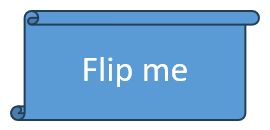
示例保留其余所有帧值,仅替换两个翻转设置。这一点很重要,因为为 Frame 赋新值会替换完整帧。
#include <DOM/IShape.h>
#include <DOM/NullableBool.h>
#include <DOM/Presentation.h>
#include <DOM/ShapeFrame.h>
#include <Export/SaveFormat.h>
#include <system/console.h>
#include <system/string.h>

using namespace Aspose::Slides;
using namespace Aspose::Slides::Export;
using namespace System;

auto presentation = MakeObject<Presentation>(u"sample.pptx");
auto shape = presentation->get_Slide(0)->get_Shape(0);
auto frame = shape->get_Frame();

Console::WriteLine(String::Format(u"Horizontal flip before change: {0}", frame->get_FlipH()));
Console::WriteLine(String::Format(u"Vertical flip before change: {0}", frame->get_FlipV()));

shape->set_Frame(MakeObject<ShapeFrame>(frame->get_X(), frame->get_Y(), frame->get_Width(), frame->get_Height(), NullableBool::True, NullableBool::True, frame->get_Rotation()));

presentation->Save(u"flipped-shape.pptx", SaveFormat::Pptx);
presentation->Dispose();
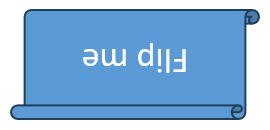
保存后的形状在水平和垂直方向上均已镜像,同时保持位置、大小和旋转不变。
常见问题
是否应该使用集合索引作为形状标识符?
仅在集合在使用索引前不会改变的短期处理场景中使用。对于作者编写的模板,建议使用经过验证的 Name 或 AlternativeText 约定;对于幻灯片范围的互操作工作,则使用 OfficeInteropShapeId。
隐藏形状会从 Z 顺序中移除吗?
不会。隐藏的形状仍保留在集合的相同索引处。它仍然可以被找到、重新排序、编辑或再次显示。
为什么克隆的形状会出现在另一个形状前面?
AddClone 将克隆追加到集合末尾,即 Z 顺序的前端。使用 InsertClone 可选择初始索引,或在所有形状添加完毕后使用 Reorder。
我可以使用固定索引来标识预设形状的调整吗?
只能在验证了确切的预设和集合布局后使用。更推荐遍历 IGeometryShape::get_Adjustments 并检查 IAdjustValue::get_Type;当同一语义类型出现多次时,可使用 IAdjustValue::get_Name 作为补充信息。