
使用 C++ 在演示文稿中应用形状效果
介绍
虽然 PowerPoint 中的效果可用于突出形状,但它们不同于 填充 或轮廓。使用 PowerPoint 效果,您可以在形状上创建逼真的反射,扩散形状的发光等。
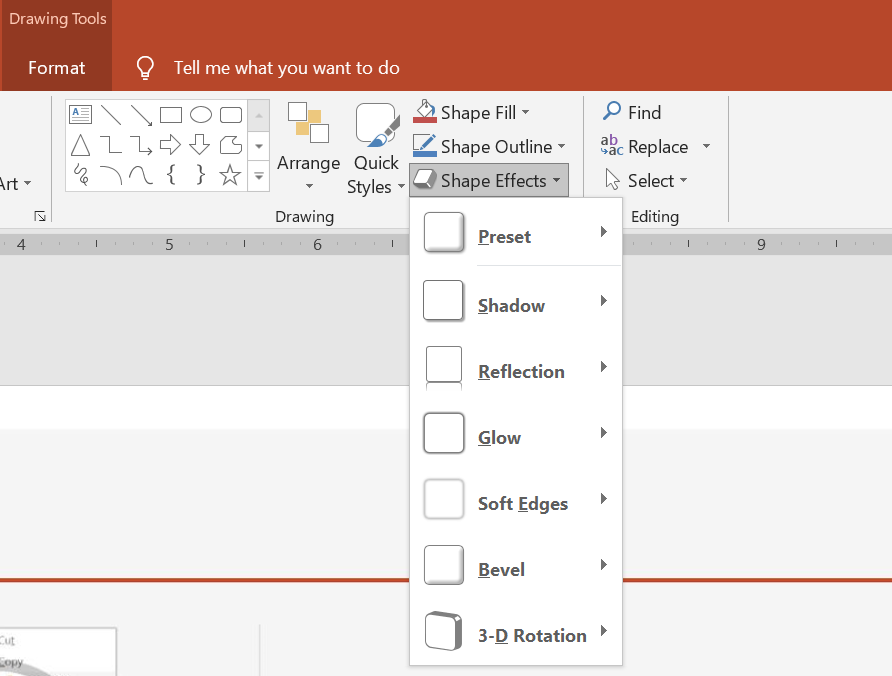
PowerPoint 提供六种可应用于形状的效果,您可以对形状应用一种或多种效果。
某些效果组合看起来比其他组合更好。因此,PowerPoint 在 Preset 下提供选项。Preset 选项本质上是已知看起来不错的两种或更多效果的组合。通过选择预设,您无需浪费时间测试或组合不同的效果来寻找合适的组合。
Aspose.Slides 在 EffectFormat 类下提供属性和方法,使您能够在 PowerPoint 演示文稿中对形状应用相同的效果。
应用阴影效果
Aspose.Slides for C++ 支持形状的外部和内部阴影。您可以自定义其颜色、方向、距离和模糊半径,以匹配演示文稿的设计。
应用外部阴影
使用外部阴影可使卡片或面板在幻灯片背景中突出。阴影超出形状边缘,营造出形状悬浮在幻灯片上的效果。调整其颜色、方向、距离和模糊半径,以匹配模板的光照和样式。
以下 C++ 代码示例演示如何对矩形应用 外部阴影效果:
#include <DOM/Effects/IOuterShadow.h>
#include <DOM/IAutoShape.h>
#include <DOM/IColorFormat.h>
#include <DOM/IEffectFormat.h>
#include <DOM/IShapeCollection.h>
#include <DOM/ISlide.h>
#include <DOM/Presentation.h>
#include <DOM/ShapeType.h>
#include <Export/SaveFormat.h>
#include <drawing/color.h>

using namespace Aspose::Slides;
using namespace Aspose::Slides::Export;
using namespace System::Drawing;

auto presentation = System::MakeObject<Presentation>();
auto slide = presentation->get_Slide(0);

auto shape = slide->get_Shapes()->AddAutoShape(ShapeType::RoundCornerRectangle, 20.0f, 20.0f, 200.0f, 100.0f);
auto effectFormat = shape->get_EffectFormat();
effectFormat->EnableOuterShadowEffect();
auto outerShadowEffect = effectFormat->get_OuterShadowEffect();
outerShadowEffect->get_ShadowColor()->set_Color(Color::get_DarkGray());
outerShadowEffect->set_Distance(10);
outerShadowEffect->set_Direction(45.0f);

presentation->Save(u"shadow_effect.pptx", SaveFormat::Pptx);

应用内部阴影
在重现模板的视觉样式时,使用内部阴影可为卡片或面板提供凹陷的外观。外部阴影延伸到形状之外,使其看起来凸起,而内部阴影则在边缘内部进行遮蔽。
调用 EnableInnerShadowEffect,然后配置 InnerShadowEffect。更大的模糊半径值会产生更柔和的边缘。
以下 C++ 示例创建了一个带有深灰色内部阴影的浅蓝色卡片,并将其保存为 PPTX 文件:
#include <DOM/Effects/IInnerShadow.h>
#include <DOM/IAutoShape.h>
#include <DOM/IColorFormat.h>
#include <DOM/IEffectFormat.h>
#include <DOM/IFillFormat.h>
#include <DOM/ILineFormat.h>
#include <DOM/IShapeCollection.h>
#include <DOM/ISlide.h>
#include <DOM/Presentation.h>
#include <DOM/FillType.h>
#include <DOM/ShapeType.h>
#include <Export/SaveFormat.h>
#include <drawing/color.h>

using namespace Aspose::Slides;
using namespace Aspose::Slides::Export;
using namespace System::Drawing;

auto presentation = System::MakeObject<Presentation>();
auto slide = presentation->get_Slide(0);

auto shape = slide->get_Shapes()->AddAutoShape(ShapeType::Rectangle, 20.0f, 20.0f, 200.0f, 100.0f);
shape->get_FillFormat()->set_FillType(FillType::Solid);
shape->get_FillFormat()->get_SolidFillColor()->set_Color(Color::get_LightBlue());
shape->get_LineFormat()->get_FillFormat()->set_FillType(FillType::NoFill);

shape->get_EffectFormat()->EnableInnerShadowEffect();
auto shadow = shape->get_EffectFormat()->get_InnerShadowEffect();
shadow->get_ShadowColor()->set_Color(Color::get_DimGray());
shadow->set_Direction(225);
shadow->set_Distance(7);
shadow->set_BlurRadius(6);

presentation->Save(u"inner_shadow_effect.pptx", SaveFormat::Pptx);

要移除内部阴影,请在形状的 EffectFormat 上调用 DisableInnerShadowEffect。
应用反射效果
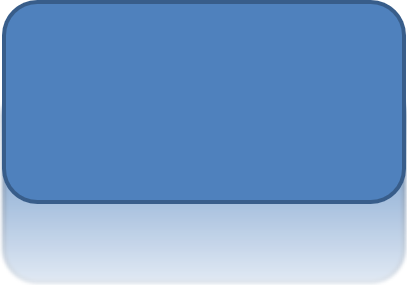
在 Aspose.Slides for C++ 中应用反射效果时,您可以为形状添加镜面反射,并调整距离、透明度和大小等参数。此效果通过为形状提供更精致、专业的外观来提升演示文稿的美感。使用简短代码即可轻松实现,可快速在多个元素上应用以保持设计一致性。
以下 C++ 代码示例演示如何对形状应用 反射效果:
#include <DOM/Effects/IReflection.h>
#include <DOM/IAutoShape.h>
#include <DOM/IEffectFormat.h>
#include <DOM/IShapeCollection.h>
#include <DOM/ISlide.h>
#include <DOM/Presentation.h>
#include <DOM/RectangleAlignment.h>
#include <DOM/ShapeType.h>
#include <Export/SaveFormat.h>

using namespace Aspose::Slides;
using namespace Aspose::Slides::Export;

auto presentation = System::MakeObject<Presentation>();
auto slide = presentation->get_Slide(0);

auto shape = slide->get_Shapes()->AddAutoShape(ShapeType::RoundCornerRectangle, 20.0f, 20.0f, 200.0f, 100.0f);
auto effectFormat = shape->get_EffectFormat();
effectFormat->EnableReflectionEffect();
auto reflectionEffect = effectFormat->get_ReflectionEffect();
reflectionEffect->set_RectangleAlign(RectangleAlignment::Bottom);
reflectionEffect->set_Direction(90.0f);
reflectionEffect->set_Distance(40);
reflectionEffect->set_BlurRadius(2);

presentation->Save(u"reflection_effect.pptx", SaveFormat::Pptx);
应用发光效果
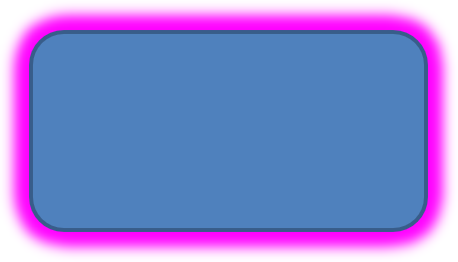
在 Aspose.Slides for C++ 中对形状应用发光效果时,您可以在形状周围添加柔和的光环,并调整颜色和大小等属性。此效果有助于突出形状,并为演示文稿增添吸引人的视觉元素。使用少量代码即可轻松实现,提升幻灯片的整体外观。
以下 C++ 代码示例演示如何对形状应用 发光效果:
#include <DOM/Effects/IGlow.h>
#include <DOM/IAutoShape.h>
#include <DOM/IColorFormat.h>
#include <DOM/IEffectFormat.h>
#include <DOM/IShapeCollection.h>
#include <DOM/ISlide.h>
#include <DOM/Presentation.h>
#include <DOM/ShapeType.h>
#include <Export/SaveFormat.h>
#include <drawing/color.h>

using namespace Aspose::Slides;
using namespace Aspose::Slides::Export;
using namespace System::Drawing;

auto presentation = System::MakeObject<Presentation>();
auto slide = presentation->get_Slide(0);

auto shape = slide->get_Shapes()->AddAutoShape(ShapeType::RoundCornerRectangle, 20.0f, 20.0f, 200.0f, 100.0f);
auto effectFormat = shape->get_EffectFormat();
effectFormat->EnableGlowEffect();
auto glowEffect = effectFormat->get_GlowEffect();
glowEffect->get_Color()->set_Color(Color::get_Magenta());
glowEffect->set_Radius(15);

presentation->Save(u"glow_effect.pptx", SaveFormat::Pptx);
应用柔和边缘效果
在 Aspose.Slides for C++ 中应用柔和边缘效果时,您可以在形状的边缘创建平滑的模糊过渡。此效果为设计增添更细腻、精致的外观,适用于需要柔和外观的设计。您可以轻松调整半径等参数,以在演示文稿中各种形状上实现所需效果。
以下 C++ 代码示例演示如何对形状应用 柔和边缘:
#include <DOM/Effects/ISoftEdge.h>
#include <DOM/IAutoShape.h>
#include <DOM/IEffectFormat.h>
#include <DOM/IShapeCollection.h>
#include <DOM/ISlide.h>
#include <DOM/Presentation.h>
#include <DOM/ShapeType.h>
#include <Export/SaveFormat.h>

using namespace Aspose::Slides;
using namespace Aspose::Slides::Export;

auto presentation = System::MakeObject<Presentation>();
auto slide = presentation->get_Slide(0);

auto shape = slide->get_Shapes()->AddAutoShape(ShapeType::RoundCornerRectangle, 20.0f, 20.0f, 200.0f, 150.0f);
auto effectFormat = shape->get_EffectFormat();
effectFormat->EnableSoftEdgeEffect();
auto softEdgeEffect = effectFormat->get_SoftEdgeEffect();
softEdgeEffect->set_Radius(8);

presentation->Save(u"soft_edges_effect.pptx", SaveFormat::Pptx);

常见问题
我可以对同一形状应用多个效果吗?
是的,您可以在单个形状上组合不同的效果,例如阴影、反射和发光,以创建更具动感的外观。
哪些形状可以应用效果?
您可以对多种形状应用效果,包括自动形状、图表、表格、图片、SmartArt 对象、OLE 对象等。
我可以对组合形状应用效果吗?
是的,您可以对组合形状应用效果。该效果将应用于整个组合。