
إدارة الصفوف والأعمدة في جداول PowerPoint باستخدام Python
مقدمة
Aspose.Slides for Python via Java يتيح لك إدارة بنية الجدول وتنسيقه في عروض PowerPoint من خلال الفئة جدول . يمكنك تعيين صف رأس، استنساخ أو إزالة الصفوف والأعمدة، وتطبيق تنسيق النص على صف أو عمود كامل.
تشرح هذه المقالة هذه العمليات باستخدام أمثلة Python. كما توضح كيفية استرجاع إعداد نمط الجدول لإعادة استخدامه. فهارس الصفوف والأعمدة في الجدول تبدأ من الصفر.
التحكم في ارتفاع الصف
استخدم Row.setMinimalHeight لتعيين الحد الأدنى لارتفاع الصف بالنقاط. هو حد أدنى، ليس ارتفاعًا ثابتًا. Row.getHeight تُرجع الارتفاع الفعلي. يمكنك الوصول إلى الصف عبر Table.getRows.
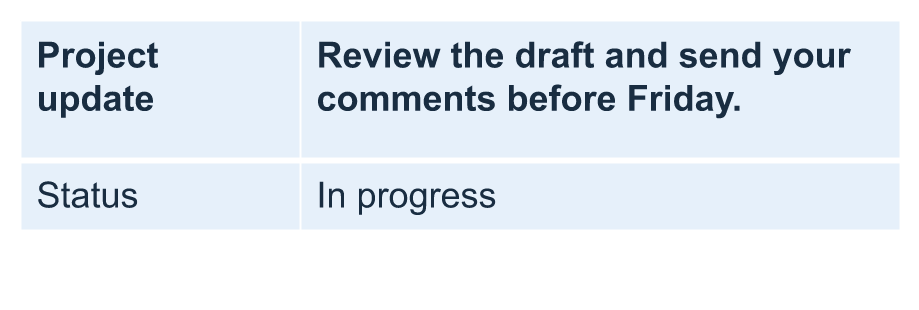
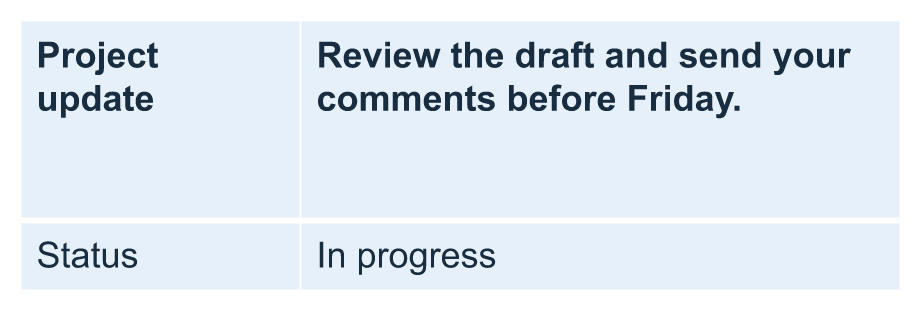
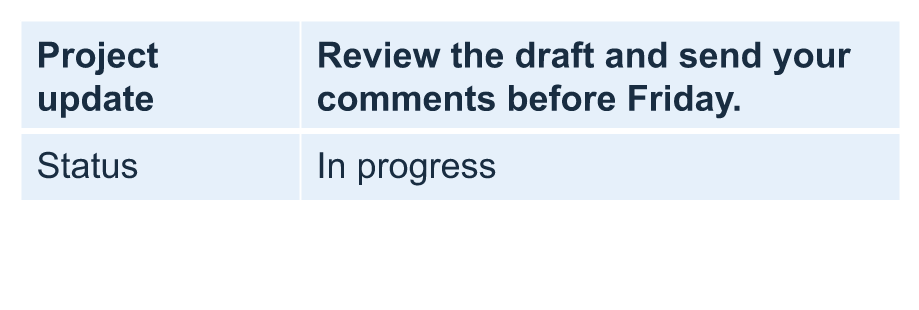
المثال يحمل row-height-input.pptx، والتي تحتوي على جدول كأول شكل في الشريحة الأولى. يبدأ الصف الأول عند 70 نقطة. تستخدم الخلايا نص Arial بحجم 18 نقطة، مع التفاف، وهوامش علوية وسفلية قيمتها 6 نقاط؛ النص الطويل في العمود الثاني يلتف إلى عدة أسطر. يزيد المثال الحد الأدنى إلى 100 نقطة، ثم يقلله إلى 20 نقطة، يطبع الارتفاع الفعلي بعد كل تعديل، ويحفظ كلا النتيجتين.
import jpype
import asposeslides

if not jpype.isJVMStarted():
    jpype.startJVM()

from asposeslides.api import Presentation, SaveFormat

presentation = Presentation("row-height-input.pptx")
try:
    slide = presentation.getSlides().get_Item(0)

    table = slide.getShapes().get_Item(0)
    row = table.getRows().get_Item(0)

    row.setMinimalHeight(100)
    print(f"Increased: minimum = {row.getMinimalHeight():.1f}, actual = {row.getHeight():.1f} pt")
    presentation.save("row-height-increased.pptx", SaveFormat.Pptx)

    row.setMinimalHeight(20)
    print(f"Decreased: minimum = {row.getMinimalHeight():.1f}, actual = {row.getHeight():.1f} pt")
    presentation.save("row-height-decreased.pptx", SaveFormat.Pptx)
finally:
    presentation.dispose()
مع العرض المرفق، يؤدي زيادة الحد الأدنى إلى إضافة مساحة إلى الصف. يقلل التخفيض من هذه المسافة الإضافية، لكن الارتفاع الفعلي يظل أكبر من 20 نقطة لأن النص وهوامش الخلية تحتاج إلى مساحة أكبر. لا يمكن لتقليل الحد الأدنى فقط أن يجبر الصف على أن يكون أقل من المساحة المطلوبة لمحتوياته.
عدة عوامل تؤثر على الارتفاع الفعلي:
- النص وحجم الخط: النص الطويل، أو فواصل سطر صريحة، أو خط أكبر قد يتطلب مساحة عمودية إضافية.
- اللف وعرض العمود: عند تمكين اللف، يمكن أن يؤدي تقليل عرض العمود باستخدام Column.setWidth إلى إنشاء مزيد من الأسطر. عمود أوسع يمكن أن يقلل المساحة المطلوبة عموديًا.
- هوامش الخلية: Cell.setMarginTop وCell.setMarginBottom يضيفان مساحة عمودية. Cell.setMarginLeft وCell.setMarginRight يقللان العرض المتاح للنص وقد يتسببان في لف إضافي.
في هذا الجدول دون خلايا مدمجة، تحدد الخلية التي تحتاج أكبر مساحة عمودية الحد الأدنى للمحتوى للصف بأكمله. لجعل الصف أقصر، قد تحتاج أيضًا إلى تقصير النص، تقليل حجم الخط أو الهوامش، أو توسيع العمود.
تظهر الصور أدناه نفس الجدول بنفس المقياس. في النتائج الموضحة، كانت الارتفاعات الفعلية 70، 100، و55.2 نقطة: ظل الصف الأخير أعلى من الحد الأدنى 20 نقطة. قد تختلف قياسات النص الدقيقة باختلاف الخطوط المتوفرة في بيئتك. حمّل النتائج المحفوظة: الحد الأدنى المتزايد والحد الأدنى المتناقص.
| الأصل: الحد الأدنى 70 نقطة، الفعلي 70 نقطة | متزايد: الحد الأدنى 100 نقطة، الفعلي 100 نقطة | متناقص: الحد الأدنى 20 نقطة، الفعلي 55.2 نقطة |
|---|---|---|
 |
 |
 |
تعيين الصف الأول كعنوان
استخدم الطريقة setFirstRow لتحديد الصف الأول لتنسيق العنوان. مظهره يعتمد على نمط الجدول المطبق على الجدول.
- حمّل العرض باستخدام الفئة Presentation .
- احصل على الشريحة الأولى.
- احصل على الجدول المخزن كأول شكل في الشريحة.
- فعّل تنسيق العنوان للصف الأول.
- احفظ العرض المعدل.
يتطلب المثال وجود table.pptx يحتوي على جدول كأول شكل في الشريحة الأولى. يفعّل تنسيق العنوان للصف الأول ويحفظ الملف كـ First_row_header.pptx.
import jpype
import asposeslides

if not jpype.isJVMStarted():
    jpype.startJVM()

from asposeslides.api import Presentation, SaveFormat

presentation = Presentation("table.pptx")
try:
    slide = presentation.getSlides().get_Item(0)

    table = slide.getShapes().get_Item(0)
    table.setFirstRow(True)

    presentation.save("First_row_header.pptx", SaveFormat.Pptx)
finally:
    presentation.dispose()
استنساخ صف أو عمود في الجدول
استنسخ الصفوف أو الأعمدة لإعادة استخدام محتواها وتنسيقها. يمكنك إلحاق نسخة إلى نهاية الجدول أو إدراجها في موقع معين.
- حمّل العرض باستخدام الفئة Presentation .
- احصل على الشريحة الأولى.
- حدّد عرض الأعمدة وارتفاعات الصفوف.
- أضف جدولًا باستخدام الطريقة addTable .
- استنسخ الصفوف المطلوبة.
- استنسخ الأعمدة المطلوبة.
- احفظ العرض المعدل.
يتطلب المثال وجود Test.pptx يحتوي على شريحة واحدة على الأقل. ينشئ جدولًا بثلاثة أعمدة وخمسة صفوف، بأبعاد محددة بالنقاط. يضيف نسخًا من الصف الأول والعمود الأول، ثم يدرج نسخًا من الصف الثاني والعمود الثاني عند الفهرس 3 (الموقع الرابع). الجدول الناتج يحتوي على سبعة صفوف وخمسة أعمدة. المعامل False يمنع الاستنساخ في الصفوف أو الأعمدة المدمجة المجاورة؛ هذا الجدول لا يحتوي على خلايا مدمجة.
import jpype
import asposeslides

if not jpype.isJVMStarted():
    jpype.startJVM()

from asposeslides.api import Presentation, SaveFormat

presentation = Presentation("Test.pptx")
try:
    slide = presentation.getSlides().get_Item(0)

    column_widths = jpype.JArray(jpype.JDouble)([50, 50, 50])
    row_heights = jpype.JArray(jpype.JDouble)([50, 30, 30, 30, 30])
    table = slide.getShapes().addTable(100, 50, column_widths, row_heights)

    table.get_Item(0, 0).getTextFrame().setText("Row 1 Cell 1")
    table.get_Item(1, 0).getTextFrame().setText("Row 1 Cell 2")
    table.getRows().addClone(table.getRows().get_Item(0), False)

    table.get_Item(0, 1).getTextFrame().setText("Row 2 Cell 1")
    table.get_Item(1, 1).getTextFrame().setText("Row 2 Cell 2")
    table.getRows().insertClone(3, table.getRows().get_Item(1), False)

    table.getColumns().addClone(table.getColumns().get_Item(0), False)
    table.getColumns().insertClone(3, table.getColumns().get_Item(1), False)

    presentation.save("table_out.pptx", SaveFormat.Pptx)
finally:
    presentation.dispose()
إزالة صف أو عمود من جدول
إزالة الصفوف أو الأعمدة التي لم تعد بحاجة إليها في جدول. عند إزالة عنصر، يتم تعديل فهارس الصفوف أو الأعمدة التي تليه.
- أنشئ عرضًا باستخدام الفئة Presentation .
- احصل على الشريحة الأولى.
- حدّد عرض الأعمدة وارتفاعات الصفوف.
- أضف جدولًا باستخدام الطريقة addTable .
- احذف الصف الثاني والعمود الثاني.
- احفظ العرض المعدل.
ينشئ هذا المثال جدولًا ثلاث × ثلاث ويزيل الصف والعمود عند الفهرس 1، ليترك جدولًا اثنين × اثنين في TestTable_out.pptx. الأبعاد بالنقاط. المعامل False يمنع إزالة الصفوف أو الأعمدة المدمجة المجاورة؛ هذا الجدول لا يحتوي على خلايا مدمجة.
import jpype
import asposeslides

if not jpype.isJVMStarted():
    jpype.startJVM()

from asposeslides.api import Presentation, SaveFormat

presentation = Presentation()
try:
    slide = presentation.getSlides().get_Item(0)

    column_widths = jpype.JArray(jpype.JDouble)([100, 50, 30])
    row_heights = jpype.JArray(jpype.JDouble)([30, 50, 30])
    table = slide.getShapes().addTable(100, 100, column_widths, row_heights)

    table.getRows().removeAt(1, False)
    table.getColumns().removeAt(1, False)

    presentation.save("TestTable_out.pptx", SaveFormat.Pptx)
finally:
    presentation.dispose()
تعيين تنسيق النص على مستوى صف الجدول
طبق تنسيق النص على كامل الصف للحفاظ على تناسق خلاياه. يمكنك تعيين خصائص الخط، تنسيق الفقرة، واتجاه النص دون تنسيق كل خلية على حدة.
- حمّل العرض باستخدام الفئة Presentation .
- احصل على الجدول في الشريحة الأولى.
- استخدم setFontHeight للصف الأول.
- استخدم setAlignment وsetMarginRight للصف الأول.
- استخدم setTextVerticalType للصف الثاني.
- احفظ العرض المعدل.
يتطلب المثال وجود table.pptx يحتوي على جدول كأول شكل في الشريحة الأولى وعلى الأقل صفين. يطبق نصًا بحجم 25 نقطة، محاذاة إلى اليمين، وهوامش فقرة يمنى بمقدار 20 نقطة على الصف الأول، ثم يضبط النص عموديًا في الصف الثاني.
import jpype
import asposeslides

if not jpype.isJVMStarted():
    jpype.startJVM()

from asposeslides.api import Presentation, SaveFormat, PortionFormat, ParagraphFormat, TextFrameFormat, TextAlignment, TextVerticalType

presentation = Presentation("table.pptx")
try:
    slide = presentation.getSlides().get_Item(0)

    table = slide.getShapes().get_Item(0)

    portion_format = PortionFormat()
    portion_format.setFontHeight(25)
    table.getRows().get_Item(0).setTextFormat(portion_format)

    paragraph_format = ParagraphFormat()
    paragraph_format.setAlignment(TextAlignment.Right)
    paragraph_format.setMarginRight(20)
    table.getRows().get_Item(0).setTextFormat(paragraph_format)

    text_frame_format = TextFrameFormat()
    text_frame_format.setTextVerticalType(TextVerticalType.Vertical)
    table.getRows().get_Item(1).setTextFormat(text_frame_format)

    presentation.save("row_formatting.pptx", SaveFormat.Pptx)
finally:
    presentation.dispose()
تعيين تنسيق النص على مستوى عمود الجدول
طبق تنسيق النص على كامل العمود للحفاظ على تناسق خلاياه. يمكنك تعيين خصائص الخط، تنسيق الفقرة، واتجاه النص دون تنسيق كل خلية على حدة.
- حمّل العرض باستخدام الفئة Presentation .
- احصل على الجدول في الشريحة الأولى.
- استخدم setFontHeight للعمود الأول.
- استخدم setAlignment وsetMarginRight للعمود الأول.
- استخدم setTextVerticalType للعمود الثاني.
- احفظ العرض المعدل.
يتطلب المثال وجود table.pptx يحتوي على جدول كأول شكل في الشريحة الأولى وعلى الأقل عمودين. يطبق نصًا بحجم 25 نقطة، محاذاة إلى اليمين، وهوامش فقرة يمنى بمقدار 20 نقطة على العمود الأول، ثم يضبط النص عموديًا في العمود الثاني.
import jpype
import asposeslides

if not jpype.isJVMStarted():
    jpype.startJVM()

from asposeslides.api import Presentation, SaveFormat, PortionFormat, ParagraphFormat, TextFrameFormat, TextAlignment, TextVerticalType

presentation = Presentation("table.pptx")
try:
    slide = presentation.getSlides().get_Item(0)

    table = slide.getShapes().get_Item(0)

    portion_format = PortionFormat()
    portion_format.setFontHeight(25)
    table.getColumns().get_Item(0).setTextFormat(portion_format)

    paragraph_format = ParagraphFormat()
    paragraph_format.setAlignment(TextAlignment.Right)
    paragraph_format.setMarginRight(20)
    table.getColumns().get_Item(0).setTextFormat(paragraph_format)

    text_frame_format = TextFrameFormat()
    text_frame_format.setTextVerticalType(TextVerticalType.Vertical)
    table.getColumns().get_Item(1).setTextFormat(text_frame_format)

    presentation.save("column_formatting.pptx", SaveFormat.Pptx)
finally:
    presentation.dispose()
الحصول على خصائص نمط الجدول
استخدم الطريقة getStylePreset لاسترجاع الإعداد المطبق على جدول وإعادة استخدامه في جدول آخر. هذا يحدد الإعداد بدلاً من تجاوز تنسيق كل خلية على حدة.
ينشئ المثال جدولًا، يطبق TableStylePreset.DarkStyle1، ثم يقرأ الإعداد مرة أخرى. يطبع القيمة العددية المقابلة لـ DarkStyle1 ويحفظ الجدول في table.pptx.
import jpype
import asposeslides

if not jpype.isJVMStarted():
    jpype.startJVM()

from asposeslides.api import Presentation, SaveFormat, TableStylePreset

presentation = Presentation()
try:
    slide = presentation.getSlides().get_Item(0)

    column_widths = jpype.JArray(jpype.JDouble)([100, 150])
    row_heights = jpype.JArray(jpype.JDouble)([5, 5, 5])
    table = slide.getShapes().addTable(10, 10, column_widths, row_heights)
    table.setStylePreset(TableStylePreset.DarkStyle1)

    style_preset = table.getStylePreset()
    print(style_preset)

    presentation.save("table.pptx", SaveFormat.Pptx)
finally:
    presentation.dispose()
الأسئلة الشائعة
هل يمكنني تطبيق سمات/أنماط PowerPoint على جدول تم إنشاؤه بالفعل؟
نعم. يرث الجدول سمة الشريحة/التخطيط/القالب الرئيسي، ولا يزال بإمكانك تجاوز التعبئة والحدود وألوان النص فوق تلك السمة.
هل يمكنني فرز صفوف الجدول كما في Excel؟
لا، جداول Aspose.Slides لا تدعم الفرز أو الفلاتر مدمجة. قم بفرز البيانات في الذاكرة أولاً، ثم أعد تعبئة صفوف الجدول بهذا الترتيب.
هل يمكنني الحصول على أعمدة متناوبة (مخططة) مع الحفاظ على ألوان مخصصة في خلايا معينة؟
نعم. فعّل الأعمدة المتناوبة، ثم تجاوز خلايا معينة بالتنسيق المحلي؛ تنسيق الخلية يتفوّق على نمط الجدول.