
เพิ่มเส้นแนวโน้มให้กับแผนภูมิการนำเสนอด้วย JavaScript
ภาพรวม
บทความนี้อธิบายวิธีการเพิ่มเส้นแนวโน้มลงในแผนภูมิการนำเสนอโดยใช้ Aspose.Slides แสดงวิธีสร้างแผนภูมิ เพิ่มเส้นแนวโน้มให้กับชุดข้อมูลในแผนภูมิ และทำงานกับประเภทของเส้นแนวโน้มหลายประเภท รวมถึงเส้นแนวโน้มแบบเอ็กซ์โพเนนเชียล, เชิงเส้น, ลอการิทึม, ค่าเฉลี่ยเคลื่อนที่, พหุนาม, และกำลัง
นอกจากนี้ยังอธิบายวิธีเพิ่มเส้นกำหนดเองลงในแผนภูมิโดยแทรกรูปทรงเส้น และมีส่วน FAQ สั้น ๆ เกี่ยวกับค่าการฉายเส้นแนวโน้มไปข้างหน้าและถอยหลัง และว่าด้วยการที่เส้นแนวโน้มจะคงอยู่หรือไม่เมื่อนำออกเป็น PDF หรือ SVG หรือเมื่อตอบสนองแผนภูมิเป็นภาพ
เพิ่มเส้นแนวโน้ม
ใช้ TrendlineCollection.add เพื่อเพิ่มเส้นแนวโน้มให้กับชุดข้อมูลในแผนภูมิ โดยเลือกประเภทด้วย TrendlineType ตัวอย่างสร้างแผนภูมิคอลัมน์แบบกลุ่มด้วยข้อมูลเริ่มต้นและเพิ่มสองเส้นแนวโน้มให้กับแต่ละหนึ่งในสามชุดข้อมูลของมัน
เส้นแนวโน้มแบบเอ็กซ์โพเนนเชียลซ่อนสมการและค่า R-squared ผ่าน setDisplayEquation และ setDisplayRSquaredValue ส่วนเส้นแนวโน้มเชิงเส้นมีสีแดง เส้นแนวโน้มแบบลอการิทึมใช้ addTextFrameForOverriding เพื่อกำหนดฉลากที่กำหนดเอง ค่าเฉลี่ยเคลื่อนที่ใช้ setPeriod ของสามจุดข้อมูลและกำหนดชื่อด้วย setTrendlineName
เส้นแนวโน้มแบบพหุนามมี setOrder เป็นสามและขยายหนึ่งประเภทไปข้างหน้าผ่าน setForward เส้นแนวโน้มแบบกำลังขยายหนึ่งประเภทถอยหลังผ่าน setBackward
const aspose = { slides: require("aspose.slides.via.java") };
const java = require("java");

const red = java.getStaticFieldValue("java.awt.Color", "RED");

const presentation = new aspose.slides.Presentation();
try {
    const slide = presentation.getSlides().get_Item(0);

    const chart = slide.getShapes().addChart(aspose.slides.ChartType.ClusteredColumn, 20, 20, 500, 400);

    const firstSeries = chart.getChartData().getSeries().get_Item(0);

    const exponentialTrendline = firstSeries.getTrendLines().add(aspose.slides.TrendlineType.Exponential);
    exponentialTrendline.setDisplayEquation(false);
    exponentialTrendline.setDisplayRSquaredValue(false);

    const linearTrendline = firstSeries.getTrendLines().add(aspose.slides.TrendlineType.Linear);
    linearTrendline.getFormat().getLine().getFillFormat().setFillType(java.newByte(aspose.slides.FillType.Solid));
    linearTrendline.getFormat().getLine().getFillFormat().getSolidFillColor().setColor(red);

    const secondSeries = chart.getChartData().getSeries().get_Item(1);

    const logarithmicTrendline = secondSeries.getTrendLines().add(aspose.slides.TrendlineType.Logarithmic);
    logarithmicTrendline.addTextFrameForOverriding("New log trend line");

    const movingAverageTrendline = secondSeries.getTrendLines().add(aspose.slides.TrendlineType.MovingAverage);
    movingAverageTrendline.setPeriod(java.newByte(3));
    movingAverageTrendline.setTrendlineName("New TrendLine Name");

    const thirdSeries = chart.getChartData().getSeries().get_Item(2);

    const polynomialTrendline = thirdSeries.getTrendLines().add(aspose.slides.TrendlineType.Polynomial);
    polynomialTrendline.setForward(1);
    polynomialTrendline.setOrder(java.newByte(3));

    const powerTrendline = thirdSeries.getTrendLines().add(aspose.slides.TrendlineType.Power);
    powerTrendline.setBackward(1);

    presentation.save("ChartTrendLines.pptx", aspose.slides.SaveFormat.Pptx);
} finally {
    presentation.dispose();
}
ตั้งค่าจุดตัดของเส้นแนวโน้ม
ใช้ setIntercept เพื่อตั้งค่าค่า Y ของเส้นแนวโน้มที่ X = 0 การตั้งค่านี้สนับสนุนสำหรับเส้นแนวโน้มเชิงเส้น, เอ็กซ์โพเนนเชียล, และพหุนาม
ตัวอย่างเช่น โมเดลต้นทุนการผลิตอาจต้องเริ่มที่ต้นทุนคงที่ที่ทราบเป็น 100 แม้ว่าการวัดที่ปริมาณการผลิตที่ไม่เป็นศูนย์จะบ่งบอกฐานค่าเริ่มต้นที่แตกต่าง สำหรับเส้นแนวโน้มเชิงเส้น การตรกูลจุดตัดทำให้สมการ y = ax + b มี b = 100; ความชันจะถูกฟิตให้ตรงกับข้อมูลภายใต้เงื่อนไขนั้น มันไม่ได้เพียงแค่เคลื่อนย้ายเส้นที่ฟิตแล้ว การตั้งค่าการตัดแกนควบคุมจุดที่แกนของแผนภูมิเข้ากัน ไม่ได้ควบคุมค่าสัมประสิทธิ์ของเส้นแนวโน้มที่ฟิตแล้ว
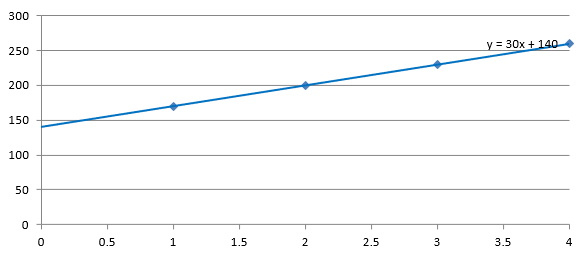
ตัวอย่างต่อไปนี้สร้างแผนภูมิกระจาย (XY) ด้วยปริมาณการผลิตตั้งแต่ 1 ถึง 4 และต้นทุน 170, 200, 230, และ 260 บันทึกแผนภูมิด้วยจุดตัดอัตโนมัติเริ่มต้น ตั้งค่าจุดตัดเป็น 100 และบันทึก PPTX ที่สอง ทั้งสองไฟล์ต่างกันเฉพาะการตั้งค่าจุดตัด เส้นแนวโน้มแสดงสมการและขยายกลับไปที่ X = 0
const aspose = { slides: require("aspose.slides.via.java") };

const presentation = new aspose.slides.Presentation();
try {
    const slide = presentation.getSlides().get_Item(0);

    const chart = slide.getShapes().addChart(aspose.slides.ChartType.ScatterWithMarkers, 20, 20, 480, 210);
    chart.setLegend(false);

    chart.getChartData().getSeries().clear();
    chart.getChartData().getCategories().clear();

    const workbook = chart.getChartData().getChartDataWorkbook();
    workbook.clear(0);

    const nameCell = workbook.getCell(0, 0, 1, "Production cost");
    const series = chart.getChartData().getSeries().add(nameCell, aspose.slides.ChartType.ScatterWithMarkers);
    const costs = [170, 200, 230, 260];

    for (let i = 0; i < costs.length; i++) {
        const xCell = workbook.getCell(0, i + 1, 0, i + 1);
        const yCell = workbook.getCell(0, i + 1, 1, costs[i]);
        series.getDataPoints().addDataPointForScatterSeries(xCell, yCell);
    }

    const trendline = series.getTrendLines().add(aspose.slides.TrendlineType.Linear);
    trendline.setDisplayEquation(true);
    trendline.setBackward(1);

    presentation.save("AutomaticIntercept.pptx", aspose.slides.SaveFormat.Pptx);

    trendline.setIntercept(100);
    presentation.save("FixedIntercept.pptx", aspose.slides.SaveFormat.Pptx);
} finally {
    presentation.dispose();
}
โดยการคำนวณอัตโนมัติ ข้อมูลเหล่านี้ให้ผลลัพธ์ y = 30x + 140 การตั้งค่าจุดตัดเป็น 100 ให้ผลลัพธ์ประมาณ y = 43.33x + 100: ค่าที่ฟิตที่ศูนย์สอดคล้องกับฐานที่ทราบ ในขณะที่เส้นไม่ได้ผ่านทุกจุดข้อมูลแล้ว
| จุดตัดอัตโนมัติ | จุดตัดคงที่ 100 |
|---|---|
 |
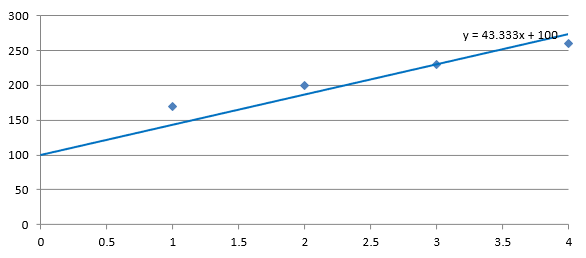 |
ทั้งสองภาพใช้ข้อมูลและสเกลแกนอเดียวกัน เส้นแนวโน้มถูกขยายกลับไปที่ X = 0 เพื่อแสดงจุดตัดของมัน
โดยค่าเริ่มต้น getIntercept จะคืนค่า NaN ซึ่งหมายถึงจุดตัดที่ไม่ได้ระบุ ไม่ใช่ศูนย์ แล้วจุดตัดจะถูกคำนวณโดยอัตโนมัติจากข้อมูล
เพิ่มเส้นกำหนดเอง
เส้นกำหนดเองคืรูปทรงที่วาดเหนือแผนภูมิ ไม่ใช่เส้นแนวโน้มที่คำนวณจากข้อมูลชุดข้อมูล ตัวอย่างนี้ใช้ ShapeCollection.addAutoShape เพื่อเพิ่มเส้นแนวนอนลงในสไลด์เหนือแผนภูมิ ตำแหน่งของเส้นกำหนดโดยพิกัดสไลด์หน่วยจุด ดังนั้นจึงเริ่มที่ขอบซ้ายของแผนภูมิและอยู่กึ่งกลางลงไปของแผนภูมิ ความกว้างของเส้นตรงกับความกว้างของแผนภูมิ getLineFormat ให้สีเส้นเป็นสีแดงทึบ
const aspose = { slides: require("aspose.slides.via.java") };
const java = require("java");

const red = java.getStaticFieldValue("java.awt.Color", "RED");

const presentation = new aspose.slides.Presentation();
try {
    const slide = presentation.getSlides().get_Item(0);

    const chart = slide.getShapes().addChart(aspose.slides.ChartType.ClusteredColumn, 100, 100, 500, 400);

    const line = slide.getShapes().addAutoShape(aspose.slides.ShapeType.Line, chart.getX(), chart.getY() + chart.getHeight() / 2, chart.getWidth(), 0);
    line.getLineFormat().getFillFormat().setFillType(java.newByte(aspose.slides.FillType.Solid));
    line.getLineFormat().getFillFormat().getSolidFillColor().setColor(red);

    presentation.save("AddCustomLines.pptx", aspose.slides.SaveFormat.Pptx);
} finally {
    presentation.dispose();
}
FAQ
‘forward’ และ ‘backward’ มีความหมายว่าอย่างไรสำหรับเส้นแนวโน้ม?
เป็นความยาวของเส้นแนวโน้มที่ฉายไปข้างหน้า/ถอยหลัง: สำหรับแผนภูมิกระจาย (XY) — หน่วยแกน; สำหรับแผนภูมิที่ไม่ใช่กระจาย — จำนวนหมวดหมู่ ค่าที่รับได้ต้องไม่เป็นค่าติดลบ
เส้นแนวโน้มจะคงอยู่หรือไม่เมื่อนำเสนอออกเป็น PDF หรือ SVG หรือเมื่อตอบสนองสไลด์เป็นภาพ?
ใช่ Aspose.Slides แปลงการนำเสนอเป็น PDF หรือ SVG และเรนเดอร์แผนภูมิเป็นภาพ; เส้นแนวโน้มในฐานะส่วนของแผนภูมิจะคงอยู่ในกระบวนการเหล่านี้ นอกจากนี้ยังมีเมธอดให้ ส่งออกภาพของแผนภูมิ เอง.