
使用 PHP 管理演示文稿中的文本框
简介
在 Aspose.Slides for PHP via Java 中,幻灯片文本存储在属于形状的文本框中。AutoShape 类表示最常见的承载文本的形状,并通过 AutoShape::getTextFrame 方法公开其文本。
Note
每个自动形状都派生自 Shape,但并非所有形状都是自动形状或支持文本框。在处理已有演示文稿时,使用java_instanceof 检查形状是否为 AutoShape ,然后再访问其文本。
在幻灯片上创建文本框
要创建文本框,需要向幻灯片添加自动形状,在其文本框中添加文本,然后保存演示文稿。下面的示例创建了一个矩形文本框:
use aspose\slides\Presentation;
use aspose\slides\SaveFormat;
use aspose\slides\ShapeType;

$presentation = new Presentation();
try {
    $slide = $presentation->getSlides()->get_Item(0);
    $textBox = $slide->getShapes()->addAutoShape(ShapeType::Rectangle, 150, 75, 300, 50);
    $textBox->addTextFrame("Aspose TextBox");

    $presentation->save("TextBox.pptx", SaveFormat::Pptx);
} finally {
    $presentation->dispose();
}
传递给 ShapeCollection::addAutoShape 的坐标和尺寸以点为单位。AutoShape::addTextFrame 使用提供的文本初始化文本框。
检查文本框形状
使用 AutoShape::isTextBox 方法确定自动形状是否被视为文本框。当演示文稿同时包含承载文本的自动形状和纯图形的自动形状时,这很有用。
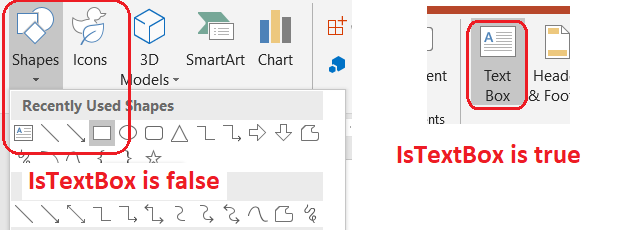
以下示例检查演示文稿中的每个自动形状:
use aspose\slides\Presentation;
use aspose\slides\ShapeType;

$presentation = new Presentation();
try {
    $slide = $presentation->getSlides()->get_Item(0);
    $textBox = $slide->getShapes()->addAutoShape(ShapeType::Rectangle, 10, 10, 120, 40);
    $textBox->addTextFrame("Text box");
    $slide->getShapes()->addAutoShape(ShapeType::Ellipse, 150, 10, 40, 40);

    $autoShapeClass = new JavaClass("com.aspose.slides.AutoShape");
    for ($slideIndex = 0; $slideIndex < java_values($presentation->getSlides()->size()); $slideIndex++) {
        $currentSlide = $presentation->getSlides()->get_Item($slideIndex);
        for ($shapeIndex = 0; $shapeIndex < java_values($currentSlide->getShapes()->size()); $shapeIndex++) {
            $shape = $currentSlide->getShapes()->get_Item($shapeIndex);
            if (java_instanceof($shape, $autoShapeClass)) {
                echo (java_is_true($shape->isTextBox()) ? "The shape is a text box." : "The shape is not a text box.") . PHP_EOL;
            }
        }
    }
} finally {
    $presentation->dispose();
}
新添加的自动形状在包含非空文本之前不被视为文本框。可以通过 AutoShape::addTextFrame 或 TextFrame::setText 提供该文本。添加或赋予空字符串会导致 AutoShape::isTextBox 返回 false:
use aspose\slides\Presentation;
use aspose\slides\ShapeType;

$presentation = new Presentation();
try {
    $slide = $presentation->getSlides()->get_Item(0);

    $shape1 = $slide->getShapes()->addAutoShape(ShapeType::Rectangle, 10, 10, 100, 40);
    $shape1->addTextFrame("Shape 1");
    echo (java_is_true($shape1->isTextBox()) ? "true" : "false") . PHP_EOL;

    $shape2 = $slide->getShapes()->addAutoShape(ShapeType::Rectangle, 10, 70, 100, 40);
    $shape2->getTextFrame()->setText("Shape 2");
    echo (java_is_true($shape2->isTextBox()) ? "true" : "false") . PHP_EOL;

    $shape3 = $slide->getShapes()->addAutoShape(ShapeType::Rectangle, 10, 130, 100, 40);
    $shape3->addTextFrame("");
    echo (java_is_true($shape3->isTextBox()) ? "true" : "false") . PHP_EOL;

    $shape4 = $slide->getShapes()->addAutoShape(ShapeType::Rectangle, 10, 190, 100, 40);
    $shape4->getTextFrame()->setText("");
    echo (java_is_true($shape4->isTextBox()) ? "true" : "false") . PHP_EOL;
} finally {
    $presentation->dispose();
}
前两次调用打印 true;后两次打印 false。
查找拥有文本框的形状
通用的文本处理代码可能会收到一个 TextFrame,却不知道它所属的演示文稿对象。使用只读的 TextFrame::getParentShape 方法返回其所属的 Shape。
对于由自动形状或其他承载文本的形状拥有的文本框,TextFrame::getParentShape 返回所有者,而 TextFrame::getParentCell 返回 null。在访问之前请使用 java_is_null 检查返回值。若要识别形状和表格单元格的所有者(包括与 SmartArt 节点关联的形状),请参阅 Search and Replace Text。
向文本框添加列
TextFrameFormat::setColumnCount 方法将文本框划分为多列,而 TextFrameFormat::setColumnSpacing 方法以点为单位设置列间距。这两个设置属于 TextFrameFormat ,可通过已有文本框的文本框进行更改。文本在同一形状内的列之间重新流动;不会延续到其他形状。
以下示例创建了一个三列文本框,列间距为 10 点,保存演示文稿,并从输出文件读取存储的设置:
use aspose\slides\Presentation;
use aspose\slides\SaveFormat;
use aspose\slides\ShapeType;

$presentation = new Presentation();
try {
    $slide = $presentation->getSlides()->get_Item(0);
    $textBox = $slide->getShapes()->addAutoShape(ShapeType::Rectangle, 100, 100, 300, 200);
    $textBox->addTextFrame("This text is distributed automatically across all columns in the text box.");

    $textFrameFormat = $textBox->getTextFrame()->getTextFrameFormat();
    $textFrameFormat->setColumnCount(3);
    $textFrameFormat->setColumnSpacing(10);

    $presentation->save("TextBoxColumns.pptx", SaveFormat::Pptx);

    $savedPresentation = new Presentation("TextBoxColumns.pptx");
    try {
        $savedTextBox = $savedPresentation->getSlides()->get_Item(0)->getShapes()->get_Item(0);
        $savedFormat = $savedTextBox->getTextFrame()->getTextFrameFormat();
        echo "Columns: " . java_values($savedFormat->getColumnCount()) . "; spacing: " . java_values($savedFormat->getColumnSpacing()) . " points" . PHP_EOL;
    } finally {
        $savedPresentation->dispose();
    }
} finally {
    $presentation->dispose();
}
从各列提取文本
使用 TextFrame::splitTextByColumns 可检索现有文本框中每个可视列分配的文本。该方法按照列的阅读顺序为每列返回一个字符串。单列文本框生成仅包含一个元素的数组,空列则用空字符串表示。返回的字符串仅包含纯文本;不保留段级格式。
这在以下情况下很有用:
- 提取文本并保持其基于列的阅读顺序。
- 索引或比较多列幻灯片的内容。
- 将每列导出到单独的文件、数据库字段或其他目标。
- 检查在更改列数(使用 TextFrameFormat::setColumnCount)、列间距(使用 TextFrameFormat::setColumnSpacing)、字体或文本框大小后,文本如何重新分配。
该方法报告当前 TextFrame 中分布的文本;不会自动在不同形状或文本框之间流动文本。列的分布可能受可用字体和其他文本布局设置的影响,因此在结果一致性重要时,请确保所需字体可用。
以下示例加载演示文稿,找到第一个具有文本框的多列自动形状,读取其配置的列数,并将每列的文本写入单独的文件。未提供文本框的形状将被跳过。
use aspose\slides\Presentation;

$presentation = new Presentation("MultiColumnText.pptx");
try {
    $textBox = null;
    $autoShapeClass = new JavaClass("com.aspose.slides.AutoShape");
    $shapes = $presentation->getSlides()->get_Item(0)->getShapes();
    for ($shapeIndex = 0; $shapeIndex < java_values($shapes->size()); $shapeIndex++) {
        $shape = $shapes->get_Item($shapeIndex);
        if (java_instanceof($shape, $autoShapeClass)) {
            $textFrame = $shape->getTextFrame();
            if (!java_is_null($textFrame)) {
                $columnCount = java_values($textFrame->getTextFrameFormat()->getColumnCount());
                if ($columnCount > 1) {
                    $textBox = $shape;
                    break;
                }
            }
        }
    }

    if ($textBox === null) {
        echo "No multi-column text frame was found." . PHP_EOL;
    } else {
        $textFrame = $textBox->getTextFrame();
        $configuredColumnCount = java_values($textFrame->getTextFrameFormat()->getColumnCount());
        $columnTexts = java_values($textFrame->splitTextByColumns());

        echo "Configured columns: " . $configuredColumnCount . PHP_EOL;

        foreach ($columnTexts as $columnIndex => $columnText) {
            $columnNumber = $columnIndex + 1;
            echo "Column " . $columnNumber . ": " . $columnText . PHP_EOL;
            $outputPath = "Column-" . $columnNumber . ".txt";
            $bytesWritten = file_put_contents($outputPath, $columnText);
            if ($bytesWritten === false) {
                echo "Could not write column " . $columnNumber . " to " . $outputPath . PHP_EOL;
            }
        }
    }
} finally {
    $presentation->dispose();
}
更新文本
要在整个演示文稿中更新文本,需要遍历幻灯片和形状,选择自动形状,然后编辑其文本段。对段级别进行操作可以同时更改文本和字符格式。
以下示例将自动形状文本中所有出现的 years 替换为 months,并将每个受影响的段设为粗体:
use aspose\slides\NullableBool;
use aspose\slides\Presentation;
use aspose\slides\SaveFormat;

$presentation = new Presentation("Text.pptx");
try {
    $autoShapeClass = new JavaClass("com.aspose.slides.AutoShape");
    for ($slideIndex = 0; $slideIndex < java_values($presentation->getSlides()->size()); $slideIndex++) {
        $slide = $presentation->getSlides()->get_Item($slideIndex);
        for ($shapeIndex = 0; $shapeIndex < java_values($slide->getShapes()->size()); $shapeIndex++) {
            $shape = $slide->getShapes()->get_Item($shapeIndex);
            if (!java_instanceof($shape, $autoShapeClass)) {
                continue;
            }

            $textFrame = $shape->getTextFrame();
            if (java_is_null($textFrame)) {
                continue;
            }

            for ($paragraphIndex = 0; $paragraphIndex < java_values($textFrame->getParagraphs()->getCount()); $paragraphIndex++) {
                $paragraph = $textFrame->getParagraphs()->get_Item($paragraphIndex);
                for ($portionIndex = 0; $portionIndex < java_values($paragraph->getPortions()->getCount()); $portionIndex++) {
                    $portion = $paragraph->getPortions()->get_Item($portionIndex);
                    $text = java_values($portion->getText());
                    if ($text !== null && strpos($text, "years") !== false) {
                        $updatedText = str_replace("years", "months", $text);
                        $portion->setText($updatedText);
                        $portion->getPortionFormat()->setFontBold(NullableBool::True);
                    }
                }
            }
        }
    }

    $presentation->save("TextChanged.pptx", SaveFormat::Pptx);
} finally {
    $presentation->dispose();
}
此遍历仅更新自动形状中的文本。存储在表格、图表、SmartArt 或组合形状中的文本需要遍历这些对象各自的集合。
添加带超链接的文本框
可以将超链接分配给特定的文本段,这样仅该文本会作为可点击的链接。使用 HyperlinkManager::setExternalHyperlinkClick 将该段与外部 URL 关联。
以下示例创建带链接的文本并将其保存到演示文稿中:
use aspose\slides\Presentation;
use aspose\slides\SaveFormat;
use aspose\slides\ShapeType;

$presentation = new Presentation();
try {
    $slide = $presentation->getSlides()->get_Item(0);
    $textBox = $slide->getShapes()->addAutoShape(ShapeType::Rectangle, 150, 150, 200, 50);
    $textBox->addTextFrame("Aspose.Slides");

    $textPortion = $textBox->getTextFrame()->getParagraphs()->get_Item(0)->getPortions()->get_Item(0);
    $textPortion->getPortionFormat()->getHyperlinkManager()->setExternalHyperlinkClick("https://www.aspose.com/");

    $presentation->save("Hyperlink.pptx", SaveFormat::Pptx);
} finally {
    $presentation->dispose();
}
常见问题
文本框和母版或布局幻灯片上的文本占位符有什么区别?
占位符可以从 母版幻灯片 或 布局幻灯片 继承其位置和格式。普通文本框是创建所在幻灯片上的独立形状,在布局更改时不会获得占位符行为。
如何在不更改图表、表格或 SmartArt 中的文本的情况下替换文本?
将遍历限制在 AutoShape 对象,如更新文本示例所示。图表、表格和 SmartArt 将文本存储在各自的对象模型中,因此不会被该循环修改。