
Kelola Daftar Bertanda Poin dan Bernomor dalam Presentasi di C++
Gambaran Umum
Aspose.Slides for C++ memungkinkan Anda membuat dan memformat daftar berpoin dan bernomor dalam presentasi PowerPoint dan OpenDocument. Item daftar adalah sebuah paragraf yang pengaturan peluruannya dikendalikan melalui format paragrafnya.
Gunakan metode IParagraph::get_ParagraphFormat untuk mengakses pengaturan daftar tingkat paragraf. Titik masuk utama adalah IParagraphFormat::get_Bullet, yang mengembalikan objek IBulletFormat. Dengan objek ini, Anda dapat mengatur tipe peluru, simbol, gambar, warna, ukuran, gaya penomoran, dan nomor mulai.
Artikel ini menunjukkan cara:
- membuat daftar berpoin dengan simbol kustom
- membuat peluru gambar
- membuat daftar berjenjang dengan mengatur kedalaman paragraf
- membuat daftar bernomor
- memeriksa dan mengubah pemformatan daftar dalam presentasi yang ada
- membaca penanda daftar sebenarnya dan nomor bersama teks paragraf
Buat Daftar Poin
Untuk membuat daftar berpoin, tambahkan objek Paragraph ke sebuah ITextFrame dan setel IBulletFormat::set_Type ke BulletType::Symbol. Anda kemudian dapat mengatur IBulletFormat::set_Char, IBulletFormat::get_Color, dan IBulletFormat::set_Height untuk mengendalikan tampilan peluru.
Kode C++ berikut menunjukkan cara membuat daftar berpoin dalam sebuah slide:
#include <DOM/BulletType.h>
#include <DOM/IAutoShape.h>
#include <DOM/IBulletFormat.h>
#include <DOM/IColorFormat.h>
#include <DOM/IParagraphCollection.h>
#include <DOM/IParagraphFormat.h>
#include <DOM/IShapeCollection.h>
#include <DOM/ISlide.h>
#include <DOM/ITextFrame.h>
#include <DOM/NullableBool.h>
#include <DOM/Paragraph.h>
#include <DOM/Presentation.h>
#include <DOM/ShapeType.h>
#include <Export/SaveFormat.h>
#include <drawing/color.h>

using namespace Aspose::Slides;
using namespace Aspose::Slides::Export;
using namespace System::Drawing;

auto createParagraph = [](System::String text)
{
    auto paragraph = System::MakeObject<Paragraph>();
    auto paragraphFormat = paragraph->get_ParagraphFormat();
    auto bulletFormat = paragraphFormat->get_Bullet();

    bulletFormat->set_Type(BulletType::Symbol);
    bulletFormat->set_Char(u'*');
    paragraphFormat->set_Indent(15);
    bulletFormat->set_IsBulletHardColor(NullableBool::True);
    bulletFormat->get_Color()->set_Color(System::Drawing::Color::get_IndianRed());
    bulletFormat->set_Height(100);
    paragraph->set_Text(text);

    return paragraph;
};

auto presentation = System::MakeObject<Presentation>();
auto slide = presentation->get_Slide(0);

auto autoShape = slide->get_Shapes()->AddAutoShape(ShapeType::Rectangle, 20, 20, 200, 50);

auto textFrame = autoShape->get_TextFrame();
textFrame->get_Paragraphs()->Clear();

auto paragraph1 = createParagraph(u"The first paragraph");
textFrame->get_Paragraphs()->Add(paragraph1);

auto paragraph2 = createParagraph(u"The second paragraph");
textFrame->get_Paragraphs()->Add(paragraph2);

presentation->Save(u"symbol_bullets.pptx", SaveFormat::Pptx);
presentation->Dispose();
Hasilnya:

Buat Daftar Bernomor
Gunakan daftar bernomor ketika urutan item penting. Setel IBulletFormat::set_Type ke BulletType::Numbered. Anda juga dapat memilih format penomoran dengan IBulletFormat::set_NumberedBulletStyle atau setel IBulletFormat::set_NumberedBulletStartWith ketika daftar harus mulai dari nilai selain 1.
Kode C++ berikut menunjukkan cara membuat daftar bernomor dalam sebuah slide:
#include <DOM/BulletType.h>
#include <DOM/IAutoShape.h>
#include <DOM/IBulletFormat.h>
#include <DOM/IParagraphCollection.h>
#include <DOM/IParagraphFormat.h>
#include <DOM/IShapeCollection.h>
#include <DOM/ISlide.h>
#include <DOM/ITextFrame.h>
#include <DOM/Paragraph.h>
#include <DOM/Presentation.h>
#include <DOM/ShapeType.h>
#include <Export/SaveFormat.h>

using namespace Aspose::Slides;
using namespace Aspose::Slides::Export;

auto presentation = System::MakeObject<Presentation>();
auto slide = presentation->get_Slide(0);

auto autoShape = slide->get_Shapes()->AddAutoShape(ShapeType::Rectangle, 20, 20, 90, 80);

auto textFrame = autoShape->get_TextFrame();
textFrame->get_Paragraphs()->Clear();

auto paragraph1 = System::MakeObject<Paragraph>();
paragraph1->get_ParagraphFormat()->get_Bullet()->set_Type(BulletType::Numbered);
paragraph1->set_Text(u"Apple");
textFrame->get_Paragraphs()->Add(paragraph1);

auto paragraph2 = System::MakeObject<Paragraph>();
paragraph2->get_ParagraphFormat()->get_Bullet()->set_Type(BulletType::Numbered);
paragraph2->set_Text(u"Orange");
textFrame->get_Paragraphs()->Add(paragraph2);

auto paragraph3 = System::MakeObject<Paragraph>();
paragraph3->get_ParagraphFormat()->get_Bullet()->set_Type(BulletType::Numbered);
paragraph3->set_Text(u"Banana");
textFrame->get_Paragraphs()->Add(paragraph3);

presentation->Save(u"numbered_bullets.pptx", SaveFormat::Pptx);
presentation->Dispose();
Hasilnya:

Buat Peluru Gambar
Aspose.Slides memungkinkan Anda mengganti simbol peluru reguler dengan sebuah gambar. Peluru gambar paling cocok dengan gambar sederhana yang tetap terbaca pada ukuran kecil, seperti ikon atau file PNG transparan kecil.
Note
Idealnya, jika Anda berencana mengganti simbol peluru reguler dengan gambar, sebaiknya pilih grafik sederhana dengan latar belakang transparan. Gambar semacam itu cocok sebagai simbol peluru kustom.Untuk membuat peluru gambar, tambahkan sebuah gambar ke IPresentation::get_Images dan tugaskan objek IPPImage yang dikembalikan ke IBulletFormat::get_Picture. Setel IBulletFormat::set_Type ke BulletType::Picture sebelum menugaskan gambar.
Misalkan kita memiliki “image.png”:

Kode C++ berikut menunjukkan cara membuat peluru gambar dalam slide:
#include <DOM/BulletType.h>
#include <DOM/IAutoShape.h>
#include <DOM/IBulletFormat.h>
#include <DOM/IImageCollection.h>
#include <DOM/IParagraphCollection.h>
#include <DOM/IParagraphFormat.h>
#include <DOM/IShapeCollection.h>
#include <DOM/ISlide.h>
#include <DOM/ISlidesPicture.h>
#include <DOM/ITextFrame.h>
#include <DOM/Paragraph.h>
#include <DOM/Presentation.h>
#include <DOM/ShapeType.h>
#include <Export/SaveFormat.h>
#include <IImage.h>
#include <Util/Images.h>

using namespace Aspose::Slides;
using namespace Aspose::Slides::Export;

auto createParagraph = [](System::String text, System::SharedPtr<IPPImage> image)
{
    auto paragraph = System::MakeObject<Paragraph>();
    auto paragraphFormat = paragraph->get_ParagraphFormat();
    auto bulletFormat = paragraphFormat->get_Bullet();

    bulletFormat->set_Type(BulletType::Picture);
    bulletFormat->get_Picture()->set_Image(image);
    paragraphFormat->set_Indent(15);
    bulletFormat->set_Height(100);
    paragraph->set_Text(text);

    return paragraph;
};

auto presentation = System::MakeObject<Presentation>();
auto slide = presentation->get_Slide(0);

auto autoShape = slide->get_Shapes()->AddAutoShape(ShapeType::Rectangle, 20, 20, 200, 50);

auto textFrame = autoShape->get_TextFrame();
textFrame->get_Paragraphs()->Clear();

auto sourceImage = Images::FromFile(u"image.png");
auto bulletImage = presentation->get_Images()->AddImage(sourceImage);
sourceImage->Dispose();

auto paragraph1 = createParagraph(u"The first paragraph", bulletImage);
textFrame->get_Paragraphs()->Add(paragraph1);

auto paragraph2 = createParagraph(u"The second paragraph", bulletImage);
textFrame->get_Paragraphs()->Add(paragraph2);

presentation->Save(u"picture_bullets.pptx", SaveFormat::Pptx);
presentation->Dispose();
Hasilnya:

Buat Daftar Bertingkat
Gunakan IParagraphFormat::set_Depth untuk menempatkan item daftar pada tingkat yang berbeda. Tingkat 0 adalah tingkat teratas, tingkat 1 berada di dalamnya, dan seterusnya.
Kode C++ berikut menunjukkan cara membuat daftar berpoin bertingkat:
#include <DOM/IAutoShape.h>
#include <DOM/IParagraphCollection.h>
#include <DOM/IParagraphFormat.h>
#include <DOM/IShapeCollection.h>
#include <DOM/ISlide.h>
#include <DOM/ITextFrame.h>
#include <DOM/Paragraph.h>
#include <DOM/Presentation.h>
#include <DOM/ShapeType.h>
#include <Export/SaveFormat.h>

using namespace Aspose::Slides;
using namespace Aspose::Slides::Export;

auto presentation = System::MakeObject<Presentation>();
auto slide = presentation->get_Slide(0);

auto autoShape = slide->get_Shapes()->AddAutoShape(ShapeType::Rectangle, 20, 20, 260, 110);

auto textFrame = autoShape->get_TextFrame();
textFrame->get_Paragraphs()->Clear();

auto paragraph1 = System::MakeObject<Paragraph>();
paragraph1->get_ParagraphFormat()->set_Depth(0);
paragraph1->set_Text(u"My text - Depth 0");
textFrame->get_Paragraphs()->Add(paragraph1);

auto paragraph2 = System::MakeObject<Paragraph>();
paragraph2->get_ParagraphFormat()->set_Depth(1);
paragraph2->set_Text(u"My text - Depth 1");
textFrame->get_Paragraphs()->Add(paragraph2);

auto paragraph3 = System::MakeObject<Paragraph>();
paragraph3->get_ParagraphFormat()->set_Depth(2);
paragraph3->set_Text(u"My text - Depth 2");
textFrame->get_Paragraphs()->Add(paragraph3);

auto paragraph4 = System::MakeObject<Paragraph>();
paragraph4->get_ParagraphFormat()->set_Depth(3);
paragraph4->set_Text(u"My text - Depth 3");
textFrame->get_Paragraphs()->Add(paragraph4);

presentation->Save(u"multilevel_bullets.pptx", SaveFormat::Pptx);
presentation->Dispose();
Hasilnya:

Ubah Daftar yang Ada
Untuk mengubah pemformatan daftar dalam presentasi yang ada, akses paragraf target dan perbarui pengaturannya IParagraphFormat::get_Bullet. Properti yang sama yang digunakan untuk membuat daftar dapat digunakan untuk memeriksa atau memodifikasi daftar yang dimuat dari file PPT, PPTX, atau ODP.
#include <DOM/BulletType.h>
#include <DOM/IAutoShape.h>
#include <DOM/IBulletFormat.h>
#include <DOM/IParagraph.h>
#include <DOM/IParagraphFormat.h>
#include <DOM/ISlide.h>
#include <DOM/ITextFrame.h>
#include <DOM/NumberedBulletStyle.h>
#include <DOM/Presentation.h>
#include <Export/SaveFormat.h>

using namespace Aspose::Slides;
using namespace Aspose::Slides::Export;

auto presentation = System::MakeObject<Presentation>(u"input.pptx");
auto slide = presentation->get_Slide(0);
auto autoShape = System::ExplicitCast<IAutoShape>(slide->get_Shape(0));

auto paragraph = autoShape->get_TextFrame()->get_Paragraph(0);
auto paragraphFormat = paragraph->get_ParagraphFormat();
auto bulletFormat = paragraphFormat->get_Bullet();

bulletFormat->set_Type(BulletType::Numbered);
bulletFormat->set_NumberedBulletStyle(NumberedBulletStyle::BulletRomanUCPeriod);
bulletFormat->set_NumberedBulletStartWith(1);
paragraphFormat->set_MarginLeft(30);
paragraphFormat->set_Indent(-20);

presentation->Save(u"updated_list.pptx", SaveFormat::Pptx);
presentation->Dispose();
Baca Nilai Peluru Aktual
Saat mengekstrak konten presentasi, pertahankan penanda daftar bersama teks paragraf. Panggil IParagraphFormat::GetEffective dan akses IParagraphFormatEffectiveData::get_Bullet untuk mendapatkan format peluru yang efektif. Periksa get_Type sebelum membaca get_ActualBulletValue.
Untuk daftar bernomor, bedakan tiga nilai berikut:
- get_NumberedBulletStyle menentukan format, seperti angka Arab diikuti titik atau huruf kecil diikuti titik.
- get_NumberedBulletStartWith menentukan nomor awal untuk sekelompok paragraf bernomor.
- get_ActualBulletValue mengembalikan penanda yang diformat untuk paragraf tertentu. Misalnya, item kedua dalam daftar yang dimulai dari 5 mengembalikan
6..
Pertahankan IParagraphFormat::get_Depth pada setiap paragraf untuk menyimpan tingkat nesting-nya. Penanda aktual tidak mengenkode hierarki penuh: item bersarang dapat mengembalikan c. bukan label gabungan seperti 6.c..
Contoh mandiri berikut membuat daftar, menyimpannya ke presentasi, dan memuat ulang presentasi untuk melaporkan teks, kedalaman, tipe peluru, dan nilai aktual setiap paragraf. Penanda gambar biru kecil dibuat dari SVG inline.
#include <DOM/BulletType.h>
#include <DOM/IAutoShape.h>
#include <DOM/IBulletFormat.h>
#include <DOM/IBulletFormatEffectiveData.h>
#include <DOM/IColorFormat.h>
#include <DOM/IFillFormat.h>
#include <DOM/IImageCollection.h>
#include <DOM/ILineFormat.h>
#include <DOM/IParagraph.h>
#include <DOM/IParagraphCollection.h>
#include <DOM/IParagraphFormat.h>
#include <DOM/IParagraphFormatEffectiveData.h>
#include <DOM/IPortionFormat.h>
#include <DOM/IShapeCollection.h>
#include <DOM/ISlide.h>
#include <DOM/ISlideSize.h>
#include <DOM/ISlidesPicture.h>
#include <DOM/ITextFrame.h>
#include <DOM/FillType.h>
#include <DOM/NullableBool.h>
#include <DOM/NumberedBulletStyle.h>
#include <DOM/Paragraph.h>
#include <DOM/Presentation.h>
#include <DOM/ShapeType.h>
#include <DOM/SlideSizeScaleType.h>
#include <DOM/SvgImage.h>
#include <Export/SaveFormat.h>
#include <drawing/color.h>
#include <system/console.h>

using namespace Aspose::Slides;
using namespace Aspose::Slides::Export;
using namespace System::Drawing;

{
    auto presentation = System::MakeObject<Presentation>();
    presentation->get_SlideSize()->SetSize(720, 440, SlideSizeScaleType::DoNotScale);
    auto slide = presentation->get_Slide(0);

    auto shape = slide->get_Shapes()->AddAutoShape(ShapeType::Rectangle, 30, 20, 660, 400);
    shape->get_FillFormat()->set_FillType(FillType::NoFill);
    shape->get_LineFormat()->get_FillFormat()->set_FillType(FillType::NoFill);

    auto textFrame = shape->get_TextFrame();
    textFrame->get_Paragraphs()->Clear();

    // Buat penanda gambar tanpa file gambar eksternal.
    auto svg = System::MakeObject<SvgImage>(u"<svg xmlns='http://www.w3.org/2000/svg' width='16' height='16'><rect width='16' height='16' rx='4' fill='#0078D4'/></svg>");
    auto bulletImage = presentation->get_Images()->AddImage(svg);

    auto addParagraph = [&](System::String text, int16_t depth, BulletType type, int16_t start = 1, NumberedBulletStyle style = NumberedBulletStyle::BulletArabicPeriod)
    {
        auto paragraph = System::MakeObject<Paragraph>();
        paragraph->set_Text(text);

        auto format = paragraph->get_ParagraphFormat();
        format->set_Depth(depth);
        format->set_MarginLeft(30 + depth * 40);
        format->set_Indent(-28);
        format->set_SpaceAfter(8);
        format->get_DefaultPortionFormat()->set_FontHeight(22);
        format->get_DefaultPortionFormat()->get_FillFormat()->set_FillType(FillType::Solid);
        format->get_DefaultPortionFormat()->get_FillFormat()->get_SolidFillColor()->set_Color(Color::get_Black());
        auto bullet = format->get_Bullet();
        bullet->set_Type(type);
        bullet->set_IsBulletHardColor(NullableBool::True);
        bullet->get_Color()->set_Color(Color::get_Black());
        if (type == BulletType::Numbered)
        {
            bullet->set_NumberedBulletStyle(style);
            bullet->set_NumberedBulletStartWith(start);
        }
        else if (type == BulletType::Symbol)
        {
            bullet->set_Char(u'\u2022');
        }
        else if (type == BulletType::Picture)
        {
            bullet->get_Picture()->set_Image(bulletImage);
        }

        textFrame->get_Paragraphs()->Add(paragraph);
    };

    addParagraph(u"First item", 0, BulletType::Numbered, 5);
    addParagraph(u"Second item", 0, BulletType::Numbered, 5);
    addParagraph(u"Nested item", 1, BulletType::Numbered, 3, NumberedBulletStyle::BulletAlphaLCPeriod);
    addParagraph(u"Next nested item", 1, BulletType::Numbered, 3, NumberedBulletStyle::BulletAlphaLCPeriod);
    addParagraph(u"Deep item", 2, BulletType::Numbered, 4, NumberedBulletStyle::BulletRomanLCPeriod);
    addParagraph(u"Back to top level", 0, BulletType::Numbered, 5);
    addParagraph(u"Symbol marker", 0, BulletType::Symbol);
    addParagraph(u"No bullet", 0, BulletType::None);
    addParagraph(u"Picture marker", 0, BulletType::Picture);
    presentation->Save(u"actual_bullet_values.pptx", SaveFormat::Pptx);
    presentation->Dispose();
}

auto loadedPresentation = System::MakeObject<Presentation>(u"actual_bullet_values.pptx");
auto loadedShape = System::ExplicitCast<IAutoShape>(loadedPresentation->get_Slide(0)->get_Shape(0));
System::Console::WriteLine(u"Text | Depth | Type | Actual value");
for (auto paragraph : loadedShape->get_TextFrame()->get_Paragraphs())
{
    auto bullet = paragraph->get_ParagraphFormat()->GetEffective()->get_Bullet();
    auto actualValue = bullet->get_ActualBulletValue();
    System::String marker;
    switch (bullet->get_Type())
    {
        case BulletType::Numbered:
        case BulletType::Symbol:
            marker = actualValue;
            break;
        case BulletType::None:
            marker = (actualValue.IsNull() ? System::String(u"null") : actualValue) + u" (no bullet)";
            break;
        case BulletType::Picture:
            marker = (actualValue.IsNull() ? System::String(u"null") : actualValue) + u" (image required)";
            break;
        default:
            marker = u"unsupported bullet type";
            break;
    }
    System::Console::WriteLine(u"{0} | {1} | {2} | {3}", paragraph->get_Text(), paragraph->get_ParagraphFormat()->get_Depth(), bullet->get_Type(), marker);
}
loadedPresentation->Dispose();
Daftar sumber ditampilkan di bawah.
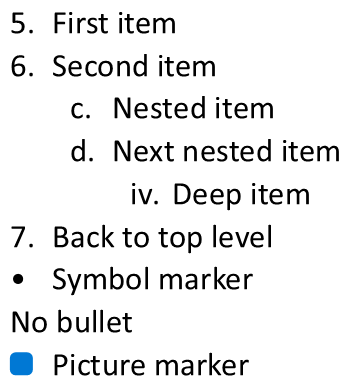
Laporan cocok dengan penanda yang ditampilkan di PowerPoint:
Text | Depth | Type | Actual value
First item | 0 | Numbered | 5.
Second item | 0 | Numbered | 6.
Nested item | 1 | Numbered | c.
Next nested item | 1 | Numbered | d.
Deep item | 2 | Numbered | iv.
Back to top level | 0 | Numbered | 7.
Symbol marker | 0 | Symbol | •
No bullet | 0 | None | null (no bullet)
Picture marker | 0 | Picture | null (image required)
Untuk BulletType::None and BulletType::Picture, get_ActualBulletValue mengembalikan System::String null, bukan string kosong. Gunakan IsNull untuk memeriksa nilai ini. Tangani tipe ini secara terpisah: yang pertama tidak memiliki penanda, sedangkan yang kedua memerlukan ekstraksi gambar peluru secara terpisah. Peluru gambar tidak dapat direproduksi hanya dengan mengekstrak penanda teks.
FAQ
Apakah daftar berpoin dan bernomor dapat diekspor ke PDF atau gambar?
Ya. Aspose.Slides mempertahankan pemformatan daftar ketika format target mendukung tata letak teks dan fitur peluru yang bersangkutan.
Apakah saya dapat mengedit daftar dalam presentasi yang ada?
Ya. Muat presentasi, akses paragraf target, periksa atau perbarui pengaturan IParagraphFormat::get_Bullet, dan simpan presentasi.
Apakah daftar dapat berisi teks non-Latin?
Ya. Teks item daftar dapat berisi karakter Unicode, sehingga Anda dapat membuat daftar dalam presentasi multibahasa. Pastikan font yang digunakan dalam presentasi mendukung karakter yang Anda butuhkan.