
Quản lý danh sách có dấu đầu dòng và đánh số trong bản trình bày bằng C++
Overview
Aspose.Slides for C++ cho phép bạn tạo và định dạng danh sách có dấu đầu dòng và đánh số trong các bản trình bày PowerPoint và OpenDocument. Một mục danh sách là một đoạn văn mà các thiết lập dấu đầu dòng được kiểm soát thông qua định dạng đoạn văn của nó.
Sử dụng phương thức IParagraph::get_ParagraphFormat để truy cập các thiết lập danh sách ở mức đoạn văn. Điểm vào chính là IParagraphFormat::get_Bullet, trả về một đối tượng IBulletFormat. Với đối tượng này, bạn có thể đặt kiểu dấu đầu dòng, ký hiệu, hình ảnh, màu, kích thước, kiểu đánh số và số bắt đầu.
Bài viết này hướng dẫn cách:
- tạo danh sách có dấu đầu dòng với ký hiệu tùy chỉnh
- tạo dấu đầu dòng bằng hình ảnh
- tạo danh sách đa cấp bằng cách đặt độ sâu đoạn văn
- tạo danh sách đánh số
- kiểm tra và thay đổi định dạng danh sách trong một bản trình bày hiện có
Create a Bulleted List
Để tạo danh sách có dấu đầu dòng, thêm các đối tượng Paragraph vào một ITextFrame và đặt IBulletFormat::set_Type thành BulletType::Symbol. Sau đó bạn có thể đặt IBulletFormat::set_Char, IBulletFormat::get_Color và IBulletFormat::set_Height để kiểm soát giao diện dấu đầu dòng.
Mã C++ dưới đây minh họa cách tạo danh sách có dấu đầu dòng trong một slide:
auto createParagraph = [](System::String text)
{
    auto paragraph = System::MakeObject<Paragraph>();
    auto paragraphFormat = paragraph->get_ParagraphFormat();
    auto bulletFormat = paragraphFormat->get_Bullet();

    bulletFormat->set_Type(BulletType::Symbol);
    bulletFormat->set_Char(u'*');
    paragraphFormat->set_Indent(15);
    bulletFormat->set_IsBulletHardColor(NullableBool::True);
    bulletFormat->get_Color()->set_Color(System::Drawing::Color::get_IndianRed());
    bulletFormat->set_Height(100);
    paragraph->set_Text(text);

    return paragraph;
};

auto presentation = System::MakeObject<Presentation>();
auto slide = presentation->get_Slide(0);
auto autoShape = slide->get_Shapes()->AddAutoShape(ShapeType::Rectangle, 20, 20, 200, 50);

auto textFrame = autoShape->get_TextFrame();
textFrame->get_Paragraphs()->Clear();

auto paragraph1 = createParagraph(u"The first paragraph");
textFrame->get_Paragraphs()->Add(paragraph1);

auto paragraph2 = createParagraph(u"The second paragraph");
textFrame->get_Paragraphs()->Add(paragraph2);

presentation->Save(u"symbol_bullets.pptx", SaveFormat::Pptx);
presentation->Dispose();
Kết quả:

Create a Numbered List
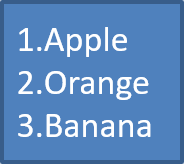
Sử dụng danh sách đánh số khi thứ tự các mục quan trọng. Đặt IBulletFormat::set_Type thành BulletType::Numbered. Bạn cũng có thể chọn định dạng đánh số với IBulletFormat::set_NumberedBulletStyle hoặc đặt IBulletFormat::set_NumberedBulletStartWith khi danh sách cần bắt đầu từ giá trị khác 1.
Mã C++ dưới đây cho thấy cách tạo danh sách đánh số trong một slide:
auto presentation = System::MakeObject<Presentation>();
auto slide = presentation->get_Slide(0);
auto autoShape = slide->get_Shapes()->AddAutoShape(ShapeType::Rectangle, 20, 20, 90, 80);

auto textFrame = autoShape->get_TextFrame();
textFrame->get_Paragraphs()->Clear();

auto paragraph1 = System::MakeObject<Paragraph>();
paragraph1->get_ParagraphFormat()->get_Bullet()->set_Type(BulletType::Numbered);
paragraph1->set_Text(u"Apple");
textFrame->get_Paragraphs()->Add(paragraph1);

auto paragraph2 = System::MakeObject<Paragraph>();
paragraph2->get_ParagraphFormat()->get_Bullet()->set_Type(BulletType::Numbered);
paragraph2->set_Text(u"Orange");
textFrame->get_Paragraphs()->Add(paragraph2);

auto paragraph3 = System::MakeObject<Paragraph>();
paragraph3->get_ParagraphFormat()->get_Bullet()->set_Type(BulletType::Numbered);
paragraph3->set_Text(u"Banana");
textFrame->get_Paragraphs()->Add(paragraph3);

presentation->Save(u"numbered_bullets.pptx", SaveFormat::Pptx);
presentation->Dispose();
Kết quả:
Create a Picture Bullet
Aspose.Slides cho phép bạn thay thế ký hiệu dấu đầu dòng thường bằng một hình ảnh. Dấu đầu dòng bằng hình ảnh hoạt động tốt nhất với các hình ảnh đơn giản, vẫn đọc được ở kích thước nhỏ, chẳng hạn như biểu tượng hoặc file PNG trong suốt nhỏ.
Lý tưởng nhất, nếu bạn dự định thay thế ký hiệu dấu đầu dòng thường bằng một hình ảnh, nên chọn một đồ họa đơn giản có nền trong suốt. Những hình ảnh như vậy hoạt động tốt như các ký hiệu dấu đầu dòng tùy chỉnh.
Hãy nhớ rằng hình ảnh sẽ được thu nhỏ xuống kích thước rất nhỏ. Vì lý do này, chúng tôi khuyến nghị mạnh mẽ chọn một hình ảnh vẫn rõ ràng và hiệu quả về mặt thị giác khi được dùng làm dấu đầu dòng trong danh sách.
Để tạo dấu đầu dòng bằng hình ảnh, thêm một hình ảnh vào IPresentation::get_Images và gán đối tượng IPPImage trả về cho IBulletFormat::get_Picture. Đặt IBulletFormat::set_Type thành BulletType::Picture trước khi gán hình ảnh.
Giả sử chúng ta có file “image.png”:

Mã C++ dưới đây cho thấy cách tạo dấu đầu dòng bằng hình ảnh trong một slide:
auto createParagraph = [](System::String text, System::SharedPtr<IPPImage> image)
{
    auto paragraph = System::MakeObject<Paragraph>();
    auto paragraphFormat = paragraph->get_ParagraphFormat();
    auto bulletFormat = paragraphFormat->get_Bullet();

    bulletFormat->set_Type(BulletType::Picture);
    bulletFormat->get_Picture()->set_Image(image);
    paragraphFormat->set_Indent(15);
    bulletFormat->set_Height(100);
    paragraph->set_Text(text);

    return paragraph;
};

auto presentation = System::MakeObject<Presentation>();
auto slide = presentation->get_Slide(0);
auto autoShape = slide->get_Shapes()->AddAutoShape(ShapeType::Rectangle, 20, 20, 200, 50);

auto textFrame = autoShape->get_TextFrame();
textFrame->get_Paragraphs()->Clear();

auto sourceImage = Images::FromFile(u"image.png");
auto bulletImage = presentation->get_Images()->AddImage(sourceImage);
sourceImage->Dispose();

auto paragraph1 = createParagraph(u"The first paragraph", bulletImage);
textFrame->get_Paragraphs()->Add(paragraph1);

auto paragraph2 = createParagraph(u"The second paragraph", bulletImage);
textFrame->get_Paragraphs()->Add(paragraph2);

presentation->Save(u"picture_bullets.pptx", SaveFormat::Pptx);
presentation->Dispose();
Kết quả:

Create a Multilevel List
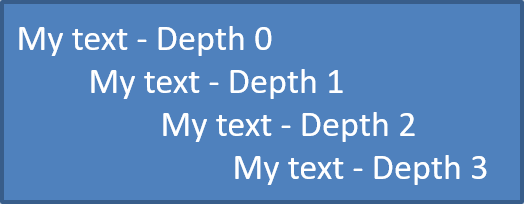
Sử dụng IParagraphFormat::set_Depth để đặt các mục danh sách ở các cấp độ khác nhau. Cấp độ 0 là cấp cao nhất, cấp độ 1 nằm bên dưới nó, và tiếp tục như vậy.
Mã C++ dưới đây cho thấy cách tạo danh sách có dấu đầu dòng đa cấp:
auto presentation = System::MakeObject<Presentation>();
auto slide = presentation->get_Slide(0);
auto autoShape = slide->get_Shapes()->AddAutoShape(ShapeType::Rectangle, 20, 20, 260, 110);

auto textFrame = autoShape->get_TextFrame();
textFrame->get_Paragraphs()->Clear();

auto paragraph1 = System::MakeObject<Paragraph>();
paragraph1->get_ParagraphFormat()->set_Depth(0);
paragraph1->set_Text(u"My text - Depth 0");
textFrame->get_Paragraphs()->Add(paragraph1);

auto paragraph2 = System::MakeObject<Paragraph>();
paragraph2->get_ParagraphFormat()->set_Depth(1);
paragraph2->set_Text(u"My text - Depth 1");
textFrame->get_Paragraphs()->Add(paragraph2);

auto paragraph3 = System::MakeObject<Paragraph>();
paragraph3->get_ParagraphFormat()->set_Depth(2);
paragraph3->set_Text(u"My text - Depth 2");
textFrame->get_Paragraphs()->Add(paragraph3);

auto paragraph4 = System::MakeObject<Paragraph>();
paragraph4->get_ParagraphFormat()->set_Depth(3);
paragraph4->set_Text(u"My text - Depth 3");
textFrame->get_Paragraphs()->Add(paragraph4);

presentation->Save(u"multilevel_bullets.pptx", SaveFormat::Pptx);
presentation->Dispose();
Kết quả:
Change an Existing List
Để thay đổi định dạng danh sách trong một bản trình bày hiện có, truy cập đoạn văn mục tiêu và cập nhật các thiết lập IParagraphFormat::get_Bullet của nó. Các thuộc tính đã dùng để tạo danh sách có thể được dùng để kiểm tra hoặc sửa đổi danh sách được tải từ file PPT, PPTX hoặc ODP.
Mã C++ dưới đây thay đổi đoạn văn đầu tiên trong một khung văn bản để sử dụng kiểu danh sách đánh số:
auto presentation = System::MakeObject<Presentation>(u"input.pptx");
auto slide = presentation->get_Slide(0);
auto autoShape = System::ExplicitCast<IAutoShape>(slide->get_Shape(0));
auto paragraph = autoShape->get_TextFrame()->get_Paragraph(0);

auto paragraphFormat = paragraph->get_ParagraphFormat();
auto bulletFormat = paragraphFormat->get_Bullet();

bulletFormat->set_Type(BulletType::Numbered);
bulletFormat->set_NumberedBulletStyle(NumberedBulletStyle::BulletRomanUCPeriod);
bulletFormat->set_NumberedBulletStartWith(1);
paragraphFormat->set_MarginLeft(30);
paragraphFormat->set_Indent(-20);

presentation->Save(u"updated_list.pptx", SaveFormat::Pptx);
presentation->Dispose();
FAQ
Can bulleted and numbered lists be exported to PDF or images?
Yes. Aspose.Slides preserves list formatting when the target format supports the corresponding text layout and bullet features.
Can I edit lists in existing presentations?
Yes. Load the presentation, access the target paragraph, inspect or update its IParagraphFormat::get_Bullet settings, and save the presentation.
Can lists contain non-Latin text?
Yes. List item text can contain Unicode characters, so you can create lists in multilingual presentations. Make sure the fonts used in the presentation support the characters you need.