
在 C++ 中自定义演示文稿形状
概述
本文介绍如何通过编辑点和几何路径编辑形状几何来自定义 Aspose.Slides 中的呈现形状。它展示了如何使用 GeometryPath 和 IGeometryPath 修改现有形状、执行基本路径编辑操作、添加或删除点,并将更新后的几何重新应用到形状。
还演示了如何创建自定义和复合形状、构建带圆角的形状,以及如何判断形状几何是否闭合。
使用编辑点更改形状
在 PowerPoint 中,您可以使用 编辑点 修改正方形:
- 将角点向内或向外移动。
- 调整点处的曲率。
- 添加新点。
编辑点允许您修改形状的轮廓,或以现有形状为基础创建新形状。
形状编辑提示
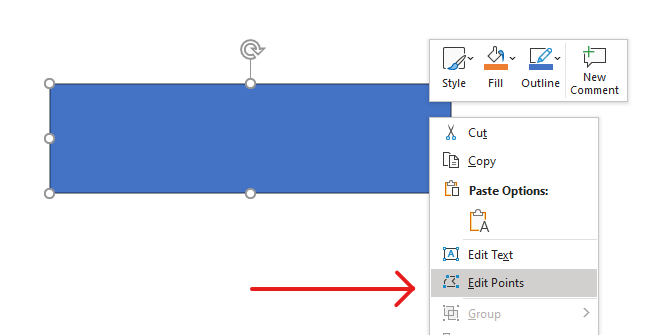
编辑 PowerPoint 形状时,请记住以下概念:
- 一个形状(或其路径)可以是闭合的也可以是开放的。
- 形状的路径由通过段链接的锚点组成。
- 段可以是直线或曲线。锚点和控制手柄决定其形状。
- 锚点可以是角点、直点或平滑点:
- 在角点处,相邻段可以形成角度。
- 在平滑点处,两个控制手柄对齐且与锚点的距离相等。
- 在直点处,两个控制手柄对齐但距离锚点的距离可能不同。
- 移动锚点或调整其手柄会改变形状的轮廓。
Aspose.Slides 为通过编辑点编辑 PowerPoint 形状提供了 GeometryPath 类和 IGeometryPath 接口。
- 一个 GeometryPath 实例表示 IGeometryShape 对象的几何路径。
- 要从 IGeometryShape 实例获取 GeometryPath,可以使用 IGeometryShape::GetGeometryPaths 方法。
- 要为形状设置 GeometryPath,可以使用以下方法:单路径形状使用 IGeometryShape::SetGeometryPath,多路径形状使用 IGeometryShape::SetGeometryPaths。
- 要添加段,可以使用 IGeometryPath 下的相关方法。
- 通过 IGeometryPath::set_Stroke 和 IGeometryPath::set_FillMode 方法,可以设置几何路径的外观。
- 使用 IGeometryPath::get_PathData 方法,可将 GeometryShape 的几何路径作为路径段数组检索。
简单编辑操作
使用以下方法编辑几何路径。接受索引的重载会在路径段数组的相应零基位置插入段。
| 操作 | 方法 |
|---|---|
| 追加或插入直线。 | GeometryPath::LineTo |
| 追加或插入带有两个控制点和终点的三次 Bézier 曲线。 | GeometryPath::CubicBezierTo |
| 追加或插入带有一个控制点和终点的二次 Bézier 曲线。 | GeometryPath::QuadraticBezierTo |
| 追加指定尺寸和角度(度)的椭圆弧。 | GeometryPath::ArcTo |
| 通过将终点连接到起点关闭当前图形。 | GeometryPath::CloseFigure |
| 设置图形的起始点。 | GeometryPath::MoveTo |
| 删除零基索引处的段。 | GeometryPath::RemoveAt |
向形状添加自定义点
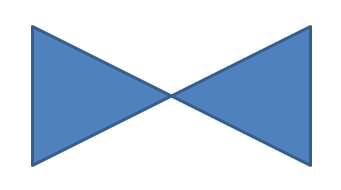
以下示例使用 GeometryPath::LineTo 向矩形形状插入两个点,并使用 IGeometryShape::SetGeometryPath 应用编辑后的路径。坐标相对于形状本身:两个新点位于其中心,左侧偏移 100 点、顶部偏移 50 点。段索引 1 和 4 将它们放在上、下边缘,向内拉动这些边缘。
#include <DOM/IAutoShape.h>
#include <DOM/IGeometryPath.h>
#include <DOM/IShapeCollection.h>
#include <DOM/ISlide.h>
#include <DOM/ISlideCollection.h>
#include <DOM/Presentation.h>
#include <DOM/ShapeType.h>
#include <system/smart_ptr.h>

using namespace Aspose::Slides;
using namespace System;

auto presentation = System::MakeObject<Presentation>();
auto slide = presentation->get_Slide(0);

auto shape = slide->get_Shapes()->AddAutoShape(ShapeType::Rectangle, 100.0f, 100.0f, 200.0f, 100.0f);

auto geometryPath = shape->GetGeometryPaths()->idx_get(0);
geometryPath->LineTo(100.0f, 50.0f, 1);
geometryPath->LineTo(100.0f, 50.0f, 4);

shape->SetGeometryPath(geometryPath);
从形状中移除点
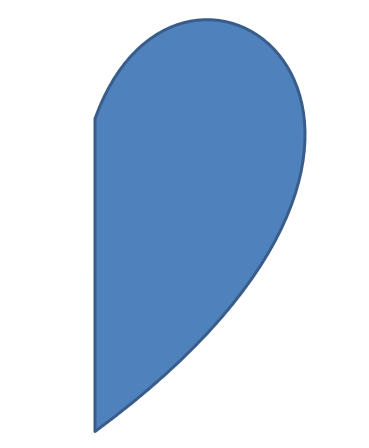
此示例使用 GeometryPath::RemoveAt 删除零基索引 2 处的段,从而更改心形轮廓。使用 IGeometryShape::SetGeometryPath 应用修改后的路径后,形状的轮廓得到更新。
#include <DOM/IAutoShape.h>
#include <DOM/IGeometryPath.h>
#include <DOM/IShapeCollection.h>
#include <DOM/ISlide.h>
#include <DOM/ISlideCollection.h>
#include <DOM/Presentation.h>
#include <DOM/ShapeType.h>
#include <system/smart_ptr.h>

using namespace Aspose::Slides;
using namespace System;

auto presentation = System::MakeObject<Presentation>();
auto slide = presentation->get_Slide(0);

auto shape = slide->get_Shapes()->AddAutoShape(ShapeType::Heart, 100.0f, 100.0f, 300.0f, 300.0f);

auto path = shape->GetGeometryPaths()->idx_get(0);
path->RemoveAt(2);

shape->SetGeometryPath(path);
创建自定义形状
此示例使用 GeometryPath 构建五角星。外半径 100 点、内半径 50 点交替定义星尖和凹槽;72 度的步进使五个星尖等距分布。路径通过 GeometryPath::CloseFigure 闭合,并使用 IGeometryShape::SetGeometryPath 应用于矩形形状,替换其轮廓。
#include <DOM/GeometryPath.h>
#include <DOM/IAutoShape.h>
#include <DOM/IShapeCollection.h>
#include <DOM/ISlide.h>
#include <DOM/ISlideCollection.h>
#include <DOM/Presentation.h>
#include <DOM/ShapeType.h>
#include <drawing/point_f.h>
#include <system/collections/list.h>
#include <system/math.h>
#include <system/smart_ptr.h>

using namespace Aspose::Slides;
using namespace System;
using namespace System::Collections::Generic;
using namespace System::Drawing;

auto points = System::MakeObject<List<PointF>>();

auto outerRadius = 100.0f;
auto innerRadius = 50.0f;
auto angleStep = 72;

for (auto angle = -90; angle < 270; angle += angleStep)
{
    auto radians = angle * (Math::PI / 180.f);
    auto x = outerRadius * Math::Cos(radians);
    auto y = outerRadius * Math::Sin(radians);
    points->Add(PointF((float)x + outerRadius, (float)y + outerRadius));

    radians = Math::PI * (angle + angleStep / 2) / 180.0;
    x = innerRadius * Math::Cos(radians);
    y = innerRadius * Math::Sin(radians);
    points->Add(PointF((float)x + outerRadius, (float)y + outerRadius));
}

auto starPath = System::MakeObject<GeometryPath>();
starPath->MoveTo(points->idx_get(0));

for (auto i = 1; i < points->get_Count(); i++)
{
    starPath->LineTo(points->idx_get(i));
}

starPath->CloseFigure();

auto presentation = System::MakeObject<Presentation>();
auto slide = presentation->get_Slide(0);

auto shape = slide->get_Shapes()->AddAutoShape(ShapeType::Rectangle, 100.0f, 100.0f, outerRadius * 2, outerRadius * 2);
shape->SetGeometryPath(starPath);

创建复合自定义形状
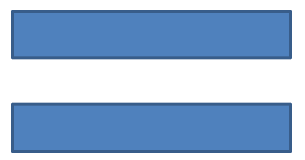
此示例为形状的上、下三分之一分别定义两个闭合的 GeometryPath 对象。使用 IGeometryShape::SetGeometryPaths 同时应用两个路径,生成一个在中间三分之一存在间隙的单一复合形状。
#include <DOM/GeometryPath.h>
#include <DOM/IAutoShape.h>
#include <DOM/IGeometryPath.h>
#include <DOM/IShapeCollection.h>
#include <DOM/ISlide.h>
#include <DOM/ISlideCollection.h>
#include <DOM/Presentation.h>
#include <DOM/ShapeType.h>
#include <system/smart_ptr.h>

using namespace Aspose::Slides;
using namespace System;

auto presentation = System::MakeObject<Presentation>();
auto slide = presentation->get_Slide(0);

auto shape = slide->get_Shapes()->AddAutoShape(ShapeType::Rectangle, 100.0f, 100.0f, 200.0f, 100.0f);

auto topPath = System::MakeObject<GeometryPath>();
topPath->MoveTo(0.0f, 0.0f);
topPath->LineTo(shape->get_Width(), 0.0f);
topPath->LineTo(shape->get_Width(), shape->get_Height() / 3);
topPath->LineTo(0.0f, shape->get_Height() / 3);
topPath->CloseFigure();

auto bottomPath = System::MakeObject<GeometryPath>();
bottomPath->MoveTo(0.0f, shape->get_Height() / 3 * 2);
bottomPath->LineTo(shape->get_Width(), shape->get_Height() / 3 * 2);
bottomPath->LineTo(shape->get_Width(), shape->get_Height());
bottomPath->LineTo(0.0f, shape->get_Height());
bottomPath->CloseFigure();

auto paths = System::MakeArray<SharedPtr<IGeometryPath>>({ topPath, bottomPath });

shape->SetGeometryPaths(paths);
创建带圆角的自定义形状
此示例将直线段与 GeometryPath::ArcTo 组合,创建一个带内凹圆角的形状。每个角的大小决定弧的宽度和高度(单位为点),-90 度的扫角绘制逆时针四分之一椭圆。完成的路径通过 IGeometryShape::SetGeometryPath 应用,并以 PPTX 格式保存演示文稿。
#include <DOM/GeometryPath.h>
#include <DOM/IAutoShape.h>
#include <DOM/IShapeCollection.h>
#include <DOM/ISlide.h>
#include <DOM/ISlideCollection.h>
#include <DOM/Presentation.h>
#include <DOM/ShapeType.h>
#include <Export/SaveFormat.h>
#include <drawing/point_f.h>

using namespace Aspose::Slides;
using namespace Aspose::Slides::Export;
using namespace System::Drawing;

auto shapeX = 20.f;
auto shapeY = 20.f;
auto shapeWidth = 300.f;
auto shapeHeight = 200.f;

auto leftTopSize = 50.f;
auto rightTopSize = 20.f;
auto rightBottomSize = 40.f;
auto leftBottomSize = 10.f;

auto presentation = System::MakeObject<Presentation>();
auto slide = presentation->get_Slide(0);

auto shape = slide->get_Shapes()->AddAutoShape(ShapeType::Custom, shapeX, shapeY, shapeWidth, shapeHeight);

auto topLeft = PointF(leftTopSize, 0.0f);
auto topRight = PointF(shapeWidth - rightTopSize, 0.0f);
auto rightBottom = PointF(shapeWidth, shapeHeight - rightBottomSize);
auto bottomLeft = PointF(leftBottomSize, shapeHeight);
auto leftTop = PointF(0.0f, leftTopSize);

auto geometryPath = System::MakeObject<GeometryPath>();
geometryPath->MoveTo(topLeft);
geometryPath->LineTo(topRight);
geometryPath->ArcTo(rightTopSize, rightTopSize, 180.0f, -90.0f);
geometryPath->LineTo(rightBottom);
geometryPath->ArcTo(rightBottomSize, rightBottomSize, -90.0f, -90.0f);
geometryPath->LineTo(bottomLeft);
geometryPath->ArcTo(leftBottomSize, leftBottomSize, 0.0f, -90.0f);
geometryPath->LineTo(leftTop);
geometryPath->ArcTo(leftTopSize, leftTopSize, 90.0f, -90.0f);
geometryPath->CloseFigure();

shape->SetGeometryPath(geometryPath);

presentation->Save(u"output.pptx", SaveFormat::Pptx);
判断形状几何是否闭合
下面的辅助方法检查每个非空几何路径是否以闭合段结束。它读取 IGeometryPath::get_PathData 并将最后一段的 IPathSegment::get_PathCommand 与 PathCommandType::Close 进行比较。当不存在非空路径时返回 false。该检查仅针对每条路径的最终命令,而不检查路径内部的每个子图形。示例对矩形输出 True。
#include <DOM/Presentation.h>
#include <DOM/ISlide.h>
#include <DOM/IShapeCollection.h>
#include <DOM/IAutoShape.h>
#include <DOM/IGeometryShape.h>
#include <DOM/IGeometryPath.h>
#include <DOM/ShapeType.h>
#include <system/array.h>
#include <system/smart_ptr.h>
#include <system/console.h>
#include <DOM/IPathSegment.h>
#include <DOM/PathCommandType.h>

using namespace Aspose::Slides;
using namespace System;

auto isGeometryClosed = [](SharedPtr<IGeometryShape> geometryShape)
{
    auto hasNonemptyPath = false;
    for (auto&& geometryPath : geometryShape->GetGeometryPaths())
    {
        auto segments = geometryPath->get_PathData();
        if (segments->get_Length() == 0)
        {
            continue;
        }

        hasNonemptyPath = true;
        auto lastSegment = segments->idx_get(segments->get_Length() - 1);
        if (lastSegment->get_PathCommand() != PathCommandType::Close)
        {
            return false;
        }
    }
    return hasNonemptyPath;
};

auto presentation = MakeObject<Presentation>();
auto slide = presentation->get_Slide(0);

auto shape = slide->get_Shapes()->AddAutoShape(ShapeType::Rectangle, 100, 100, 200, 100);
Console::WriteLine(isGeometryClosed(shape));
提取并检查形状元素
使用 IGeometryShape::CreateShapeElements 可将现有形状检查为包含路径点和点类型的元素。将每个返回的 IShapeElement 强制转换为 ShapeElement,读取其 get_PathPoints 和 get_PathTypes 返回的数组。此表示形式对轮廓分析或将几何传递给自定义绘图工具非常有用。
示例打开一个演示文稿,直接在第一张幻灯片上查找第一个几何形状,并打印其路径段。使用包含直线段和曲线段的形状进行演示,以看到两种输出。它不在组内部搜索。
#include <DOM/Presentation.h>
#include <DOM/ISlide.h>
#include <DOM/IShapeCollection.h>
#include <DOM/IAutoShape.h>
#include <DOM/IGeometryShape.h>
#include <DOM/IGeometryPath.h>
#include <DOM/ShapeType.h>
#include <system/array.h>
#include <system/smart_ptr.h>
#include <system/console.h>
#include <DOM/IShapeElement.h>
#include <DOM/ShapeElement.h>

using namespace Aspose::Slides;
using namespace System;

auto presentation = MakeObject<Presentation>(u"input.pptx");
auto slide = presentation->get_Slide(0);

SharedPtr<IGeometryShape> shape;
for (auto&& candidate : slide->get_Shapes())
{
    shape = AsCast<IGeometryShape>(candidate);
    if (shape != nullptr)
    {
        break;
    }
}
if (shape == nullptr)
{
    Console::WriteLine(u"No geometry shape found on the first slide.");
    return;
}

for (auto&& element : shape->CreateShapeElements())
{
    auto shapeElement = ExplicitCast<ShapeElement>(element);
    auto points = shapeElement->get_PathPoints();
    auto types = shapeElement->get_PathTypes();
    Console::WriteLine(u"Shape element:");

    for (auto i = 0; i < points->get_Length(); i++)
    {
        auto pointType = types[i] & 0x07; // 保留段类型,排除标志。
        switch (pointType)
        {
            case 0:
                Console::WriteLine(u"Start figure at {0}", points[i]);
                break;
            case 1:
                Console::WriteLine(u"Line to {0}", points[i]);
                break;
            case 3:
                Console::WriteLine(u"Cubic Bezier: controls {0}, {1}; end {2}", points[i], points[i + 1], points[i + 2]);
                i += 2; // 消耗两个控制点和终点。
                break;
        }
        if ((types[i] & 0x80) != 0)
        {
            Console::WriteLine(u"Close subpath back to its starting point.");
        }
    }
}
数组通过索引对应:points[i] 为一个点,types[i] 描述其角色。类型 0 开始一个图形,类型 1 从前一个点绘制直线到当前点。三次 Bézier 段从前一个终点开始,使用连续的三个类型 3 条目:两个控制点后跟新的终点。循环一次性消费这三个条目,并检查终点是否闭合。
点类型还包含标志。通过与 0x07 掩码可识别段类型,单独检测 0x80 可判断闭合子路径。例如,129 (0x81) 表示闭合子路径的直线终点,131 (0x83) 表示闭合的 Bézier 终点。仅与 1 或 3 比较原始值会遗漏这些情况。其他标志如虚线 (0x10) 和标记 (0x20) 不会改变基本段类型。
坐标与变换。 点的单位是点(1/72 英寸),X 向右递增,Y 向下递增。对于未分组的形状,提取的坐标已经包含由 get_X 和 get_Y 返回的位置,并反映其当前宽度和高度。例如,左上角在 (100, 200)、尺寸为 120 × 80 的未旋转矩形,其轮廓边界为 (100, 200)–(220, 280)。不要再次添加形状的位置。减去其 X 和 Y 可获得相对于未旋转框架的坐标。
提取的点不考虑通过 set_Rotation 设置的旋转或水平、垂直翻转。若要复现显示的轮廓,需要围绕形状中心应用这些变换。对于分组形状,还需考虑组坐标映射和变换;不要假设提取的点是最终渲染的幻灯片坐标,也不要在已在子对象框架中反映的情况下再次平移或缩放。
检查 vs. 编辑。 提取的数组仅描述轮廓,修改它们不会更新原始形状。当您的分析或绘图代码需要点/类型数组时请选择此方式。若需要在形状本地坐标系中获取几何命令或编辑几何,请使用 GetGeometryPaths。通过 SetGeometryPath 或 SetGeometryPaths 应用编辑后的路径。
将 GeometryPath 转换为 GraphicsPath
当前 Aspose.Slides for C++ 公共 API 未公开几何路径与图形路径之间的转换。要检查轮廓,请使用上文所述的形状元素。要编辑形状,请使用几何路径并将更新后的路径应用到形状。
常见问题解答
替换几何后填充和轮廓会怎样?
样式仍然保留在形状上,只有轮廓发生变化。填充和轮廓会自动应用到新几何上。
如何在旋转自定义形状时一起旋转其几何?
使用形状的 set_Rotation 方法;几何会随形状一起旋转,因为它绑定到形状自己的坐标系。
可以将自定义形状转换为图像以“锁定”结果吗?