
เพิ่มเส้นแนวโน้มให้กับแผนภูมิการนำเสนอใน C++
ภาพรวม
บทความนี้อธิบายวิธีเพิ่มเส้นแนวโน้มให้กับแผนภูมิการนำเสนอโดยใช้ Aspose.Slides. มันแสดงวิธีสร้างแผนภูมิ, เพิ่มเส้นแนวโน้มให้กับชุดข้อมูลในแผนภูมิ, และทำงานกับหลายประเภทของเส้นแนวโน้ม ได้แก่ แบบเอ็กซ์โปเนนเชียล, เชิงเส้น, ลอการิทึม, ค่าเฉลี่ยเคลื่อนที่, พหุนาม, และพาวเวอร์.
นอกจากนี้ยังอธิบายวิธีเพิ่มเส้นที่กำหนดเองลงในแผนภูมิโดยการแทรกรูปร่างเส้น, และรวมคำถามที่พบบ่อยสั้น ๆ เกี่ยวกับค่าการฉายเส้นแนวโน้มไปข้างหน้าและถอยหลังและว่าการส่งออกเป็น PDF หรือ SVG หรือการแสดงผลแผนภูมิเป็นภาพจะคงเส้นแนวโน้มไว้หรือไม่.
เพิ่มเส้นแนวโน้ม
ใช้ ITrendlineCollection::Add เพื่อเพิ่มเส้นแนวโน้มให้กับชุดข้อมูลในแผนภูมิ, โดยเลือกประเภทด้วย TrendlineType. ตัวอย่างสร้างแผนภูมิคอลัมน์แบบกลุ่มโดยใช้ข้อมูลเริ่มต้นและเพิ่มเส้นแนวโน้มสองเส้นให้กับแต่ละหนึ่งในสามชุดข้อมูลของมัน.
เส้นแนวโน้มแบบเอ็กซ์โปเนนเชียลซ่อนสมการและค่าความสัมพันธ์ R-squared ผ่าน ITrendline::set_DisplayEquation และ ITrendline::set_DisplayRSquaredValue, ขณะที่เส้นแนวโน้มเชิงเส้นเป็นสีแดง. เส้นแนวโน้มลอการิทึมใช้ IOverridableText::AddTextFrameForOverriding สำหรับป้ายกำกับที่กำหนดเอง. ค่าเฉลี่ยเคลื่อนที่ใช้ ITrendline::set_Period เพื่อเฉลี่ยจุดข้อมูลสามจุดและ ITrendline::set_TrendlineName สำหรับชื่อที่กำหนดเอง.
เส้นแนวโน้มพหุนามใช้ ITrendline::set_Order เพื่อกำหนดลำดับเป็นสามและขยายหนึ่งประเภทไปข้างหน้าผ่าน ITrendline::set_Forward. เส้นแนวโน้มพาวเวอร์ขยายหนึ่งประเภทไปข้างหลังผ่าน ITrendline::set_Backward.
#include <system/shared_ptr.h>
#include <drawing/color.h>
#include <DOM/Presentation.h>
#include <DOM/ISlide.h>
#include <DOM/IShapeCollection.h>
#include <DOM/ILineFormat.h>
#include <DOM/IFillFormat.h>
#include <DOM/IColorFormat.h>
#include <DOM/FillType.h>
#include <DOM/IChart.h>
#include <DOM/Chart/ChartType.h>
#include <DOM/Chart/IChartData.h>
#include <DOM/Chart/IChartSeries.h>
#include <DOM/Chart/IChartSeriesCollection.h>
#include <DOM/Chart/ITrendline.h>
#include <DOM/Chart/ITrendlineCollection.h>
#include <DOM/Chart/TrendlineType.h>
#include <DOM/Chart/IFormat.h>
#include <Export/SaveFormat.h>

using namespace System;
using namespace System::Drawing;
using namespace Aspose::Slides;
using namespace Aspose::Slides::Charts;
using namespace Aspose::Slides::Export;

auto presentation = MakeObject<Presentation>();
auto slide = presentation->get_Slide(0);

auto chart = slide->get_Shapes()->AddChart(ChartType::ClusteredColumn, 20, 20, 500, 400);

auto firstSeries = chart->get_ChartData()->get_Series()->idx_get(0);

auto exponentialTrendline = firstSeries->get_TrendLines()->Add(TrendlineType::Exponential);
exponentialTrendline->set_DisplayEquation(false);
exponentialTrendline->set_DisplayRSquaredValue(false);

auto linearTrendline = firstSeries->get_TrendLines()->Add(TrendlineType::Linear);
linearTrendline->get_Format()->get_Line()->get_FillFormat()->set_FillType(FillType::Solid);
linearTrendline->get_Format()->get_Line()->get_FillFormat()->get_SolidFillColor()->set_Color(Color::get_Red());

auto secondSeries = chart->get_ChartData()->get_Series()->idx_get(1);

auto logarithmicTrendline = secondSeries->get_TrendLines()->Add(TrendlineType::Logarithmic);
logarithmicTrendline->AddTextFrameForOverriding(u"New log trend line");

auto movingAverageTrendline = secondSeries->get_TrendLines()->Add(TrendlineType::MovingAverage);
movingAverageTrendline->set_Period(3);
movingAverageTrendline->set_TrendlineName(u"New TrendLine Name");

auto thirdSeries = chart->get_ChartData()->get_Series()->idx_get(2);

auto polynomialTrendline = thirdSeries->get_TrendLines()->Add(TrendlineType::Polynomial);
polynomialTrendline->set_Forward(1);
polynomialTrendline->set_Order(3);

auto powerTrendline = thirdSeries->get_TrendLines()->Add(TrendlineType::Power);
powerTrendline->set_Backward(1);

presentation->Save(u"ChartTrendLines.pptx", SaveFormat::Pptx);
ตั้งค่าจุดตัดของเส้นแนวโน้ม
ใช้ ITrendline::set_Intercept เพื่อกำหนดค่าของ Y ของเส้นแนวโน้มที่ X = 0. การตั้งค่านี้สนับสนุนสำหรับเส้นแนวโน้มเชิงเส้น, เอ็กซ์โปเนนเชียล, และพหุนาม.
ตัวอย่างเช่น โมเดลต้นทุนการผลิตอาจต้องเริ่มที่ค่าใช้จ่ายคงที่ที่รู้จักคือ 100, แม้จะมีการวัดที่ปริมาณการผลิตที่ไม่เป็นศูนย์ที่บ่งชี้ฐานต้นแบบที่แตกต่าง. สำหรับเส้นแนวโน้มเชิงเส้น, การกำหนดจุดตัดทำให้สมการ y = ax + b มีเงื่อนไข b = 100; ความชันจะถูกปรับให้เข้ากับข้อมูลภายใต้เงื่อนไขนั้น. การทำเช่นนี้ไม่ได้เพียงแค่ย้ายเส้นที่ได้ปรับแล้ว. การตั้งค่าการตัดแกนจะกำหนดตำแหน่งที่แกนของแผนภูมิพบกัน, ไม่ใช่ค่าสัมประสิทธิ์ของเส้นแนวโน้มที่ได้ปรับ.
ตัวอย่างต่อไปนี้สร้างแผนภูมิกระจาย (XY) ด้วยปริมาณการผลิตตั้งแต่ 1 ถึง 4 และค่าใช้จ่าย 170, 200, 230, และ 260. มันบันทึกแผนภูมิด้วยจุดตัดอัตโนมัติเริ่มต้น, ตั้งค่าจุดตัดเป็น 100, และบันทึก PPTX ที่สอง. ไฟล์ทั้งสองแตกต่างกันเพียงการตั้งค่าจุดตัด. เส้นแนวโน้มจะแสดงสมการและขยายกลับไปที่ X = 0.
#include <system/shared_ptr.h>
#include <system/object_ext.h>
#include <DOM/Chart/IChartDataWorkbook.h>
#include <DOM/Chart/IChartDataCell.h>
#include <DOM/Chart/IChartCategoryCollection.h>
#include <DOM/Chart/IChartDataPointCollection.h>
#include <DOM/Presentation.h>
#include <DOM/ISlide.h>
#include <DOM/IShapeCollection.h>
#include <DOM/IChart.h>
#include <DOM/Chart/ChartType.h>
#include <DOM/Chart/IChartData.h>
#include <DOM/Chart/IChartSeries.h>
#include <DOM/Chart/IChartSeriesCollection.h>
#include <DOM/Chart/ITrendline.h>
#include <DOM/Chart/ITrendlineCollection.h>
#include <DOM/Chart/TrendlineType.h>
#include <Export/SaveFormat.h>

using namespace System;
using namespace Aspose::Slides;
using namespace Aspose::Slides::Charts;
using namespace Aspose::Slides::Export;

auto presentation = MakeObject<Presentation>();
auto slide = presentation->get_Slide(0);

auto chart = slide->get_Shapes()->AddChart(ChartType::ScatterWithMarkers, 20, 20, 480, 210);
chart->set_HasLegend(false);

chart->get_ChartData()->get_Series()->Clear();
chart->get_ChartData()->get_Categories()->Clear();

auto workbook = chart->get_ChartData()->get_ChartDataWorkbook();
workbook->Clear(0);

auto nameCell = workbook->GetCell(0, 0, 1, ObjectExt::Box<String>(u"Production cost"));
auto series = chart->get_ChartData()->get_Series()->Add(nameCell, ChartType::ScatterWithMarkers);
const double costs[] = { 170, 200, 230, 260 };

for (auto i = 0; i < 4; i++)
{
    auto xCell = workbook->GetCell(0, i + 1, 0, ObjectExt::Box<int32_t>(i + 1));
    auto yCell = workbook->GetCell(0, i + 1, 1, ObjectExt::Box<double>(costs[i]));
    series->get_DataPoints()->AddDataPointForScatterSeries(xCell, yCell);
}

auto trendline = series->get_TrendLines()->Add(TrendlineType::Linear);
trendline->set_DisplayEquation(true);
trendline->set_Backward(1);

presentation->Save(u"AutomaticIntercept.pptx", SaveFormat::Pptx);

trendline->set_Intercept(100);
presentation->Save(u"FixedIntercept.pptx", SaveFormat::Pptx);
ด้วยการคำนวณอัตโนมัติ, ข้อมูลเหล่านี้ให้ผลลัพธ์ y = 30x + 140. การตั้งค่าจุดตัดเป็น 100 แทนจะให้ผลประมาณ y = 43.33x + 100: ค่าได้จากการปรับที่ศูนย์ตรงกับฐานต้นแบบที่รู้จัก, ในขณะที่เส้นจะไม่ผ่านทุกจุดข้อมูลอีกต่อไป.
| จุดตัดอัตโนมัติ | จุดตัดคงที่ 100 |
|---|---|
 |
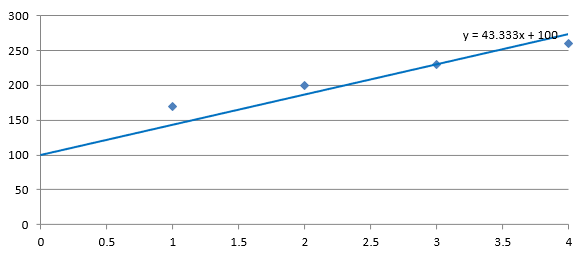 |
ทั้งสองภาพใช้ข้อมูลและสเกลแกนเดียวกัน. เส้นแนวโน้มถูกขยายกลับไปที่ X = 0 เพื่อแสดงจุดตัดของมัน.
โดยค่าเริ่มต้น, คุณสมบัตินี้มีค่า std::numeric_limits<double>::quiet_NaN(), ซึ่งหมายถึงจุดตัดที่ไม่ได้ระบุแทนที่จะเป็นศูนย์. จุดตัดจะถูกคำนวณอัตโนมัติจากข้อมูล.
เพิ่มเส้นที่กำหนดเอง
เส้นที่กำหนดเองคือรูปทรงที่วาดเหนือแผนภูมิแทนที่จะเป็นเส้นแนวโน้มที่คำนวณจากข้อมูลชุด. ตัวอย่างนี้ใช้ IShapeCollection::AddAutoShape เพื่อเพิ่มเส้นแนวนอนลงในสไลด์เหนือแผนภูมิ. ตำแหน่งของเส้นระบุในพิกัดสไลด์, วัดเป็นจุด, ดังนั้นจึงเริ่มที่ขอบซ้ายของแผนภูมิและอยู่กึ่งกลางลงของแผนภูมิ. ความกว้างของเส้นเท่ากับความกว้างของแผนภูมิ. รูปแบบเส้นที่ส่งกลับโดย IShape::get_LineFormat ทำให้เส้นมีสีแดงทึบ.
#include <system/shared_ptr.h>
#include <drawing/color.h>
#include <DOM/Presentation.h>
#include <DOM/ISlide.h>
#include <DOM/IShapeCollection.h>
#include <DOM/IAutoShape.h>
#include <DOM/ShapeType.h>
#include <DOM/ILineFormat.h>
#include <DOM/IFillFormat.h>
#include <DOM/IColorFormat.h>
#include <DOM/FillType.h>
#include <DOM/IChart.h>
#include <DOM/Chart/ChartType.h>
#include <Export/SaveFormat.h>

using namespace System;
using namespace System::Drawing;
using namespace Aspose::Slides;
using namespace Aspose::Slides::Charts;
using namespace Aspose::Slides::Export;

auto presentation = MakeObject<Presentation>();
auto slide = presentation->get_Slide(0);

auto chart = slide->get_Shapes()->AddChart(ChartType::ClusteredColumn, 100, 100, 500, 400);

auto line = slide->get_Shapes()->AddAutoShape(ShapeType::Line, chart->get_X(), chart->get_Y() + chart->get_Height() / 2, chart->get_Width(), 0);
line->get_LineFormat()->get_FillFormat()->set_FillType(FillType::Solid);
line->get_LineFormat()->get_FillFormat()->get_SolidFillColor()->set_Color(Color::get_Red());

presentation->Save(u"AddCustomLines.pptx", SaveFormat::Pptx);
คำถามที่พบบ่อย
‘forward’ และ ‘backward’ หมายถึงอะไรสำหรับเส้นแนวโน้ม?
พวกมันคือความยาวของเส้นแนวโน้มที่ขยายไปข้างหน้า/ถอยหลัง: สำหรับแผนภูมิกระจาย (XY) — หน่วยตามแกน; สำหรับแผนภูมิไม่ใช่กระจาย — จำนวนหมวดหมู่. ค่าอนุญาตต้องเป็นจำนวนเต็มบวกหรือศูนย์เท่านั้น.
เส้นแนวโน้มจะคงอยู่เมื่อส่งออกการนำเสนอเป็น PDF หรือ SVG, หรือเมื่อแปลงสไลด์เป็นภาพหรือไม่?
ใช่. Aspose.Slides แปลงการนำเสนอเป็น PDF หรือ SVG และแสดงแผนภูมิเป็นภาพ; เส้นแนวโน้มซึ่งเป็นส่วนหนึ่งของแผนภูมิจึงคงอยู่ระหว่างการดำเนินการเหล่านี้. นอกจากนี้ยังมีเมธอดสำหรับ ส่งออกภาพของแผนภูมิ ด้วย.