
在 Python 中為簡報圖表新增趨勢線
概觀
本文說明如何使用 Aspose.Slides 為簡報圖表加入趨勢線。內容展示如何建立圖表、為圖表系列新增趨勢線,並處理多種趨勢線類型,包括指數、線性、對數、移動平均、多項式與冪次。
此外,還說明如何透過插入線條形狀的方式為圖表加入自訂線,並提供一段簡短的 FAQ,說明前向與後向趨勢線投射值的含義,以及在匯出為 PDF 或 SVG、或將投影片渲染為影像時,趨勢線是否會被保留。
新增趨勢線
使用 TrendlineCollection.add 為圖表系列新增趨勢線,並以 TrendlineType 指定類型。範例建立一個預設資料的叢集柱狀圖,並為其三個系列中的每一個加入兩條趨勢線。
指數趨勢線透過 setDisplayEquation 與 setDisplayRSquaredValue 隱藏其方程式與 R 平方值;線性趨勢線則設定為紅色。對數趨勢線使用 addTextFrameForOverriding 來自訂標籤。移動平均則設定 setPeriod 為三個資料點,並使用自訂的 setTrendlineName。
多項式趨勢線的階數為三,透過 setOrder 設定,並利用 setForward 向前延伸一個類別。冪次趨勢線則透過 setBackward 向後延伸一個類別。
import jpype
import asposeslides

if not jpype.isJVMStarted():
    jpype.startJVM()

from asposeslides.api import ChartType, FillType, Presentation, SaveFormat, TrendlineType
from java.awt import Color

presentation = Presentation()
try:
    slide = presentation.getSlides().get_Item(0)

    chart = slide.getShapes().addChart(ChartType.ClusteredColumn, 20, 20, 500, 400)

    first_series = chart.getChartData().getSeries().get_Item(0)

    exponential_trendline = first_series.getTrendLines().add(TrendlineType.Exponential)
    exponential_trendline.setDisplayEquation(False)
    exponential_trendline.setDisplayRSquaredValue(False)

    linear_trendline = first_series.getTrendLines().add(TrendlineType.Linear)
    linear_trendline.getFormat().getLine().getFillFormat().setFillType(FillType.Solid)
    linear_trendline.getFormat().getLine().getFillFormat().getSolidFillColor().setColor(Color.RED)

    second_series = chart.getChartData().getSeries().get_Item(1)

    logarithmic_trendline = second_series.getTrendLines().add(TrendlineType.Logarithmic)
    logarithmic_trendline.addTextFrameForOverriding("New log trend line")

    moving_average_trendline = second_series.getTrendLines().add(TrendlineType.MovingAverage)
    moving_average_trendline.setPeriod(jpype.JByte(3))
    moving_average_trendline.setTrendlineName("New TrendLine Name")

    third_series = chart.getChartData().getSeries().get_Item(2)

    polynomial_trendline = third_series.getTrendLines().add(TrendlineType.Polynomial)
    polynomial_trendline.setForward(1)
    polynomial_trendline.setOrder(jpype.JByte(3))

    power_trendline = third_series.getTrendLines().add(TrendlineType.Power)
    power_trendline.setBackward(1)

    presentation.save("ChartTrendLines.pptx", SaveFormat.Pptx)
finally:
    presentation.dispose()
設定趨勢線截距
使用 setIntercept 可將趨勢線的 Y 值固定在 X = 0。此設定支援線性、指數與多項式趨勢線。
例如,若生產成本模型必須以已知的固定成本 100 為起點,即使非零產量的測量值暗示不同的基線,也可透過固定截距達成。對於線性趨勢線而言,固定截距會將方程式 y = ax + b 之 b 約束為 100,而斜率則在此約束下擬合資料。此操作並非僅僅將已擬合的線段平移。軸交叉設定會控制圖表座標軸的相交位置,而非擬合趨勢線的係數。
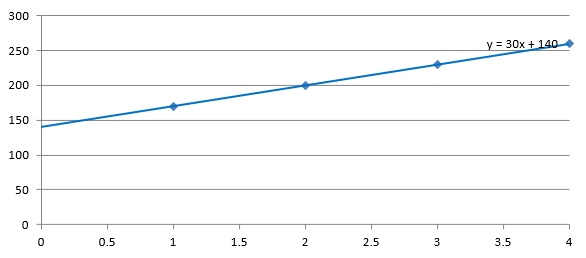
以下範例建立一個散佈 (XY) 圖表,產量為 1 到 4,成本分別為 170、200、230 與 260。它先以預設的自動截距儲存圖表,然後將截距設定為 100,並儲存第二個 PPTX。兩個檔案唯一的差異在於截距設定。趨勢線會顯示其方程式,並延伸回 X = 0。
import jpype
import asposeslides

if not jpype.isJVMStarted():
    jpype.startJVM()

from asposeslides.api import ChartType, Presentation, SaveFormat, TrendlineType

presentation = Presentation()
try:
    slide = presentation.getSlides().get_Item(0)

    chart = slide.getShapes().addChart(ChartType.ScatterWithMarkers, 20, 20, 480, 210)
    chart.setLegend(False)

    chart.getChartData().getSeries().clear()
    chart.getChartData().getCategories().clear()

    workbook = chart.getChartData().getChartDataWorkbook()
    workbook.clear(0)

    name_cell = workbook.getCell(0, 0, 1, "Production cost")
    series = chart.getChartData().getSeries().add(name_cell, ChartType.ScatterWithMarkers)
    costs = [170, 200, 230, 260]

    for i in range(len(costs)):
        x_cell = workbook.getCell(0, i + 1, 0, i + 1)
        y_cell = workbook.getCell(0, i + 1, 1, costs[i])
        series.getDataPoints().addDataPointForScatterSeries(x_cell, y_cell)

    trendline = series.getTrendLines().add(TrendlineType.Linear)
    trendline.setDisplayEquation(True)
    trendline.setBackward(1)

    presentation.save("AutomaticIntercept.pptx", SaveFormat.Pptx)

    trendline.setIntercept(100)
    presentation.save("FixedIntercept.pptx", SaveFormat.Pptx)
finally:
    presentation.dispose()
使用自動計算時,這些資料產生 y = 30x + 140。將截距改為 100 則約得到 y = 43.33x + 100:在零點的擬合值符合已知基線,但此線不再通過每個資料點。
| 自動截距 | 截距固定為 100 |
|---|---|
 |
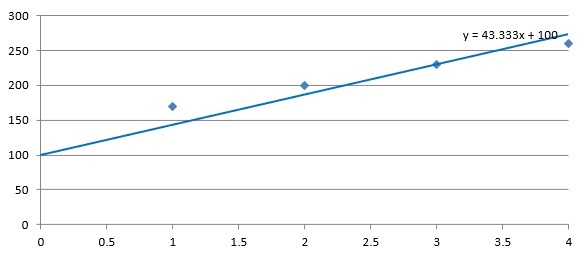 |
兩張圖片使用相同的資料與座標軸比例。趨勢線皆延伸回 X = 0,以顯示其截距。
預設情況下,getIntercept 會傳回 NaN,表示截距未指定,而非零。此時會自動根據資料計算截距。
新增自訂線
自訂線是繪製在圖表之上的形狀,而非根據系列資料計算的趨勢線。此範例使用 ShapeCollection.addAutoShape 在幻燈片上於圖表上方加入一條水平線。線條位置以點為單位的投影片座標指定,起點位於圖表左邊緣,垂直位置位於圖表中部。寬度與圖表寬度相同。透過 getLineFormat 方法可取得線條格式,並套用純紅色。
import jpype
import asposeslides

if not jpype.isJVMStarted():
    jpype.startJVM()

from asposeslides.api import ChartType, FillType, Presentation, SaveFormat, ShapeType
from java.awt import Color

presentation = Presentation()
try:
    slide = presentation.getSlides().get_Item(0)

    chart = slide.getShapes().addChart(ChartType.ClusteredColumn, 100, 100, 500, 400)

    line = slide.getShapes().addAutoShape(ShapeType.Line, chart.getX(), chart.getY() + chart.getHeight() / 2, chart.getWidth(), 0)
    line.getLineFormat().getFillFormat().setFillType(FillType.Solid)
    line.getLineFormat().getFillFormat().getSolidFillColor().setColor(Color.RED)

    presentation.save("AddCustomLines.pptx", SaveFormat.Pptx)
finally:
    presentation.dispose()
FAQ
「前向」與「後向」在趨勢線中代表什麼意思?
它們是趨勢線向前或向後投射的長度:對於散佈 (XY) 圖表,以座標軸單位計算;對於非散佈圖表,以類別數計算。僅允許非負值。
匯出簡報為 PDF 或 SVG,或將投影片渲染為影像時,趨勢線會被保留嗎?
會。Aspose.Slides 可將簡報轉換為 PDF 或 SVG,並將圖表渲染為影像;作為圖表一部份的趨勢線在這些操作中皆會被保留。亦提供可將圖表本身 匯出為影像 的方法。