
Python でプレゼンテーション チャートにトレンドラインを追加する
概要
この記事では、Aspose.Slides を使用してプレゼンテーションのチャートにトレンドラインを追加する方法を説明します。チャートの作成、チャート系列へのトレンドラインの追加、指数、線形、対数、移動平均、多項式、指数 (power) などのさまざまなトレンドラインの種類の使用方法を示します。
また、ライン シェイプを挿入してチャートにカスタム ラインを追加する方法を説明し、前方および後方のトレンドライン投影値や、PDF や SVG へのエクスポート、スライドを画像としてレンダリングした際にトレンドラインが保持されるかどうかに関する簡単な FAQ も含んでいます。
トレンドラインの追加
TrendlineCollection.add を使用してチャート系列にトレンドラインを追加し、TrendlineType で種類を選択します。この例では、デフォルト データを使用したクラスター カラム チャートを作成し、3 つの系列それぞれに 2 本のトレンドラインを追加します。
指数トレンドラインは setDisplayEquation と setDisplayRSquaredValue によって数式と決定係数を非表示にし、線形トレンドラインは赤色に設定します。対数トレンドラインは addTextFrameForOverriding を使用してカスタム ラベルを付けます。移動平均は 3 データ ポイントの setPeriod とカスタム setTrendlineName を使用します。
多項式トレンドラインは setOrder で 3 次に設定し、setForward によって 1 カテゴリ 前方に伸ばします。指数 (power) トレンドラインは setBackward によって 1 カテゴリ 後方に伸ばします。
import jpype
import asposeslides

if not jpype.isJVMStarted():
    jpype.startJVM()

from asposeslides.api import ChartType, FillType, Presentation, SaveFormat, TrendlineType
from java.awt import Color

presentation = Presentation()
try:
    slide = presentation.getSlides().get_Item(0)

    chart = slide.getShapes().addChart(ChartType.ClusteredColumn, 20, 20, 500, 400)

    first_series = chart.getChartData().getSeries().get_Item(0)

    exponential_trendline = first_series.getTrendLines().add(TrendlineType.Exponential)
    exponential_trendline.setDisplayEquation(False)
    exponential_trendline.setDisplayRSquaredValue(False)

    linear_trendline = first_series.getTrendLines().add(TrendlineType.Linear)
    linear_trendline.getFormat().getLine().getFillFormat().setFillType(FillType.Solid)
    linear_trendline.getFormat().getLine().getFillFormat().getSolidFillColor().setColor(Color.RED)

    second_series = chart.getChartData().getSeries().get_Item(1)

    logarithmic_trendline = second_series.getTrendLines().add(TrendlineType.Logarithmic)
    logarithmic_trendline.addTextFrameForOverriding("New log trend line")

    moving_average_trendline = second_series.getTrendLines().add(TrendlineType.MovingAverage)
    moving_average_trendline.setPeriod(jpype.JByte(3))
    moving_average_trendline.setTrendlineName("New TrendLine Name")

    third_series = chart.getChartData().getSeries().get_Item(2)

    polynomial_trendline = third_series.getTrendLines().add(TrendlineType.Polynomial)
    polynomial_trendline.setForward(1)
    polynomial_trendline.setOrder(jpype.JByte(3))

    power_trendline = third_series.getTrendLines().add(TrendlineType.Power)
    power_trendline.setBackward(1)

    presentation.save("ChartTrendLines.pptx", SaveFormat.Pptx)
finally:
    presentation.dispose()
トレンドラインの切片の設定
setIntercept を使用して、X = 0 のときのトレンドラインの Y 値を固定します。この設定は線形、指数、多項式トレンドラインでサポートされています。
たとえば、生産コストモデルで既知の固定費 100 から開始したい場合があります。測定値が非ゼロの生産量で別のベースラインを示唆していても同様です。線形トレンドラインの場合、切片を固定すると方程式 y = ax + b が b = 100 に制約され、傾きはその制約下でデータにフィットします。これは既にフィットした線を単に移動させるものではありません。軸交差設定はチャートの軸が交わる位置を制御し、フィットしたトレンドラインの係数を変更するものではありません。
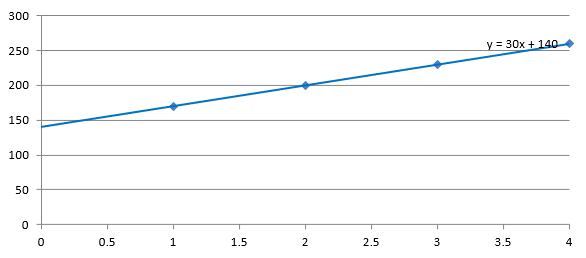
以下の例では、1〜4 の生産量と 170、200、230、260 のコストで散布図 (XY) を作成します。デフォルトの自動切片でチャートを保存し、切片を 100 に設定して 2 番目の PPTX を保存します。2 つのファイルは切片設定だけが異なります。トレンドラインは数式を表示し、X = 0 まで伸びます。
import jpype
import asposeslides

if not jpype.isJVMStarted():
    jpype.startJVM()

from asposeslides.api import ChartType, Presentation, SaveFormat, TrendlineType

presentation = Presentation()
try:
    slide = presentation.getSlides().get_Item(0)

    chart = slide.getShapes().addChart(ChartType.ScatterWithMarkers, 20, 20, 480, 210)
    chart.setLegend(False)

    chart.getChartData().getSeries().clear()
    chart.getChartData().getCategories().clear()

    workbook = chart.getChartData().getChartDataWorkbook()
    workbook.clear(0)

    name_cell = workbook.getCell(0, 0, 1, "Production cost")
    series = chart.getChartData().getSeries().add(name_cell, ChartType.ScatterWithMarkers)
    costs = [170, 200, 230, 260]

    for i in range(len(costs)):
        x_cell = workbook.getCell(0, i + 1, 0, i + 1)
        y_cell = workbook.getCell(0, i + 1, 1, costs[i])
        series.getDataPoints().addDataPointForScatterSeries(x_cell, y_cell)

    trendline = series.getTrendLines().add(TrendlineType.Linear)
    trendline.setDisplayEquation(True)
    trendline.setBackward(1)

    presentation.save("AutomaticIntercept.pptx", SaveFormat.Pptx)

    trendline.setIntercept(100)
    presentation.save("FixedIntercept.pptx", SaveFormat.Pptx)
finally:
    presentation.dispose()
自動計算の場合、これらのデータは y = 30x + 140 を生成します。切片を 100 に設定すると約 y = 43.33x + 100 となり、ゼロでのフィット値が既知のベースラインに一致し、線はすべてのデータポイントを通過しなくなります。
| 自動切片 | 100 に固定した切片 |
|---|---|
 |
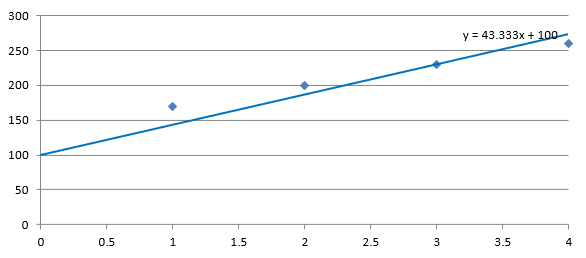 |
両方の画像は同じデータと軸スケールを使用しています。トレンドラインは X = 0 まで伸びて切片を示しています。
デフォルトでは、getIntercept は NaN を返します。これは切片が未指定であることを表し、ゼロではありません。その後、切片はデータから自動的に計算されます。
カスタムラインの追加
カスタム ラインは系列データから計算されたトレンドラインではなく、チャート上に描画されたシェイプです。この例では、ShapeCollection.addAutoShape を使用してチャート上に水平線を追加します。線の位置はスライド座標(ポイント単位)で指定され、チャートの左端から開始し、チャートの高さのちょうど半分の位置に配置されます。幅はチャートの幅と同じです。getLineFormat メソッドで、実線の赤色を適用するための線の書式設定にアクセスします。
import jpype
import asposeslides

if not jpype.isJVMStarted():
    jpype.startJVM()

from asposeslides.api import ChartType, FillType, Presentation, SaveFormat, ShapeType
from java.awt import Color

presentation = Presentation()
try:
    slide = presentation.getSlides().get_Item(0)

    chart = slide.getShapes().addChart(ChartType.ClusteredColumn, 100, 100, 500, 400)

    line = slide.getShapes().addAutoShape(ShapeType.Line, chart.getX(), chart.getY() + chart.getHeight() / 2, chart.getWidth(), 0)
    line.getLineFormat().getFillFormat().setFillType(FillType.Solid)
    line.getLineFormat().getFillFormat().getSolidFillColor().setColor(Color.RED)

    presentation.save("AddCustomLines.pptx", SaveFormat.Pptx)
finally:
    presentation.dispose()
よくある質問
「前方」および「後方」はトレンドラインで何を意味しますか?
トレンドラインを前方または後方に投影した長さを指します。散布図 (XY) チャートの場合は軸単位、非散布図の場合はカテゴリ数で表されます。負の値は使用できません。
プレゼンテーションを PDF または SVG にエクスポートしたり、スライドを画像としてレンダリングしたりするときにトレンドラインは保持されますか?
はい。Aspose.Slides はプレゼンテーションを PDF または SVG に変換し、チャートを画像としてレンダリングします。トレンドラインはチャートの一部としてこれらの操作中に保持されます。また、チャート自体の画像を エクスポート するメソッドも利用可能です。