
Python via Java Kullanarak Sunumlarda Madde İşaretli ve Numaralı Listeleri Yönetme
Genel Bakış
Aspose.Slides for Python via Java, PowerPoint ve OpenDocument sunumlarında madde işaretli ve numaralı listeler oluşturmanıza ve biçimlendirmenize olanak tanır. Bir liste öğesi, madde işareti ayarları paragraf biçimi üzerinden kontrol edilen bir paragraftır.
Paragraf düzeyinde liste ayarlarına erişmek için Paragraph.getParagraphFormat yöntemini kullanın. Ana giriş noktası, bir BulletFormat nesnesi döndüren ParagraphFormat.getBullet yöntemidir. Bu nesne sayesinde madde işareti türünü, sembolünü, resmini, rengini, boyutunu, numaralandırma stilini ve başlangıç sayısını ayarlayabilirsiniz.
Bu makale şunları gösterir:
- özel bir sembolle madde işaretli liste oluşturma
- resimli madde işareti oluşturma
- paragraf derinliği ayarlanarak çok seviyeli liste oluşturma
- numaralı liste oluşturma
- mevcut bir sunumda liste biçimlendirmesini inceleme ve değiştirme
Madde İşaretli Liste Oluşturma
Madde işaretli bir liste oluşturmak için Paragraph nesnelerini bir TextFrame içine ekleyin ve BulletFormat.setType yöntemini BulletType.Symbol olarak ayarlayın. Ardından madde işareti görünümünü kontrol etmek için BulletFormat.setChar, BulletFormat.getColor ve BulletFormat.setHeight yöntemlerini kullanabilirsiniz.
Aşağıdaki Python kodu, bir slaytta madde işaretli liste oluşturmayı gösterir:
import jpype
import asposeslides

if not jpype.isJVMStarted():
    jpype.startJVM()

from asposeslides.api import BulletType, NullableBool, Paragraph, Presentation, SaveFormat, ShapeType
from java.awt import Color

presentation = Presentation()
try:
    slide = presentation.getSlides().get_Item(0)
    auto_shape = slide.getShapes().addAutoShape(ShapeType.Rectangle, 20, 20, 200, 50)

    text_frame = auto_shape.getTextFrame()
    text_frame.getParagraphs().clear()

    bullet_color = Color(205, 92, 92)

    first_paragraph = Paragraph()
    first_paragraph.getParagraphFormat().getBullet().setType(BulletType.Symbol)
    first_paragraph.getParagraphFormat().getBullet().setChar('*')
    first_paragraph.getParagraphFormat().setIndent(15)
    first_paragraph.getParagraphFormat().getBullet().setBulletHardColor(NullableBool.True_)
    first_paragraph.getParagraphFormat().getBullet().getColor().setColor(bullet_color)
    first_paragraph.getParagraphFormat().getBullet().setHeight(100)
    first_paragraph.setText("The first paragraph")
    text_frame.getParagraphs().add(first_paragraph)

    second_paragraph = Paragraph()
    second_paragraph.getParagraphFormat().getBullet().setType(BulletType.Symbol)
    second_paragraph.getParagraphFormat().getBullet().setChar('*')
    second_paragraph.getParagraphFormat().setIndent(15)
    second_paragraph.getParagraphFormat().getBullet().setBulletHardColor(NullableBool.True_)
    second_paragraph.getParagraphFormat().getBullet().getColor().setColor(bullet_color)
    second_paragraph.getParagraphFormat().getBullet().setHeight(100)
    second_paragraph.setText("The second paragraph")
    text_frame.getParagraphs().add(second_paragraph)

    presentation.save("symbol_bullets.pptx", SaveFormat.Pptx)
finally:
    presentation.dispose()
Sonuç:

Numaralı Liste Oluşturma
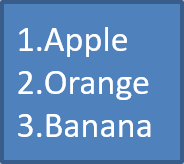
Öğelerin sırası önemli olduğunda numaralı listeler kullanın. BulletFormat.setType yöntemini BulletType.Numbered olarak ayarlayın. Ayrıca BulletFormat.setNumberedBulletStyle ile bir numaralandırma biçimi seçebilir veya listenin 1 yerine farklı bir değerle başlamasını istiyorsanız BulletFormat.setNumberedBulletStartWith kullanabilirsiniz.
Aşağıdaki Python kodu, bir slaytta numaralı liste oluşturmayı gösterir:
import jpype
import asposeslides

if not jpype.isJVMStarted():
    jpype.startJVM()

from asposeslides.api import BulletType, Paragraph, Presentation, SaveFormat, ShapeType

presentation = Presentation()
try:
    slide = presentation.getSlides().get_Item(0)
    auto_shape = slide.getShapes().addAutoShape(ShapeType.Rectangle, 20, 20, 90, 80)

    text_frame = auto_shape.getTextFrame()
    text_frame.getParagraphs().clear()

    first_paragraph = Paragraph()
    first_paragraph.getParagraphFormat().getBullet().setType(BulletType.Numbered)
    first_paragraph.setText("Apple")
    text_frame.getParagraphs().add(first_paragraph)

    second_paragraph = Paragraph()
    second_paragraph.getParagraphFormat().getBullet().setType(BulletType.Numbered)
    second_paragraph.setText("Orange")
    text_frame.getParagraphs().add(second_paragraph)

    third_paragraph = Paragraph()
    third_paragraph.getParagraphFormat().getBullet().setType(BulletType.Numbered)
    third_paragraph.setText("Banana")
    text_frame.getParagraphs().add(third_paragraph)

    presentation.save("numbered_bullets.pptx", SaveFormat.Pptx)
finally:
    presentation.dispose()
Sonuç:
Resimli Madde İşareti Oluşturma
Aspose.Slides, normal bir madde işareti sembolünü bir resimle değiştirme imkanı sunar. Resimli madde işaretleri, küçük boyutlarda okunabilirliğini koruyan, örneğin simge ya da şeffaf PNG dosyaları gibi basit görsellerle en iyi şekilde çalışır.
Note
Eğer normal bir madde işareti sembolünü bir resimle değiştirmeyi planlıyorsanız, şeffaf arka plana sahip basit bir grafik seçin. Bu tür görseller özel madde işareti sembolleri olarak iyi sonuç verir. Görselin çok küçük bir boyuta ölçeklendirileceğini unutmayın. Bu nedenle, liste içinde bir madde işareti olarak kullanıldığında net ve görsel olarak etkili kalan bir görsel seçmenizi şiddetle öneririz.Resimli bir madde işareti oluşturmak için bir resmi Presentation.getImages metoduna ekleyin ve dönen resim nesnesini BulletFormat.getPicture metoduna atayın. Resmi atamadan önce BulletFormat.setType yöntemini BulletType.Picture olarak ayarlayın.
“Diyelim ki image.png adlı bir görselimiz var”:

Aşağıdaki Python kodu, bir slaytta resimli madde işaretleri oluşturmayı gösterir:
import jpype
import asposeslides

if not jpype.isJVMStarted():
    jpype.startJVM()

from asposeslides.api import BulletType, Images, Paragraph, Presentation, SaveFormat, ShapeType

presentation = Presentation()
try:
    slide = presentation.getSlides().get_Item(0)
    auto_shape = slide.getShapes().addAutoShape(ShapeType.Rectangle, 20, 20, 200, 50)

    text_frame = auto_shape.getTextFrame()
    text_frame.getParagraphs().clear()

    image = Images.fromFile("image.png")
    try:
        bullet_image = presentation.getImages().addImage(image)
    finally:
        image.dispose()

    first_paragraph = Paragraph()
    first_paragraph.getParagraphFormat().getBullet().setType(BulletType.Picture)
    first_paragraph.getParagraphFormat().getBullet().getPicture().setImage(bullet_image)
    first_paragraph.getParagraphFormat().setIndent(15)
    first_paragraph.getParagraphFormat().getBullet().setHeight(100)
    first_paragraph.setText("The first paragraph")
    text_frame.getParagraphs().add(first_paragraph)

    second_paragraph = Paragraph()
    second_paragraph.getParagraphFormat().getBullet().setType(BulletType.Picture)
    second_paragraph.getParagraphFormat().getBullet().getPicture().setImage(bullet_image)
    second_paragraph.getParagraphFormat().setIndent(15)
    second_paragraph.getParagraphFormat().getBullet().setHeight(100)
    second_paragraph.setText("The second paragraph")
    text_frame.getParagraphs().add(second_paragraph)

    presentation.save("picture_bullets.pptx", SaveFormat.Pptx)
finally:
    presentation.dispose()
Sonuç:

Çok Seviyeli Liste Oluşturma
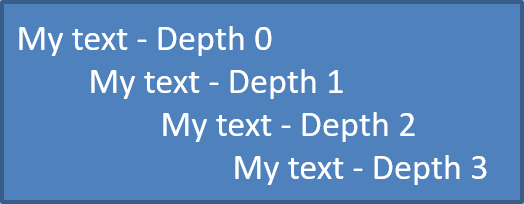
Liste öğelerini farklı seviyelere yerleştirmek için ParagraphFormat.setDepth metodunu kullanın. Seviye 0 en üst seviyedir, seviye 1 onun altında yer alır ve bu şekilde devam eder.
Aşağıdaki Python kodu, çok seviyeli madde işaretli bir liste oluşturmayı gösterir:
import jpade
import asposeslides

if not jpype.isJVMStarted():
    jpype.startJVM()

from asposeslides.api import Paragraph, Presentation, SaveFormat, ShapeType

presentation = Presentation()
try:
    slide = presentation.getSlides().get_Item(0)
    auto_shape = slide.getShapes().addAutoShape(ShapeType.Rectangle, 20, 20, 260, 110)

    text_frame = auto_shape.getTextFrame()
    text_frame.getParagraphs().clear()

    first_paragraph = Paragraph()
    first_paragraph.getParagraphFormat().setDepth(0)
    first_paragraph.setText("My text - Depth 0")
    text_frame.getParagraphs().add(first_paragraph)

    second_paragraph = Paragraph()
    second_paragraph.getParagraphFormat().setDepth(1)
    second_paragraph.setText("My text - Depth 1")
    text_frame.getParagraphs().add(second_paragraph)

    third_paragraph = Paragraph()
    third_paragraph.getParagraphFormat().setDepth(2)
    third_paragraph.setText("My text - Depth 2")
    text_frame.getParagraphs().add(third_paragraph)

    fourth_paragraph = Paragraph()
    fourth_paragraph.getParagraphFormat().setDepth(3)
    fourth_paragraph.setText("My text - Depth 3")
    text_frame.getParagraphs().add(fourth_paragraph)

    presentation.save("multilevel_bullets.pptx", SaveFormat.Pptx)
finally:
    presentation.dispose()
Sonuç:
Mevcut Bir Listeyi Değiştirme
Mevcut bir sunumda liste biçimlendirmesini değiştirmek için hedef paragrafı alın ve ParagraphFormat.getBullet ayarlarını güncelleyin. Listeleri oluşturmak için kullanılan aynı özellikler, PPT, PPTX veya ODP dosyalarından yüklenen listeleri incelemek veya değiştirmek için de kullanılabilir.
Aşağıdaki Python kodu, bir metin çerçevesindeki ilk paragrafı numaralı liste stiline dönüştürür:
import jpype
import asposeslides

if not jpype.isJVMStarted():
    jpype.startJVM()

from asposeslides.api import BulletType, NumberedBulletStyle, Presentation, SaveFormat

presentation = Presentation("input.pptx")
try:
    slide = presentation.getSlides().get_Item(0)
    auto_shape = slide.getShapes().get_Item(0)
    paragraph = auto_shape.getTextFrame().getParagraphs().get_Item(0)

    paragraph.getParagraphFormat().getBullet().setType(BulletType.Numbered)
    paragraph.getParagraphFormat().getBullet().setNumberedBulletStyle(NumberedBulletStyle.BulletRomanUCPeriod)
    paragraph.getParagraphFormat().getBullet().setNumberedBulletStartWith(1)
    paragraph.getParagraphFormat().setMarginLeft(30)
    paragraph.getParagraphFormat().setIndent(-20)

    presentation.save("updated_list.pptx", SaveFormat.Pptx)
finally:
    presentation.dispose()
SSS
Madde işaretli ve numaralı listeler PDF veya görüntülere aktarılabilir mi?
Evet. Aspose.Slides, hedef format ilgili metin düzeni ve madde işareti özelliklerini desteklediğinde liste biçimlendirmesini korur.
Mevcut sunumlardaki listeleri düzenleyebilir miyim?
Evet. Sunumu yükleyin, hedef paragrafı alın, ParagraphFormat.getBullet ayarlarını inceleyin veya güncelleyin ve ardından sunumu kaydedin.
Listeler Latin dışı metin içerebilir mi?
Evet. Liste öğesi metni Unicode karakterler içerebilir, bu sayede çok dilli sunumlarda listeler oluşturabilirsiniz. Kullanılan yazı tiplerinin ihtiyacınız olan karakterleri desteklediğinden emin olun.