
مدیریت فهرستهای نقطهدار و شمارهدار در ارائهها با استفاده از Python از طریق Java
نمای کلی
Aspose.Slides for Python via Java به شما امکان میدهد فهرستهای نقطهدار و شمارهدار را در ارائههای PowerPoint و OpenDocument ایجاد و قالببندی کنید. یک مورد فهرست یک پاراگراف است که تنظیمات گلوله آن از طریق قالببندی پاراگراف کنترل میشود.
از روش Paragraph.getParagraphFormat برای دسترسی به تنظیمات فهرست در سطح پاراگراف استفاده کنید. نقطه ورود اصلی ParagraphFormat.getBullet است که یک شیء BulletFormat را برمیگرداند. با استفاده از این شیء میتوانید نوع گلوله، نماد، تصویر، رنگ، اندازه، سبک شمارهگذاری و عدد شروع را تنظیم کنید.
این مقاله نشان میدهد چگونه:
- یک فهرست نقطهدار با نماد سفارشی ایجاد کنید
- یک گلوله تصویری بسازید
- یک فهرست چندسطحی با تنظیم عمق پاراگراف ایجاد کنید
- یک فهرست شمارهدار بسازید
- قالببندی فهرست را در یک ارائه موجود بازرسی و تغییر دهید
ایجاد فهرست نقطهدار
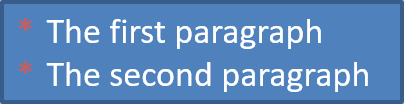
برای ایجاد فهرست نقطهدار، اشیاء Paragraph را به یک TextFrame اضافه کنید و BulletFormat.setType را به BulletType.Symbol تنظیم کنید. سپس میتوانید با استفاده از BulletFormat.setChar، BulletFormat.getColor و BulletFormat.setHeight ظاهر گلوله را کنترل کنید.
کد Python زیر نحوه ایجاد فهرست نقطهدار را در یک اسلاید نشان میدهد:
import jpype
import asposeslides

if not jpype.isJVMStarted():
    jpype.startJVM()

from asposeslides.api import BulletType, NullableBool, Paragraph, Presentation, SaveFormat, ShapeType
from java.awt import Color

presentation = Presentation()
try:
    slide = presentation.getSlides().get_Item(0)
    auto_shape = slide.getShapes().addAutoShape(ShapeType.Rectangle, 20, 20, 200, 50)

    text_frame = auto_shape.getTextFrame()
    text_frame.getParagraphs().clear()

    bullet_color = Color(205, 92, 92)

    first_paragraph = Paragraph()
    first_paragraph.getParagraphFormat().getBullet().setType(BulletType.Symbol)
    first_paragraph.getParagraphFormat().getBullet().setChar('*')
    first_paragraph.getParagraphFormat().setIndent(15)
    first_paragraph.getParagraphFormat().getBullet().setBulletHardColor(NullableBool.True_)
    first_paragraph.getParagraphFormat().getBullet().getColor().setColor(bullet_color)
    first_paragraph.getParagraphFormat().getBullet().setHeight(100)
    first_paragraph.setText("The first paragraph")
    text_frame.getParagraphs().add(first_paragraph)

    second_paragraph = Paragraph()
    second_paragraph.getParagraphFormat().getBullet().setType(BulletType.Symbol)
    second_paragraph.getParagraphFormat().getBullet().setChar('*')
    second_paragraph.getParagraphFormat().setIndent(15)
    second_paragraph.getParagraphFormat().getBullet().setBulletHardColor(NullableBool.True_)
    second_paragraph.getParagraphFormat().getBullet().getColor().setColor(bullet_color)
    second_paragraph.getParagraphFormat().getBullet().setHeight(100)
    second_paragraph.setText("The second paragraph")
    text_frame.getParagraphs().add(second_paragraph)

    presentation.save("symbol_bullets.pptx", SaveFormat.Pptx)
finally:
    presentation.dispose()
نتیجه:
ایجاد فهرست شمارهدار
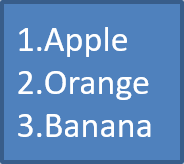
زمانی که ترتیب موارد اهمیت دارد از فهرستهای شمارهدار استفاده کنید. BulletFormat.setType را به BulletType.Numbered تنظیم کنید. همچنین میتوانید با BulletFormat.setNumberedBulletStyle قالب شمارهگذاری را انتخاب کنید یا با BulletFormat.setNumberedBulletStartWith زمانی که فهرست باید از مقدار دیگری غیر از 1 شروع شود، مقدار شروع را تعیین کنید.
کد Python زیر نحوه ایجاد فهرست شمارهدار را در یک اسلاید نشان میدهد:
import jpype
import asposeslides

if not jpype.isJVMStarted():
    jpype.startJVM()

from asposeslides.api import BulletType, Paragraph, Presentation, SaveFormat, ShapeType

presentation = Presentation()
try:
    slide = presentation.getSlides().get_Item(0)
    auto_shape = slide.getShapes().addAutoShape(ShapeType.Rectangle, 20, 20, 90, 80)

    text_frame = auto_shape.getTextFrame()
    text_frame.getParagraphs().clear()

    first_paragraph = Paragraph()
    first_paragraph.getParagraphFormat().getBullet().setType(BulletType.Numbered)
    first_paragraph.setText("Apple")
    text_frame.getParagraphs().add(first_paragraph)

    second_paragraph = Paragraph()
    second_paragraph.getParagraphFormat().getBullet().setType(BulletType.Numbered)
    second_paragraph.setText("Orange")
    text_frame.getParagraphs().add(second_paragraph)

    third_paragraph = Paragraph()
    third_paragraph.getParagraphFormat().getBullet().setType(BulletType.Numbered)
    third_paragraph.setText("Banana")
    text_frame.getParagraphs().add(third_paragraph)

    presentation.save("numbered_bullets.pptx", SaveFormat.Pptx)
finally:
    presentation.dispose()
نتیجه:
ایجاد گلوله تصویری
Aspose.Slides به شما امکان میدهد نماد گلوله عادی را با یک تصویر جایگزین کنید. گلولههای تصویری بهترین عملکرد را با تصاویر سادهای دارند که در اندازه کوچک خوانا میمانند، مانند آیکونها یا فایلهای PNG شفاف کوچک.
Note
اگر قصد دارید نماد گلوله عادی را با یک تصویر جایگزین کنید، یک گرافیک ساده با پسزمینه شفاف انتخاب کنید. چنین تصاویری بهعنوان نمادهای سفارشی گلوله کارایی خوبی دارند.برای ایجاد گلوله تصویری، یک تصویر را به Presentation.getImages اضافه کنید و شیء تصویر 반환 شده را به BulletFormat.getPicture اختصاص دهید. قبل از اختصاص تصویر، BulletFormat.setType را به BulletType.Picture تنظیم کنید.
فرض کنید تصویری به نام “image.png” داریم:

کد Python زیر نحوه ایجاد گلولههای تصویری را در یک اسلاید نشان میدهد:
import jpype
import asposeslides

if not jpype.isJVMStarted():
    jpype.startJVM()

from asposeslides.api import BulletType, Images, Paragraph, Presentation, SaveFormat, ShapeType

presentation = Presentation()
try:
    slide = presentation.getSlides().get_Item(0)
    auto_shape = slide.getShapes().addAutoShape(ShapeType.Rectangle, 20, 20, 200, 50)

    text_frame = auto_shape.getTextFrame()
    text_frame.getParagraphs().clear()

    image = Images.fromFile("image.png")
    try:
        bullet_image = presentation.getImages().addImage(image)
    finally:
        image.dispose()

    first_paragraph = Paragraph()
    first_paragraph.getParagraphFormat().getBullet().setType(BulletType.Picture)
    first_paragraph.getParagraphFormat().getBullet().getPicture().setImage(bullet_image)
    first_paragraph.getParagraphFormat().setIndent(15)
    first_paragraph.getParagraphFormat().getBullet().setHeight(100)
    first_paragraph.setText("The first paragraph")
    text_frame.getParagraphs().add(first_paragraph)

    second_paragraph = Paragraph()
    second_paragraph.getParagraphFormat().getBullet().setType(BulletType.Picture)
    second_paragraph.getParagraphFormat().getBullet().getPicture().setImage(bullet_image)
    second_paragraph.getParagraphFormat().setIndent(15)
    second_paragraph.getParagraphFormat().getBullet().setHeight(100)
    second_paragraph.setText("The second paragraph")
    text_frame.getParagraphs().add(second_paragraph)

    presentation.save("picture_bullets.pptx", SaveFormat.Pptx)
finally:
    presentation.dispose()
نتیجه:

ایجاد فهرست چندسطحی
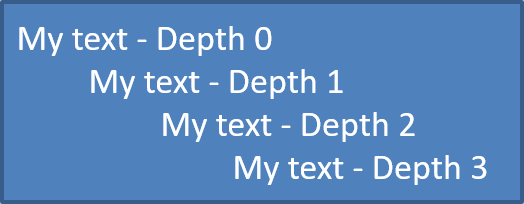
از ParagraphFormat.setDepth برای قرار دادن موارد فهرست در سطوح مختلف استفاده کنید. سطح 0 بالاترین سطح است، سطح 1 زیر آن تو در تو میباشد و به همین ترتیب ادامه دارد.
کد Python زیر نحوه ایجاد فهرست نقطهدار چندسطحی را نشان میدهد:
import jpype
import asposeslides

if not jpype.isJVMStarted():
    jpype.startJVM()

from asposeslides.api import Paragraph, Presentation, SaveFormat, ShapeType

presentation = Presentation()
try:
    slide = presentation.getSlides().get_Item(0)
    auto_shape = slide.getShapes().addAutoShape(ShapeType.Rectangle, 20, 20, 260, 110)

    text_frame = auto_shape.getTextFrame()
    text_frame.getParagraphs().clear()

    first_paragraph = Paragraph()
    first_paragraph.getParagraphFormat().setDepth(0)
    first_paragraph.setText("My text - Depth 0")
    text_frame.getParagraphs().add(first_paragraph)

    second_paragraph = Paragraph()
    second_paragraph.getParagraphFormat().setDepth(1)
    second_paragraph.setText("My text - Depth 1")
    text_frame.getParagraphs().add(second_paragraph)

    third_paragraph = Paragraph()
    third_paragraph.getParagraphFormat().setDepth(2)
    third_paragraph.setText("My text - Depth 2")
    text_frame.getParagraphs().add(third_paragraph)

    fourth_paragraph = Paragraph()
    fourth_paragraph.getParagraphFormat().setDepth(3)
    fourth_paragraph.setText("My text - Depth 3")
    text_frame.getParagraphs().add(fourth_paragraph)

    presentation.save("multilevel_bullets.pptx", SaveFormat.Pptx)
finally:
    presentation.dispose()
نتیجه:
تغییر فهرست موجود
برای تغییر قالببندی فهرست در یک ارائه موجود، پاراگراف هدف را دسترسی یافته و تنظیمات ParagraphFormat.getBullet آن را بهروز کنید. همان خصوصیات استفاده شده برای ایجاد فهرستها میتوانند برای بازرسی یا اصلاح فهرستهای بارگذاریشده از فایل PPT، PPTX یا ODP به کار روند.
کد Python زیر اولین پاراگراف در یک فریم متن را به سبک فهرست شمارهدار تغییر میدهد:
import jpype
import asposeslides

if not jpype.isJVMStarted():
    jpype.startJVM()

from asposeslides.api import BulletType, NumberedBulletStyle, Presentation, SaveFormat

presentation = Presentation("input.pptx")
try:
    slide = presentation.getSlides().get_Item(0)
    auto_shape = slide.getShapes().get_Item(0)
    paragraph = auto_shape.getTextFrame().getParagraphs().get_Item(0)

    paragraph.getParagraphFormat().getBullet().setType(BulletType.Numbered)
    paragraph.getParagraphFormat().getBullet().setNumberedBulletStyle(NumberedBulletStyle.BulletRomanUCPeriod)
    paragraph.getParagraphFormat().getBullet().setNumberedBulletStartWith(1)
    paragraph.getParagraphFormat().setMarginLeft(30)
    paragraph.getParagraphFormat().setIndent(-20)

    presentation.save("updated_list.pptx", SaveFormat.Pptx)
finally:
    presentation.dispose()
پرسشهای متداول
آیا فهرستهای نقطهدار و شمارهدار میتوانند به PDF یا تصاویر صادر شوند؟
بله. Aspose.Slides قالببندی فهرست را وقتی فرمت هدف از چیدمان متن و ویژگیهای گلوله مربوطه پشتیبانی میکند، حفظ میکند.
آیا میتوانم فهرستها را در ارائههای موجود ویرایش کنم؟
بله. ارائه را بارگذاری کنید، پاراگراف هدف را دسترسی یافته، تنظیمات ParagraphFormat.getBullet آن را بازرسی یا بهروز کنید و سپس ارائه را ذخیره کنید.
آیا فهرستها میتوانند متن غیر لاتین داشته باشند؟
بله. متن موارد فهرست میتواند شامل کاراکترهای Unicode باشد، بنابراین میتوانید فهرستها را در ارائههای چندزبانه ایجاد کنید. اطمینان حاصل کنید که فونتهای استفادهشده در ارائه از کاراکترهای مورد نیاز پشتیبانی میکنند.