
Áp dụng hoạt ảnh hình dạng trong bản trình chiếu bằng C++
Tổng quan
Để làm việc với các hành vi riêng lẻ bên trong một hiệu ứng hoặc chỉnh sửa các đoạn đường chuyển động, xem Tuỳ chỉnh hoạt ảnh.
Aspose.Slides for C++ biểu diễn các hoạt ảnh trên slide dưới dạng hiệu ứng trong dòng thời gian của slide. Một hiệu ứng có hình dạng mục tiêu, loại và phụ hiệu ứng, một trình kích hoạt, cài đặt thời gian, và các thuộc tính tùy chọn như âm thanh hoặc hành vi sau hoạt ảnh.
Dòng thời gian chứa hai loại chuỗi:
- Chuỗi chính chạy khi slide tiến lên.
- Chuỗi tương tác bắt đầu khi hình dạng kích hoạt của nó được nhấp.
Vì các hộp văn bản, hình ảnh, biểu đồ, bảng và các đối tượng slide khác triển khai IShape, bạn sử dụng cùng một phương thức ISequence::AddEffect cho hầu hết nội dung slide. Các hiệu ứng khả dụng được liệt kê trong enumeration EffectType.
Thêm hoạt ảnh cho hình dạng
Để thêm một hoạt ảnh, lấy chuỗi chính của slide và gọi ISequence::AddEffect với hình dạng mục tiêu, loại hiệu ứng, phụ loại và trình kích hoạt. Đối với một hiệu ứng bắt đầu khi một hình dạng khác được nhấp, tạo một chuỗi tương tác mà trình kích hoạt là hình dạng khác đó.
Ví dụ sau tạo cả hai loại hoạt ảnh và lưu kết quả vào shape-animations.pptx.
#include <DOM/Animation/EffectSubtype.h>
#include <DOM/Animation/EffectTriggerType.h>
#include <DOM/Animation/EffectType.h>
#include <DOM/Animation/IEffect.h>
#include <DOM/Animation/ISequence.h>
#include <DOM/Animation/ISequenceCollection.h>
#include <DOM/Animation/ITiming.h>
#include <DOM/IAnimationTimeLine.h>
#include <DOM/IAutoShape.h>
#include <DOM/IShapeCollection.h>
#include <DOM/ISlide.h>
#include <DOM/ISlideCollection.h>
#include <DOM/ITextFrame.h>
#include <DOM/Presentation.h>
#include <DOM/ShapeType.h>
#include <Export/SaveFormat.h>

using namespace Aspose::Slides;
using namespace Aspose::Slides::Animation;
using namespace Aspose::Slides::Export;
using namespace System;

auto presentation = MakeObject<Presentation>();
auto slide = presentation->get_Slide(0);

auto targetShape = slide->get_Shapes()->AddAutoShape(ShapeType::RoundCornerRectangle, 120.0f, 100.0f, 320.0f, 80.0f);
targetShape->get_TextFrame()->set_Text(u"Click to animate this shape");

auto mainSequence = slide->get_Timeline()->get_MainSequence();
auto entranceEffect = mainSequence->AddEffect(targetShape, EffectType::Fade, EffectSubtype::None, EffectTriggerType::OnClick);
entranceEffect->get_Timing()->set_Duration(1.5f);

auto triggerShape = slide->get_Shapes()->AddAutoShape(ShapeType::Bevel, 20.0f, 20.0f, 100.0f, 40.0f);
triggerShape->get_TextFrame()->set_Text(u"Move");

auto interactiveSequence = slide->get_Timeline()->get_InteractiveSequences()->Add(triggerShape);
interactiveSequence->AddEffect(targetShape, EffectType::PathFootball, EffectSubtype::None, EffectTriggerType::OnClick);

presentation->Save(u"shape-animations.pptx", SaveFormat::Pptx);
presentation->Dispose();
Trình kích hoạt kiểm soát khi nào một hiệu ứng bắt đầu:
- EffectTriggerType::OnClick chờ một cú nhấp trong chuỗi chính, hoặc một cú nhấp vào hình dạng kích hoạt trong chuỗi tương tác.
- EffectTriggerType::WithPrevious bắt đầu cùng với hiệu ứng trước.
- EffectTriggerType::AfterPrevious bắt đầu khi hiệu ứng trước kết thúc.
Để hoạt ảnh một hình ảnh, biểu đồ hoặc loại hình dạng khác, truyền đối tượng đó vào ISequence::AddEffect thay vì targetShape. Đối với các tùy chọn nhóm đặc thù cho biểu đồ, xem Biểu đồ hoạt ảnh.
Đọc hoạt ảnh hình dạng
Sử dụng ISequence::GetEffectsByShape khi bạn biết hình dạng mục tiêu. Để kiểm tra mọi hiệu ứng, liệt kê chuỗi chính và mọi chuỗi tương tác. Việc liệt kê tránh giả định rằng một chuỗi chứa hiệu ứng ở chỉ mục 0.
Ví dụ sau tạo một hình dạng với các hiệu ứng chuỗi chính và chuỗi tương tác, lấy các hiệu ứng nhắm vào hình dạng, và sau đó liệt kê mọi chuỗi trên slide.
#include <DOM/Animation/EffectSubtype.h>
#include <DOM/Animation/EffectTriggerType.h>
#include <DOM/Animation/EffectType.h>
#include <DOM/Animation/IEffect.h>
#include <DOM/Animation/ISequence.h>
#include <DOM/Animation/ISequenceCollection.h>
#include <DOM/Animation/ITiming.h>
#include <DOM/IAnimationTimeLine.h>
#include <DOM/IAutoShape.h>
#include <DOM/IShape.h>
#include <DOM/IShapeCollection.h>
#include <DOM/ISlide.h>
#include <DOM/ISlideCollection.h>
#include <DOM/ITextFrame.h>
#include <DOM/Presentation.h>
#include <DOM/ShapeType.h>
#include <system/console.h>
#include <system/string.h>

using namespace Aspose::Slides;
using namespace Aspose::Slides::Animation;
using namespace System;

auto printSequence = [](const String& label, const SharedPtr<ISequence>& sequence)
{
    Console::WriteLine(String::Format(u"  {0}: {1} effect(s)", label, sequence->get_Count()));

    for (const auto& effect : sequence)
    {
        auto targetName = effect->get_TargetShape() == nullptr ? u"unknown" : effect->get_TargetShape()->get_Name();
        auto effectDescription = String::Format(u"{0} {1}; target: {2}; trigger: {3}", effect->get_Type(), effect->get_Subtype(), targetName, effect->get_Timing()->get_TriggerType());
        Console::WriteLine(u"    " + effectDescription);
    }
};

auto presentation = MakeObject<Presentation>();
auto slide = presentation->get_Slide(0);
auto targetShape = slide->get_Shapes()->AddAutoShape(ShapeType::Rectangle, 120.0f, 100.0f, 320.0f, 80.0f);
targetShape->get_TextFrame()->set_Text(u"Animated shape");

auto mainSequence = slide->get_Timeline()->get_MainSequence();
mainSequence->AddEffect(targetShape, EffectType::Fade, EffectSubtype::None, EffectTriggerType::OnClick);

auto triggerShape = slide->get_Shapes()->AddAutoShape(ShapeType::Bevel, 20.0f, 20.0f, 100.0f, 40.0f);
triggerShape->get_TextFrame()->set_Text(u"Move");

auto interactiveSequence = slide->get_Timeline()->get_InteractiveSequences()->Add(triggerShape);
interactiveSequence->AddEffect(targetShape, EffectType::PathFootball, EffectSubtype::None, EffectTriggerType::OnClick);

auto targetEffects = mainSequence->GetEffectsByShape(targetShape);
Console::WriteLine(String::Format(u"The main sequence contains {0} effect(s) for {1}.", targetEffects->get_Length(), targetShape->get_Name()));

printSequence(u"Main sequence", mainSequence);

int32_t interactiveIndex = 1;
for (const auto& sequence : slide->get_Timeline()->get_InteractiveSequences())
{
    auto triggerName = sequence->get_TriggerShape() == nullptr ? u"unknown" : sequence->get_TriggerShape()->get_Name();
    auto sequenceLabel = String::Format(u"Interactive sequence {0}, trigger: {1}", interactiveIndex, triggerName);
    printSequence(sequenceLabel, sequence);
    interactiveIndex++;
}

presentation->Dispose();
Nếu bạn chỉ cần các hiệu ứng cho một hình dạng, trước tiên xác định hình dạng bằng tên, kiểu placeholder hoặc thuộc tính ổn định khác; sau đó gọi ISequence::GetEffectsByShape. Đừng giả định rằng IShapeCollection::idx_get ở chỉ mục 0 luôn là đối tượng mong muốn.
Làm việc với các hiệu ứng placeholder kế thừa
Một placeholder trên slide thông thường có thể kế thừa hành vi hoạt ảnh từ placeholder tương ứng trên slide bố cục và slide chủ. IShape::GetBasePlaceholder trả về placeholder cha đó, hoặc nullptr khi không có cha.
Trong bản trình chiếu ví dụ dưới đây, phần chân trang có Random Bars trên slide thông thường, Split trên slide bố cục và Fly In trên slide chủ.
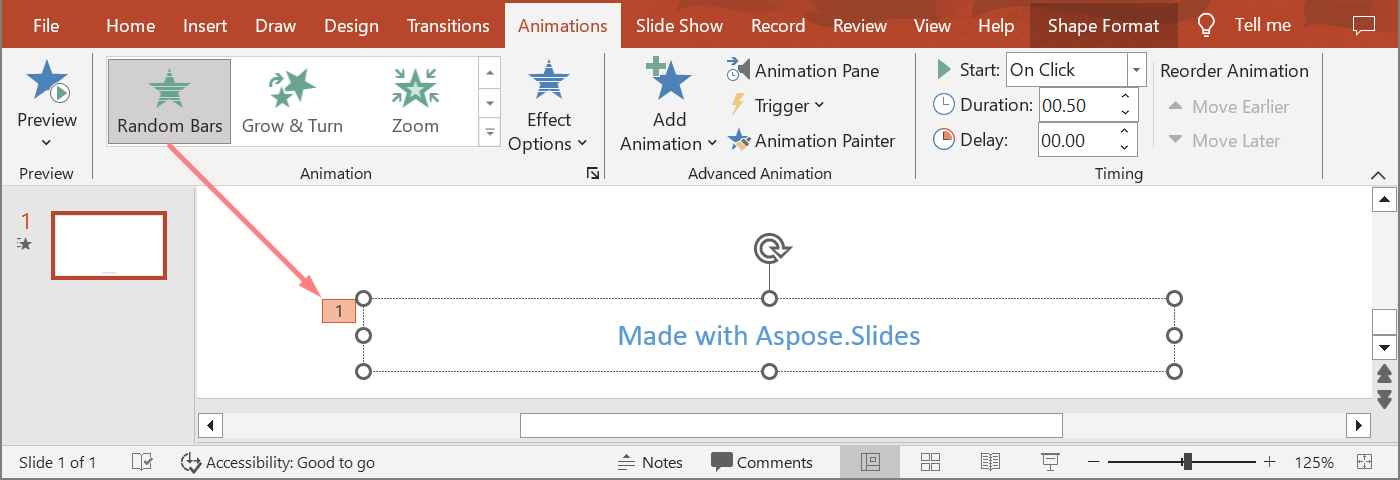
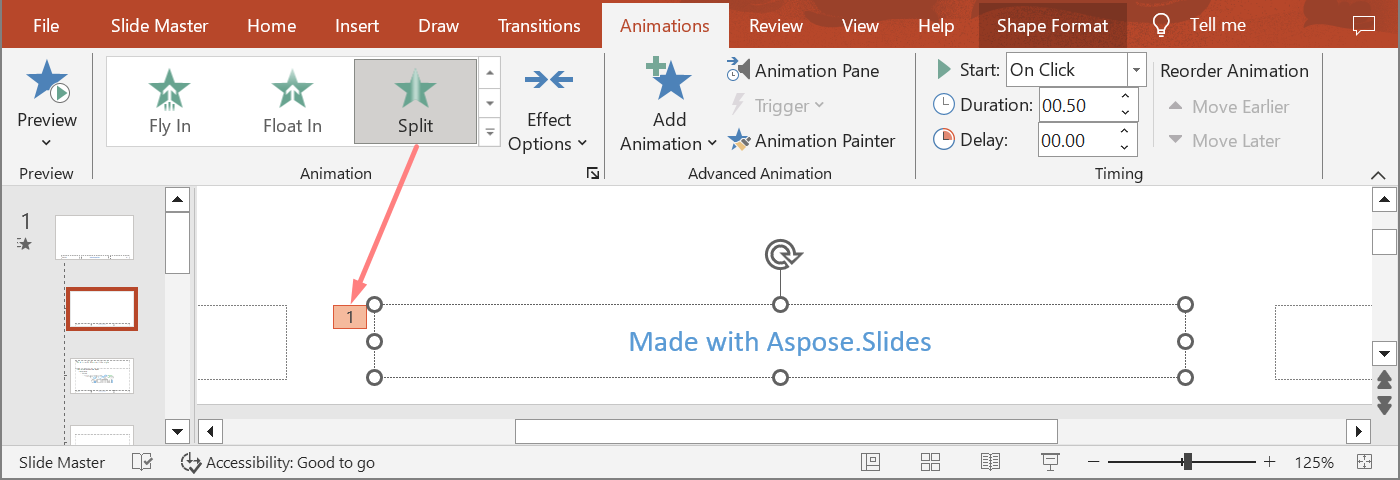
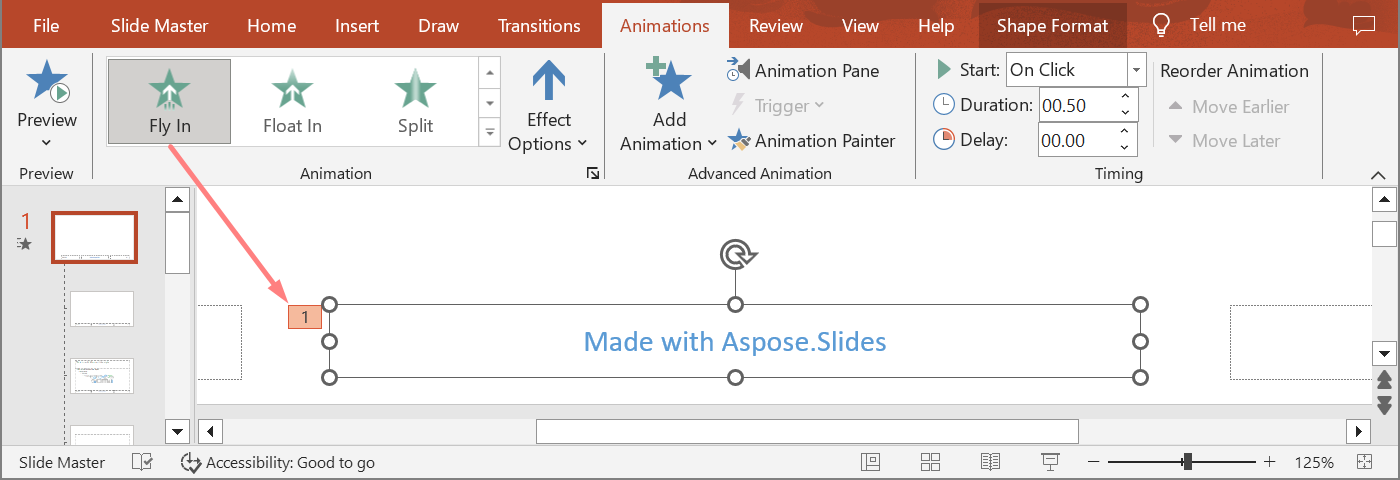
Ví dụ tiếp theo xây dựng cây hierarchy của placeholder. Nó thêm hiệu ứng vào một placeholder chủ, một placeholder bố cục và placeholder tương ứng trên slide thông thường. Mọi lời gọi tới IShape::GetBasePlaceholder đều được kiểm tra trước khi sử dụng hình dạng trả về.
#include <DOM/Animation/EffectSubtype.h>
#include <DOM/Animation/EffectTriggerType.h>
#include <DOM/Animation/EffectType.h>
#include <DOM/Animation/IEffect.h>
#include <DOM/Animation/ISequence.h>
#include <DOM/IAnimationTimeLine.h>
#include <DOM/IAutoShape.h>
#include <DOM/IGlobalLayoutSlideCollection.h>
#include <DOM/ILayoutPlaceholderManager.h>
#include <DOM/ILayoutSlide.h>
#include <DOM/IMasterSlide.h>
#include <DOM/IShape.h>
#include <DOM/IShapeCollection.h>
#include <DOM/ISlide.h>
#include <DOM/ISlideCollection.h>
#include <DOM/Presentation.h>
#include <DOM/SlideLayoutType.h>
#include <Export/SaveFormat.h>
#include <system/array.h>
#include <system/console.h>
#include <system/exceptions.h>
#include <system/string.h>

using namespace Aspose::Slides;
using namespace Aspose::Slides::Animation;
using namespace Aspose::Slides::Export;
using namespace System;

auto findPlaceholderWithBase = [](const SharedPtr<ISlide>& slide) -> SharedPtr<IShape>
{
    for (const auto& shape : slide->get_Shapes())
    {
        if (shape->GetBasePlaceholder() != nullptr)
            return shape;
    }

    return nullptr;
};

auto printEffects = [](const String& source, const ArrayPtr<SharedPtr<IEffect>>& effects)
{
    Console::WriteLine(String::Format(u"{0}: {1} effect(s)", source, effects->get_Length()));

    for (const auto& effect : effects)
        Console::WriteLine(String::Format(u"  {0} {1}", effect->get_Type(), effect->get_Subtype()));
};

auto presentation = MakeObject<Presentation>();
auto layoutSlide = presentation->get_LayoutSlides()->GetByType(SlideLayoutType::Blank);
auto layoutPlaceholder = layoutSlide->get_PlaceholderManager()->AddTextPlaceholder(100.0f, 100.0f, 400.0f, 80.0f);
layoutSlide->get_Timeline()->get_MainSequence()->AddEffect(layoutPlaceholder, EffectType::Split, EffectSubtype::VerticalIn, EffectTriggerType::OnClick);

auto masterPlaceholder = layoutPlaceholder->GetBasePlaceholder();
if (masterPlaceholder != nullptr)
{
    auto masterSequence = layoutSlide->get_MasterSlide()->get_Timeline()->get_MainSequence();
    masterSequence->AddEffect(masterPlaceholder, EffectType::Fly, EffectSubtype::Bottom, EffectTriggerType::OnClick);
}

auto slide = presentation->get_Slides()->AddEmptySlide(layoutSlide);
auto slidePlaceholder = findPlaceholderWithBase(slide);

if (slidePlaceholder == nullptr)
    throw InvalidOperationException(u"The slide does not contain a placeholder linked to its layout slide.");

slide->get_Timeline()->get_MainSequence()->AddEffect(slidePlaceholder, EffectType::RandomBars, EffectSubtype::Horizontal, EffectTriggerType::OnClick);
printEffects(u"Normal slide", slide->get_Timeline()->get_MainSequence()->GetEffectsByShape(slidePlaceholder));

auto baseLayoutPlaceholder = slidePlaceholder->GetBasePlaceholder();
if (baseLayoutPlaceholder != nullptr)
{
    printEffects(u"Layout slide", layoutSlide->get_Timeline()->get_MainSequence()->GetEffectsByShape(baseLayoutPlaceholder));

    auto baseMasterPlaceholder = baseLayoutPlaceholder->GetBasePlaceholder();
    if (baseMasterPlaceholder != nullptr)
        printEffects(u"Master slide", layoutSlide->get_MasterSlide()->get_Timeline()->get_MainSequence()->GetEffectsByShape(baseMasterPlaceholder));
}

presentation->Save(u"placeholder-animations.pptx", SaveFormat::Pptx);
presentation->Dispose();
Thay đổi thời gian hoạt ảnh
Hộp thoại Timing của PowerPoint ánh xạ tới các phương thức của ITiming.
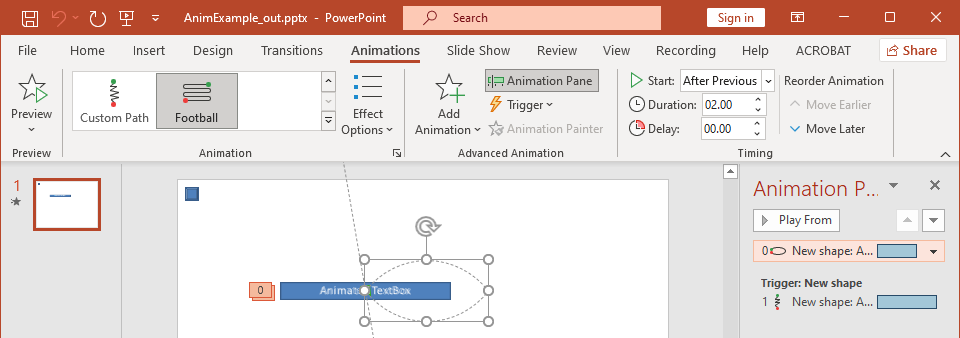
- Bắt đầu ánh xạ tới ITiming::set_TriggerType.
- Thời lượng ánh xạ tới ITiming::set_Duration, tính bằng giây.
- Độ trễ ánh xạ tới ITiming::set_TriggerDelayTime, tính bằng giây.
- Lặp lại ánh xạ tới ITiming::set_RepeatCount, ITiming::set_RepeatUntilNextClick, hoặc ITiming::set_RepeatUntilEndSlide.
- Quay lại khi phát xong ánh xạ tới ITiming::set_Rewind.
Ví dụ độc lập này thêm một hiệu ứng, thay đổi thời gian của nó qua đối tượng trả về bởi ISequence::AddEffect, và lưu kết quả. Giữ tham chiếu tới IEffect trả về tránh việc phải dùng chỉ mục bộ sưu tập không cần thiết.
#include <DOM/Animation/EffectSubtype.h>
#include <DOM/Animation/EffectTriggerType.h>
#include <DOM/Animation/EffectType.h>
#include <DOM/Animation/IEffect.h>
#include <DOM/Animation/ISequence.h>
#include <DOM/Animation/ITiming.h>
#include <DOM/IAnimationTimeLine.h>
#include <DOM/IAutoShape.h>
#include <DOM/IShapeCollection.h>
#include <DOM/ISlide.h>
#include <DOM/ISlideCollection.h>
#include <DOM/ITextFrame.h>
#include <DOM/Presentation.h>
#include <DOM/ShapeType.h>
#include <Export/SaveFormat.h>

using namespace Aspose::Slides;
using namespace Aspose::Slides::Animation;
using namespace Aspose::Slides::Export;
using namespace System;

auto presentation = MakeObject<Presentation>();
auto slide = presentation->get_Slide(0);
auto shape = slide->get_Shapes()->AddAutoShape(ShapeType::Rectangle, 120.0f, 100.0f, 320.0f, 80.0f);
shape->get_TextFrame()->set_Text(u"Timed animation");

auto effect = slide->get_Timeline()->get_MainSequence()->AddEffect(shape, EffectType::Fade, EffectSubtype::None, EffectTriggerType::OnClick);
effect->get_Timing()->set_TriggerType(EffectTriggerType::OnClick);
effect->get_Timing()->set_Duration(2.0f);
effect->get_Timing()->set_TriggerDelayTime(0.5f);
effect->get_Timing()->set_RepeatUntilNextClick(false);
effect->get_Timing()->set_RepeatUntilEndSlide(false);
effect->get_Timing()->set_RepeatCount(2.0f);
effect->get_Timing()->set_Rewind(true);

presentation->Save(u"shape-animation-timing.pptx", SaveFormat::Pptx);
presentation->Dispose();
Sử dụng một chế độ lặp lại một cách có chủ đích. Kết hợp số lần lặp lại với cờ “until” có thể gây ra kết quả khó hiểu trên các trình xem khác nhau. Khi thay đổi chế độ lặp, hãy gọi ITiming::set_RepeatUntilNextClick và ITiming::set_RepeatUntilEndSlide trước ITiming::set_RepeatCount, vì việc đặt bất kỳ cờ nào cũng sẽ thay đổi chế độ lặp hiện hoạt.
Thêm và Trích xuất âm thanh cho hoạt ảnh
Một hiệu ứng hoạt ảnh có thể tham chiếu âm thanh nhúng qua IEffect::set_Sound. IEffect::set_StopPreviousSound cho phép một hiệu ứng dừng âm thanh được một hiệu ứng trước đó khởi động.
Thêm âm thanh vào một hiệu ứng
Ví dụ sau yêu cầu một tệp âm thanh cục bộ có tên animation-sound.wav. Nó tạo hai hiệu ứng, nhúng tệp đó làm âm thanh cho hiệu ứng đầu tiên, và cấu hình hiệu ứng thứ hai để dừng âm thanh. Nó sử dụng các đối tượng trả về bởi ISequence::AddEffect, vì vậy không cần chỉ mục chuỗi.
#include <DOM/Animation/EffectSubtype.h>
#include <DOM/Animation/EffectTriggerType.h>
#include <DOM/Animation/EffectType.h>
#include <DOM/Animation/IEffect.h>
#include <DOM/Animation/ISequence.h>
#include <DOM/IAnimationTimeLine.h>
#include <DOM/IAudio.h>
#include <DOM/IAudioCollection.h>
#include <DOM/IAutoShape.h>
#include <DOM/IShapeCollection.h>
#include <DOM/ISlide.h>
#include <DOM/ISlideCollection.h>
#include <DOM/ITextFrame.h>
#include <DOM/Presentation.h>
#include <DOM/ShapeType.h>
#include <Export/SaveFormat.h>
#include <system/io/file.h>

using namespace Aspose::Slides;
using namespace Aspose::Slides::Animation;
using namespace Aspose::Slides::Export;
using namespace System;
using namespace System::IO;

auto presentation = MakeObject<Presentation>();
auto slide = presentation->get_Slide(0);
auto firstShape = slide->get_Shapes()->AddAutoShape(ShapeType::Rectangle, 80.0f, 100.0f, 240.0f, 80.0f);
auto secondShape = slide->get_Shapes()->AddAutoShape(ShapeType::Rectangle, 400.0f, 100.0f, 240.0f, 80.0f);
firstShape->get_TextFrame()->set_Text(u"Starts sound");
secondShape->get_TextFrame()->set_Text(u"Stops sound");

auto sequence = slide->get_Timeline()->get_MainSequence();
auto firstEffect = sequence->AddEffect(firstShape, EffectType::Fade, EffectSubtype::None, EffectTriggerType::OnClick);
auto secondEffect = sequence->AddEffect(secondShape, EffectType::Fade, EffectSubtype::None, EffectTriggerType::OnClick);

auto audioData = File::ReadAllBytes(u"animation-sound.wav");
auto effectSound = presentation->get_Audios()->AddAudio(audioData);
firstEffect->set_Sound(effectSound);
secondEffect->set_StopPreviousSound(true);

presentation->Save(u"shape-animation-sound.pptx", SaveFormat::Pptx);
presentation->Dispose();
Trích xuất âm thanh được nhúng trong hiệu ứng
Ví dụ sau yêu cầu một bản trình chiếu cục bộ có tên presentation-with-animation-sounds.pptx. Nó quét cả chuỗi chính và chuỗi tương tác và ghi mọi âm thanh hiệu ứng được nhúng vào thư mục extracted-animation-sounds. Đuôi mở rộng được chọn dựa trên loại MIME âm thanh được cung cấp bởi IAudio::get_ContentType.
#include <DOM/Animation/IEffect.h>
#include <DOM/Animation/ISequence.h>
#include <DOM/Animation/ISequenceCollection.h>
#include <DOM/IAnimationTimeLine.h>
#include <DOM/IAudio.h>
#include <DOM/ISlide.h>
#include <DOM/ISlideCollection.h>
#include <DOM/Presentation.h>
#include <system/console.h>
#include <system/io/directory.h>
#include <system/io/file.h>
#include <system/io/path.h>
#include <system/string.h>

using namespace Aspose::Slides;
using namespace Aspose::Slides::Animation;
using namespace System;
using namespace System::IO;

auto getAudioExtension = [](const String& contentType)
{
    auto normalizedType = String::IsNullOrEmpty(contentType) ? String::Empty : contentType.ToLowerInvariant();

    if (normalizedType == u"audio/mpeg")
        return String(u".mp3");

    if (normalizedType == u"audio/mp4")
        return String(u".m4a");

    if (normalizedType == u"audio/ogg")
        return String(u".ogg");

    if (normalizedType == u"audio/wav" || normalizedType == u"audio/x-wav")
        return String(u".wav");

    return String(u".bin");
};

auto saveSounds = [&getAudioExtension](const SharedPtr<ISequence>& sequence, const String& outputDirectory, int32_t& soundIndex)
{
    for (const auto& effect : sequence)
    {
        if (effect->get_Sound() == nullptr)
            continue;

        auto extension = getAudioExtension(effect->get_Sound()->get_ContentType());
        auto outputPath = Path::Combine(outputDirectory, String::Format(u"effect-sound-{0}{1}", soundIndex, extension));
        File::WriteAllBytes(outputPath, effect->get_Sound()->get_BinaryData());
        soundIndex++;
    }
};

auto inputPath = String(u"presentation-with-animation-sounds.pptx");
auto outputDirectory = String(u"extracted-animation-sounds");

Directory::CreateDirectory_(outputDirectory);

auto presentation = MakeObject<Presentation>(inputPath);
int32_t soundIndex = 1;

for (const auto& slide : presentation->get_Slides())
{
    saveSounds(slide->get_Timeline()->get_MainSequence(), outputDirectory, soundIndex);

    for (const auto& sequence : slide->get_Timeline()->get_InteractiveSequences())
        saveSounds(sequence, outputDirectory, soundIndex);
}

Console::WriteLine(String::Format(u"Extracted {0} sound file(s) to {1}.", soundIndex - 1, Path::GetFullPath(outputDirectory)));
presentation->Dispose();
Đối với các đối tượng âm thanh lớn, hãy sử dụng IAudio::GetStream và sao chép luồng vào tệp thay vì tải toàn bộ đối tượng vào mảng byte.
Thiết lập hành vi sau hoạt ảnh
Tùy chọn After animation kiểm soát những gì xảy ra với một hình dạng sau khi hiệu ứng của nó kết thúc.
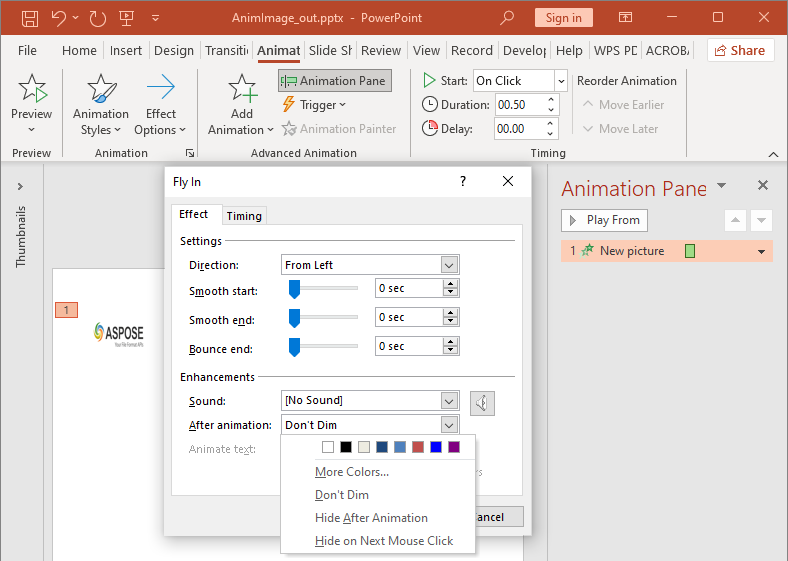
Enumeration AfterAnimationType hỗ trợ giữ nguyên hình dạng, thay đổi màu, ẩn nó sau hoạt ảnh, hoặc ẩn nó khi nhấp tiếp theo. Khi kiểu là AfterAnimationType::Color, gọi IEffect::get_AfterAnimationColor để cũng đặt màu.
Ví dụ độc lập này tạo một hiệu ứng, đặt hành vi sau hoạt ảnh qua đối tượng hiệu ứng trả về, và lưu kết quả.
#include <DOM/Animation/AfterAnimationType.h>
#include <DOM/Animation/EffectSubtype.h>
#include <DOM/Animation/EffectTriggerType.h>
#include <DOM/Animation/EffectType.h>
#include <DOM/Animation/IEffect.h>
#include <DOM/Animation/ISequence.h>
#include <DOM/IAnimationTimeLine.h>
#include <DOM/IAutoShape.h>
#include <DOM/IColorFormat.h>
#include <DOM/IShapeCollection.h>
#include <DOM/ISlide.h>
#include <DOM/ISlideCollection.h>
#include <DOM/ITextFrame.h>
#include <DOM/Presentation.h>
#include <DOM/ShapeType.h>
#include <Export/SaveFormat.h>
#include <drawing/color.h>

using namespace Aspose::Slides;
using namespace Aspose::Slides::Animation;
using namespace Aspose::Slides::Export;
using namespace System;
using namespace System::Drawing;

auto presentation = MakeObject<Presentation>();
auto slide = presentation->get_Slide(0);
auto shape = slide->get_Shapes()->AddAutoShape(ShapeType::Rectangle, 120.0f, 100.0f, 320.0f, 80.0f);
shape->get_TextFrame()->set_Text(u"Dim after animation");

auto effect = slide->get_Timeline()->get_MainSequence()->AddEffect(shape, EffectType::Fade, EffectSubtype::None, EffectTriggerType::OnClick);
effect->set_AfterAnimationType(AfterAnimationType::Color);
effect->get_AfterAnimationColor()->set_Color(Color::get_LightGray());

presentation->Save(u"shape-animation-after-effect.pptx", SaveFormat::Pptx);
presentation->Dispose();
Thay đổi kiểu khỏi AfterAnimationType::Color sẽ xóa cài đặt màu sau hoạt ảnh.
Hoạt ảnh văn bản
Hoạt ảnh văn bản có hai điều khiển liên quan:
- ITextAnimation::set_BuildType kiểm soát việc các đoạn văn xuất hiện cùng nhau hay theo mức độ đoạn.
- IEffect::set_AnimateTextType kiểm soát việc văn bản xuất hiện toàn bộ, theo từ hoặc theo ký tự. IEffect::set_DelayBetweenTextParts đặt độ trễ giữa các từ hoặc ký tự. Giá trị dương là phần trăm của thời lượng hiệu ứng; giá trị âm là độ trễ tính bằng giây.
Ví dụ độc lập sau hoạt ảnh các từ trong một hộp văn bản. BuildType::AsOneObject vô hiệu hoá việc xây dựng đoạn văn theo đoạn, vì vậy cài đặt từ áp dụng cho toàn bộ khung văn bản.
#include <DOM/Animation/AnimateTextType.h>
#include <DOM/Animation/BuildType.h>
#include <DOM/Animation/EffectSubtype.h>
#include <DOM/Animation/EffectTriggerType.h>
#include <DOM/Animation/EffectType.h>
#include <DOM/Animation/IEffect.h>
#include <DOM/Animation/ISequence.h>
#include <DOM/Animation/ITextAnimation.h>
#include <DOM/IAnimationTimeLine.h>
#include <DOM/IAutoShape.h>
#include <DOM/IShapeCollection.h>
#include <DOM/ISlide.h>
#include <DOM/ISlideCollection.h>
#include <DOM/ITextFrame.h>
#include <DOM/Presentation.h>
#include <DOM/ShapeType.h>
#include <Export/SaveFormat.h>

using namespace Aspose::Slides;
using namespace Aspose::Slides::Animation;
using namespace Aspose::Slides::Export;
using namespace System;

auto presentation = MakeObject<Presentation>();
auto slide = presentation->get_Slide(0);
auto textBox = slide->get_Shapes()->AddAutoShape(ShapeType::Rectangle, 80.0f, 80.0f, 560.0f, 100.0f);
textBox->get_TextFrame()->set_Text(u"Aspose.Slides animates this sentence word by word.");

auto effect = slide->get_Timeline()->get_MainSequence()->AddEffect(textBox, EffectType::Fade, EffectSubtype::None, EffectTriggerType::OnClick);
effect->get_TextAnimation()->set_BuildType(BuildType::AsOneObject);
effect->set_AnimateTextType(AnimateTextType::ByWord);
effect->set_DelayBetweenTextParts(20.0f);

presentation->Save(u"animated-text.pptx", SaveFormat::Pptx);
presentation->Dispose();
Để xây dựng một hộp văn bản theo đoạn, sử dụng ITextAnimation::set_BuildType với BuildType::ByLevelParagraphs1 hoặc mức độ đoạn khác. Để nhắm mục tiêu một đoạn riêng biệt với hiệu ứng riêng, sử dụng overload của ISequence::AddEffect chấp nhận một IParagraph. Xem Văn bản hoạt ảnh để biết các ví dụ mức độ đoạn.
Xuất và Ghi chú Tương thích
- Lưu dưới dạng PPT hoặc PPTX bảo tồn mô hình hoạt ảnh, nhưng việc phát lại cuối cùng được điều khiển bởi trình xem bản trình chiếu.
- PDF và hình ảnh tĩnh không phát hoạt ảnh. Sử dụng HTML5 export, GIF hoạt ảnh, hoặc video conversion khi đầu ra phải hiển thị chuyển động.
- Đối với HTML5, bật Html5Options::set_AnimateShapes và, khi cần, Html5Options::set_AnimateTransitions.
- Kết xuất video hỗ trợ nhiều hiệu ứng nhập cảnh, nhấn mạnh, thoát và đường chuyển động phổ biến, nhưng không phải mọi hiệu ứng PowerPoint đều được hỗ trợ. Kiểm tra supported animations and effects hiện tại và kiểm thử các bản trình chiếu quan trọng với phiên bản Aspose.Slides mục tiêu của bạn.
- Các hiệu ứng tuỳ chỉnh nâng cao và các hiệu ứng nhập từ định dạng bản trình chiếu khác có thể được bảo tồn trong tệp nhưng hiển thị khác nhau trong PowerPoint, HTML5 hoặc video. Xác thực kết quả xuất thay vì chỉ dựa vào tên hiệu ứng.
Câu hỏi thường gặp
Tại sao một hoạt ảnh xuất hiện trong PowerPoint nhưng không trong PDF?
PDF là định dạng tĩnh, vì vậy hoạt ảnh và chuyển đổi slide không được phát. Xuất sang HTML5, GIF hoạt ảnh, hoặc video khi cần duy trì chuyển động.
Tại sao một hiệu ứng phát khác nhau trong video?
Xuất video render hoạt ảnh thay vì lưu nguyên hành vi PowerPoint. Một số hiệu ứng nâng cao không được hỗ trợ hoặc chỉ gần đúng. Xem bảng hiệu ứng được hỗ trợ và kiểm thử bản trình chiếu thực tế trước khi sử dụng sản xuất.
Có phải di chuyển một hình dạng lên trước hoặc xuống sau thay đổi thứ tự hoạt ảnh không?
Không. Thứ tự z-order của hình dạng kiểm soát sự chồng lấp, trong khi thứ tự chuỗi và trình kích hoạt kiểm soát việc phát hoạt ảnh. Thay đổi dòng thời gian nếu bạn cần thứ tự phát khác.